
Searching for an open-source dashboard for Playwright? That is exactly what Lastest is: a free, self-hosted review UI that sits on top of Playwright. Point it at your existing .spec.ts files and every run lands in one place - visual diffs, baselines, versioned history, WCAG scores, and a team review workflow - with no rip-and-replace and no per-snapshot bill. If you already run Playwright in CI and just want a dashboard to see and approve what changed, skip to getting started; the rest of this page is the full tour.
Visual regression testing has always been stuck between a rock and a hard place. On one side, expensive SaaS tools that nickel-and-dime you per snapshot. On the other, open-source frameworks that lack any real review workflow. The Lastest test management dashboard takes a different approach: AI authors and heals the tests, human reviewers stay in control, and your costs do not explode as your pipeline scales. Here is what the dashboard actually does, the economics behind it, your deployment options, and whether it fits your team.
What Is the Lastest Test Management Dashboard?
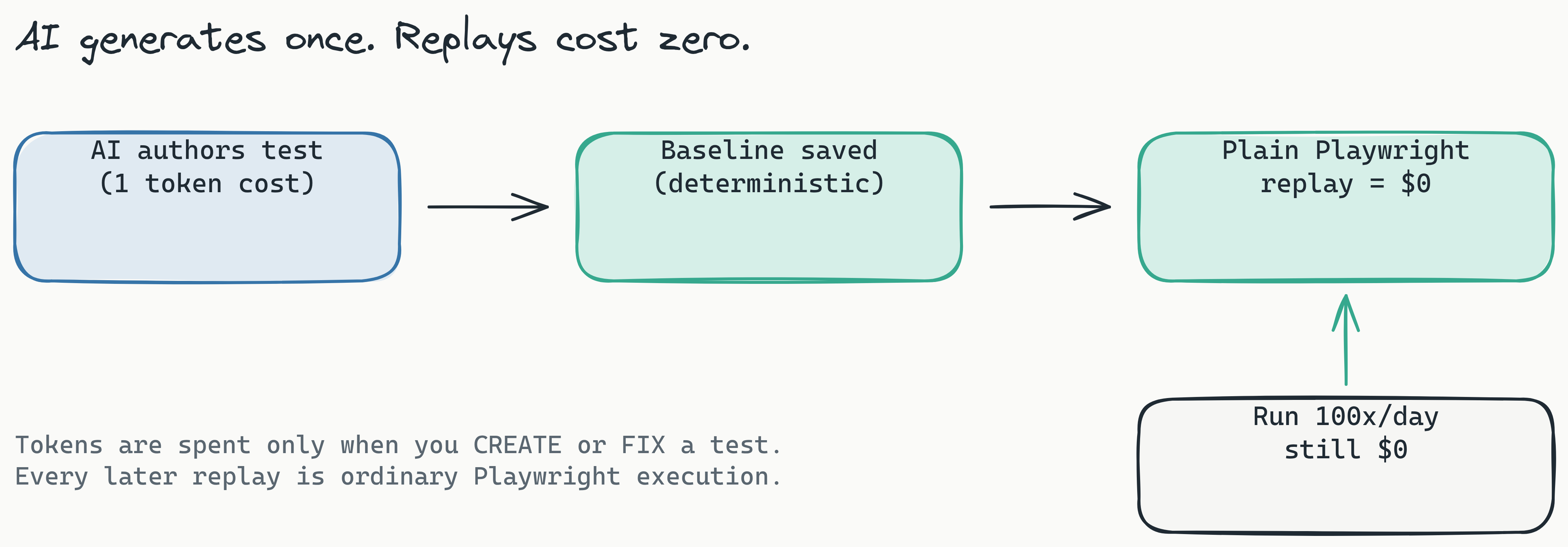
Think of the Lastest test management dashboard as an open-source visual regression and end-to-end testing platform that cleanly separates test generation from test review. Most tools charge you for every snapshot taken during every CI run. Lastest flips that model: AI writes resilient Playwright tests (paying tokens only when it creates or fixes a test), and then humans manage results through a centralized dashboard, with zero additional token consumption for every subsequent replay.
The dashboard is your command center. Reviewers inspect visual diffs, render a verdict, manage baselines, and walk back through versioned test history, all from one interface. Built on Playwright, it ships a reusable GitHub Action, posts GitLab MR comments (self-hosted GitLab included), and runs an embedded containerized Chromium pool that streams live to the dashboard, so there is no local Playwright install to babysit. If you are used to per-snapshot pricing from tools like Percy or Applitools, the economics alone are worth a look. See the full feature breakdown for the whole surface.
What makes the Lastest test management dashboard different from other visual testing tools? Lastest pairs AI-authored, self-healing Playwright tests with a single human review seam and a zero-token replay model. You spend tokens only when creating or fixing a test; every later replay is plain Playwright execution that costs nothing. That decouples test execution from recurring cost, which is what makes high-frequency CI/CD economical.
Three Ways to Work, One Human Seam
The dashboard does not force a single workflow on you. You choose how much autonomy the AI gets, per test or per team, across three modes:
- AI-Free recording - fully air-gapped, no API keys, no model calls. You record, Lastest captures.
- AI-Assisted - the AI proposes test code and fixes; a human reviews every change before it lands.
- Full Autonomous (Play Agent) - an 11-step pipeline of specialized sub-agents (Orchestrator, Planner, Scout, Diver, Generator, Healer, and others) plans, generates, runs, and fixes tests on its own. You can pause, approve, or skip any step, and it resumes where it left off.
Whichever mode you pick, there is exactly one human review seam, and the AI never approves its own output. When a run produces a diff, the reviewer renders one of three verdicts: pass, fix, or regression. That single decision is the whole job. Detection is the machine's; judgment is yours. We unpack why that one-seam design is the thing that lets AI testing actually scale in The 2026 AI Testing Scale Gap.
Why Human Oversight Still Matters
Picture this: your team rolls out a new font across the entire application. An AI-only system flags every page as a failure, hundreds of diffs that all represent the same intentional change. Without a human seam, your team either ignores the alerts (which defeats the purpose) or burns hours dismissing them one by one. With the Lastest dashboard, a reviewer approves the change once, sets the new baseline, and moves on.
To make that one decision faster, every failure is auto-classified. Lastest's AI failure classification tags each one as a real regression, flaky, environment, or test-maintenance issue, with a confidence score and a short reasoning note, so the reviewer triages by severity instead of squinting at raw pixels. Practitioners consistently report that AI-only visual testing without a review step leads to alert fatigue and a quiet collapse of trust in the suite. The dashboard is built to keep the human cheap, not absent.
Three Diff Engines: Pixel, Structural, and Perceptual
Where many tools rely on a single comparison strategy, Lastest ships three distinct diff engines, each tuned for a different class of change. You can set one per test or pick a global default.
Pixel (Pixelmatch) compares images at the individual pixel level. It is fast and pixel-perfect, ideal for high-stakes UI where exact placement matters: button colors, icon alignment, border widths. If a pixel shifts even slightly, this engine catches it. The trade-off is that it is the noisiest of the three.
Structural (SSIM) uses the Structural Similarity Index to compare layout and structure rather than raw pixels, so it tolerates minor reflow. A product listing that renders different items by region produces different pixels but the same structure, and the structural engine correctly reads that as unchanged. Ideal for content-heavy pages where text length varies by locale or dynamic data.
Perceptual (Butteraugli) is aligned to the human eye. It catches contrast shifts and gradient differences a person would actually notice, while ignoring anti-aliasing and font-rendering noise that varies across operating systems. This is the engine that catches real bugs other tools miss while suppressing the false positives that come from cross-OS rendering differences.
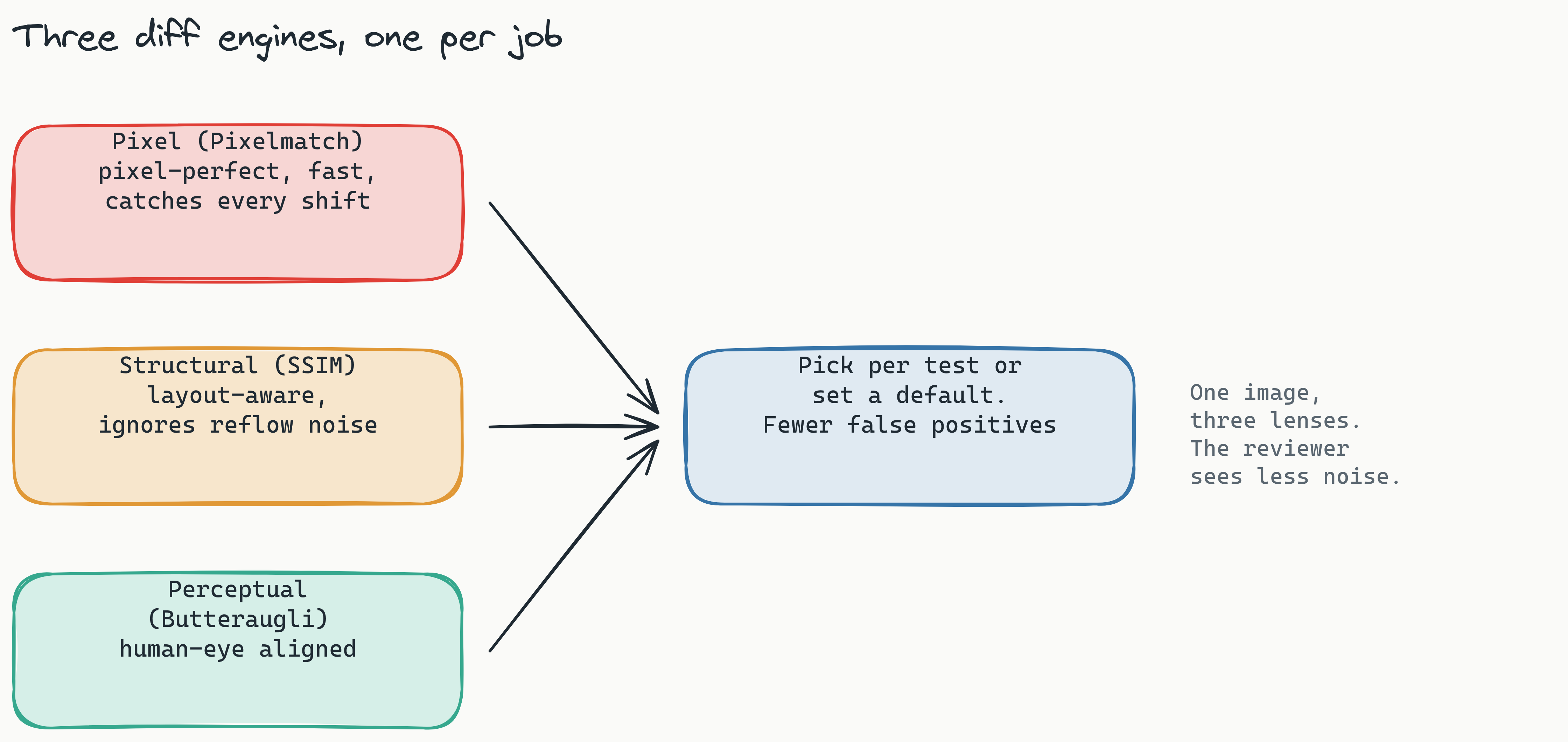
Which diff engine should my team use for visual regression testing? Use Pixel (Pixelmatch) for static UI where exact placement matters, Structural (SSIM) for content-heavy or dynamic pages, and Perceptual (Butteraugli) when you want a human-eye result that ignores anti-aliasing noise. The dashboard lets you toggle engines on a per-test basis. For more on cutting noise, see how to reduce false positives in visual regression testing.
On top of the engines, Lastest stabilizes screenshots so cross-OS runs stay comparable: text-region-aware OCR diffing, timestamp freezing, network-idle and font-loading waits, DOM stability detection, page-shift detection, burst capture, and auto-masking of dynamic content. Compare this to competitors: Applitools offers a proprietary "Visual AI" but not three explicit engine choices, and Percy is pixel-dominant with limited structural awareness.
Self-Healing Selectors and AI Test Generation
Tests that break every time a developer renames a class are not worth keeping. Lastest authors resilient Playwright code with a 7-layer selector fallback: data-testid, then id, role, aria-label, text, CSS, and finally OCR. When a refactor breaks the primary selector, the test falls through to the next layer instead of failing, which is why these are called self-healing selectors. There is a deeper walkthrough in how self-healing selectors work.
Generation takes more than a URL. Lastest can ingest URLs, OpenAPI specs, and markdown PRDs or user stories, and Route Discovery scans your source for paths the spec missed. Crucially, you bring your own AI: Claude CLI, the Anthropic API, OpenRouter, OpenAI, or a local Ollama model. You can even use one provider for generation and a different one for diff analysis. No lock-in, and no mandatory vendor key. The whole feature set lives under features.
Zero-Token Replays: The Economics of Unlimited Reviews
How do zero-token replays work? You spend tokens only when generating a new test or healing a broken one. Every subsequent replay, whether triggered by a CI commit, a manual re-run, or a scheduled cron, costs zero tokens because it is plain Playwright execution. That decouples test execution cost from test frequency entirely. On self-hosted infrastructure, screenshots and replays are unlimited regardless of volume.
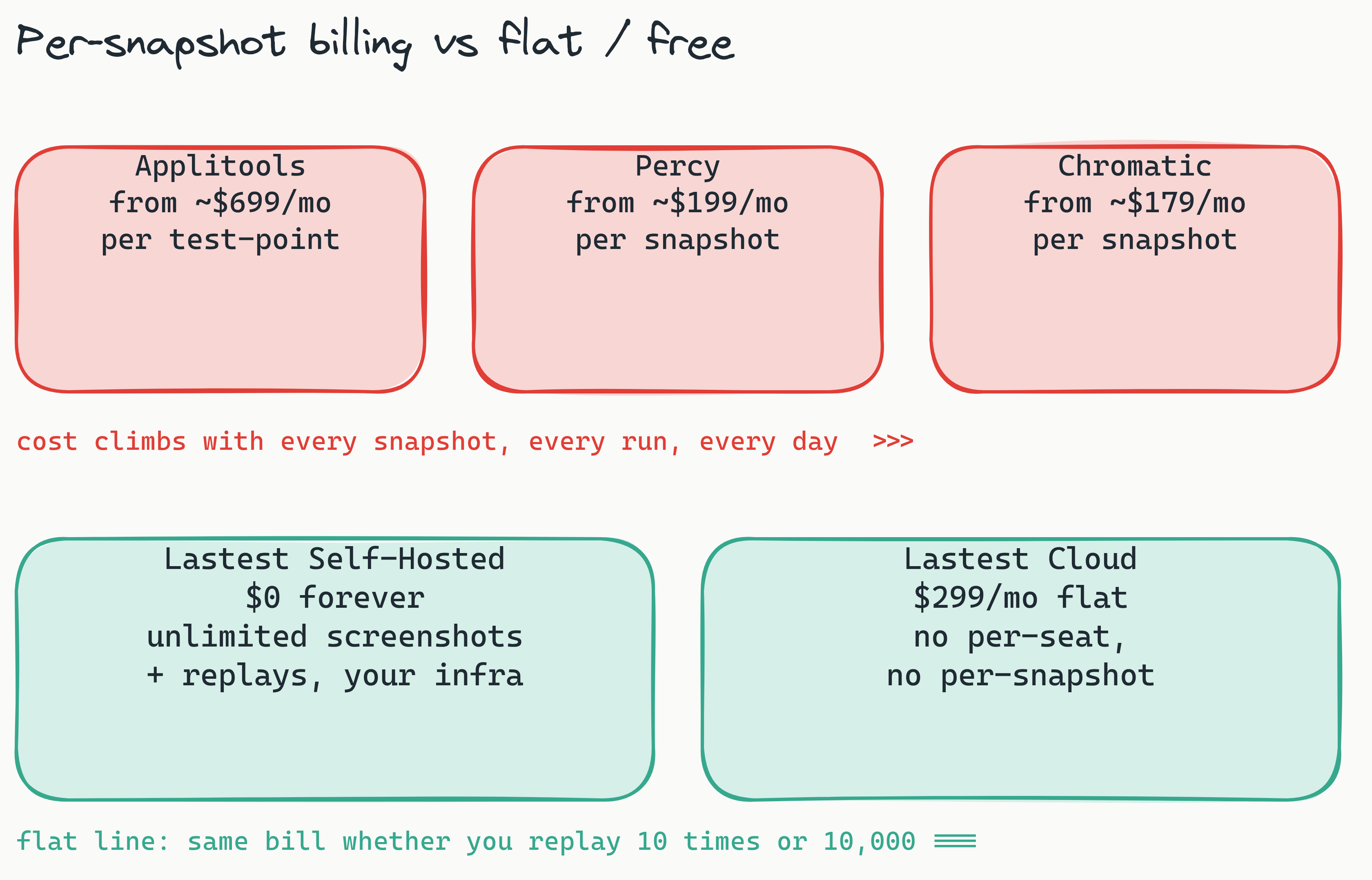
Competing tools price the opposite way. Per-snapshot and per-test-point models mean the bill climbs with every run, so high-frequency CI quietly becomes a budget conversation. Rough public starting points: Applitools starts around $699/mo, Percy around $199/mo, and Chromatic around $179/mo, typically on per-screenshot or per-seat tiers that grow with usage.
| Tool | Pricing Model | How cost scales with run frequency |
|---|---|---|
| Percy | Per-snapshot, from ~$199/mo | Climbs with every run |
| Applitools | Per-test-point, from ~$699/mo | Climbs with every run |
| Chromatic | Per-snapshot, from ~$179/mo | Climbs with every run |
| Lastest Cloud | $299/mo flat, zero-token replays | Flat, no per-seat or per-snapshot fee |
| Lastest Self-Hosted | $0 forever (FSL-1.1-ALv2) | Flat at zero, unlimited screenshots |
The self-hosted version has no token limits and no usage-based costs at all: you run the entire dashboard on your own infrastructure and replay thousands of times a day for nothing. For pipelines that run visual tests on every commit, push, and pull request, this turns visual testing from a budget concern into a rounding error. There is a fuller cost teardown in visual regression pricing for startups.
Self-Hosted Dashboard: Your Server, Your Rules, Your Data
Yes, you can run the entire Lastest dashboard on your own infrastructure, and it is free forever under the FSL-1.1-ALv2 license. Screenshots never leave your network, which makes it a fit for teams with strict data residency requirements under GDPR or similar regimes that restrict third-party data processing.
The embedded browser pool provisions into a local k3d cluster for development or into your own Kubernetes cluster in production, and Distributed Remote Runners fan tests out across CI. Because the full source is on GitHub, your security team can audit every line, contribute integrations, or fork it. No vendor lock-in, no subscription requirement. The self-host guide walks through the setup.
For CTOs and IT directors, this answers the most common objection to SaaS visual testing: "what happens to our data if we cancel?" With self-hosted Lastest, your data never leaves your infrastructure in the first place.
How does self-hosting the Lastest dashboard help with GDPR compliance? Running Lastest on your own infrastructure keeps all test data, snapshots, and visual diffs inside your controlled environment, with no transmission to third-party servers. That simplifies compliance with GDPR and similar data residency rules, and the open-source codebase lets internal security teams audit every component.
CI/CD Native: Smart Run, Actions, and MCP
Lastest is built to live inside your pipeline rather than beside it. It ships a reusable GitHub Action, posts GitLab MR comments, supports webhook triggers, and runs scheduled cron jobs. Smart Run reads your git diff and runs only the tests your change actually touches, so a one-line change does not trigger the whole suite. Branch baselines fork when a PR opens and merge back when it merges, so every branch reviews against the right reference.
For a GitHub Actions setup, the reusable action drops into your workflow and diffs land directly in the dashboard as an interactive review interface, not a static HTML report or a wall of CLI output. There is a step-by-step in visual regression testing with GitHub Actions.
If your team already works through coding agents, the MCP server exposes roughly 20 tools over the Model Context Protocol, so Cursor, Claude Code, and other agents can drive Lastest directly: author a test, run it, read the diff, and heal it without leaving the editor. Browse the full tools and try a live demo.
Accessibility and Test History, Built In
Visual testing is the obvious job, but the dashboard quietly covers two more. Every screenshot is scored for accessibility: axe-core runs on each capture and produces a WCAG 2.2 AA score from 0 to 100 with severity-weighted deductions and per-build trend sparklines, so accessibility regressions show up next to visual ones.
And nothing is lost. Every edit, AI fix, and restore is versioned with a reason, so you can walk back through exactly why a test changed. You can compose a build by cherry-picking specific test versions, which makes "why did this start failing" a question the dashboard can answer instead of a git archaeology session.
Lastest Dashboard vs. Percy, Applitools, and Chromatic
Four options dominate the visual testing conversation. Here is how they compare on the criteria engineering teams actually weigh:
| Feature | Lastest | Percy | Applitools | Chromatic |
|---|---|---|---|---|
| Pricing | Free self-host / $299/mo flat cloud | Per-snapshot, no self-host | Per-test-point, from ~$699/mo | Free for OSS, paid for private |
| Self-Hosted | Yes (open source) | No (SaaS only) | No (SaaS only) | No (SaaS only) |
| Diff Engines | 3 (Pixelmatch, SSIM, Butteraugli) | Pixel-dominant | Proprietary Visual AI | Pixel + Chrome engine |
| AI Test Generation | Yes, self-healing, bring-your-own-AI | Not explicitly AI generation | Partial (Ultrafast Grid) | No |
| Replay Cost | Zero-token replays | Billed per snapshot | Billed per test-point | Billed per snapshot |
| Data Sovereignty | Full control (self-hosted) | Third-party servers | Third-party servers | Third-party servers |
Each competitor has real strengths. Applitools' Visual AI is powerful for complex validation, but it is expensive and SaaS-only. Percy is simple for basic pixel comparison but lacks engine flexibility and predictable cost. Chromatic is excellent for Storybook-driven projects but does not serve teams testing full application flows. For teams that need cost control, data sovereignty, and flexible diff engines, Lastest fills a clear gap. There is a head-to-head in Lastest vs Percy vs Applitools.
Who Should Use the Lastest Dashboard? A Team-by-Team Guide
CTOs and IT directors get the self-hosting option that satisfies data residency requirements, an auditable open-source codebase, and no per-seat licensing or sales-team negotiation. The self-hosted build is made for independent deployment inside your VPC. See the CTO decision guide.
QA managers get one centralized review surface across projects and teams, with AI failure classification doing the first-pass triage so the human queue stays short.
Engineering leads get CI/CD integration that feeds diffs straight into the dev workflow, plus Smart Run so only touched tests run. Zero-token replays mean developers can test on every commit without a budget conversation.
Solo founders and small teams can adopt the free self-hosted version from day one and migrate to Cloud later if they want managed infra. If that is you, start with Lastest for solo founders or for developers doing their own QA.
Getting Started
Two paths. The fastest is Lastest Cloud, which has a free evaluation tier with a monthly quota, no credit card to look around: create an account, run a sample test, and explore the review interface in minutes. When you outgrow the free quota, Cloud is a flat $299/mo with no per-seat or per-snapshot fees.
To self-host, clone the repo and bring it up:
- Clone
github.com/las-team/lastest - From the root, run
docker compose up - Open the dashboard locally and run your first test
The self-hosted build is fully functional and free forever. Cloud adds managed infrastructure, automatic updates, and priority support, but the core experience is identical.
Frequently Asked Questions
Is there an open-source dashboard for Playwright?
Yes - Lastest is a free, open-source (FSL-1.1-ALv2), self-hosted dashboard built on Playwright. It gives your existing Playwright tests a review UI: visual diffs, baseline approval, versioned history, WCAG scores, and CI/CD integration through a reusable GitHub Action and a CLI runner. You do not have to rewrite anything - point it at your .spec.ts files and results stream into the dashboard.
Can I use the dashboard with my existing Playwright tests?
Yes. Lastest runs plain Playwright under the hood, so it works alongside the specs you already have. Add the lastest reporter (or the reusable Action) and every run posts its screenshots and diffs to the dashboard for review - no migration, no lock-in.
What is a zero-token replay in visual testing? A zero-token replay means tokens are spent only when you create or fix a test. Every subsequent replay, whether triggered by a CI commit, a manual re-run, or a scheduled cron, is plain Playwright execution that costs nothing. This decouples test frequency from ongoing cost.
How does the Lastest dashboard differ from Percy? Percy uses per-snapshot pricing and a pixel-dominant engine with no self-hosting. Lastest offers three engines (Pixelmatch, SSIM, Butteraugli), self-hosting, self-healing selectors, and zero-token replays that make high-frequency CI economical.
Can the Lastest dashboard be used for GDPR-compliant testing? Yes. The self-hosted version keeps all test data on your infrastructure with no outbound traffic to third-party servers, and the open-source codebase lets your security team audit every component.
Which diff engine should I use for dynamic content pages? The Structural (SSIM) engine is best for content-heavy or dynamic pages where text length varies by locale or user data. It compares structure rather than individual pixels, tolerating reflow that does not change the layout.
Do I have to use a specific AI provider? No. Lastest is bring-your-own-AI: Claude CLI, the Anthropic API, OpenRouter, OpenAI, or a local Ollama model. You can also run fully AI-free recording with no API keys at all.
What CI/CD tools does Lastest integrate with? A reusable GitHub Action, GitLab MR comments (self-hosted GitLab included), webhook triggers, and scheduled cron. Smart Run reads your git diff and runs only the tests your change touches.
Final Thoughts
The Lastest test management dashboard is built for teams that have outgrown per-snapshot pricing but want more structure than a raw open-source framework gives them. AI authors and heals the tests, three diff engines cover every visual scenario, failure classification and WCAG scoring sharpen the review, zero-token replays make high-frequency CI economical, and self-hosting keeps your data yours. Detection is the machine's job; one verdict is the human's.
Start free: self-host Lastest for $0 forever, or spin up Lastest Cloud for a flat $299/mo with no per-seat or per-snapshot fees. The full source is on GitHub at github.com/las-team/lastest. Run it against your own pipeline and watch the bill stay flat as the test count climbs.