
This visual testing CTO decision guide exists because the choice has stopped being a line-item QA decision and become an architecture decision. Frontend delivery velocity has blown past what manual review can cover, and a single shifted checkout button or broken pricing layout reaches production between two green CI runs. The question is no longer whether to do visual regression testing. It is which model, which diff engine, and which deployment your team can actually sustain without drowning in false positives.
The stakes keep rising. Frontend architectures in 2026 lean on micro-frontends, server-side rendering, and animation-heavy interfaces, which multiplies the visual surface area that can break on any deploy. Manual QA cannot keep pace with teams shipping dozens of times a day. The right tool turns visual testing from a bottleneck into a quality gate that runs on every push.
This guide gives engineering leaders a decision framework for a fragmented vendor landscape. We'll cover evaluation criteria, pricing models, deployment options, and CI/CD integration patterns, so you can make an informed call for your team. If you want a head start, you can self-host the open-source build for free and run a pilot this week.
Why Visual Testing Matters More in 2026 (And Why CTOs Should Care)
Visual testing matters more this year because frontend delivery velocity has outrun manual QA capacity, and visual defects hit revenue, brand trust, and user retention directly. CTOs who punt this decision to individual teams risk fragmentation, inconsistent quality, and expensive tool sprawl that is painful to unwind later.
Visual regression testing automates screenshot comparisons, checking your app against baseline images to catch unintended visual changes. Done right, it spots what unit and integration tests miss: layout shifts, font rendering problems, color mismatches, and responsive breakpoint failures.
The headline risk is conversion. Users in 2026 have less patience for visual hiccups than ever, and one bad deploy can undo weeks of brand-building. Meanwhile CI/CD acceleration means teams push code dozens of times daily, creating constant opportunities for regressions to slip through unseen.
Why should CTOs invest in visual testing now? Visual quality is directly tied to revenue and brand trust. With frontend complexity high in 2026 and CI/CD pipelines pushing code dozens of times daily, manual QA cannot keep pace. The right tool, paired with a perceptual diff engine and a single human review seam, keeps false-positive noise low enough that the suite stays trusted instead of ignored.
Why should CTOs care? Because visual quality is now a revenue issue, full stop. The CTO who owns this decision ensures consistent customer experiences across every deployment.
The Three Types of Visual Testing - Which Does Your Team Need?
The three types, pixel-only, structural, and perceptual, differ in accuracy, false-positive rate, and complexity. Your choice depends on how much noise your team can tolerate and how precise you need to be.
Perceptual diffing exists because pixel comparison is noisy: anti-aliasing, font rendering, and sub-pixel shifts all trip it. A perceptual, human-eye-aligned engine ignores that cosmetic noise and flags the changes a reviewer would actually care about, which is what keeps the queue trustworthy at scale. Understanding these three approaches is critical for picking the right tool.
Pixel-only diffing compares images at the individual pixel level. Fast and easy to implement, but produces high false-positive rates. Any anti-aliasing, font rendering difference, or sub-pixel shift triggers a failure. Best for small teams that don't mind investigating noise.
Structural diffing compares DOM and layout structure instead of raw pixel values. It ignores rendering differences and focuses on meaningful layout changes. Medium speed and accuracy. Best for teams that want fewer false positives than pixel-only but don't need pixel-perfect precision.
Perceptual diffing is aligned to the human eye: it distinguishes meaningful visual changes from cosmetic noise, so a shifted element flags while a different anti-aliasing pattern does not. Slower, but it produces the lowest false-positive rates. This is the noise-versus-signal trade-off at the heart of visual testing: the best engine filters the former and amplifies the latter.
| Type | Speed | False Positive Rate | Best For |
|---|---|---|---|
| Pixel-only | Fast | High | Small teams, simple UIs |
| Structural | Medium | Medium | Teams with moderate UI complexity |
| Perceptual/AI | Slower | Low | Enterprise, complex apps, CI/CD |
Lastest ships all three diff engines: Pixel (Pixelmatch), Structural (SSIM), and Perceptual (Butteraugli). You pick the right balance of speed and accuracy per test case, using pixel precision for a critical checkout button and perceptual diffing for content areas where small variation is fine. See the full feature set for how the engines pair with stabilization (OCR text-region diffing, timestamp freezing, network-idle wait, auto-masking of dynamic content).
Cloud vs. Self-Hosted - The Data Privacy Question
The choice between cloud and self-hosted visual regression testing comes down to data sovereignty, compliance obligations, and your team's infrastructure preferences. For regulated industries, self-hosted wins every time.
Self-hosted visual regression testing puts infrastructure on your own servers, behind your own firewall, under your own data policies. With Lastest self-hosted, screenshots and DOM snapshots never leave your network. For enterprises under strict compliance mandates, that is not a preference, it is a requirement.
For regulated teams, data residency is the deciding factor. Sending application screenshots to a third-party cloud creates data-transfer exposure many legal teams refuse to accept. A self-hosted, open-source tool sidesteps the question entirely: the data stays inside infrastructure you already control and audit, and you can run it air-gapped with no API keys at all.
For visual testing in regulated industries, self-hosted is often the only viable option:
- Fintech companies must comply with PCI-DSS requirements restricting data from leaving controlled environments.
- Healthtech organizations face HIPAA regulations on protected health information that may appear in application screenshots.
- Government technology teams need data sovereignty guarantees only self-hosted infrastructure can provide.
Why self-hosted wins:
- Full data control with no third-party access to application screenshots.
- No egress fees or bandwidth costs for transferring large snapshot volumes.
- Air-gapped environments supported for classified or sensitive projects.
- Custom retention policies and backup strategies aligned with internal compliance.
What's the best deployment model for regulated industries? Self-hosted visual testing is the safe default for fintech, healthtech, and government teams. It keeps all screenshots and DOM data behind your firewall, under your own data policies, with an air-gapped recording mode that needs no API keys. Lastest is open source under FSL-1.1, so the entire pipeline is auditable.
Lastest's self-hosted edition is free, forever, with unlimited screenshots and replays on your own infrastructure. For teams that need full infrastructure control, self-host Lastest for free and keep every screenshot inside your network.
Cost Analysis - Per-Snapshot Pricing vs. Flat-Rate vs. Open Source
Understanding the true cost of visual testing means looking past advertised starting prices. Hidden costs, snapshot overages, per-seat fees, and enterprise add-ons, can multiply effective pricing several times over as your suite grows.
| Tool | Starting Price | Model | Key Limitation |
|---|---|---|---|
| Percy | from ~$199/month | Per-snapshot | Overage costs at scale |
| Applitools | from ~$699/month | Per-test + AI | Expensive at enterprise |
| Chromatic | from ~$179/month | Per-snapshot | Tight Storybook coupling |
| BackstopJS | Free | Open-source | No UI dashboard, no review |
| Lastest | $0 self-hosted / $299/mo cloud | Open source + flat-rate cloud | Cloud is a flat $299/mo |
Per-snapshot and per-seat pricing make costs unpredictable as your test suite and team grow. Two engineers added, or one large suite re-baselined, and the bill moves in ways finance did not plan for. The variable you cannot control is replay volume: every re-run after a failed deploy can cost more.
Which pricing model is most cost-effective for scaling teams? Flat-rate or open-source pricing removes the uncertainty of per-snapshot and per-seat models. Lastest is $0 self-hosted with unlimited screenshots, or a flat $299/month on Cloud with no per-seat and no per-screenshot fees. Either way, replays are zero-token, so re-running tests after a failed deploy costs nothing.
This is where the zero-token model matters most. AI runs only when you create or fix a test; every replay after that is plain Playwright execution. You can re-run a suite thousands of times a day for $0 in tokens, and self-hosted screenshots are unlimited regardless of volume. For a team that iterates frequently, that removes the line item that usually balloons.
The open source versus paid debate often misses a point: mature open-source projects like BackstopJS lack the review workflow, oversight dashboard, and managed CI/CD integrations enterprise teams need. The best compromise is open-source software with an optional managed cloud tier, which is exactly what Lastest offers. You get transparency and control, with the convenience of a managed service if you want it, and no vendor lock-in. Compare the numbers in our 2026 enterprise pricing breakdown for open-source VRT.
How to Integrate Visual Testing Into Your CI/CD Pipeline
Integrating visual testing into your CI/CD pipeline means running visual regression checks on every pull request, with failure handling tuned to your team's tolerance for drift. A solid GitHub Actions setup catches regressions before they reach production.
Teams typically adopt one of two integration patterns. The first runs visual checks on every pull request against branch baselines, catching regressions before they merge to main. The second runs scheduled batches comparing production versus staging, catching issues that only appear with live data or third-party integrations. Lastest supports both, plus webhook triggers and scheduled cron.
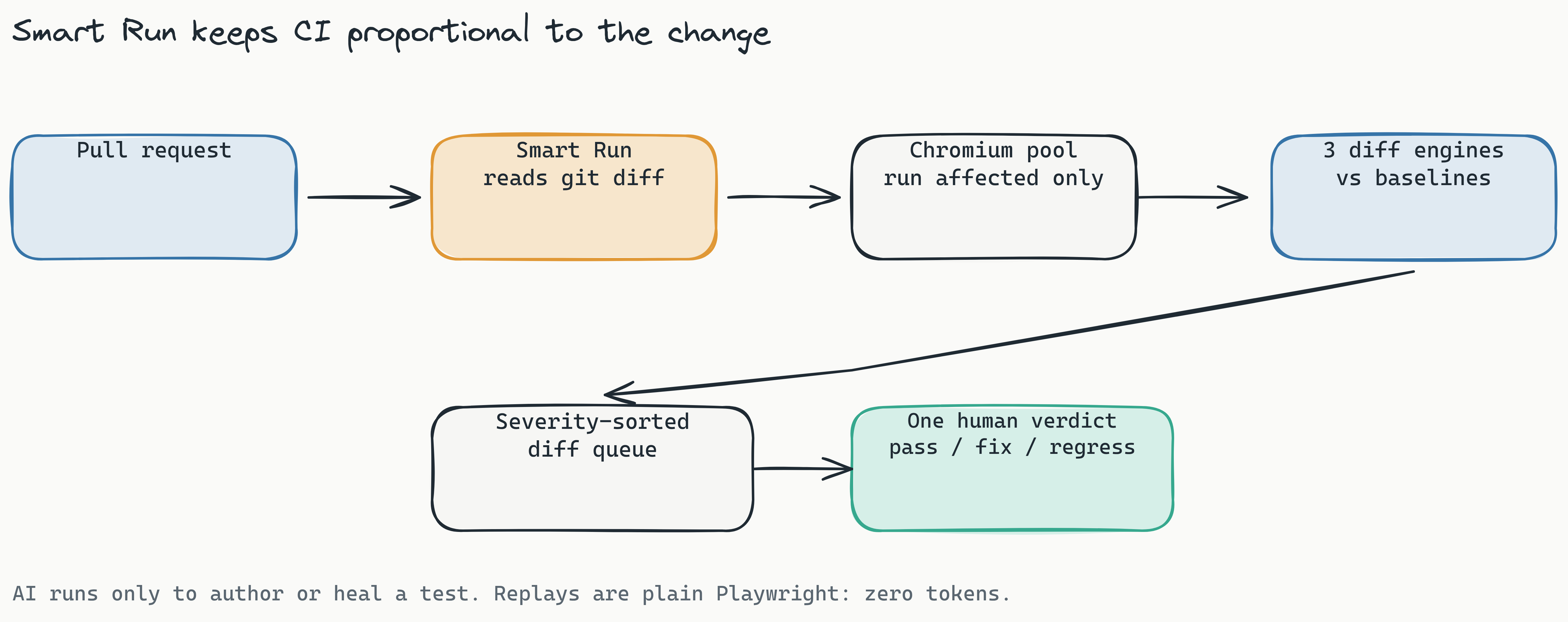
The detail that controls cost at scale is which tests run. Lastest's Smart Run reads the git diff and runs only the tests your change actually touches, instead of the whole suite on every push. Combined with branch baselines that fork on PR open and merge back on PR merge, that keeps pipeline time and review load proportional to the change, not the suite size.
Here's the shape of a GitHub Actions workflow using the reusable Lastest Action:
name: Visual Regression
on: [pull_request]
jobs:
  visual-test:
    runs-on: ubuntu-latest
    steps:
      - uses: actions/checkout@v4
      - name: Run Lastest visual tests
        uses: las-team/lastest-action@v1
        with:
          smart-run: true
Best practices for pipeline integration: keep baselines per branch and update them only after an intentional visual change is reviewed and approved by a human. Run visual tests in parallel across remote runners to keep wall-clock time low. For a deeper walkthrough, see our visual regression testing with GitHub Actions guide.
Lastest provisions a containerized Chromium pool, into k3d locally or your cluster in production, so there is no local Playwright install to drift between machines. That removes the "works on my machine" problem common to visual testing setups. Coding agents can also drive the whole flow through the MCP server, which exposes around 20 tools to Cursor, Claude Code, and similar.
How We Evaluated 5 Visual Testing Tools for Enterprise Teams
This visual testing implementation for enterprise teams evaluation covers five tools - Percy, Applitools, Chromatic, BackstopJS, and Lastest - against five enterprise-readiness criteria: scalability, onboarding time, collaboration features, CI/CD compatibility, and data privacy.
Scalability measured each tool's ability to handle large daily snapshot volume without performance degradation or cost explosion. Percy and Chromatic scale well but at rising per-snapshot costs. Applitools handles volume but at enterprise pricing that climbs steeply with usage. Lastest's flat-rate cloud and unlimited self-hosted screenshots scale cost-predictably.
Onboarding time tracked days from install to first meaningful test running in CI. BackstopJS requires significant configuration. Percy and Chromatic offer quick-start guides but require cloud account setup. Lastest authors its first tests for you: point it at URLs, an OpenAPI spec, or a markdown PRD and it generates resilient Playwright code, so teams reach a first run fast.
Collaboration features include review workflows, role-based access, and approval gates. Percy's review interface is mature. Applitools offers AI-driven review suggestions. Lastest centers on exactly one human review seam: a reviewer renders one of three verdicts (pass, fix, regression) on a severity-sorted diff queue, and AI never approves its own output. Every edit, AI-fix, and restore is versioned with a reason.
CI/CD compatibility measured integration with GitHub Actions, GitLab, and webhook-driven pipelines. Lastest ships a reusable GitHub Action, posts GitLab MR comments (self-hosted GitLab supported), and supports webhook triggers and scheduled cron, with Smart Run to run only the affected tests.
Data privacy assessed self-hosting and data residency. Percy, Applitools, and Chromatic are cloud-first or require enterprise contracts for self-hosted. BackstopJS is fully open-source but lacks a dashboard, review workflow, and enterprise support. Lastest is open source under FSL-1.1 and fully self-hostable, so screenshots can stay entirely inside your own network.
For teams where compliance or data residency is the deciding factor, the combination of free self-hosting, an air-gapped recording mode, and a single auditable review seam makes Lastest a strong contender. The full comparison against named competitors lives in Lastest vs Percy vs Applitools (2026).
Why Some Visual Testing Initiatives Fail (And How to Avoid It)
Visual testing initiatives most commonly fail for four reasons: unmanaged false positives, no developer-workflow integration, poor baseline management, and treating visual testing as a tool purchase rather than a process change. Each one thins out the team that keeps opening the queue.
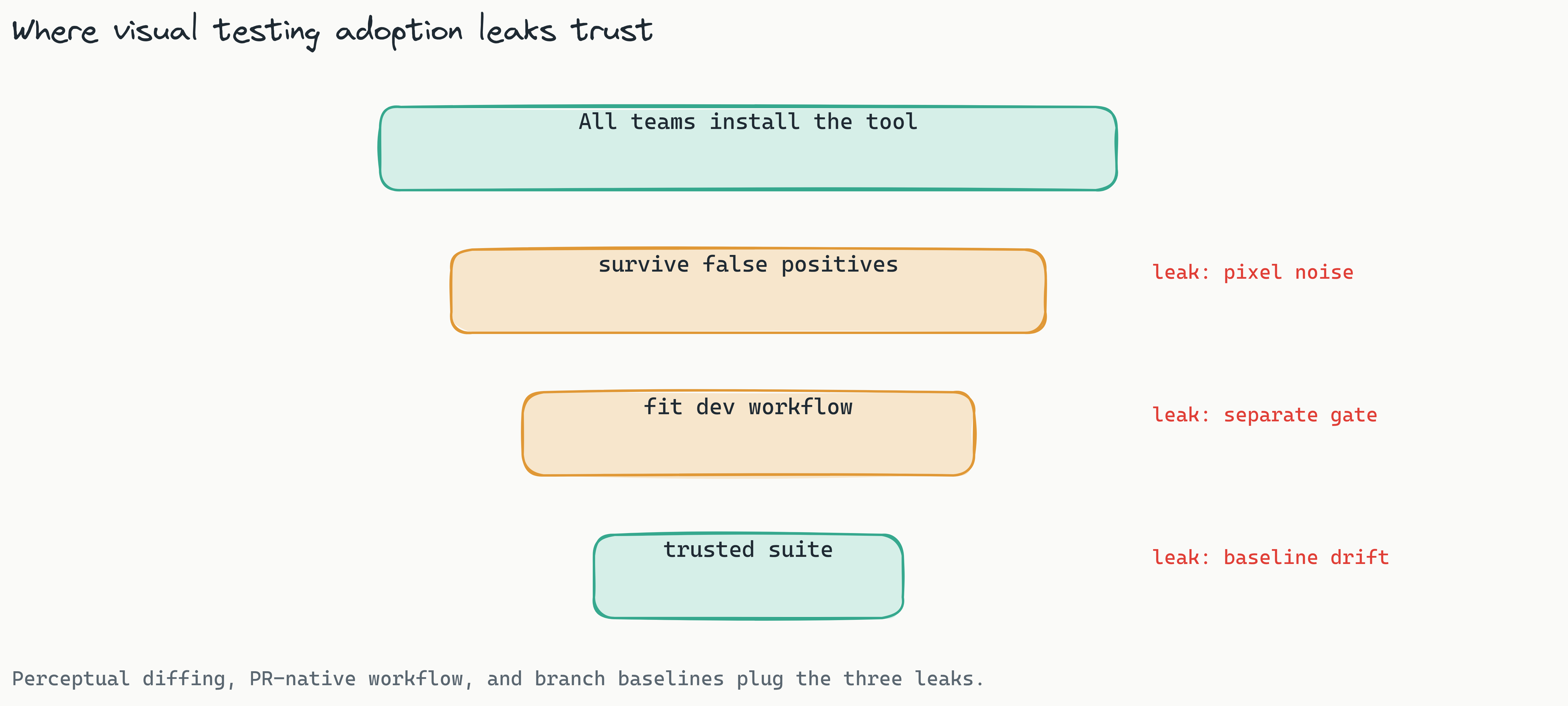
The false-positive problem is the number-one adoption killer. With pixel-only diffing, every anti-aliasing variation, font difference, and animation frame fires a failure. Developers investigate, find nothing, and eventually ignore the suite. That noise drowns out the real signal.
The fix is a perceptual, human-eye-aligned engine for the areas that are naturally noisy, with pixel precision reserved for the elements that must be exact. Multiple diff engines in one tool let you tune per test instead of accepting one global noise floor. Lastest also auto-classifies every failure as real regression, flaky, environment, or test-maintenance, with a confidence score and reasoning, so the queue arrives pre-triaged.
Poor baseline management is the second failure mode. Teams forget to update baselines after intentional redesigns, so every later deploy fails. Tie baseline updates to the review workflow: when a developer intends a visual change, they approve the new baseline as part of the pull request, and branch baselines that fork on PR open and merge on PR merge make that automatic.
Adoption also needs developer buy-in. If visual testing reads as a separate QA gate rather than part of the developer workflow, it stalls. Choose a tool that plugs into existing PR workflows instead of forcing a detour to a separate dashboard, which is why teams shipping AI-written code increasingly fold it into the developer's own loop.
Tool sprawl is the silent cost killer. One team adopts Percy, another Chromatic, a third experiments with BackstopJS. Consolidating on a single tool, ideally one that supports multiple diff engines and both deployment models, reduces licensing costs and simplifies training.
Frequently Asked Questions
What is the difference between pixel diff and structural diff in visual testing? Pixel diff compares screenshots pixel-by-pixel, catching every rendering difference including anti-aliasing and font variations. Structural diff compares DOM structure and CSS properties, ignoring cosmetic differences and focusing on meaningful layout changes. Pixel diff produces higher false positive rates, while structural diff is more noise-tolerant.
Can visual regression testing replace unit tests? No. Visual regression testing catches layout and rendering issues that unit tests miss, but it doesn't verify business logic, data integrity, or API responses. Visual testing complements unit, integration, and end-to-end testing - it's an additional layer, not a replacement.
How many snapshots should my team baseline for production applications? Most enterprise teams baseline 50–200 critical screens representing core user flows, checkout processes, and landing pages. Start with high-traffic pages and mission-critical components, then expand to secondary flows as your team gains confidence. Quality matters more than quantity.
Is open-source visual testing suitable for enterprise teams? Yes, when the open-source tool offers a review workflow, CI/CD integrations, and a single auditable approval seam. Lastest is open source under FSL-1.1 and combines code transparency with the review, classification, and CI features enterprise teams need, while avoiding vendor lock-in.
What is zero-token replay in visual testing? AI runs only when you create or fix a test. Every replay after that is plain Playwright execution, so re-running tests after a failed deploy costs nothing in AI tokens. Self-hosted screenshots are unlimited regardless of volume, which matters for teams that iterate frequently.
How long does it take to implement visual testing in CI/CD? Because Lastest generates the first Playwright tests for you from URLs, an OpenAPI spec, or a PRD, a small pilot of five flows can run in CI the same day. Full rollout covering 50+ screens usually takes one to two weeks if you close the review loop at small scale first.
Decision Framework - A 5-Step Guide for CTOs
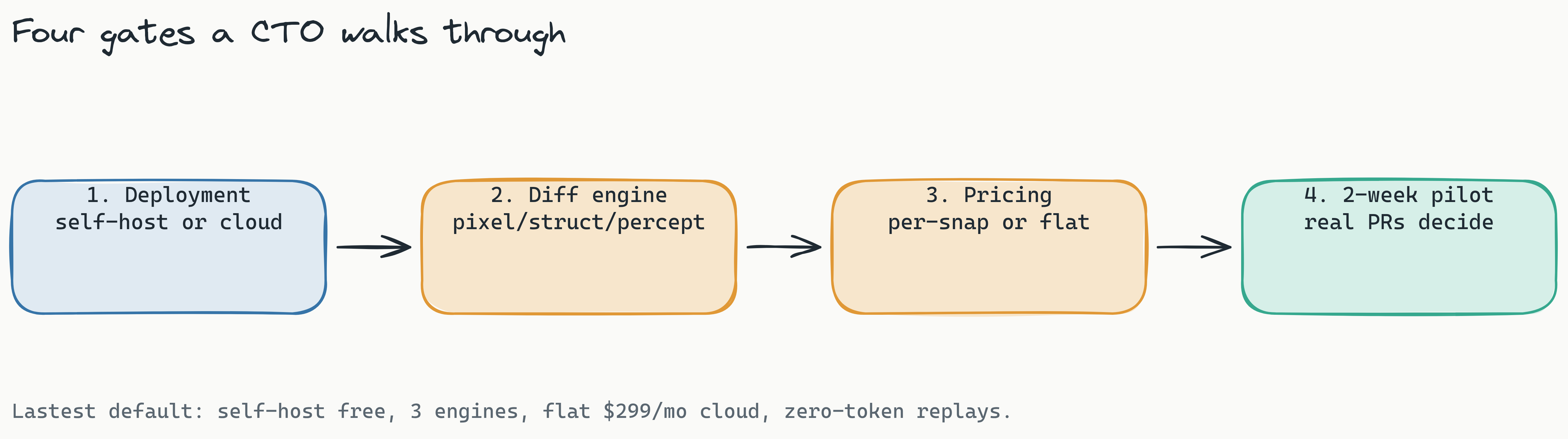
This visual testing CTO decision guide has covered evaluation criteria, pricing models, deployment options, and integration patterns. Here's a five-step process to make your decision.
Step 1: Audit your visual surface area. Count the number of screens, components, and states your application renders. Estimate total snapshot volume per deployment. This determines whether per-snapshot pricing or flat-rate makes more economic sense.
Step 2: Define your baseline quality bar. Is your team zero-tolerance for visual drift, or are P0-level issues the only blockers? High-tolerance teams can use faster pixel-only diffing. Low-tolerance teams need perceptual AI diffing to minimize false positives.
Step 3: Choose deployment model. Review your compliance requirements. If your data cannot leave your network, self-hosted is mandatory and an open-source, air-gappable tool removes the residency question entirely. If cloud is acceptable, prefer flat-rate pricing so the bill stays predictable.
Step 4: Evaluate against your CI/CD. Does the tool offer a native GitHub Action and MR comments? Can you run tests in parallel on remote runners, and does it run only the affected tests on each change?
Step 5: Run a 2-week pilot with real PRs. Measure false positive rate, onboarding time, and team satisfaction. Compare results against your current manual process.
| Team Profile | Recommended Deployment | Recommended Diff Engine |
|---|---|---|
| Regulated (fintech/healthtech) | Self-hosted | Perceptual (AI) |
| Fast-moving startup | Cloud flat-rate | Structural or Perceptual |
| SaaS company (data-residency needs) | Self-hosted or flat-rate cloud | Perceptual |
| Small team, simple UI | Self-hosted free | Pixel-only or Structural |
Conclusion
Visual testing in 2026 is a CTO-level priority. Frontend complexity, CI/CD acceleration, and user expectations for pixel-accurate experiences make automated visual regression testing essential infrastructure, not optional tooling.
Three takeaways. First, match the diff engine to your tolerance for false positives, and prefer a tool that gives you a perceptual engine for noisy areas and pixel precision for the critical ones. Second, self-hosted, open-source models offer data-sovereignty advantages cloud-only tools cannot match, which matters most for regulated industries. Third, integrate visual testing into developer workflows, not around them, and keep the human review seam down to a single verdict so adoption survives scale.
This visual testing CTO decision guide has given you the framework and criteria to choose well. Now it is time to run your pilot. Whether you are evaluating for a regulated fintech or a fast-moving startup, start with the open-source build: it ships three diff engines (Pixelmatch, SSIM, Butteraugli), zero-token replays, AI failure classification, Smart Run, WCAG 2.2 AA scoring, and a single human review seam. Self-host Lastest for free, or watch a demo first, then skip the ops with Cloud at a flat $299/month. The full source is on GitHub.
With your team aligned around a single visual testing strategy, you eliminate tool sprawl and build quality into every deployment. That is the outcome every CTO should aim for: consistent, pixel-accurate experiences at scale, without drowning in noise.