
Every QA team knows the sinking feeling: you push a harmless CSS tweak, the visual regression pipeline lights up red, and someone spends 20 minutes confirming it was just anti-aliasing noise. The "boy who cried wolf" problem is real. To reduce false positives in visual regression testing, you have to stop the pipeline from flagging cosmetic noise as a bug, because false positives erode trust in automation, slow down releases, and waste engineering hours that should go toward real regressions.
There is no single magic bullet. Reducing false positives is a deliberate strategy that combines the right diff engine for each element, a controlled rendering environment, and one human review seam. This is the broad, canonical how-to: it walks through every layer end to end, using Lastest's three diff engines and self-hosted infrastructure as a practical framework for cutting false positives without losing detection accuracy. If you want to go deeper on a specific layer, two companion guides drill down: one on the AI and perceptual-diffing approach, and one on what changed in 2026. If you want the mechanics first, the features overview and docs cover the same ground in product terms.
What Causes False Positives in Visual Regression Testing?
What are the most common causes of false positives in visual regression testing? False positives in visual regression testing are most commonly caused by unstable rendering environments, anti-aliasing inconsistencies, and the use of rigid, pixel-by-pixel comparison algorithms that treat any sub-pixel shift as a failure.
The root causes break down into four categories.
Cross-browser rendering differences are the biggest offender. WebKit, Chromium, and Gecko engines handle sub-pixel positioning, font hinting, and shadow rendering differently. A button that looks identical in Chrome might shift by one pixel in Firefox-and a pixel diff engine will flag it.
Anti-aliasing anomalies create phantom diffs. Modern browsers use different anti-aliasing algorithms depending on the OS, GPU, and even screen resolution. Text edges, curved borders, and gradient backgrounds are particularly prone to these variations.
Dynamic content breaks snapshot stability. Timestamps, live data widgets, animated loaders, and third-party embeds produce different visual output on every render. If your test captures these elements, you're guaranteed false positives.
Viewport and clipping issues surface when tests run across different screen sizes or browser zoom levels. A 0.5-pixel rounding difference in how a browser rounds layout coordinates can shift an entire element, triggering a false positive.
These are not theoretical edge cases. They are daily occurrences for teams using hyper-sensitive default diff engines in tools like Percy or BackstopJS. The fix starts with understanding that no single comparison method works for every UI element.
Why Use Multiple Diff Engines Instead of One?
Why is it better to use multiple diff engines instead of just one? Using multiple diff engines-pixel, structural, and perceptual-allows teams to match the comparison method to the type of UI element being tested, drastically reducing false positives while maintaining detection accuracy.
Here is how each engine works and where it excels.
Pixel diffing compares screenshots pixel by pixel. It is the most sensitive method and the most prone to false positives. Use it only for static, pixel-perfect layouts-critical UI elements like button borders, icon alignment, and fixed-position elements where even a one-pixel shift matters. For everything else, pixel diffing creates noise.
Structural diffing analyzes the DOM tree and layout structure rather than raw pixels. It ignores cosmetic changes like anti-aliasing variation or slight color shifts but catches real layout breaks-missing elements, shifted containers, or incorrect dimensions. Structural diffing is ideal for responsive layouts, pages with dynamic content, and text-heavy interfaces where font rendering quirks are irrelevant.
Perceptual diffing in Lastest uses Butteraugli, a perceptual metric aligned to the human eye. It tolerates anti-aliasing quirks, shadow rendering differences, and minor color variations, but it catches the changes a person would actually notice-a missing image, a relocated CTA, or a broken layout that affects comprehension. Perceptual diffing is best for full-page screenshots and pages with complex visual hierarchy.
Most existing tools commit to one approach. Applitools leans perceptual. Percy offers pixel and structural diffing but not all three. Lastest provides all three engines (Pixelmatch, SSIM, and Butteraugli) in a single platform, letting teams assign the right engine to each test case. That per-test flexibility is the single most effective strategy for false positive reduction. We go deeper on the underlying comparison math in how DOM diffing changes visual regression comparison.
How to Configure Playwright for Lower False Positives
How do you configure Playwright to reduce false positives in visual regression tests? To configure Playwright for lower false positives, set a consistent viewport, disable animations, and use a stable CI environment before delegating the diff strategy to a dedicated visual regression tool like Lastest.
Environment hardening is the step that happens before any screenshot is captured. It eliminates rendering variability so that the diff engine only compares intentional changes.
Start with a fixed viewport. Responsive testing is valuable, but it introduces viewport-dependent false positives. For visual regression tests, lock viewport dimensions:
// playwright.config.ts
import { defineConfig } from '@playwright/test';

export default defineConfig({
  use: {
    viewport: { width: 1280, height: 720 },
    actionTimeout: 10000,
    baseURL: 'http://localhost:3000',
  },
  projects: [
    {
      name: 'visual-regression',
      testDir: './tests/visual',
      retries: 0,
    },
  ],
});
Next, disable animations and transitions in your test setup. CSS animations, JavaScript-based loading states, and hover transitions produce different visual output on every render, even with identical code:
// test-setup.ts
import { test } from '@playwright/test';

test.beforeEach(async ({ page }) => {
  await page.addStyleTag({
    content: `
      *, *::before, *::after {
        animation: none !important;
        transition: none !important;
      }
    `,
  });
});
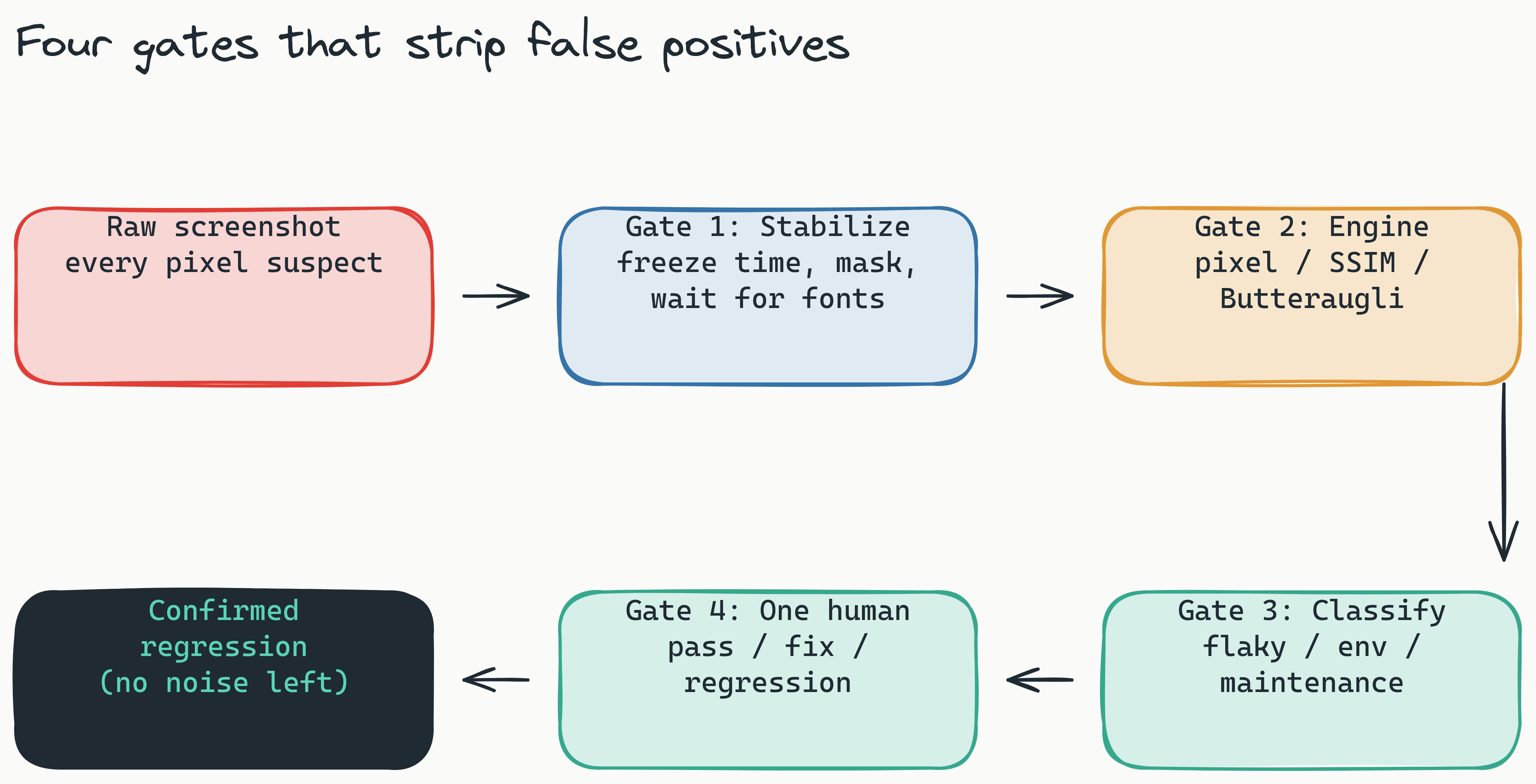
Finally, use a containerized browser for consistent rendering. The same Playwright version running on macOS and Linux produces different anti-aliasing results. Running tests inside a pinned container eliminates OS-induced variance. Lastest ships an embedded browser pool (containerized Chromium, no local Playwright install) plus stabilization built for cross-OS consistency: text-region-aware OCR diffing, timestamp freezing, network-idle and font-loading waits, DOM stability detection, page-shift detection, and auto-masking of dynamic content. Those are the levers that remove environmental drift before the diff engine ever runs.
The Role of Self-Hosted Infrastructure in Reducing False Positives
Does self-hosting visual regression tests help reduce false positives? Yes. Self-hosting eliminates false positives caused by network-induced rendering variance, such as image compression artifacts and server-side rendering differences. By running the diff engine on the same Docker host as your tests, you ensure the engine compares the exact pixel data your test captured.
Running visual regression tests on self-hosted infrastructure eliminates a class of false positives that cloud-only tools cannot avoid: network-induced rendering variance.
When tests upload screenshots to a third-party server, the tool must compress, transfer, and decompress images. Compression artifacts, latency-induced timeouts, and server-side rendering differences all introduce noise. A pixel that looks sharp in your local environment might appear compressed or color-shifted after passing through a cloud pipeline.
Self-hosting the diff engine-running it on the same Docker host or CI runner as your tests-removes these variables. The screenshot never leaves your environment. The diff engine runs against the exact same pixel data your test captured, on the same hardware, under the same OS.
This is not just a hosting preference. It is a false-positive-reduction strategy. When you control the entire rendering and diffing pipeline on one host, you eliminate every source of environmental noise except the code change itself. Self-hosted screenshots are also unlimited, so there is no incentive to under-sample your UI to save money. See self-host for the one-command setup.
Lastest is free and open source when self-hosted (FSL-1.1 license, your infra, unlimited screenshots and replays). If you would rather skip ops, Lastest Cloud is a flat $299 per month, with no per-seat and no per-screenshot fees. For teams prioritizing false positive reduction, self-hosting is the clear path.
How Can Human Oversight Help Filter Visual Regressions?
How does human oversight in a visual regression dashboard filter out false positives? Human oversight panels, like the one built into Lastest's dashboard, help filter visual regressions by allowing QA engineers to approve, reject, or annotate flagged diffs before they block a build, preventing false positives from halting development.
No diff engine is perfect. Even the best AI model cannot consistently distinguish between an intentional design update and an accidental regression. A human-in-the-loop step catches these edge cases.
Consider a real scenario: your team redesigns a button. The new button is larger, colored differently, and placed higher on the page. A structural or perceptual diff engine flags it as a regression. But it is an intentional change. Without human review, either the build blocks (halting the release) or the change passes silently (risking unapproved modifications). Lastest gives the reviewer exactly one seam with three verdicts: pass, fix, or regression. The reviewer marks the redesign a planned pass and the build moves on. AI never approves its own output.
Lastest's zero-token replays make this economically feasible. AI only runs when you create or fix a test; every replay after that is plain Playwright execution, so reviewing diffs day after day costs nothing in tokens and self-hosted screenshots stay unlimited. Lastest also auto-classifies every failure as real regression, flaky, environment, or test-maintenance, with a confidence score, so the reviewer triages a sorted queue instead of a wall of red.
Integrating human oversight into PR workflows is equally important. Lastest is CI/CD native: a reusable GitHub Action, GitLab MR comments, webhook triggers, and scheduled runs. Smart Run reads the git diff and runs only the tests your change actually touched, so the reviewer never wades through diffs for code that did not move. Branch baselines fork on PR open and merge back on PR merge, which keeps intentional design changes from leaking across branches as false positives.
Visual Regression Testing Best Practices for CI/CD Pipelines
Combining environment control, engine selection, and human oversight into a single CI/CD workflow produces the most reliable visual regression pipeline.
Step 1: Environment Consistency
Pin your test environment with a container. The same Node version, Playwright version, and OS base image must be used for every run. Lastest's embedded browser pool provides a containerized Chromium out of the box (it provisions into k3d locally or your cluster in prod), but any CI system can achieve the same with a pinned image.
Step 2: Snapshot Selection
Do not snapshot every page on every commit. Trigger visual regression tests only when relevant files change-component code, stylesheets, or templates. Lastest's Smart Run does this for you by reading the git diff and running only the tests your change touched, which reduces noise from unrelated changes and speeds up the pipeline.
Step 3: Diff Engine Assignment
Assign the appropriate diff engine per test case. Use pixel diff for static critical elements like checkboxes, radio buttons, and fixed-position headers. Use structural diff for responsive layouts and text-heavy pages. Use perceptual diff for full-page screenshots and pages with complex visual hierarchy. Lastest lets you set the engine per test, so this stays a one-line decision per snapshot. For more comparison patterns, see Lastest vs Percy vs Applitools.
Step 4: Human Review Before Merge
Configure your CI pipeline to require human approval for any flagged diff before merging. Use Lastest's GitHub integration to surface diffs directly in the PR. QA engineers can approve intentional changes and reject real regressions without context switching.
Step-by-Step Pipeline Summary
The complete pipeline follows this workflow: (1) Stabilize environment with a pinned container, (2) Run Playwright tests with fixed viewport and animations disabled, (3) Capture screenshots, (4) Run Lastest diff with engine selection per test, (5) Human review dashboard, (6) Approve or reject in PR.
Lastest vs. Competitors: Multi-Engine Comparison
| Feature | Percy | Applitools | Chromatic | BackstopJS | Lastest |
|---|---|---|---|---|---|
| Pixel Diff | ✅ | ✅ | ✅ | ✅ | ✅ |
| Structural Diff | ✅ | ❌ | ✅ | ❌ | ✅ |
| Perceptual/AI Diff | ❌ | ✅ | ❌ | ❌ | ✅ |
| Self-Hosted | ❌ | ✅ (On-prem) | ❌ | ✅ | ✅ (Free) |
| Open Source | ❌ | ❌ | ❌ | ✅ | ✅ |
| CI/CD Ready | ✅ | ✅ | ✅ | ✅ | ✅ |
| Starting Price | from ~$199/mo | from ~$699/mo | from ~$179/mo | Free | Free self-hosted, Cloud $299/mo flat |
The table reveals the key differentiator: Lastest offers all three diff engines in a self-hosted, open-source package. No competitor provides the same combination of flexibility, cost, and environment control. Teams can start with the free self-hosted version, test on real projects, and upgrade to cloud only when scaling requires it.
Frequently Asked Questions
What is the best diff engine for reducing false positives in visual testing? There is no single "best" engine. The most effective approach is to use a combination of pixel, structural, and perceptual diff engines, applying the right one to each type of UI element under test.
Is self-hosting visual regression tests worth the effort? Yes, especially for teams prioritizing accuracy. Self-hosting eliminates network-induced false positives from image compression and server-side rendering, and tools like Lastest make setup simple with a
docker-compose upcommand.How does human oversight fit into an automated CI/CD pipeline? Human oversight acts as a final filter. A dashboard allows QA engineers to approve intentional design changes or reject real regressions before they block a build, ensuring that automation does not become a bottleneck.
Does open-source visual regression testing work for enterprise teams? Yes. Lastest's open-source, self-hosted model provides the environment control enterprise teams need for accuracy, while the dashboard and GitHub integration support the human oversight workflows that large teams require.
How can I integrate visual regression tests into my existing Playwright setup? You can delegate screenshots from your existing Playwright tests to a dedicated visual regression tool. Configure a fixed viewport, disable animations in setup hooks, and use Docker for consistency before passing snapshots to the diff tool.
Related Reading
This guide is the broad hub. To go deeper on a specific angle, read how to reduce visual regression false positives with AI and perceptual diffing, which dives into the three diff engines (Pixelmatch, SSIM, Butteraugli) and AI failure classification. For the state of the art and what shifted this year, see the 2026 field guide to reducing false positives in visual testing.
Conclusion
False positives in visual regression testing are not an unsolvable nuisance. They are a symptom of relying on a single comparison method, an uncontrolled rendering environment, or an automated pipeline without human review. The fix is a layered strategy: stabilize the environment, match the diff engine to the element type, self-host to eliminate network variance, and add human oversight as the final filter.
Modern visual regression tools like Lastest make this approach practical. With three diff engines, a self-hosted pipeline, AI failure classification, and zero-token human review, teams cut false positives while keeping confidence that real regressions still get caught.
Start free: self-host Lastest in one command (open source, unlimited screenshots, $0 forever), or skip ops with Lastest Cloud at a flat $299 per month. Browse the live demos, see how teams without dedicated QA use it on the devs-doing-QA page, and star the project on GitHub.