
Your CI is red again. Not because the code broke, but because a single pixel shifted by one shade on a button. You pull up the diff, squint at the screen, and mutter under your breath: "This is not a bug." You approve it, move on, and twenty minutes later, the same thing happens on the next pull request.
This is the hidden tax of visual regression testing: false positives. They erode team trust in automated testing, burn real engineering hours, and ultimately push some teams to abandon visual testing altogether. The real cost isn't the tooling-it's the fatigue.
This guide takes one specific angle on the fix: reducing visual regression false positives with AI. The lever is not a higher threshold or more masking, it is smarter comparison. That means two AI-adjacent techniques working together: perceptual diffing (comparison engines tuned to human vision rather than raw pixels) and AI failure classification (a model that labels each surviving diff as a real regression, flaky, environment, or test-maintenance issue before a human ever looks). If you want the broad, end-to-end playbook instead, start with the pillar guide on how to reduce false positives in visual regression testing; this post zooms in on the AI and perceptual-diffing layer of that playbook.
Below we unpack what causes false positives, why pixel-only comparison fails, and how three diff engines plus AI classification fix it in your pipeline starting today. We'll use Lastest, an open-source, self-hosted visual + E2E testing platform, as the concrete reference architecture.
What Are Visual Regression False Positives-and Why Do They Matter?
[What are visual regression false positives?]: Visual regression false positives are instances where a test flags a visual difference that is not an actual bug-like an anti-aliasing shift or a different render timestamp-triggering unnecessary developer review and slowly eroding trust in the testing process.
Let's look at three concrete examples you've almost certainly hit:
- Anti-aliasing shifts: A button's text appears one pixel thinner on Chrome vs. Firefox because each browser's sub-pixel rendering engine produces slightly different anti-aliasing. The pixel-by-pixel comparison screams "FAIL," but no human would ever notice the difference.
- Dynamic content: Timestamps, user profile avatars, or live pricing widgets change on every render. Your test snaps a screenshot at 10:00:01 AM, the baseline is from 10:00:00 AM, and suddenly you're reviewing a time difference that has zero impact on functionality.
- Scrollbar flicker: A scrollbar appears and disappears depending on viewport height, browser zoom settings, or OS-level "always show scrollbars" preferences. Each state triggers a false positive.
These aren't edge cases. In a busy suite, a large share of pixel-flagged diffs turn out to be visually imperceptible or functionally irrelevant. Industry surveys consistently put noise as the number-one reason teams distrust their visual suite.
The Real Cost of False Positive Fatigue
The immediate cost is obvious: wasted engineering time. Each false positive costs developer review time once you factor in context switching, debugging, and re-running failed pipelines. Multiply that across dozens of visual checks per day and the cumulative drain is real.
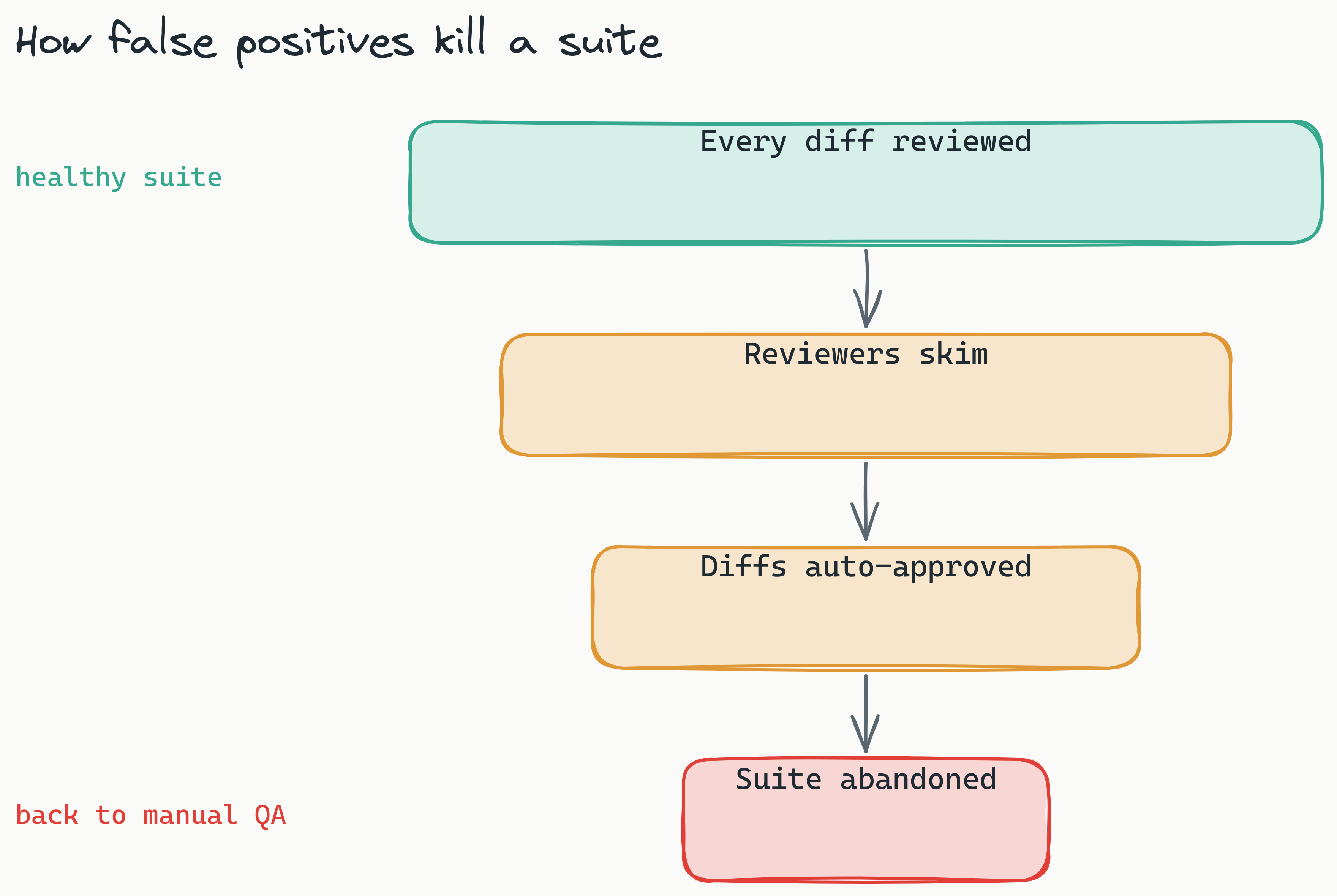
But the deeper cost is harder to quantify: trust erosion. When developers see the same noise day after day, they stop treating test failures seriously. They start auto-approving diffs without review. They lobby to remove visual tests from the CI pipeline entirely. We dug into how this trust collapse compounds in The Flake Tax: once reviewers stop opening the queue, the suite is technically running but functionally dead.
This is where visual regression testing accuracy improvement becomes an operational priority, not just a technical one. Every false positive you eliminate is developer time recovered and a vote of confidence in your automated testing strategy.
The Three Root Causes of False Positives (and Why Pixel Comparison Fails)
[What causes false positives in visual regression testing?]: The three root causes of false positives are anti-aliasing and sub-pixel rendering, dynamic content, and animation frames-all of which a simple pixel-by-pixel diff is fundamentally unable to handle.
Understanding these causes is your first step toward an automated visual testing false positives fix that actually works.
Anti-Aliasing and Sub-Pixel Rendering
Anti-aliasing smoothes jagged edges by blending foreground and background colors at the pixel boundary. The problem? Different browsers, operating systems, and even GPU drivers implement anti-aliasing differently. What looks identical to the human eye can differ by several pixels when compared mathematically. Anti-aliasing differences are one of the largest contributors to noise in cross-machine test suites.
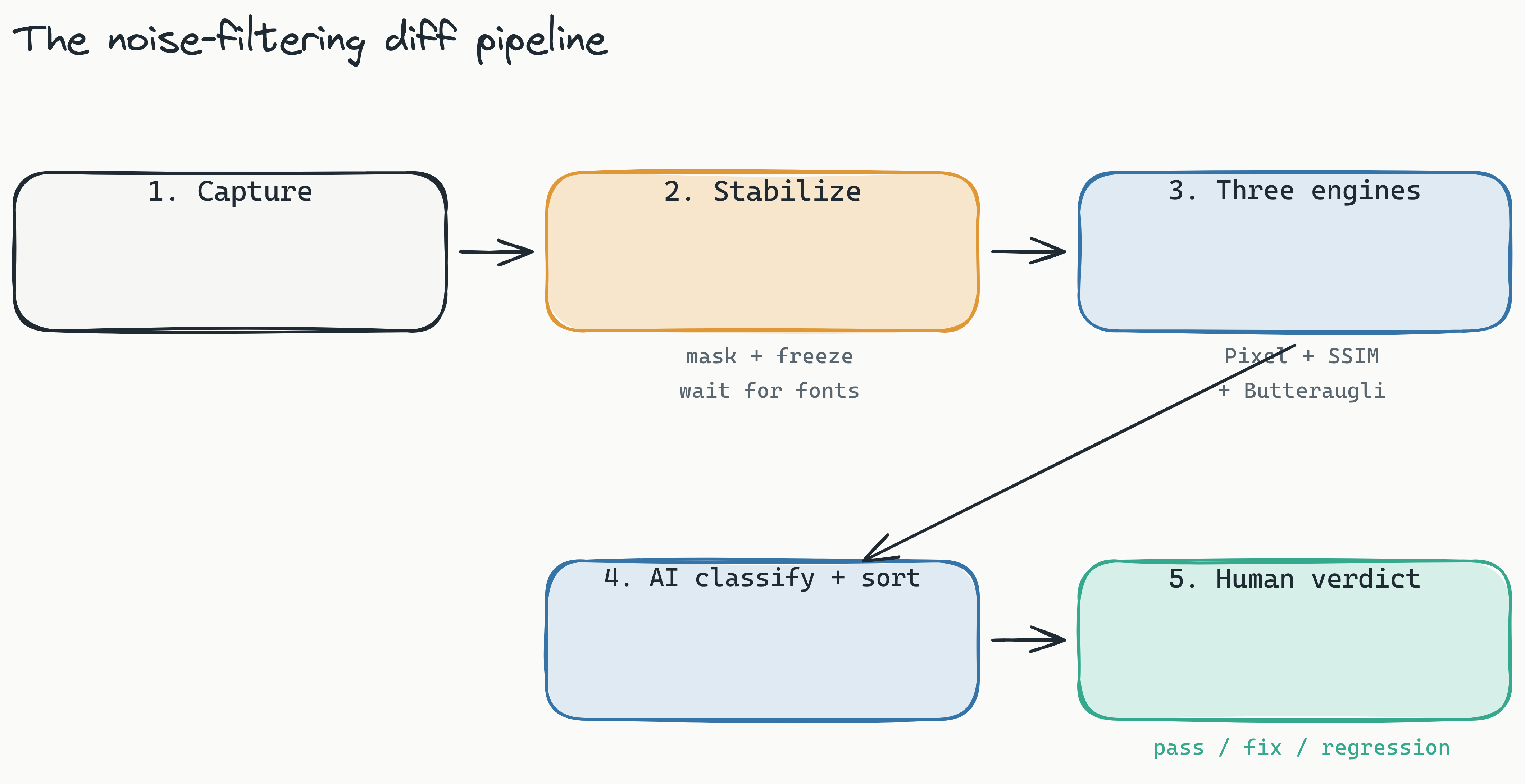
Sub-pixel rendering compounds this. Modern displays have sub-pixel geometries (RGB stripes, Pentile matrices), and browsers optimize text rendering for these layouts. Text that renders at 14.3px on one machine may render at 14.0px on another, shifting every character by a fraction of a pixel. This is exactly why Lastest stabilizes screenshots with text-region-aware OCR diffing and a font-loading wait before it ever compares pixels.
Dynamic Content
Timestamps, live counters, randomized avatars, personalized greetings, and embedded third-party widgets all change on every page load. A pixel comparison treats these as failures because the pixel values are different-even though the content is functionally correct.
This category tends to be the largest single share of false positives in most test suites. It's especially pernicious for SaaS and e-commerce platforms where dynamic pricing, user-specific dashboards, and A/B testing create endless variation. Lastest's stabilization layer attacks this directly with timestamp freezing and auto-mask of dynamic content, so the diff never sees the moving parts.
Flaky Animations and Transitions
CSS animations, JavaScript transitions, and loading spinners introduce timing-dependent rendering. Your screenshot captures an animation frame at 127ms; the baseline captured it at 131ms. The four-millisecond difference triggers a failure, even though the animation is identical to the human eye.
A simple pixel-by-pixel comparison cannot distinguish between "the button is broken" and "the button's hover animation is 3ms ahead of schedule." It lacks the semantic understanding to make that judgment. This is why teams that rely solely on pixel comparison eventually burn out-they're using a tool that treats meaningless noise as actionable failures.
Why AI-Powered Multi-Engine Diff Is the 2026 Standard for Reducing Noise
[How does AI reduce false positives in visual testing?]: A multi-engine diff reduces false positives by comparing each screenshot with three different algorithms-pixel, structural, and perceptual-then letting AI classify each remaining failure as a real regression, flaky, environment, or test-maintenance issue, so only genuinely broken differences reach a human.
The shift in modern visual regression testing is not a single algorithm but the combination of three distinct comparison engines, each catching what the others miss. Lastest runs all three:
- Pixel (Pixelmatch): The traditional approach. Compares every pixel exactly. Fast, and catches "pixel-perfect" failures like missing icons or shifted elements. High recall, low precision-it catches everything, but also flags everything.
- Structural (SSIM): Measures the structural similarity index between images. It detects changes in layout, position, and shape rather than exact color values, so it ignores anti-aliasing and sub-pixel shifts because it is comparing structure, not exact pixel positions.
- Perceptual (Butteraugli): A model aligned with human visual perception. It effectively asks: "Would a human looking at this screen actually notice this difference?" It ignores imperceptible anti-aliasing, font noise, and timestamp variations while still catching real visual bugs.
No single engine is perfect. Pixel diff catches everything but creates noise. Structural diff can miss fine-grained color bugs. Perceptual diff can wave through a subtle change. Running all three together is the leverage point: when only the pixel engine screams but structure and perception agree the screen is fine, that is almost always noise, not a bug.
This is also the mental shift that kills most false positives at the source: treat visual testing as pixel verification, not a true/false assertion. A functional expect() assertion is binary-the click fired or it didn't-and it says nothing about whether the button still looks right. Pixel verification instead scores each screenshot and classifies it as unchanged, flaky, or changed against configurable pixel and percentage thresholds, so a one-shade shift lands in "flaky" rather than failing the build outright. You are grading a difference, not tripping a boolean.
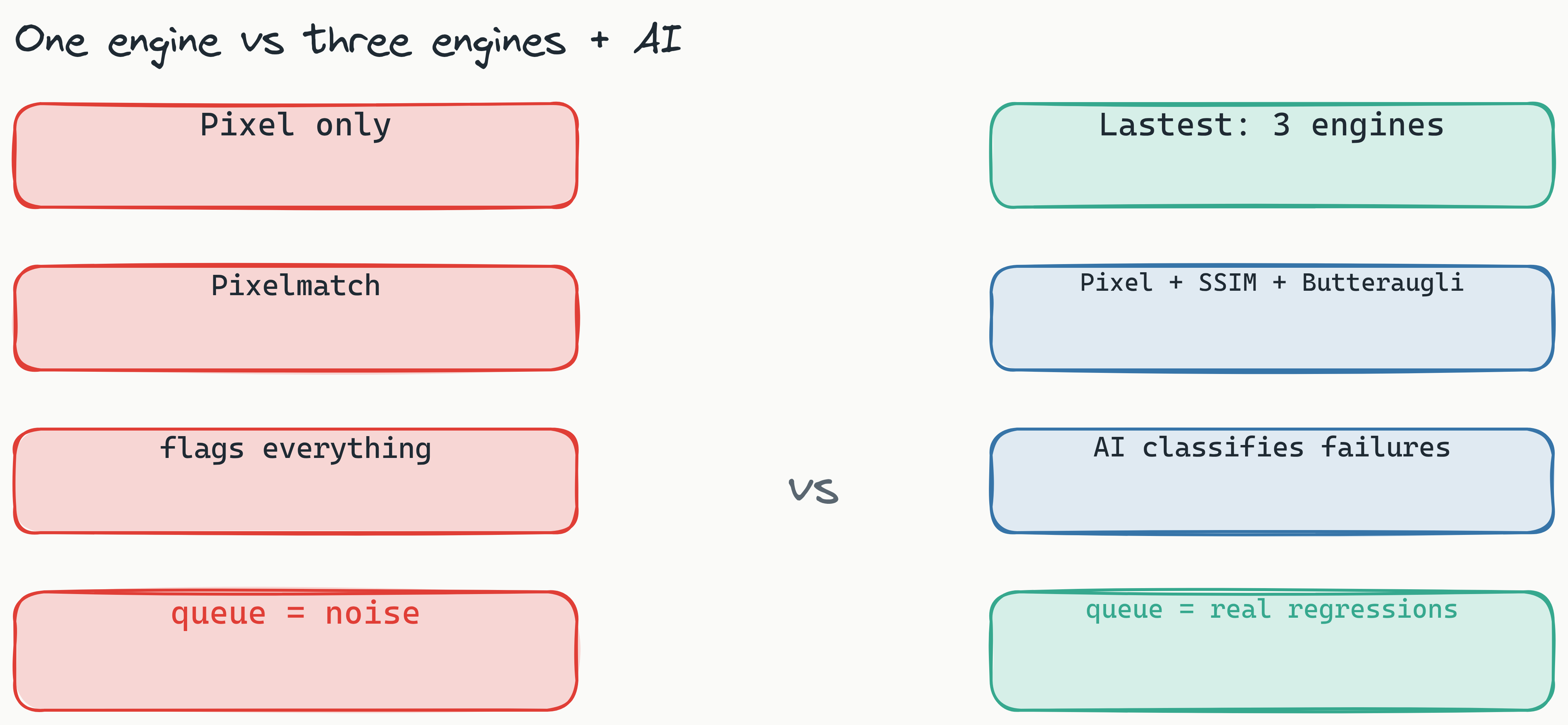
The second layer is what Lastest does after the engines run. Every failure is auto-classified as a real regression, flaky, environment, or test-maintenance issue, each with a confidence score and a short reasoning string. Crucially, the AI never approves its own output. It sorts and explains; a human renders one of three verdicts (pass, fix, regression). That single human seam is the difference between a suite people trust and one they mute. We unpack the pattern in The 2026 AI Testing Scale Gap.
Lastest implements this architecture natively, giving teams all three diff engines plus AI classification out of the box-no custom plumbing required. See the full diff stack on the features page.
Best Practices for Reducing False Positives in Your CI/CD Pipeline
[How to reduce false positives in CI/CD?]: To reduce false positives in your CI/CD pipeline, you must implement stable selectors, mask dynamic content, and use environment-specific thresholds.
These visual regression testing best practices 2026 work regardless of your tooling choice and will immediately improve your false positive rate.
Strategy 1: Stabilize Your Selectors and Test Data
Use data-testid attributes instead of CSS class names or text content for your test selectors. CSS classes change frequently; data-testid attributes are purpose-built for testing stability. Pair this with deterministic test data: seed data that produces the same output on every run rather than hitting production APIs.
Better still, stop hand-maintaining selectors at all. Lastest generates a 7-layer selector fallback (data-testid → id → role → aria-label → text → CSS → OCR), so when a refactor moves an element the test heals itself instead of failing. Fewer brittle selectors means fewer phantom diffs. See how self-healing selectors work.
Strategy 2: Implement Smart Content Masking
Define dynamic content regions as "no-diff zones." Most modern visual testing tools let you mask specific DOM elements or CSS selectors. Mask your timestamp widgets, live chat boxes, user avatars, and any third-party embedded content. This alone can eliminate a major portion of false positives for e-commerce and SaaS applications. Lastest goes further with auto-mask of dynamic content plus network-idle and DOM-stability waits, so much of this masking happens without you hand-listing every region. Think of it as two filters working together: a data filter that ignores dynamic-data regions (timestamps, prices, avatars) via mask selectors and text-region-aware OCR diffing, and a show-area filter that scopes the comparison and the reviewer's attention to the region that actually changed-so page-shift from an inserted row does not flag the whole screen.
Strategy 3: Use Environment-Aware Thresholds
Set different diff thresholds for staging vs. production. Staging environments often have lower visual stability-test data is injected, feature flags change frequently, and animations may behave differently. Allow a 0.5% threshold in staging while enforcing pixel-perfect comparison in production. This prevents staging noise from slowing down your pipeline while maintaining strict production standards.
Strategy 4: Adopt Zero-Token Review Cycles
One overlooked contributor to false positive fatigue is the cost of running and reviewing diffs. When every run or screenshot costs money, teams rush through approvals. With zero-token replays, AI runs only when you create or fix a test; every replay after that is plain Playwright execution at $0 in tokens, and self-hosted screenshots are unlimited regardless of volume. Teams can afford to run the suite thousands of times a day and still investigate every diff carefully, which is what actually builds confidence. No diff gets skipped because someone is watching a credit meter.
Strategy 5: Let AI Classify, but Keep One Human Seam
Do not chase a fully automatic accept-everything button. Lastest instead classifies each failure (real regression, flaky, environment, test-maintenance) with a confidence score and reasoning, then sorts the queue so the obvious noise sinks and likely regressions float to the top. A reviewer still renders the final verdict in three buttons, but on a pre-sorted queue that takes seconds, not minutes. The AI does the triage; the human keeps the judgment. That balance is what makes the noise reduction trustworthy rather than scary.
You can wire all five strategies together by hand-or get them out of the box. Lastest ships the three-engine pixel verification, the data and show-area filters, animation and flaky-test guards, self-healing selectors, and AI failure classification on every plan. Self-host it free, run the same stack on Lastest Cloud at a flat $299/month, or watch a live diff on a real app before you wire up CI. If you are still choosing a tool, the Lastest vs Percy vs Applitools comparison and pricing breakdown put the numbers side by side.
Open-Source vs. Proprietary: Which Approach Reduces More False Positives?
Open-source tools often provide more flexibility and transparency for tuning false-positive reduction, while proprietary tools offer out-of-the-box AI trained on larger datasets.
Here's how the major tools compare in this ai-powered visual testing tool comparison:
| Tool | Diff Engines | Open-Source? | Pricing Model | General False Positive Reduction |
|---|---|---|---|---|
| Lastest | Pixel + Structural + Perceptual + AI classification | ✅ Yes (self-hosted free) | $0 self-hosted; Cloud $299/mo flat | Three engines plus AI triage cut noise to real regressions |
| Applitools | AI-based (proprietary) | ❌ No | From ~$699/month | Good out-of-box accuracy |
| Percy | Pixel only | ❌ No | From ~$199/month | Higher baseline noise |
| BackstopJS | Pixel only (configurable) | ✅ Yes | Free | Requires manual tuning |
| Chromatic | Pixel + auto-accept | ❌ No | From ~$179/month | Moderate noise reduction |
One detail the pricing column hides: Lastest's Cloud plan is a flat $299/month with no per-seat or per-screenshot fees, and self-hosting is free forever under an open license. With most proprietary tools, noise is doubly expensive-you pay to capture the screenshot and you pay an engineer to dismiss the false positive. We break down the math in visual regression testing pricing for startups.
The Transparency Argument
Open-source tools give you visibility into how your diffs are classified. You can inspect the code, see which engine flagged which diff, and tune thresholds yourself. This is critical for teams that need auditability or have unique visual requirements. An open-source visual regression testing tool like Lastest provides BackstopJS-level flexibility with enterprise-grade AI power.
The Convenience Argument
Proprietary tools train their AI models on thousands of customer test suites, which means they offer better out-of-box accuracy for common visual patterns. However, you pay for this convenience-both in licensing costs and in reduced control. When the AI makes a mistake, you can't inspect its reasoning.
For most teams, the optimal path is open-source flexibility with AI capabilities. Lastest's open-source model gives you the transparency of BackstopJS and the multi-engine AI power of enterprise tools like Applitools, with zero vendor lock-in if you self-host.
The Pipeline That Filters Noise Before It Reaches You
Putting the pieces together, here is the path a single screenshot takes from capture to verdict. Each stage strips noise so a human only ever sees the diffs that might actually matter.
How to Measure Your False Positive Reduction Progress
[How to track visual regression false positive reduction?]: To measure your progress in reducing false positives, track the False Positive Rate (FPR), the Mean Time to Review (MTTR), and the Diff-Override Ratio over time.
These metrics provide visual regression testing accuracy improvement data you can present to leadership.
The FPR Formula
False Positive Rate = (false positives flagged / total test runs) × 100
Establish your baseline before switching tools. Run your current setup for two weeks. Calculate FPR weekly. After switching to a multi-engine AI tool, compare the numbers. A reduction from 25% to 10% means you've recovered a significant portion of your team's review time.
The MTTR Metric
Track how long developers spend reviewing each diff per test run. If your team takes 45 minutes per CI run on review, and you reduce that to 15 minutes, you've reclaimed 30 minutes per developer per run. For a team of 10 running tests 20 times per month, that's 100 hours saved.
The Override Ratio
Count how many times per week a developer manually overrides a diff (approves it despite the test flag). A high override ratio is a leading indicator of trust erosion. If it exceeds 20% of flagged diffs, your team is auto-approving without proper review. Track this weekly.
Frequently Asked Questions
How do you fix false positives in visual regression testing?
Start by identifying your top three sources of noise (anti-aliasing, dynamic content, or animations), then implement targeted fixes like smart content masking, environment-specific thresholds, or switching to a multi-engine AI diff tool.
What is the difference between pixel diff and perceptual diff?
Pixel diff compares every single pixel exactly, which catches all changes but creates many false positives. Perceptual diff uses machine learning to evaluate whether a human would notice the difference, ignoring imperceptible changes like anti-aliasing shifts.
Can open-source visual regression tools reduce false positives?
Yes. Open-source tools like Lastest offer flexible, transparent configurations and can integrate multiple diff engines to significantly reduce false positives without the cost of proprietary tools.
What is SSIM in visual regression testing?
Structural Similarity Index (SSIM) is a method for measuring the similarity between two images by assessing changes in structural information, luminance, and contrast. It is less sensitive to imperceptible pixel shifts than pixel-by-pixel comparison.
How much time do visual regression false positives waste?
Industry data suggests false positives can cost a significant amount of developer hours per team per month due to context switching and re-running pipelines. Reducing them directly recovers that time for productive work.
What is a zero-token replay in visual testing?
A zero-token replay means that after the first time a visual diff is reviewed, re-examining that same comparison in future runs costs no additional compute or credits. This encourages thorough review without financial penalty.
Related Reading
This post focused on the AI and perceptual-diffing layer. For the full, layered playbook (environment hardening, self-hosting, engine selection, and the human seam end to end), read the pillar guide on how to reduce false positives in visual regression testing. To see where perceptual diffing and AI classification sit in the current state of the art, read the 2026 field guide to reducing false positives in visual testing.
Getting Started: Your 4-Step Plan to Slash False Positives Today
Step 1: Audit your current false positive rate using the FPR formula. Run for two weeks to establish a baseline.
Step 2: Identify your top three false positive causes. Are anti-aliasing differences flooding your pipeline? Dynamic content? Animation jitter? Target the most frequent cause first.
Step 3: Implement smart masking for dynamic content and environment-specific thresholds. This is a quick win that costs nothing but configuration time.
Step 4: Evaluate a multi-engine AI tool. Run it in parallel with your current setup. Compare false positive rates. The difference will be immediate.
Many teams start with Lastest's free self-hosted version to run their first multi-engine audit. They often find that their "unreliable" visual test suite was never the problem-they were simply using the wrong comparison engine.
Start cutting false positives today
To reduce visual regression false positives with AI, you do not need a bigger budget, just a better diff. Two ways to begin:
- Self-host for free, forever. Clone the repo, point it at your app, and run the three-engine diff on your own infra with unlimited screenshots. Start at lastest.cloud/self-host or read the docs.
- Skip the ops with Cloud. Flat $299/month, no per-seat or per-screenshot fees, every replay zero-token. See live demos first if you want proof before you wire up CI.
The full source, including all three diff engines and the AI failure classifier, is open on GitHub: github.com/las-team/lastest. Find the noise in your tests, delete it, and get your team trusting the green checkmark again.