
False positives in visual regression testing aren't just annoying, they're a silent productivity killer. Industry surveys consistently put a large share of test-failure review time into investigating failures that turn out to be nothing. A font rendering quirk. A millisecond animation delay. A browser-specific anti-aliasing artifact. This "cry wolf" problem erodes trust in your test suite and slows releases to a crawl.
This is a 2026 field guide: less a from-scratch tutorial than a snapshot of what actually changed in how teams kill that noise this year. The short version: the state of the art moved off the single global pixel threshold and onto three combined moves - per-surface diff engines (pixel, structural, perceptual), aggressive screenshot stabilization, and AI failure classification feeding a single human verdict. Below we benchmark each shift, note where the old advice no longer holds, and show the current default. We use Lastest (open source, self-hostable) to ground the mechanics, but the principles apply to any pipeline.
If you want the timeless step-by-step instead of the trend report, the pillar guide on how to reduce false positives in visual regression testing walks the whole playbook, and the companion on reducing false positives with AI and perceptual diffing drills into the engine and classification internals this guide only summarizes.
What Are False Positives in Visual Regression Testing?
A false positive in visual regression testing is a test result that incorrectly flags a visual difference as a defect when no actual functional or meaningful UI regression exists. Imagine your CI pipeline fails because a button's border radius differs by one pixel on Firefox compared to Chrome. No user will ever notice that difference. But your diff engine screamed bloody murder.
To reduce false positives in visual testing, you first need to understand what causes them. Common triggers include:
- Font rendering variations: Different operating systems render the same typeface slightly differently. A test passing on macOS might fail on Windows for the exact same code.
- Anti-aliasing artifacts: Subtle differences in how edges are smoothed across browsers or GPU configurations.
- Animation timing: A loading spinner captured mid-transition in one run but at rest in another.
- Cross-browser rendering: Padding, margins, or shadows that browsers interpret with sub-pixel differences.
These aren't real regressions. They're noise. The challenge is separating them from true positives: actual bugs where functionality breaks or layout shifts harm the user experience. The signal-to-noise ratio in visual testing determines how much you can trust your pipeline. When noise dominates, teams stop paying attention to failed tests. That's when real regressions slip through.
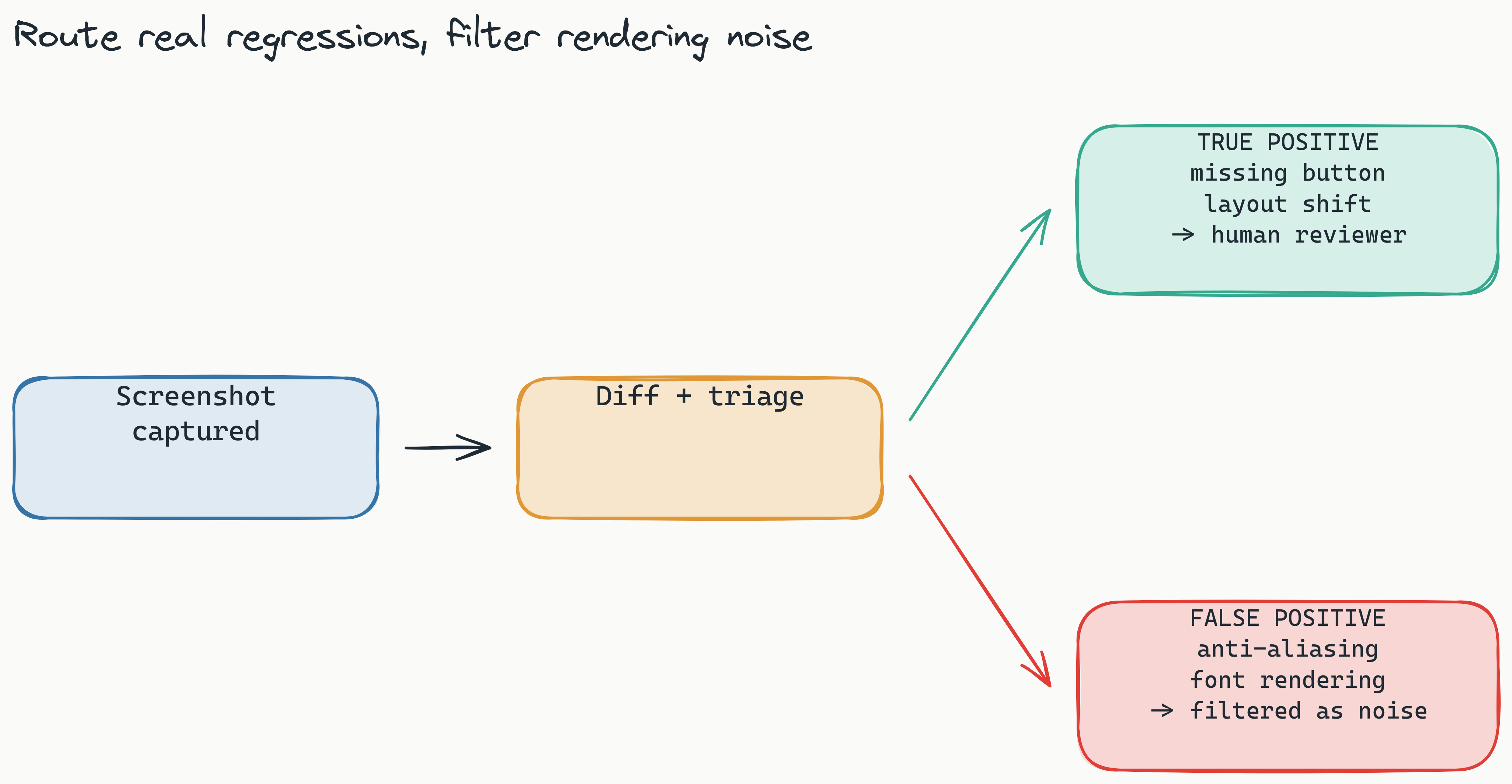
What exactly is a false positive in visual regression testing?: A false positive occurs when a visual test incorrectly flags a harmless rendering variation (like font rendering or animation timing) as a defect. Common causes include browser-specific anti-aliasing, sub-pixel differences, and cross-platform rendering inconsistencies, none of which represent real functional or layout regressions.
The Hidden Cost of False Positives: Why You Can't Ignore Them
Wasted investigation time is the obvious cost, but it is not the worst one. Understanding how to fix false positives in visual testing starts with recognizing the true scope of the problem.
Consider a realistic scenario: your team of five engineers runs visual tests on every pull request. Three tests fail. Each engineer spends 15 minutes investigating whether the failure is real. That's 45 minutes of collective context-switching. Multiply by 20 pull requests per week, and the context-switching tax piles up fast. Every week.
The damage goes deeper than time:
- CI/CD bloat: False positives trigger unnecessary pipeline re-runs, consuming compute resources and delaying other builds.
- Trust erosion: When teams see red tests that always turn out to be false alarms, they start merging with red tests. This is the most dangerous outcome: a real regression now goes unnoticed.
- Review fatigue: Engineers become desensitized to visual test failures. They approve screenshots without looking, defeating the purpose of visual testing entirely.
- Morale drain: Nothing kills momentum like investigating three-pixel shifts caused by a browser update you cannot control.
The cost compounds. A noisy suite might sound tolerable for a sprint, until you calculate the engineering hours burned across a quarter and the regressions that slipped through while everyone stopped looking. The best visual regression testing tool with low false positives isn't a luxury. It's a strategic investment in team velocity. We dug into the broader pattern in The Flake Tax: How CI Trust Collapses.
Why are false positives so damaging to engineering teams?: False positives drain review time, erode trust in automated testing, and cause engineers to merge code with red tests, increasing the risk that real regressions slip into production. The compounding effect over a quarter can significantly slow release velocity.
What Changed in 2026: Per-Surface Diff Engines Replaced the Global Threshold
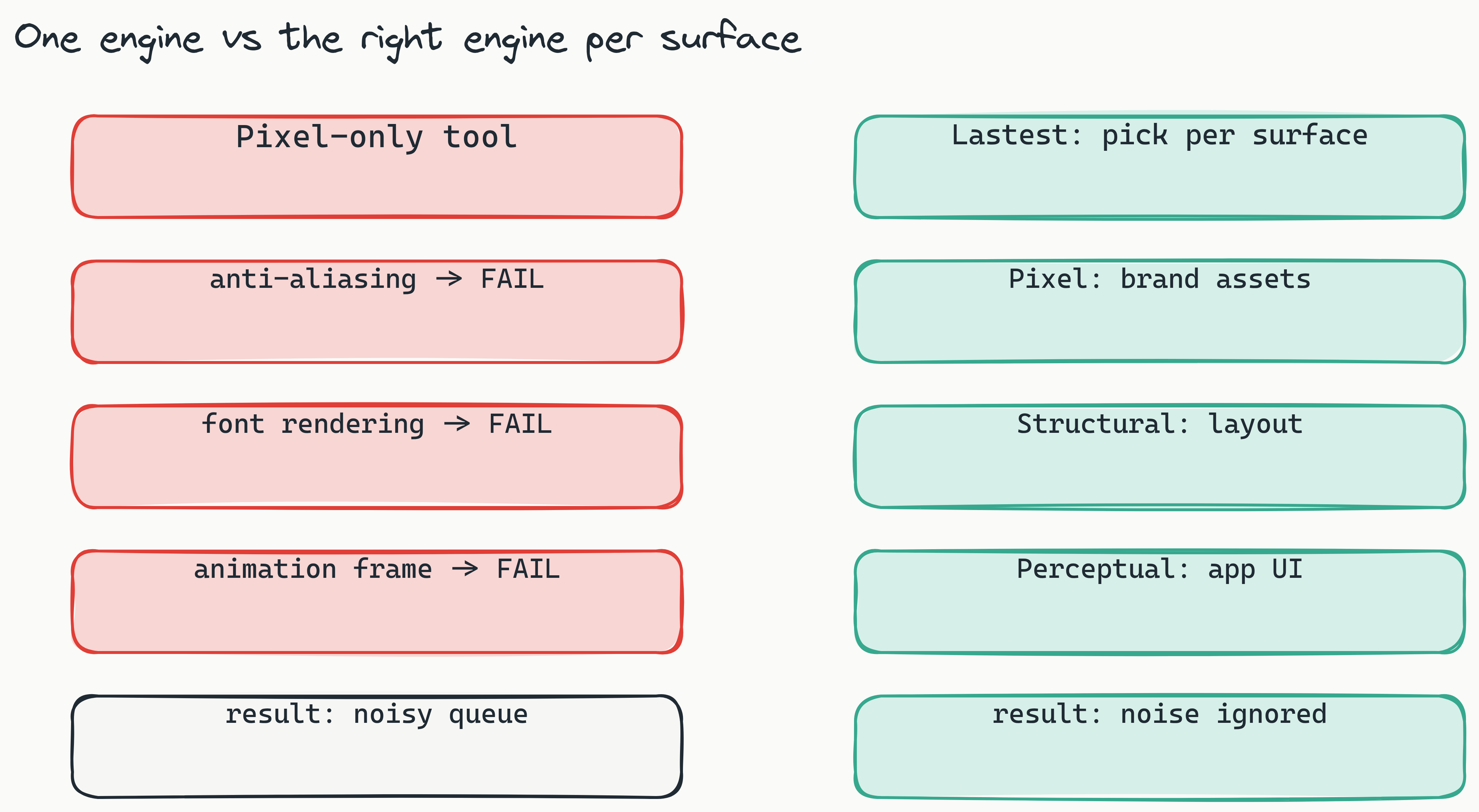
The clearest shift this year is what teams now treat as the primary lever on false positives. Through 2024 and 2025 the standard advice was to tune one global pixel threshold until the noise was bearable. In 2026 that advice is effectively dead: the single biggest lever is now which diff engine judges each screenshot, chosen per surface rather than set once for the whole suite. Most legacy tools still give you exactly one engine (pixel diffing) and call it a day. The current state of the art, and what Lastest ships, is three: pixel, structural, and perceptual, with the engine matched to the surface so the comparison understands what a meaningful change actually looks like for that component. A visual regression testing tool with low false positives now needs this kind of engine choice to be considered current.
Why a single engine isn't enough
Most visual testing tools rely on pixel-by-pixel comparison. It's both the simplest and the noisiest approach. A one-pixel anti-aliasing difference? Flagged. A font rendering variation? Flagged. An animation frame mismatch? Flagged. The signal-to-noise ratio is terrible because pixel diffing has no understanding of what constitutes a meaningful change.
The three engines, and when to reach for each
Pixel (Pixelmatch) catches exact visual changes. It's the fast, pixel-perfect safety net where no difference goes undetected, which also makes it the noisiest. Reach for it on pixel-critical surfaces like icons and brand assets where any drift matters.
Structural (SSIM) is DOM and layout-aware. It compares structural similarity (element positions, sizes, and hierarchy) rather than raw pixels. A layout shift? It catches it. A font rendering difference that leaves the layout identical? It largely ignores it. Think of structural diffing as checking the blueprint, not the paint. We go deeper in How DOM Diffing Changes Visual Regression.
Perceptual (Butteraugli) is aligned to the human eye. It is tuned to flag differences a person would actually notice and to ignore anti-aliasing and font-rendering noise. A two-pixel shift in a 200-pixel button? Imperceptible, so it stays quiet. A missing button entirely? Flagged, because a human would see that. For most application UI, this is the engine that kills the false positives that pixel diffing manufactures.
Matching the engine to the surface is the trick
You don't fight noise by cranking a global threshold. You fight it by choosing an engine whose notion of "different" matches the component. Decorative, animation-heavy, or text-dense surfaces lean perceptual or structural; pixel-critical assets lean pixel. That font rendering difference that would have wasted 15 minutes of your morning? Never flagged, because the perceptual engine was never going to care about it.
How do Lastest's three diff engines reduce false positives?: Lastest ships pixel (Pixelmatch), structural (SSIM), and perceptual (Butteraugli) engines, and you pick the one that fits each surface. Perceptual and structural ignore the anti-aliasing, font-rendering, and sub-pixel noise that single-engine pixel tools flag as defects, so real regressions stand out instead of drowning in noise.
Self-Hosted vs. Cloud: Which Is Better for False Positive Reduction?
Self-hosting attacks a whole class of false positives at the source: the ones caused by rendering on infrastructure you do not control. Inconsistent cloud environments, network latency, and browser-version mismatches all manufacture diffs that have nothing to do with your code. For QA teams, a self-hosted visual testing tool provides the control needed to minimize that noise. (Lastest also stabilizes screenshots cross-OS regardless of where they run; more on that below.)
The cloud inconsistency problem
When you run visual tests on a cloud provider's infrastructure, you're testing on someone else's machines. Those machines may have different GPU drivers, operating system versions, or installed fonts than your production environment. A test that passes locally might fail in the cloud because of a rendering difference you cannot control. Every one of those differences is a potential false positive.
Self-hosting advantages
- Consistent rendering environment: Your tests run on the same stack as your production servers. No surprises.
- Full browser control: You choose the exact browser versions and configurations. No forced updates that break your tests.
- Network latency eliminated: No timing differences between test execution and screenshot capture due to network round trips.
- Data sovereignty: Sensitive UI components never leave your network, which matters for GDPR compliance and enterprise security.
Lastest is free to self-host, forever (open source under FSL-1.1). It runs on your infrastructure, under your rules, with unlimited screenshots and replays. Crucially, replays are zero-token: AI runs only when you create or fix a test, and every replay after that is plain Playwright execution. That means you can re-run and investigate a suspected false positive as many times as you like without per-run token cost discouraging thorough investigation. If you would rather skip the ops, Lastest Cloud is a flat $299 per month (no per-seat or per-screenshot fees) with a free evaluation tier.
Should I self-host my visual regression testing tool to reduce false positives?: Self-hosting removes a real class of false positives, the ones caused by rendering on infrastructure you do not control: inconsistent cloud environments, network latency, and browser-version mismatches. Lastest is free to self-host, runs on your own infrastructure for maximum consistency, and offers zero-token replays so re-investigating a failure costs nothing.
How to Tune Your CI/CD Pipeline for Maximum Signal, Minimum Noise
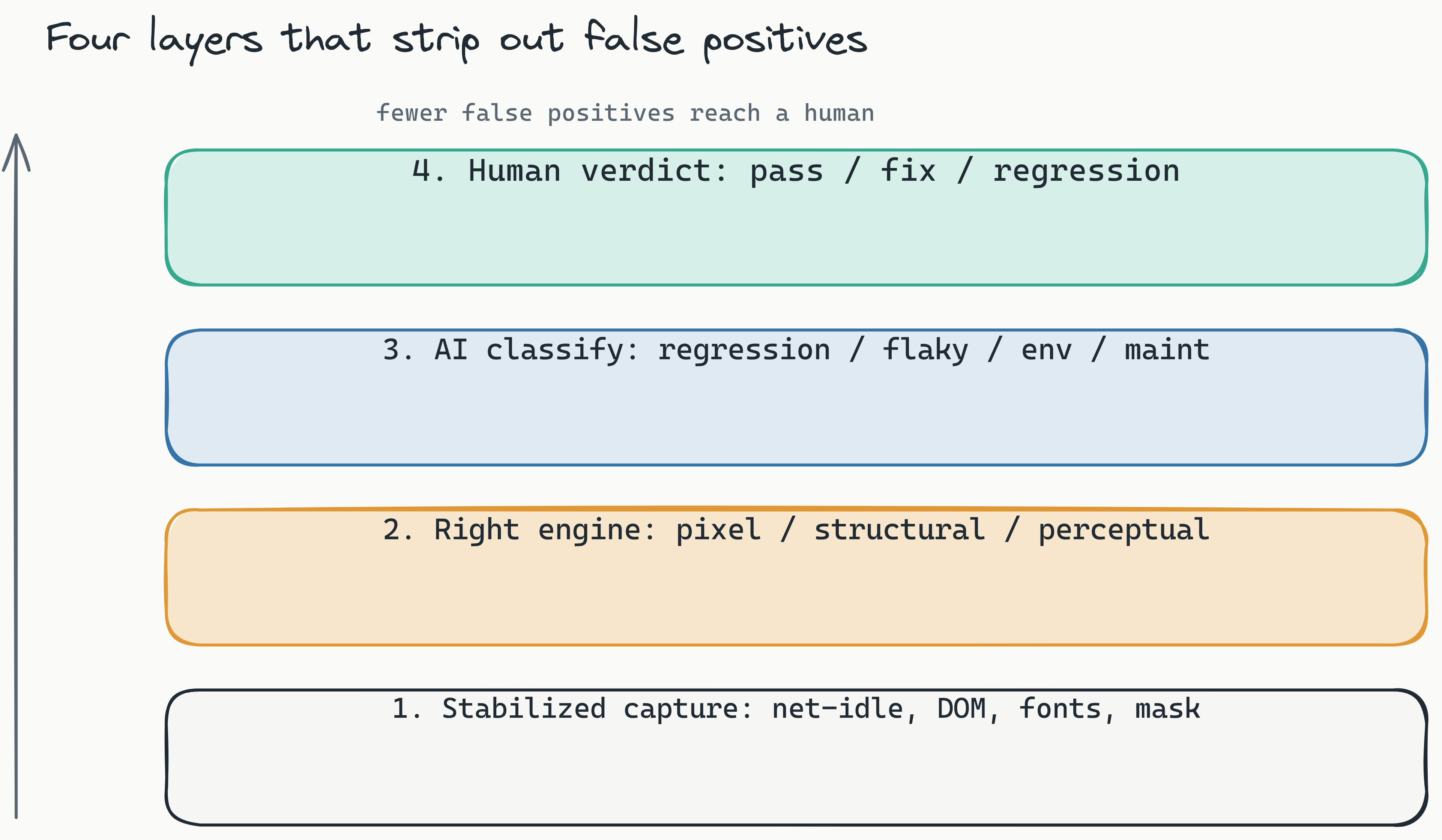
To reduce false positives in your CI/CD pipeline, capture stable screenshots, choose the right engine per surface, and never auto-accept baselines. Lastest plugs in as a reusable GitHub Action, posts GitLab MR comments, and supports webhook and scheduled-cron triggers, so the configuration below lives where your builds already run. For a deeper walkthrough see our CI/CD visual regression testing guide.
Stable snapshots (Lastest does most of this for you)
The most common cause of false positives in CI is capturing a screenshot before the page has settled. Lastest stabilizes captures with network-idle waiting, DOM-stability detection, font-loading waits, and timestamp freezing, then auto-masks dynamic content so changing data does not read as a regression. If you are hand-rolling Playwright, replicate the basics: wait for key elements to exist, pre-load fonts and images, and disable lazy loading on critical elements.
Animations and timing
Animations are a leading source of false positives, because a spinner captured mid-transition will never match a baseline captured at rest. Pause animations before capture (for example, setting animation-play-state: paused), and lean on Lastest's burst capture and page-shift detection to avoid grabbing a frame while the page is still moving.
Baseline management
Never update baselines automatically. A common mistake is to accept all new screenshots as baselines when a batch of false positives comes in. This trains your system to accept noise as truth. Instead, review baseline updates through a human-in-the-loop dashboard, which is exactly the single review seam Lastest is built around: every failure is auto-classified as real regression, flaky, environment, or test-maintenance, and a reviewer renders one of three verdicts (pass, fix, regression). The AI never approves its own output.
Pick the engine per surface, not a blanket threshold
Different content needs different notions of "different." Rather than one global pixel threshold for everything, assign the engine that fits: pixel for layout-critical or brand-critical components, perceptual or structural for animation-heavy and decorative surfaces. And let Smart Run read your git diff and run only the tests your change actually touched, so you are not generating noise from screens you never edited.
| Configuration Area | Best Practice | Common Mistake |
|---|---|---|
| Snapshot timing | Use waitForSelector and pre-load fonts |
Capturing before full render |
| Animations | Set animation-play-state: paused |
Letting animations run uncontrolled |
| Baseline updates | Manual human-in-the-loop review | Auto-updating baselines |
| Diff engine | Pick pixel, structural, or perceptual per surface | Single blanket pixel threshold for all elements |
| Network requests | Wait for all requests to complete | Capturing with pending network calls |
Mini checklist for CI/CD false positive prevention
- Wait for all network requests to complete before capturing
- Pre-load all web fonts and disable FOIT (Flash of Invisible Text)
- Pause animations programmatically before screenshot
- Use stable viewport dimensions across all test runs
- Choose the diff engine (pixel, structural, or perceptual) that fits each component type
Frequently Asked Questions
What is the difference between pixel diffing and structural diffing? Pixel diffing compares every individual pixel in two screenshots, flagging even tiny color or anti-aliasing differences. Structural diffing analyzes the Document Object Model (DOM) hierarchy and element positions, ignoring rendering quirks that don't affect layout.
How much time can my team save by reducing false positives? The time you reclaim is whatever you currently spend triaging failures that turn out to be nothing, plus the cost of the regressions that slip through once people stop trusting the suite. Audit your own rate first (step 1 of the action plan below); the bigger the noise, the bigger the recovery.
Is self-hosting difficult to set up? No. Lastest is free to self-host and ships an embedded, containerized Chromium browser pool, so there is no local Playwright install to babysit. It provisions into k3d locally or your own cluster in production.
Can I use Lastest with my existing CI/CD pipeline? Yes. Lastest is CI/CD native with a reusable GitHub Action, GitLab MR comments (self-hosted GitLab supported), webhook triggers, and scheduled cron. Zero-token replays work the same in every environment, so re-running tests in CI never burns AI tokens.
How does perceptual diffing work compared to AI-enhanced pixel matching? Lastest's perceptual engine (Butteraugli) is tuned to human visual perception, so it only flags differences a person would actually notice and ignores anti-aliasing and font-rendering noise. That is different from AI-enhanced pixel matching, which still operates at the pixel level but learns tolerances over time.
Comparing the Market: Percy, Applitools, and the Open-Source Alternative
When evaluating the best visual testing tool for low false positives, the diff engine architecture and hosting model are the critical differentiators. Percy and Applitools are strong, mature, cloud-first products; the table below compares their approach to Lastest's rather than quoting precise failure-rate numbers, which vary too much by app to be honest.
| Tool | Diff Engine Type | Hosting Model | Pricing |
|---|---|---|---|
| Percy | Pixel-based diffing | Cloud-based | From ~$199/mo (per-screenshot) |
| Applitools | AI-enhanced pixel diffing | Cloud-based | From ~$699/mo |
| Lastest | Pixel, structural, and perceptual (pick per surface) | Self-hosted (free) or cloud | $0 self-hosted / $299/mo flat Cloud |
Percy vs Applitools false positives
Percy relies on pixel comparison. For static marketing sites, it works well. For dynamic applications with animations, lazy loading, or cross-browser rendering differences, pixel-only diffing tends to flag more noise. Applitools improves on this with AI-enhanced matching that learns tolerances over time, but it remains a cloud-only solution. Both share the same constraint: one diffing method judging every difference. We compare them in detail in Lastest vs Percy vs Applitools.
Why Lastest's approach helps
Two structural advantages reduce false positives independent of any single benchmark. First, self-hosting removes cloud-rendering inconsistency, a factor that drives false positives up regardless of diff-engine quality. Second, having three engines means you can match the comparison method to the surface instead of forcing one method onto everything. Add stabilized capture and AI failure classification on top, and the noise that reaches a human shrinks.
Fair acknowledgment: Lastest has a smaller ecosystem and community than Percy or Applitools. For teams already invested in those platforms, migration is a consideration. But for teams starting fresh, or those frustrated with false positives and per-screenshot bills, the case is strong: it is free to self-host, $299/mo flat on Cloud, and open source.
Your False Positive Reduction Action Plan
To reduce false positives in visual testing, follow this five-step action plan designed to deliver measurable improvements in your team's testing efficiency.
Step 1: Audit your current false positive rate. Track how much time your team spends investigating test failures that turn out to be nothing. This baseline will quantify your problem and justify solutions.
Step 2: Match the diff engine to the surface. Single-engine pixel tools will always produce more noise. Adopt a tool that lets you choose pixel, structural, or perceptual diffing per component.
Step 3: Self-host for rendering consistency and data control. Eliminate false positives caused by cloud environment variations. Keep your tests on your infrastructure.
Step 4: Tune your CI/CD pipeline. Stabilize snapshots, pause animations, pick the right engine per surface, and never auto-update baselines.
Step 5: Keep a human in the loop. Even the best diff engine benefits from human judgment. Use a review dashboard with auto-classified failures and a one-verdict seam to validate failures before blocking deployments.
Ready to implement these strategies? Spin up Lastest free and self-hosted, or try Cloud at a flat $299/mo. The source is on GitHub.
Related Reading
This field guide tracks what changed in 2026. For the evergreen, step-by-step version, read the pillar on how to reduce false positives in visual regression testing. For a deep dive into the engine internals and the classifier behind the trends above, read how to reduce visual regression false positives with AI and perceptual diffing.
Conclusion
False positives in visual testing aren't an inevitable nuisance. They're a solvable engineering problem. Stabilized capture, the right diff engine per surface, self-hosting for a consistent rendering environment, and a single human-in-the-loop verdict each remove a distinct source of noise, and they compound. As visual testing matures, engine-choice plus AI-augmented human review (not a smarter black-box model) is becoming the reliable default.
Ready to cut your false positive rate? Self-host Lastest for free or try Cloud at a flat $299/mo. It ships three diff engines (pixel, structural, perceptual), stabilized screenshots, AI failure classification, and a human-centered review dashboard. Read the docs, see the demos, or grab the source on GitHub.