Every ERP is the same testing problem wearing a different UI framework. SAP S/4HANA renders Fiori, NetSuite renders SuiteScript-flavored forms, Dynamics 365 renders its Unified Interface, Odoo renders OWL components, ERPNext renders Frappe views. Underneath, the shape never changes: a heavy authenticated single-page app, dynamic business data that never sits still, selectors that rot on every vendor release, and an upgrade cadence you did not choose and cannot refuse.
That last part is the one that breaks teams. A web app you own gets tested when you ship. An ERP gets tested when the vendor ships, and the vendor ships on a clock. If your regression pass is a manual sprint, you have signed your best people up for that sprint two to four times a year, forever.
We already wrote the deep version of this recipe for one platform in how to test Veeva Vault CRM, and the striking thing was how little of it was Veeva-specific. This post is the general recipe: five steps that work on any ERP, using Lastest primitives that already ship. Four companion posts apply it vendor by vendor; links are at the bottom of the cadence section.
Every ERP fails a naive test tool the same way
Before the recipe, name the enemy precisely. Four properties are shared by essentially every ERP on the market, and each one defeats a specific naive approach:
- Heavy authenticated SPA. There is no public URL to screenshot. Every meaningful screen sits behind a login, and in an enterprise that login is SSO plus MFA. A test runner cannot type a one-time code, so the naive "point a browser at it" plan dies at the login page.
- Data that never sits still. Document numbers, posting dates, "last modified" stamps, exchange rates, stock levels. An ERP screen is mostly dynamic content, so a byte-for-byte pixel diff of two identical runs lights up red on the clock alone.
- Selector rot on every release. Vendor UI frameworks regenerate markup, rename classes, and reshuffle DOM structure between versions. Hand-written CSS selectors are a depreciating asset with a one-release half-life.
- A forced upgrade cadence. You cannot pin the version and walk away. The vendor pushes, your sandbox updates, and the regression pass is due whether or not your team has capacity that month.
None of these are reasons an ERP cannot be automated. They are the checklist your setup has to clear, and each one maps to a step below.
The recipe in five steps

The whole approach fits in one sentence: bridge the auth once, generate and freeze the data, mirror the module structure, tune the verify layers, and let a zero-token replay carry the cadence on hardware you control. Now the details.
Step 1: the auth bridge
Everything starts with one prerequisite: a password-auth integration user that bypasses your org's SSO and MFA. Every major ERP vendor supports this kind of account for API and automation access, because their own integration tooling needs it too. Get one scoped to the test sandbox, and the whole recipe unlocks. Without it, you are fighting an identity provider and a one-time code, and nothing downstream works.
The mechanics are ordinary Playwright. A playwright-type setup script logs in once per build and ends on an authenticated page:
// setup script (runs once per build)
await page.goto('https://erp.example.com/login')
await page.fill('#username', ERP_USER)
await page.fill('#password', ERP_PASS)
await page.click('button[type=submit]')
await page.waitForURL('**/home')   // authed home, not the login page
Lastest snapshots the entire storage state after setup (cookies, localStorage, IndexedDB) and broadcasts it cold into every parallel embedded browser that runs a test. Whatever the setup script authenticates, every test inherits. That is the bridge: authenticate once, capture storageState once, inject it everywhere.
The rule that keeps you out of trouble: never re-authenticate per test. Thirty parallel browsers each firing a login will trip the vendor's per-user auth rate limits and can lock the integration account, which takes your whole suite down. Capture once in setup, and if your builds run long, keep the session warm with a periodic keep-alive request. This is a configuration decision, not code.
Step 2: generate the data, then freeze it
Data drift is the number one source of false diffs in an ERP, and you kill it upstream in the data, not downstream in the diff. A test that fails because a posting date advanced is not catching a regression; it is training your team to ignore red.
The source of truth is a scenario spreadsheet. A CSV or a shared sheet is the one artifact a finance lead, a consultant, and a test engineer can all read and edit. Each row is a scenario, each column a parameter that makes scenarios differ:
scenario_matrix.csv
id    module       doc_type         currency  edge_case
S01   order2cash   sales_order      USD       happy_path
S02   order2cash   credit_memo      EUR       partial_return
S03   procure2pay  purchase_order   USD       three_way_match
S04   inventory    stock_transfer   JPY       negative_stock
S05   finance      journal_entry    GBP       multi_currency
A small generator expands each row into the concrete records the scenario needs: a customer, an order, its line items, the linked invoice. Seeding is an API job, and this is where Lastest's api setup type earns its place: it reuses the session from step 1 to push records through the vendor's own API, whether that is OData on S/4HANA and Dynamics, SuiteTalk or REST on NetSuite, XML-RPC on Odoo, or the Frappe REST API on ERPNext. Going from five scenarios to fifty means adding rows, not building records by hand in a sandbox UI.
Then you freeze what the generator cannot control. Turn on freezeTimestamps with a fixed timestamp so clocks stop moving, let autoMaskDynamicContent catch UUIDs and relative dates, and drop per-step ignore regions over the handful of fields that still churn (document numbers, sync indicators, user avatars). Frozen data plus stabilization is what turns a noisy ERP into a suite where a second identical run is byte-identical. The deeper version of this argument, with UI, API, and CSV export cross-checked against each other, is in testing data-heavy SaaS apps.
A quiet benefit of generating everything: the suite runs on synthetic data by construction. No customer names, no real salaries, no live financials ever get near a screenshot. For an ERP, that is not a nice-to-have; it is the difference between a security review that takes a week and one that takes a quarter.
Step 3: an area tree that mirrors the modules
Organize scenarios the way the ERP organizes itself. Every ERP already ships a module structure your team carries in their heads, so make the test repo an area tree with the same branches:
- Finance / GL: journal entries, period close screens, multi-currency renders.
- Order-to-Cash: sales orders, invoicing, credit memos, customer statements.
- Procure-to-Pay: purchase orders, goods receipt, three-way match, vendor bills.
- Inventory: stock transfers, adjustments, reorder screens, negative-stock edge cases.
- HR: employee records, leave flows, the screens where privacy stakes are highest.
- Reporting: dashboards and saved reports, where one bad aggregate hides in plain sight.
The leverage is that one spreadsheet row can drive tests in several areas at once: scenario S03 (a three-way match in USD) exercises Procure-to-Pay, Inventory, and Reporting in a single pass. You are parameterizing a handful of area tests with a column of scenarios, not writing a Cartesian product of tests by hand.
This is also where selector rot gets answered. When the vendor's UI framework reshuffles markup under you, Lastest's seven-layer selector fallback (data-testid, then id, role, aria-label, text, CSS, and finally OCR) heals the locator instead of failing the test. That fallback is the difference between a suite that survives the next release wave and one that needs a weekend of re-authoring after every push. The mechanism is worth understanding; we took it apart in how self-healing selectors work.
Step 4: tune the nine layers
Lastest checks nine verify layers on every step, and the skill for an ERP is choosing which layers gate the build and which are signal you read. The starting configuration that works across vendors:
- Enforce (fails the build):
visual,network,console,url. Visual is the core value, with record data masked. Network catches real 4xx and 5xx breakage. Console catches broken vendor JavaScript. URL catches auth and redirect regressions through trajectory divergence. - Log (signal, not a gate):
a11y(WCAG 2.2 AA scored by axe-core),perf(Web Vitals drift),dom(structural, noisy on data-driven grids), andtext(record copy changes constantly). - Disable:
design, until you have a design-token set for your vendor's system. The layer works; it just needs tokens to compare against. The day you have them, you author a config and flip it on with no code change.
One rollout nuance: start network and console in log mode, not enforce. ERP UIs fire a lot of XHRs, including permission probes that return 4xx by design, and their consoles carry first-party warnings you have not catalogued yet. Watch a few clean runs, learn the noise profile, tune the ignore lists, then promote both layers to enforce once green means green. Promoting too early is how a team learns to ignore the one alert that mattered.
Step 5: let the replay carry the cadence
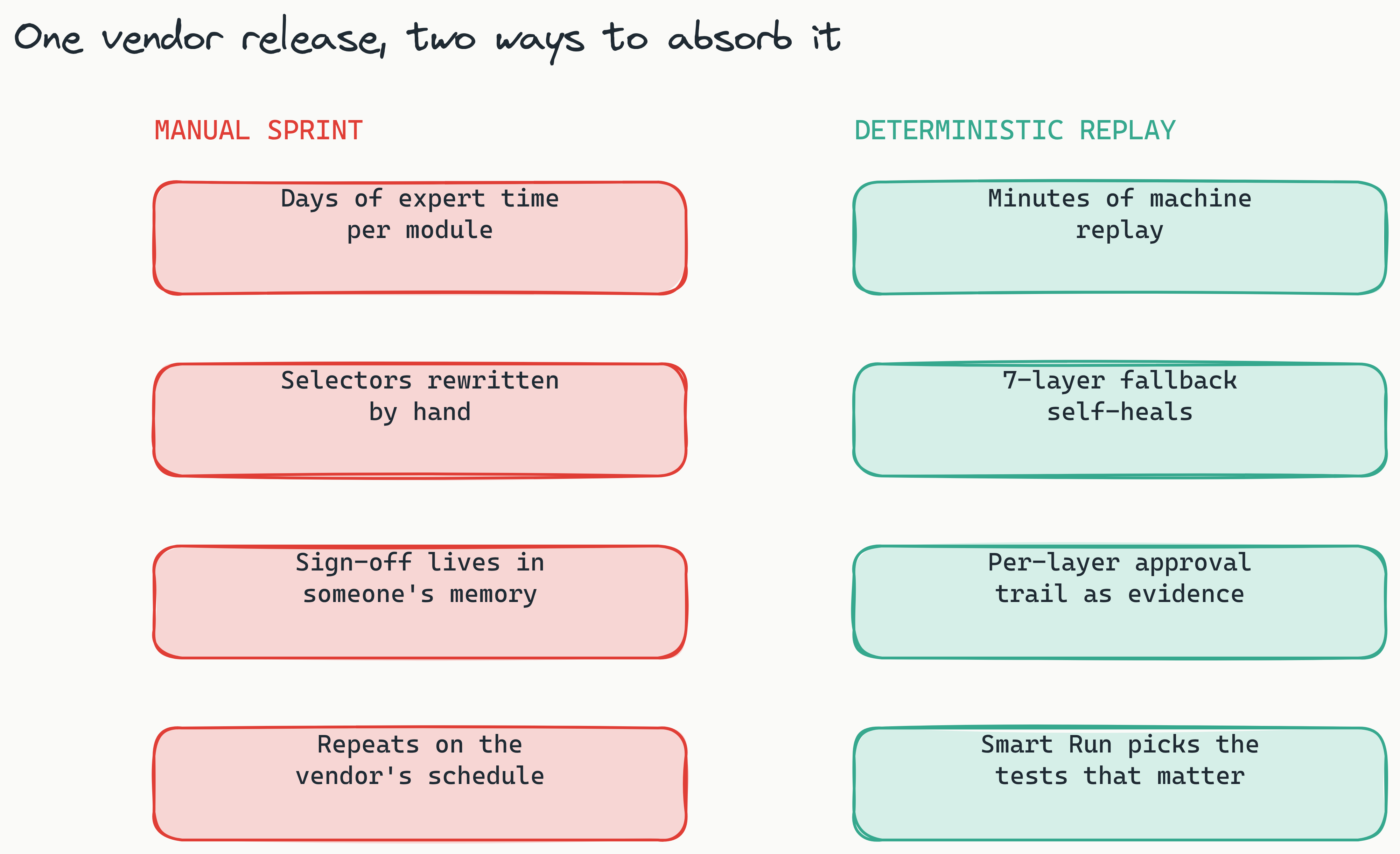
Here is where the control turns. In Lastest, AI runs only when you create or fix a test. Every replay after that is plain Playwright execution: no model in the execution path, so the same suite against the same build produces the same evidence. That determinism is what makes a replay admissible as upgrade sign-off rather than a rerun that might disagree with itself. So when the vendor pushes a release into your sandbox, the regression pass is a replay you trigger (or a cron that triggers itself), not a sprint you staff, and you can run it nightly through the preview window without the results drifting.
Two features do extra work in the ERP context. Smart Run reads git diffs and runs only the tests your change touches, which keeps day-to-day builds fast between release waves. And the per-layer approval trail quietly becomes your upgrade sign-off evidence: every layer's result is reviewed by a named human, every baseline is versioned with a reason, and every build is a shareable link. When an auditor or a steering committee asks how you validated the 2026.2 update, the answer is a URL, not a spreadsheet of screenshots someone assembled at midnight.
Know your upgrade clock
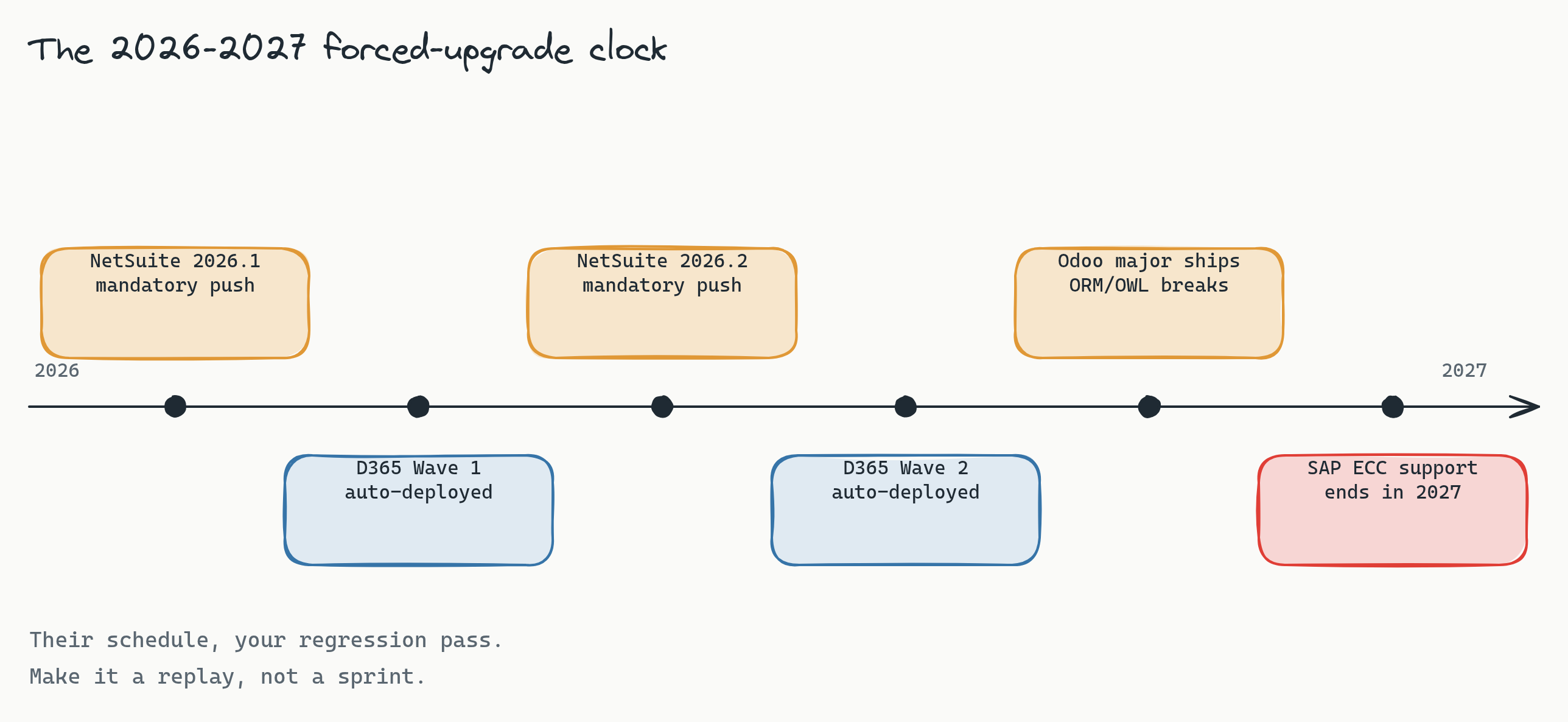
The reason this recipe matters now is that every major vendor's clock is ticking loudly through 2026 and 2027:
- SAP. SAP has said mainstream maintenance for ECC ends in 2027, which is why S/4HANA migration testing is peaking right now. A migration is the largest regression pass an ERP team will ever run, and it deserves a real suite, not a spreadsheet of screenshots. Recipe applied: how to test SAP S/4HANA.
- NetSuite. Two mandatory releases a year (2026.1 and 2026.2), with a Release Preview window of a few weeks in which to find what broke. Miss the window and the release lands anyway. Recipe applied: how to test NetSuite.
- Dynamics 365. Two release waves a year with mandatory, auto-deployed features and an early-access window of roughly four to six weeks. Recipe applied: how to test Microsoft Dynamics 365.
- Odoo. A major version every year with breaking ORM and OWL changes, and most real deployments run dozens of third-party modules that each have to survive the jump. A self-hosted test platform running beside the community edition keeps the whole module matrix under one roof you control.
- ERPNext. A fast-moving codebase with frequent releases; the upgrade clock is friendlier but never stops.
If your ERP is Salesforce-shaped rather than ledger-shaped, the same recipe holds there too: how to test Salesforce Lightning, and for the regulated-CRM variant, Veeva Vault CRM.
The common thread: the regression pass is not optional, and it arrives on the vendor's schedule. Anything that must happen on someone else's schedule should be a replay, not a project.
Why self-hosted matters more for ERP than anywhere else
An ERP holds the two datasets your security team cares about most: financials and HR records. A cloud testing tool that ships screenshots of your GL and your salary bands to a third party is a hard conversation you do not need to have. Lastest is self-hosted: the embedded browser pool, the screenshots, the baselines, and the seeded data all stay inside your network. Combine that with synthetic data generated from the spreadsheet, and there is no point in the pipeline where real financial or employee data exists at all. That is the version of "compliant" that survives a real review, and it is the default deployment, not an enterprise add-on. Details at /self-host.
Frequently asked
How do we get past SSO and MFA? You do not fight them, you route around them for one account. Ask your ERP admin for a password-auth integration user that is exempt from the SSO policy, restrict it to the test sandbox, and use it only in the setup script. Every major vendor supports this pattern for API and automation access, and it is the single prerequisite that gates everything else in this guide.
Does this work when the ERP is only reachable inside our network? Yes. Lastest is self-hosted, so the whole platform can run inside the same network segment as the ERP, and a Remote Runner covers the case where CI lives elsewhere. Screenshots, storage state, and seeded data never cross the perimeter, which is usually the shortest path through a security review.
Do we need the vendor's own test automation product? No. Vendor tools lock your test estate, and its evidence, inside the vendor you are trying to verify, and most ERP estates run more than one system. The recipe here is plain Playwright under the hood, so the same suite structure, the same review workflow, and the same deterministic replay apply to every ERP you run, with the artifacts in one place you own.
What about customizations and third-party modules? Treat each customization as another branch in the area tree and another row in the scenario spreadsheet. Custom markup is exactly where hand-written selectors rot fastest, and it is where the seven-layer fallback earns its keep, because your in-house modules rarely ship stable test IDs.
Start here
The fastest way to apply this to your estate is to walk it with someone who has done it before. Book a release-readiness review: we map your upgrade calendar against your critical processes, size the scenario matrix, and hand back the suite structure and the auth-bridge plan for your systems. If you would rather see the output before the conversation, see a sample diff report from a real replay run. Deployment is self-hosted by default, so screenshots of your ledger and your HR screens stay inside your network. Platform-specific versions of this plan: SAP S/4HANA, NetSuite, Dynamics 365, Salesforce, and Veeva Vault.
The takeaway is not that your ERP is easy to test. It is that testing it well has a known shape that does not care whose logo is on the login page. Bridge the auth once, generate and freeze the data, mirror the modules, tune the layers, and let the replay carry the cadence the vendor forces on you. The vendors set the clock; you decide whether it rings for your team or for a machine.