SAP has been unambiguous about the deadline: mainstream maintenance for ECC 6.0 ends in 2027, and the optional extended maintenance that runs to 2030 comes at a premium. That makes 2026 and 2027 the peak of the S/4HANA migration wave. Industry surveys consistently put custom code remediation at the top of the technical hurdle list, and analysts have warned for years that most teams underestimate the regression impact of everything that remediation touches. If you run SAP, you are either mid-migration right now or budgeting for one.
Here is the reframe this post argues for: an S/4HANA migration is one giant before/after equivalence test. Every business process that worked in ECC has to render and behave the same way in the Fiori UI after go-live, or behave differently in a way somebody explicitly signed off on. And then it has to keep doing that on every SAP update, which on cloud editions lands every few months, forever. Manual regression cannot carry that load. A team can click through order-to-cash once for a cutover weekend; nobody clicks through it well four times a year across five modules.

This is the recipe for carrying that load with automation instead: Lastest's full nine-layer verify pointed at the Fiori launchpad, test data generated from a spreadsheet and seeded over OData, an area tree that mirrors your module map, and one suite you replay on both sides of the cutover. It is the SAP edition of the pattern we wrote up for Veeva Vault CRM, and the general version lives in the pillar post on how to test your ERP with Lastest.
Why S/4HANA is genuinely hard to test
Teams do not fall back to manual regression on SAP because they are lazy. They fall back because Fiori breaks most of the assumptions a naive automation tool makes.
- The markup is generated, not authored. SAPUI5 assigns element IDs at render time, and they look like
__button42or__xmlview12--table. They depend on render order, they sit inside deeply nested container hierarchies, and they can shift between UI5 versions. A hand-written selector pinned to one of them is a time bomb. - Login is SSO. Most SAP shops front the launchpad with SAML through Azure AD (Entra ID) or a similar IdP, usually with MFA. A test runner cannot type a one-time code from someone's phone.
- The data never sits still. Document numbers are drawn from number ranges and increment on every posting. Timestamps, posting dates, user chips, and personalized tile layouts all churn between two otherwise identical runs.
- The update cadence is relentless. Cloud editions of S/4HANA take updates every few months, and on-premise systems get Feature Packs and support packages on their own clock. The same regression pass keeps coming back.
- The stakes are audited. This is the system of record for the general ledger. A cutover sign-off wants evidence, not vibes, and the annual audit is SOX-adjacent territory for a lot of the companies making this move.
None of these are reasons you cannot automate S/4HANA. They are the checklist your setup has to clear, and each one maps to a primitive Lastest already ships.
Selectors that survive UI5
Start with the problem that kills most SAP automation projects in month three: selector rot. Fiori gives you no stable test IDs out of the box, the generated IDs churn, and the DOM nesting shifts between UI5 versions and even between themes. A suite built on hand-written CSS selectors decays into a maintenance treadmill, and the treadmill is why teams quietly go back to clicking.
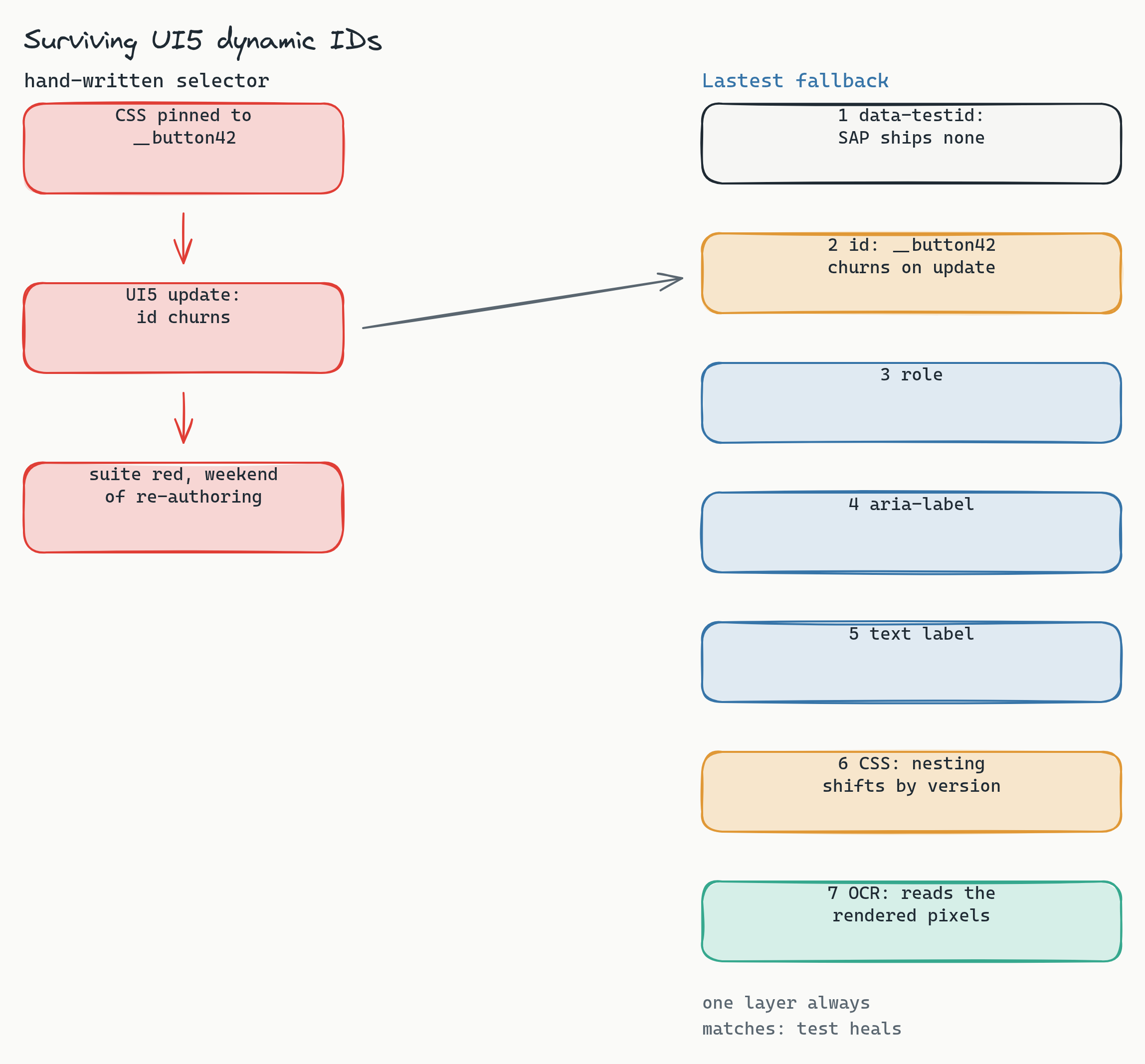
Lastest's answer is a seven-layer selector fallback: data-testid, then id, role, aria-label, text, CSS, and finally OCR. On Fiori the first layer usually finds nothing (SAP does not ship test IDs) and the second is the churny generated ID, so the layers that do the daily work are role, aria-label, and visible text, which UI5 renders reasonably well because the framework takes accessibility seriously. And when a control is so deeply custom that none of the semantic layers land, OCR reads the rendered pixels and finds the button by its label. That last resort matters more on SAP than on almost any other platform, because the one thing a Fiori update does not change is what the button says to the human. The full mechanism is in how self-healing selectors work.
The auth bridge: one login, every browser
Everything starts with authentication, and the key that unlocks it is organizational, not technical: a password-auth service user that bypasses SSO and MFA for the test system. SAP landscapes support this kind of account for automation and integrations, and your basis and identity teams have set them up before. With it, a script can log in. Without it, you are fighting a SAML redirect to Azure AD and a one-time code, and nothing downstream works.
The mechanics are ordinary Playwright. A playwright-type setup script drives the launchpad login once per build and ends with an authenticated session in the browser context:
// setup script (runs once per build)
await page.goto('https://{host}/sap/bc/ui2/flp')
await page.fill('input[name=sap-user]', SAP_USER)
await page.fill('input[name=sap-password]', SAP_PASS)
await page.click('button[type=submit]')
await page.waitForURL('**/ui2/flp**')   // the launchpad shell, not the logon form
Field names on the logon screen vary by release and configuration, so dump the login page once against your system and pin what you see; that is a ten-minute spike, not a project. The important part is what happens next: Lastest snapshots the authenticated storage state (cookies and all) and broadcasts it into every parallel embedded browser that runs a test. One login, thirty browsers. Never authenticate inside a test. Re-authing per test is slower, it hammers your IdP, and on a locked-down SAP gateway it is the fastest way to get a service user flagged. For long builds, a periodic keep-alive request in the background holds the session warm, and each test's own navigation counts as activity anyway.
Generate the data, then freeze it
If you take one thing from this post, take this: data drift is the number one source of false diffs in an ERP, and you kill it upstream in the data, not downstream in the diff. The traditional SAP answer to test data is a client copy from production, and it is exactly wrong for regression testing: it is huge, it drifts every time you refresh it, and it drags real financial data into your test estate.
The better answer is a scenario spreadsheet. Each row is a scenario, and the columns are the parameters that make scenarios differ:
scenario_matrix.csv
id    process           plant  material  currency  edge_case
S01   order-to-cash     1010   FERT      EUR       happy_path
S02   procure-to-pay    1010   ROH       USD       three_way_match
S03   order-to-cash     2010   FERT      JPY       credit_block
S04   procure-to-pay    1710   ROH       EUR       partial_delivery
S05   record-to-report  1010   -         EUR       period_close
A small generator expands each row into the master data the scenario needs: materials, vendors, customers, purchase orders, sales orders. Seeding is an API job over the standard OData services (business partner, purchase order, sales order and friends), driven by Lastest's api setup type with the same authenticated session. One SAP-specific wrinkle: OData writes on SAP gateways want a CSRF token, so the seeder does a GET to fetch the token first and sends it on every POST. That is a header, not an architecture.
Then you freeze. Seed a dedicated test client so nobody else's postings churn your baselines, and turn on stabilization: freezeTimestamps with a fixed timestamp, autoMaskDynamicContent for the generated noise, and per-step ignore regions over the handful of fields that still move, which on SAP means document numbers, posting timestamps, and the user chip in the shell bar. Generated data plus a frozen client is what turns a noisy ERP screen into a suite where a second identical run is byte-identical, and it is the same discipline the ERP pillar post builds the whole argument on.
An area tree that mirrors your modules
Organize the suite the way SAP organizes itself: as an area tree that matches your module map. Each area holds the scenarios the spreadsheet expands into, and each area has one signature trap you handle once at authoring time instead of re-fighting every build.
- Launchpad covers login, the tile grid, and navigation. The trap is personalization: tile order is per-user state, so test with a dedicated user whose layout is pinned, and let the url layer catch broken intent navigation.
- FI (record-to-report) covers GL postings, AP and AR items, and financial statements. The trap is document numbers: they increment on every posting by design, so mask them per step and diff everything around them.
- MM (procure-to-pay) covers purchase orders, goods receipt, and invoice verification. The trap is batch job timing: stock and document state depends on background jobs, so seed to a known state and assert after the seed settles, not mid-flight.
- SD (order-to-cash) covers sales orders, deliveries, and billing. The trap is pricing recalculation: condition-based prices recompute on open, so pin the pricing-relevant master data in the seed and treat an unexplained price change as the regression it is.
- PP covers production orders and confirmations, with lighter coverage: the flows are long, so test the screens that gate money and compliance first.
- HR self-services in Fiori (leave requests, time sheets) are high-traffic, low-complexity screens that make excellent early wins while the FI tree is still being authored.
The leverage is the same as in the Veeva recipe: one spreadsheet row drives tests in several areas at once, so you are parameterizing a handful of area tests with a column of scenarios, not hand-writing a Cartesian grid.
Nine layers, tuned for SAP
Lastest checks nine layers on every step, and the skill on S/4HANA is deciding which layers gate the build and which are signal you read.
- Enforce (fails the build):
visual,network,console,url. Visual is the core value with document data masked. Network catches real 4xx and 5xx failures from the gateway. Console catches broken UI5 modules. URL catches SSO redirect drift and broken launchpad intents. - Log (signal, not a gate):
a11y(WCAG 2.2 AA via axe-core),perf(Fiori screens are heavy and drift is worth watching),dom, andtext. The dom layer is especially noisy on UI5's generated markup, which is precisely why it logs instead of gates. - Disable:
design. There is no authored SAP design-token set yet, so the layer stays inert. The day you author one against your Fiori theme, you flip it on with a config, not code.
One rollout rule worth respecting: start network and console in log mode, not enforce. The Fiori launchpad fires constant OData batch calls, and the console carries first-party UI5 warnings that are noise, not signal. Watch a few clean runs, learn the real noise profile, tune your ignore hosts, then promote both layers to enforce once green means green. Promoting too early is how teams learn to ignore the one alert that mattered.
The migration double-run
Now the part that makes this a migration recipe and not just a testing recipe. The question a cutover has to answer is not "does S/4 work" but "does S/4 behave like ECC did, except where we decided otherwise." You answer an equivalence question by running the same test twice.
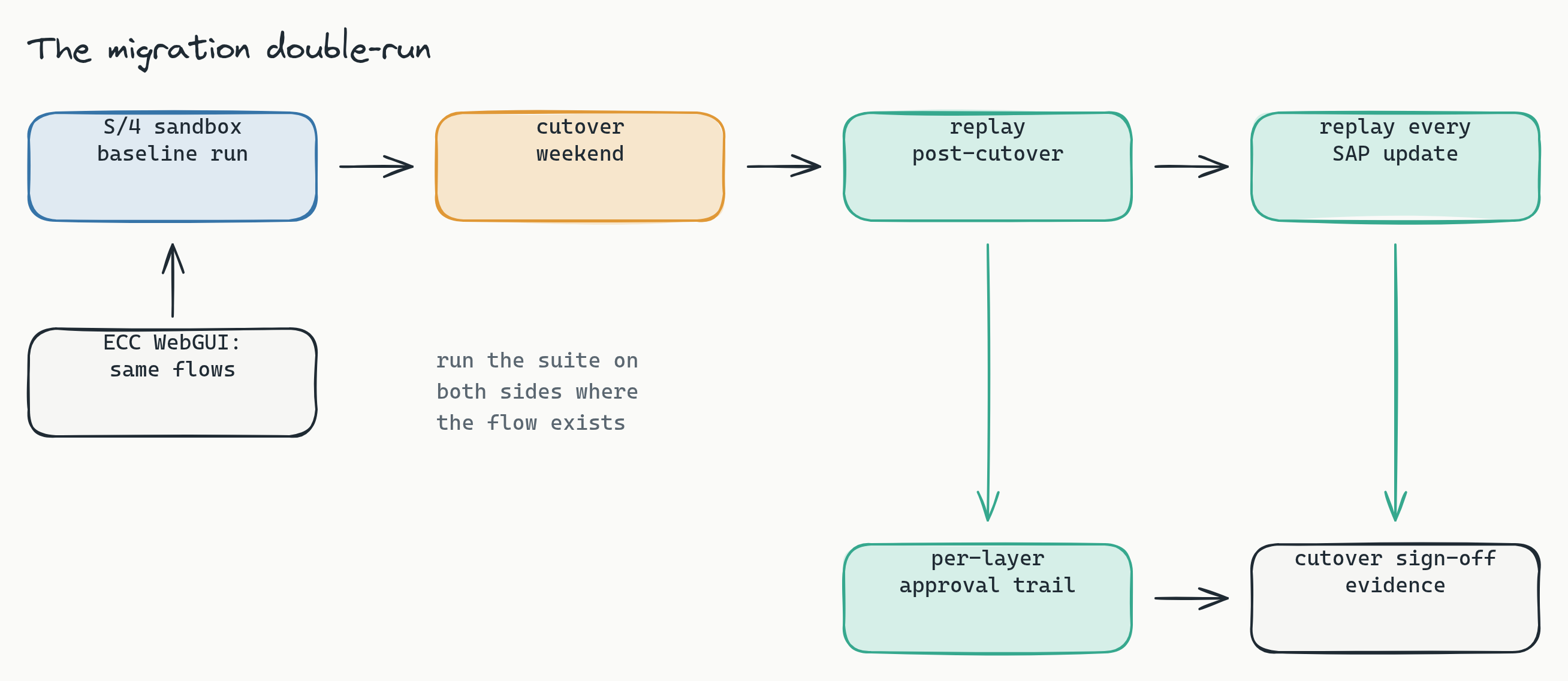
The strongest version is a true double-run: where a flow still exists in ECC (rendered through WebGUI, which puts the classic transactions in a browser where Lastest can reach them), run the same suite against both systems and diff the behavior, not just the pixels, because the Fiori screen is supposed to look different but post the same document. The pragmatic minimum, and the one every team can do, is to baseline the S/4 sandbox before cutover and replay after it: freeze the suite green against the pre-cutover sandbox, run the cutover, replay, and read the diff as the literal changelog of what the migration changed. Then keep replaying on every Feature Pack and every cloud update, forever, because replays are plain Playwright execution with no model in the path: the same suite against the same build produces the same evidence, however often you run it.
The byproduct is the part your auditors will care about. Every layer's result carries a review by a named human with one of three verdicts, every baseline change is versioned with a reason, and every build is a shareable, reproducible link. For a system of record in SOX-adjacent territory, that per-layer approval trail is not test-tool exhaust; it is the evidence package for the cutover sign-off, generated by the act of testing instead of by a documentation sprint afterward.
Your ledger stays home
Two properties of this setup matter to the reviewer who owns SAP security, and both land in your favor. Lastest is self-hosted: screenshots of your financial screens never leave your network, which is the answer to the first question the security review will ask. And because the suite runs on synthetic data generated from a spreadsheet, there is no production client copy anywhere in the test estate. The suite proves the processes work without ever touching a real vendor, a real customer, or a real posting. Because Lastest is self-hosted and source-available, the review can read the code that touches your data instead of trusting a vendor questionnaire, and every screenshot, baseline, and approval record stays on infrastructure you control.
Frequently asked
Do we have to test both ECC and S/4HANA during the migration? No, but you should baseline S/4 before cutover at minimum. The full double-run against ECC through WebGUI gives you the strongest equivalence evidence where flows still exist on both sides, and the pre-cutover baseline plus post-cutover replay gives you most of the value for a fraction of the setup.
Can this test classic SAP GUI transactions? Partially. Lastest drives browsers, so anything rendered through WebGUI (SAP GUI for HTML) is testable, and that covers most classic transactions. The native SAP GUI for Windows client is out of scope, which matters less every quarter as flows move to Fiori.
Do we need a production client copy for test data? No, and you are better off without one. Synthetic master data generated from a scenario spreadsheet and seeded over OData is smaller, reproducible, and contains no real financial records, which removes an entire category of questions from your security and compliance review.
Is the approval trail enough for our auditors? It is strong evidence: named reviewers, per-layer verdicts, versioned baselines with reasons, and reproducible build links form exactly the chain of custody auditors ask for. Your auditors make the final call on sufficiency, but you will be handing them artifacts instead of assurances.
Start here
If the 2027 clock is already on your programme plan, start with the plan rather than the tooling. Book a release-readiness review: we map your cutover milestones and Feature Pack cadence against your critical processes, size the scenario matrix, and hand back the suite structure, the auth-bridge plan for your S/4 sandbox, and what the cutover evidence package looks like. Want to see the artifact first? See a sample diff report from a real replay run. Deployment is self-hosted by default, so screenshots of your financial screens never leave your network. The cross-platform version of this recipe is in the release-testing playbook.
The 2027 deadline is not moving, and the update cadence after it never stops. The teams that get through this well will not be the ones who tested hardest during the cutover weekend; they will be the ones who turned the migration into a suite they can replay forever. Baseline now, replay on cutover, and let the machine carry the regression load that was never a good use of your people.