
Veeva is migrating its life-sciences customers off Salesforce onto Veeva Vault CRM, a purpose-built CRM that runs on Veeva's own Vault platform. It has its own UI framework (VMOC, not Salesforce Lightning), its own data model, and a REST API at /api/26.1/. Roughly 140 deployments are live, and the migration wave runs for years, not quarters. If you are a services team at Veeva, or a validation team at a customer like Bayer, you are going to test this system a lot, and you are going to test it again three times a year, because Vault ships on a fixed 26R1 / 26R2 / 26R3 cadence.
Here is the uncomfortable part: most of that testing is done by hand. Someone logs into a sandbox, clicks through a call report, checks that the sample order still renders, eyeballs an Approved Email template, and signs off. Multiply that by seven functional areas, by a dozen scenarios each, by every sandbox, by three releases a year. That is not a test suite. That is a standing tax on your most expensive people.
This post is the recipe for replacing that tax with a real regression suite. We put Lastest's full nine-layer verify on Vault CRM, generate the test data from a spreadsheet so it never drifts, organize the scenarios into an area tree, and work through the gotchas that will bite you. The headline finding from our own feasibility analysis is that this needs essentially no new platform code. It is an authoring recipe and an access checklist, not a build project. The one genuine unknown is a one-hour spike against a real vault, and we will name it precisely.
Why Vault CRM is genuinely hard to test
Before the recipe, it is worth being honest about why teams fall back to manual testing here. Vault CRM breaks most of the assumptions a naive screenshot tool makes.
- It is a heavy authenticated SPA. You cannot test a single public URL. Every meaningful page sits behind a login, and in pharma that login is usually SAML SSO through Okta, Ping, or ADFS, plus MFA. A test runner cannot type a one-time code.
- The UI is VMOC, not Lightning. Its own component framework means its own markup, its own class names, and selectors that shift between releases. Hand-written CSS selectors rot fast.
- The data never sits still. Record IDs, "Last sync" timestamps, relative dates, territory rollups: a CRM screen is mostly dynamic content. A byte-for-byte pixel diff of two identical runs will light up red on the clock alone.
- It is regulated. Under GxP you do not just need the test to pass, you need evidence that it passed, who reviewed it, and what changed. "It looked fine" is not a validation artifact.
- The regression cadence is relentless. Three GA releases a year, each with Limited and Beta phases before it, means the same regression pass comes around again and again. Predictable, but exhausting to do by hand.
None of these are reasons you cannot automate Vault CRM. They are a checklist of things your test setup has to handle. Lastest handles each of them with a primitive that already ships. Let us go through them.
The auth bridge: one login, every browser
Everything starts with authentication, and authentication has one key that unlocks the whole approach: a password-auth integration user that bypasses your org's SSO and MFA. Veeva supports exactly this kind of account for automation, and it is the single most important prerequisite in this entire post. With it, a script can log in. Without it, you are fighting Okta and a one-time code, and nothing downstream works.
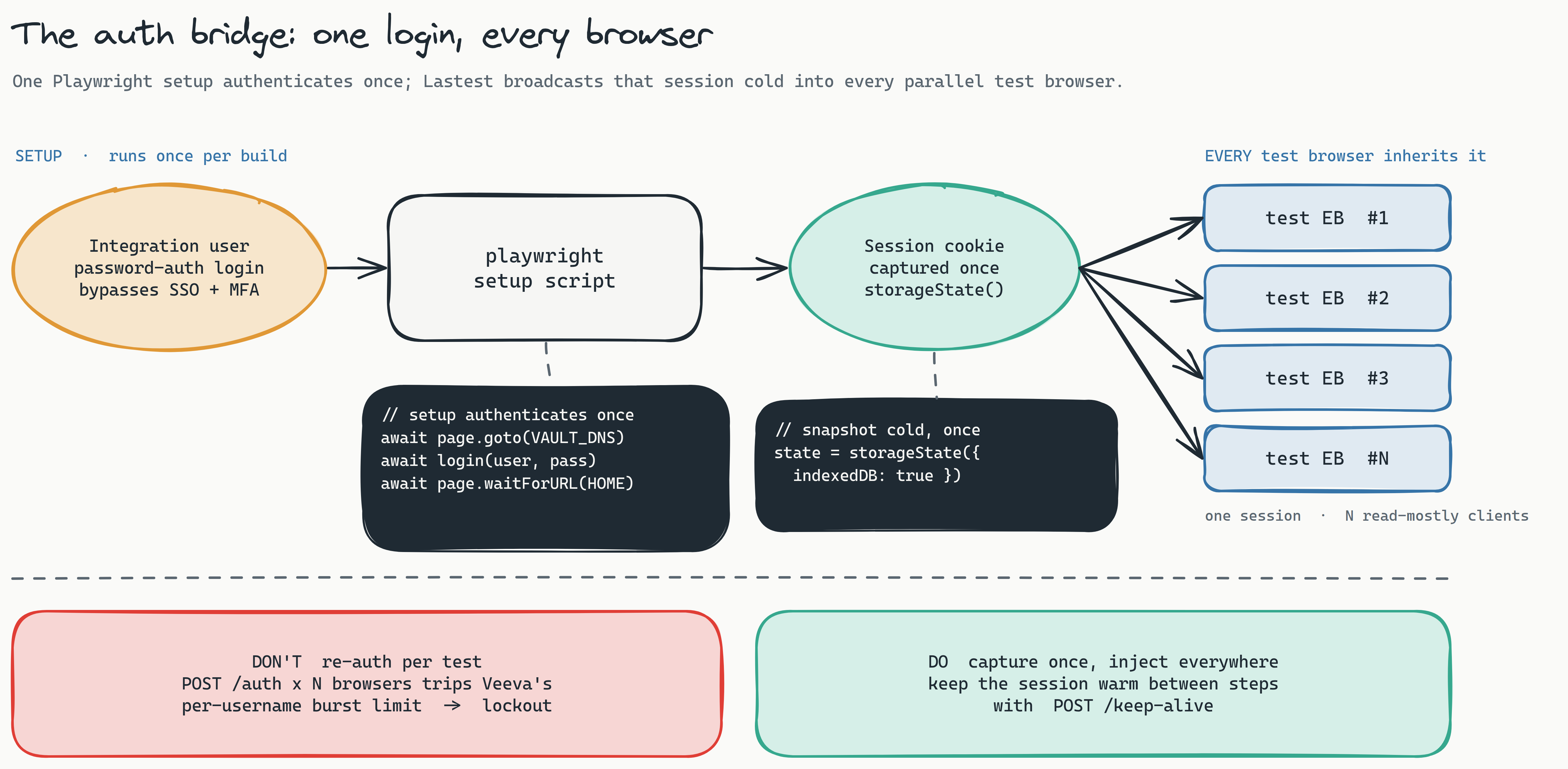
The mechanics are ordinary Playwright. A playwright-type setup script drives a login and ends with a valid Veeva session in the browser context. Lastest snapshots the entire cookie jar (including IndexedDB) and broadcasts that storage state cold into every parallel embedded browser that runs a test. Whatever the setup script authenticates, every test inherits. The default recipe is a UI login:
// setup script (runs once per build)
await page.goto('https://{vaultDNS}.veevavault.com/')
await page.fill('#username', VEEVA_USER)
await page.fill('#password', VEEVA_PASS)
await page.click('button[type=submit]')
await page.waitForURL('**/ui/home')            // authed home, not the login page
Lastest already does a post-setup waitForURL and polls for a session cookie before it snapshots, so the Veeva cookie has time to land. If a bot fingerprint check gets in the way, set a userAgentOverride in the Playwright settings; that value is threaded into the setup context already.
There is a faster variant worth knowing. Because Playwright's page.request shares the context cookie jar, you can call Veeva's auth endpoint directly and let the cookie apply itself:
const res = await page.request.post(
  'https://{vaultDNS}.veevavault.com/api/26.1/auth',
  { form: { username: VEEVA_USER, password: VEEVA_PASS } }
)
const { sessionId } = await res.json()
// If /auth returns the UI session as Set-Cookie, it is applied automatically.
// If it only returns sessionId in the body, inject it explicitly:
await page.context().addCookies([{ name: VEEVA_COOKIE, value: sessionId,
  domain: '{vaultDNS}.veevavault.com', path: '/', secure: true }])
Which branch you need is the one real unknown in this whole plan: does POST /api/26.1/auth hand back the UI session as a Set-Cookie, or only as a JSON sessionId, and what is the exact cookie name? You cannot answer that on paper. You dump page.context().cookies() after one real login and you know forever. Budget an hour for it, not a sprint.
Capture once. Do not re-authenticate per test.
The most important operational rule is in that first diagram. Veeva sessions are bearer-style, so one captured session is happily shared by thirty parallel browsers; they are all read-mostly clients of the same session. If instead you re-authenticate inside every test, thirty browsers each firing POST /auth will trip Veeva's per-username, per-domain auth burst limit and get you throttled or locked out. Capture the session once in setup, inject it everywhere, and keep it warm with a periodic POST /api/26.1/keep-alive. Each test's own navigation already counts as activity, so the only real exposure is a long, idle build, and a keep-alive step closes even that. This is a default setup step, not new code.
Generate the data, then freeze it
If you take one thing from this post, take this: data drift is the number one source of false diffs in a CRM, and you kill it upstream in the data, not downstream in the diff. A test that fails because a record's "Last modified" stamp advanced by four seconds is not catching a regression. It is training your team to ignore red. The fix is to control the data that goes into the sandbox so that two identical runs produce two identical screens.
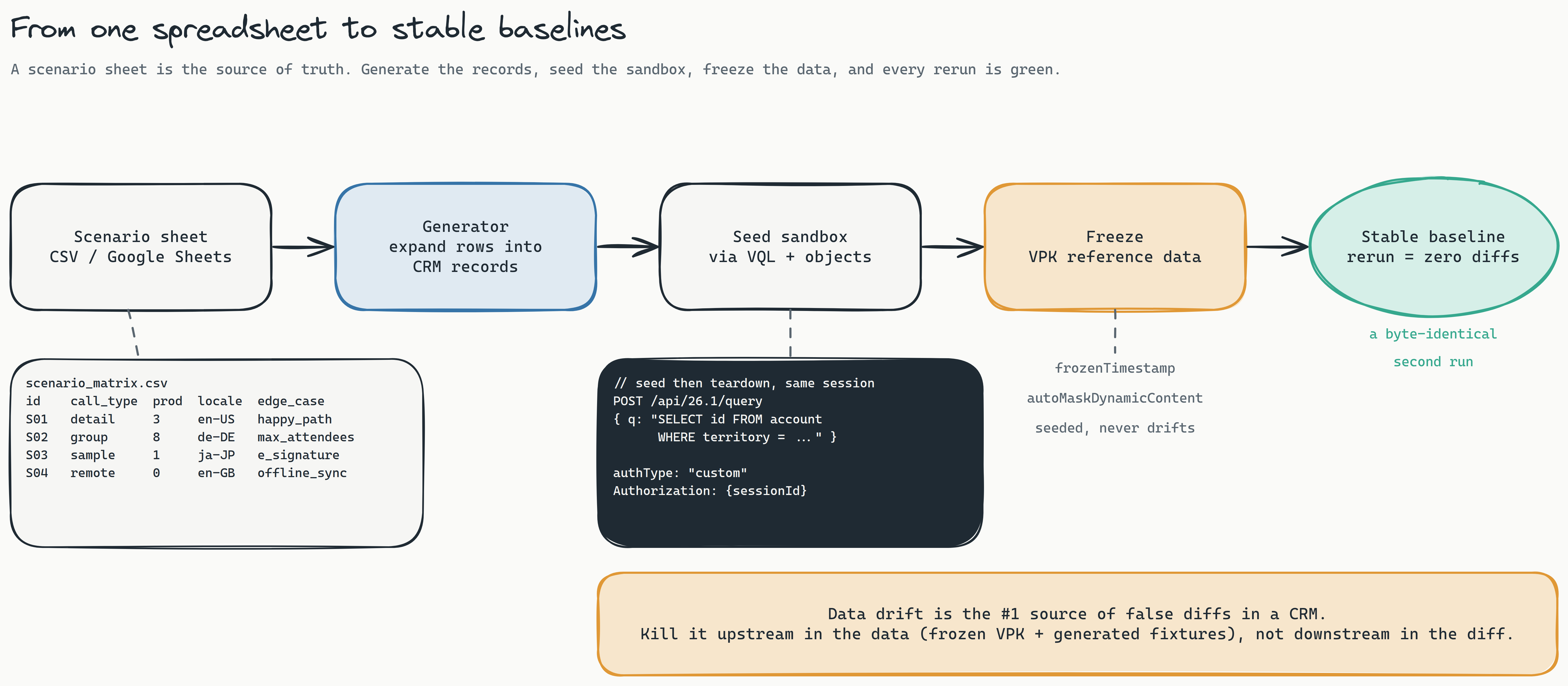
The source of truth is a spreadsheet, and that is a deliberate choice, not a shortcut. A CSV or a Google Sheet is the one artifact a validation lead, a services consultant, and a test engineer can all read and edit. Each row is a scenario. The columns are the parameters that make scenarios differ:
scenario_matrix.csv
id    call_type  products  attendees  locale  edge_case
S01   detail     3         1          en-US   happy_path
S02   group      5         8          de-DE   max_attendees
S03   sample     1         1          ja-JP   e_signature
S04   remote     0         2          en-GB   offline_sync
S05   detail     2         1          fr-FR   mfa_challenge
A small generator expands each row into the concrete CRM records the scenario needs: accounts, a territory, the call and its attendees, the products discussed, a sample lot. For a global pharma the locale column matters more than it looks, because a call report in de-DE or ja-JP is a genuinely different render, and locale bugs are exactly the kind of thing manual English-only testing never finds. Generating the data instead of hand-building it means you can go from five scenarios to fifty by adding rows, and every environment gets the same fixtures.
Seeding is an API job, and this is where Lastest's api setup type earns its place. It is not for authenticating a browser (only the playwright step can do that), it is for seeding and tearing down CRM data over VQL and the objects API, reusing the same session:
// api setup step: seed via VQL / objects, same session as the browser
POST /api/26.1/query
{ "q": "SELECT id FROM account WHERE territory__v = 'DACH-01'" }

// authType must be "custom", not "bearer":
Authorization: {sessionId}
The one detail that trips people up: Veeva wants the raw sessionId in the Authorization header, so set the seeder's auth type to custom and send the header verbatim. A bearer prefix will be rejected.
Then you freeze. Seed a dedicated sandbox with a VPK (a Vault package of config and reference data) so the baseline dataset is fixed and reproducible, and turn on Lastest's stabilization: freezeTimestamps with a fixed frozenTimestamp, autoMaskDynamicContent for UUIDs and relative times, and per-step ignore regions over the handful of fields that still move (record IDs, "Last sync", user avatars). Frozen data plus stabilization is what turns a noisy CRM into a suite where a second identical run is byte-identical. If you want the deeper version of this argument, with the UI, API, and CSV export cross-checked against each other, we wrote it up in testing data-heavy SaaS apps.
One spreadsheet, many scenarios
With data under control, you organize the tests the way Vault CRM organizes itself: as an area tree. Each functional area is a branch, each branch holds the scenarios your spreadsheet expands into, and each area has exactly one signature gotcha you handle once at authoring time.
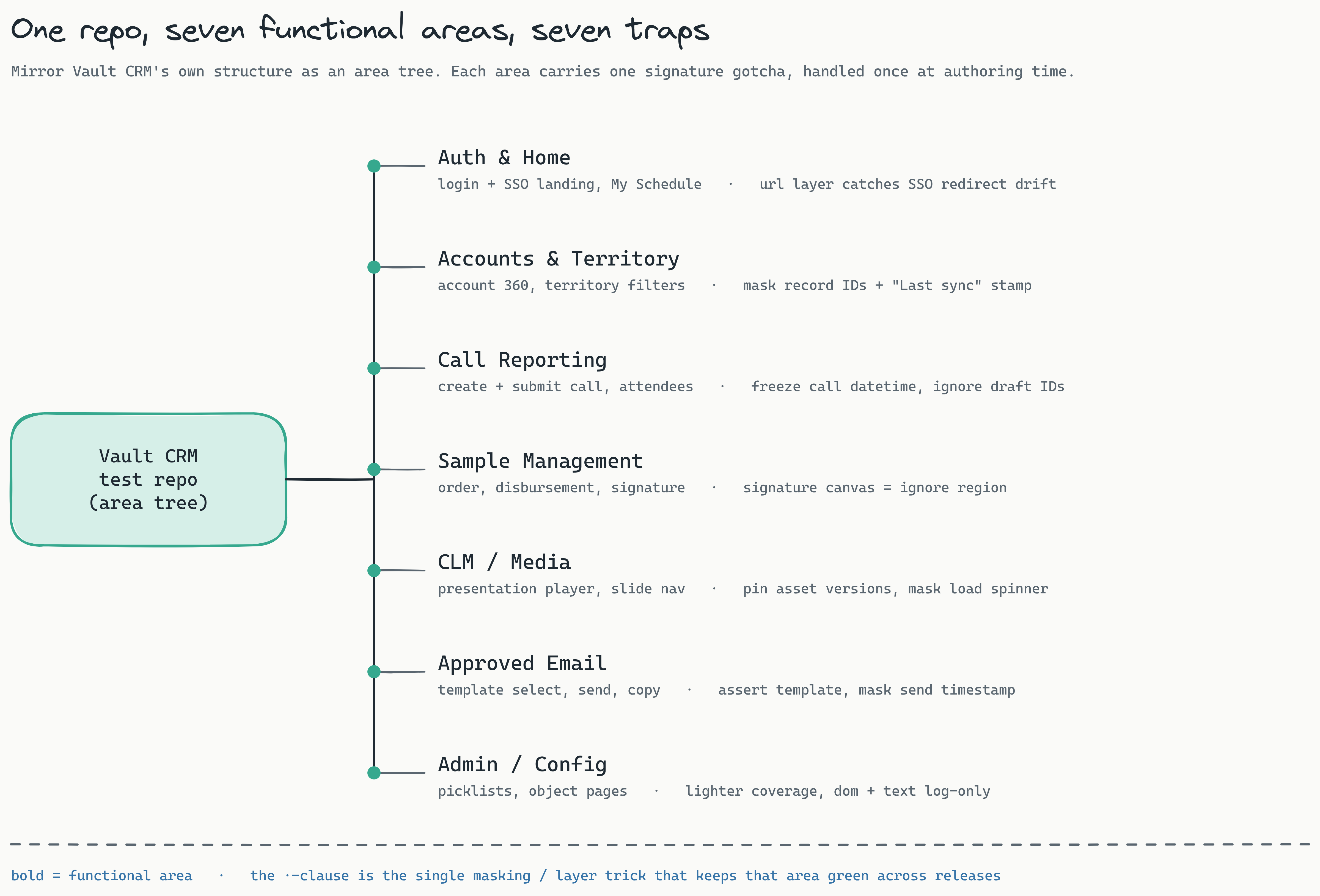
The tree is the same one Veeva consultants already carry in their heads, which is the point. It maps onto how the product is sold and configured, so the tests read like the org's mental model:
- Auth & Home covers the SSO landing, the home dashboard, and My Schedule. The trap is that SSO and redirect regressions hide in the URL trajectory, so the
urllayer earns its keep here. - Accounts & Territory covers account 360 views and territory filters, where record IDs and "Last sync" stamps churn on every load. Mask them per step.
- Call Reporting is the daily-driver flow: create a call, add attendees, log products, submit. Freeze the call datetime and ignore the auto-saved draft IDs or you will diff on your own timestamps.
- Sample Management covers orders, disbursement, and signature capture. The signature canvas is drawn fresh every time, so it is an ignore region by definition, not a bug.
- CLM / Media is the presentation player and slide navigation. Pin the asset versions and mask the media load spinner so a slow CDN does not read as a regression.
- Approved Email covers template selection, send, and compliance copy. Assert on the template content; mask the generated send timestamp.
- Admin / Config (picklists, object pages) gets lighter coverage with
domandtextin log-only mode, because that is where structural noise is highest and stakes are lowest.
The leverage is that one spreadsheet row can drive a test in several areas at once. Scenario S03 (a sample call in Japanese that captures an e-signature) exercises Call Reporting, Sample Management, and the locale render all at once. You are not writing tests per area and per scenario as a Cartesian chore; you are parameterizing a handful of area tests with a column of scenarios. And when a VMOC selector shifts under you, which it will across releases, Lastest's seven-layer selector fallback (data-testid, then id, role, aria-label, text, CSS, and finally OCR) heals it instead of failing the test. That fallback is the difference between a suite that survives 26R2 and one that needs a weekend of re-authoring after every release. We go deep on that mechanism in how self-healing selectors work.
Nine layers, tuned for a CRM
"Visual testing" undersells what a good verify does. A screenshot that only compares pixels will either miss real regressions or drown you in false ones. Lastest checks nine layers on every step, and the skill for Vault CRM is choosing which layers gate the build and which are signal you read.
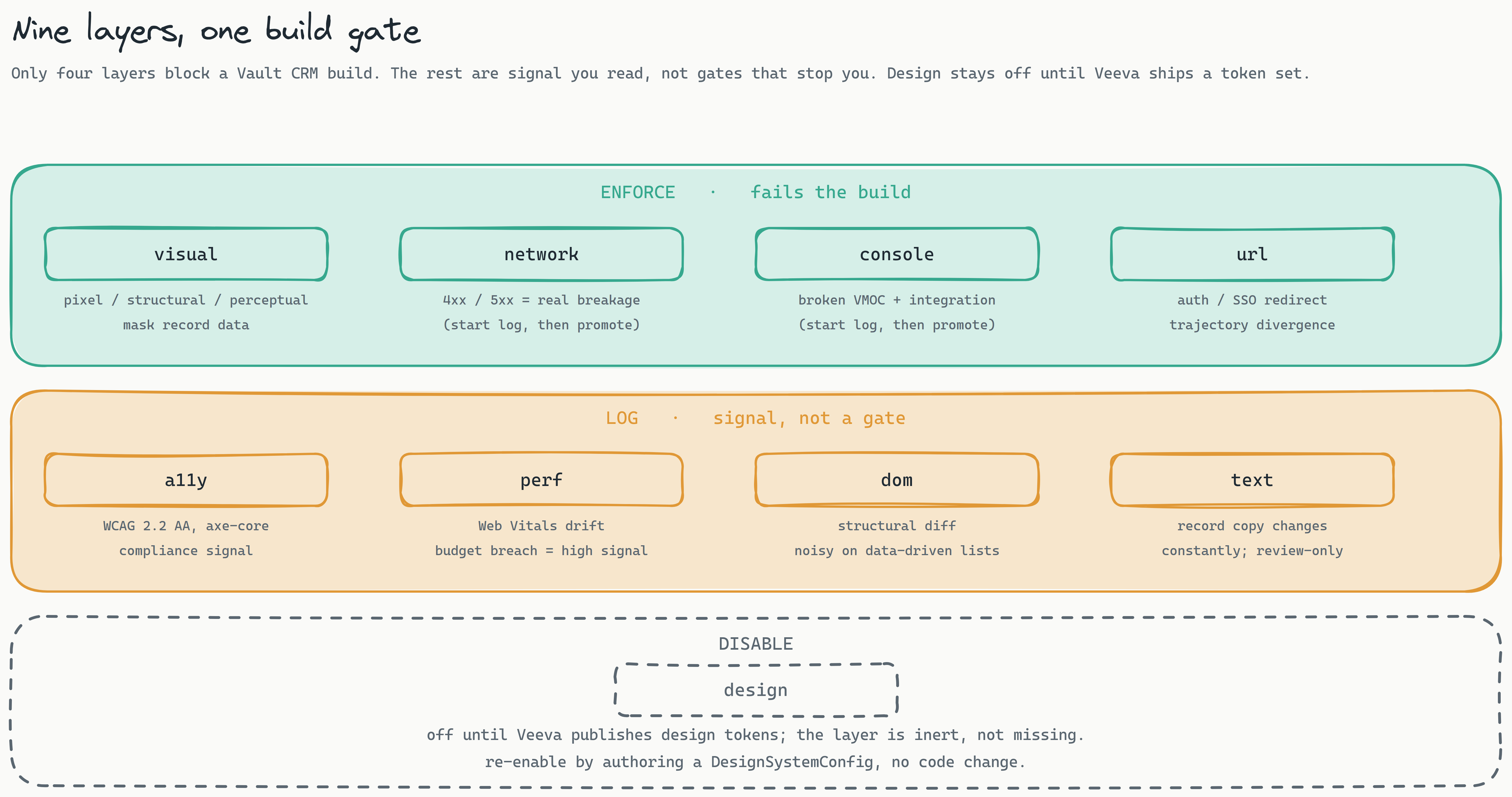
The recommended starting configuration:
- Enforce (fails the build):
visual,network,console,url. Visual is the core value, with record data masked. Network catches real 4xx and 5xx failures. Console catches broken VMOC and integration errors. URL catches auth and SSO redirect regressions through trajectory divergence. - Log (signal, not a gate):
a11y(WCAG 2.2 AA scored by axe-core),perf(Web Vitals drift),dom(structural, noisy on data-driven lists), andtext(record copy changes constantly). These surface without blocking. - Disable:
design. The design layer needs a set of Veeva design tokens you do not have yet. It stays inert until Veeva publishes one, at which point you re-enable it by authoring a config, with no code change.
One rollout nuance worth respecting: start network and console in log mode, not enforce. Vault CRM's UI fires a lot of XHRs, including transient permission probes that return 4xx by design, and its console carries first-party warnings that are not covered by the default ignore hosts. Watch a few clean runs, learn the real noise profile, tune your consoleErrorIgnoreHosts, then promote both layers to enforce once green means green. Promoting too early is how a team learns to ignore the one alert that mattered.
When a test flakes, follow the flow
You will hit flakiness. Every one of the failure modes below is a known Vault CRM gotcha, and every fix is a configuration or access change, not a change to the platform. Here is the whole troubleshooting flow on one page.
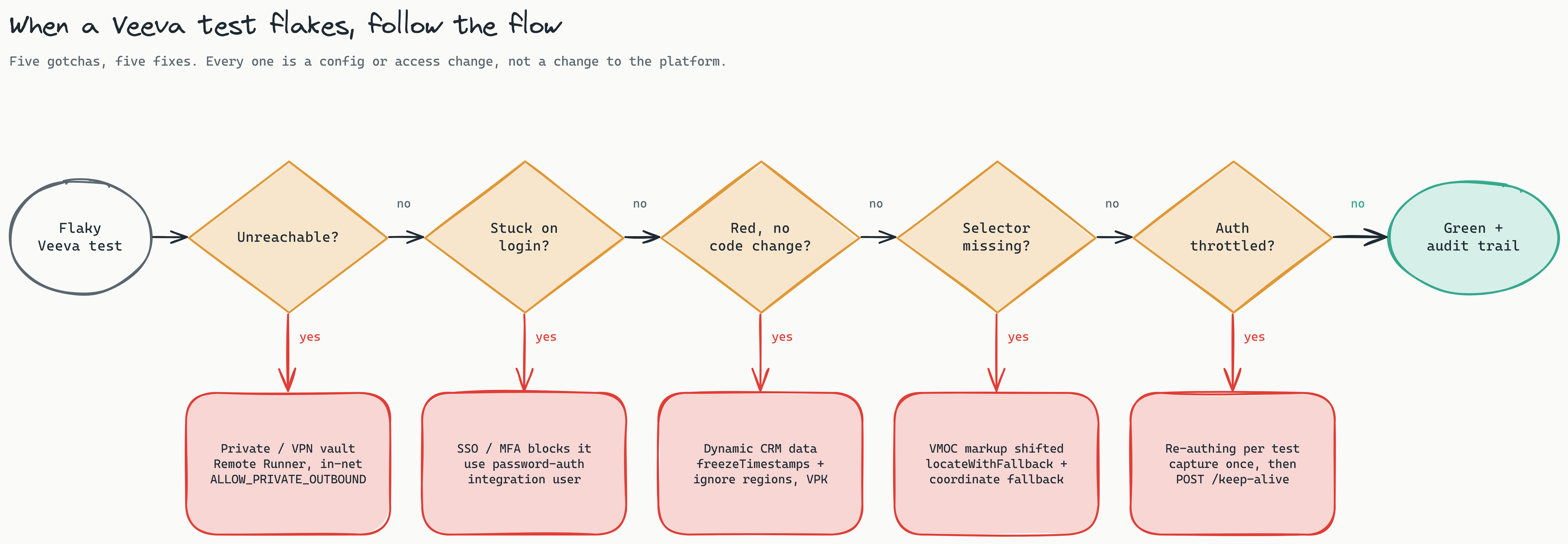
Read it left to right, and note the sequencing, because the failures tend to appear in this order as you stand a suite up.
- Unreachable from the browser? A public
*.veevavault.comsandbox is reached directly and passes the outbound-URL guard. A private or VPN-gated vault is a network reachability problem, not a security block: run a Remote Runner inside the customer network and, for API-type calls in that case, setLASTEST_ALLOW_PRIVATE_OUTBOUNDwith a host allowlist. Many pharma sandboxes are private, so expect this one. - Landing on the login page, not home? SSO or MFA is blocking the setup script. This is the integration-user prerequisite from the auth section. Log in as the password-auth automation user and, if needed, set the
userAgentOverride. - Red with no code change? Dynamic CRM data. Turn on
freezeTimestamps, add ignore regions over the moving fields, and seed frozen VPK reference data. This is the data-generation section doing its job. - Selector missing? VMOC markup shifted between releases. Lean on
locateWithFallback, set acustomTestIdAttributeif Veeva exposes one in your config, and let the coordinate fallback catch the rest. - Auth throttled or locked out? You are re-authenticating per test. Go back to capture-once and add the keep-alive. This is the single most common self-inflicted wound.
Answer no to all five and you have a green, reproducible build with a per-layer approval trail behind it. That trail is not just a convenience, as we are about to see.
What this is worth, and why it maps onto Veeva's values
Time to talk about the number that actually gets this funded. A full manual regression pass across seven functional areas is days of skilled services time, per sandbox, and it comes around three times a year. Replay makes that pass minutes of unattended machine time, and a human only looks at the diffs the system could not explain. We are not going to invent a precise hours-saved figure, because your area count and scenario depth set it. But the shape is not subtle: you are moving your most expensive people off a repetitive task they resent and onto work only they can do.
The reason this resonates at Veeva specifically is that the freed time lands squarely on the four values the company actually runs on. The diagram at the top of this post is that mapping, and it is worth being explicit about each one, because this is where a technical tool becomes a business case.
- Do the right thing. In a GxP world, evidence is the product. Lastest's per-layer approval log, versioned baselines, and shareable
/r/build links are an auditable, reproducible validation trail that falls out of normal testing as a byproduct. You are not doing testing and documentation; the testing is the documentation. - Speed. A go-live that used to wait on a manual regression sprint now waits on a replay that runs in minutes. Smart Run reads the git diff and runs only the tests a change touches, so most builds are green in the time it takes to read the PR. Migrations move faster because the safety check stopped being the bottleneck.
- Customer success. Regressions caught in a sandbox before go-live are regressions that never become a customer complaint. Fewer complaints and faster, more confident rollouts mean better adoption, and a services engagement that costs less to deliver is one you can price better for the customer. The quality work compounds into the commercial relationship.
- Employees' success. This is the human one. Nobody's career grows by clicking through the same call report for the fiftieth time. Automating the regression frees services and EAM hours for the high-value configuration and advisory work that people actually want to do. Using AI to take the repetitive testing off a person's plate is using AI for real work, and it measurably improves the working conditions of the people doing it.
That is the argument in one line: the same replay that protects the customer's data also protects your team's time, and it produces the audit trail as a by-product, in your own systems, every run. If you want the broader case for why review-and-replay is the durable shape of testing in an AI-heavy workflow, we made it in the human-in-the-loop dev cycle and validation as the final frontier.
The honest prerequisites
This works today, but "works today" is a claim about the product, not about your access. Before you can run any of it, line up four things. Three are access, one is a spike:
- A sandbox, partner, or trial vault, plus a password-auth integration user that bypasses org SSO and MFA. This gates the whole approach; get it first.
- Seeded, frozen reference data in that sandbox, delivered as a VPK, so baselines are stable between runs.
- Network reachability from an embedded browser to the vault. Public host works directly; a private or VPN vault needs a Remote Runner inside the network.
- The auth spike: one login against a real vault to confirm the session-cookie handoff. This is the only genuine unknown, and it is an hour, not a project.
For a regulated buyer, two more points matter and both land in your favor. Lastest is self-hosted, so screenshots and seeded data never leave your network, which is the answer to the first question any pharma security review will ask. And because you seed synthetic scenario data from a spreadsheet, there is no reason for real patient or HCP data to be anywhere near the suite. If you need the formal version of that conversation, the enterprise compliance guide and governance policies posts are written for exactly that reviewer.
Frequently asked
Do I need production access? No, and you should not use it. Everything here runs against a sandbox vault with seeded synthetic data. Production access adds risk and buys you nothing the sandbox does not.
What about the legacy Salesforce-based Veeva CRM? The same nine-layer approach applies; only the UI framework differs. Vault CRM is the strategic target because it is where the migrations are going, but a Lightning-based org is, if anything, better-trodden ground for Playwright.
Is the design layer a gap? No, it is a switch that is currently off. The layer works; it just needs a Veeva design-token set to compare against. The day Veeva publishes one, you author a config and flip it on, with no code change.
How is this a validation artifact and not just a green check? Because every layer's result is reviewed and approved by a named human, every baseline is versioned with a reason, and every build is a shareable, reproducible link. That chain of custody is what turns a passing test into evidence.
Start here
Vault releases three times a year, and the validation burden lands every time. Book a release-readiness review: we map the release windows against your critical Vault CRM flows, size the scenario matrix, and hand back the suite structure, the auth-bridge plan for your sandbox vault, and what the per-layer approval trail gives your validation team. Want to see the artifact first? See a sample diff report from a real replay run. Deployment is self-hosted by default, so screenshots of your regulated data stay inside your network. The cross-platform version of this recipe is in the release-testing playbook.
The takeaway is not that Vault CRM is easy to test. It is that testing it well is an authoring recipe with a known shape, not a research problem. Generate the data, freeze it, bridge the auth once, tune the layers, and let the replay carry the three-times-a-year regression that used to carry your team.