
Introduction: The Compliance Blind Spot in Your CI/CD Pipeline
Your team deploys dozens of UI changes every sprint. Each one carries risk: a shifted button that exposes a masked data field, a style override that breaks WCAG color contrast, a layout change that violates a HIPAA-mandated form structure. In regulated industries, these aren't just visual bugs, they're compliance failures with real consequences.
Most engineering teams still rely on manual visual regression testing to catch these issues. A QA engineer stares at screenshots, compares them to baselines, and hopes nothing slipped through. This approach fails audit requirements in three ways: it's inconsistent (different reviewers catch different things), undocumented (no permanent record of what was checked and approved), and painfully slow (it bottlenecks every release cycle).
This guide covers what you need to build visual testing for enterprise compliance: how visual diffs map to regulatory requirements, and how to build a pipeline that generates a verifiable audit trail with every deploy. Whether you're navigating GDPR data residency, HIPAA audit controls, or WCAG 2.2 AA accessibility standards, the tooling decisions you make today determine whether your UI testing process becomes a compliance asset or a liability. The short version: a self-hosted, open-source, multi-engine tool you fully control beats a cloud black box on every axis an auditor cares about.
What Is Visual Testing for Enterprise Compliance?
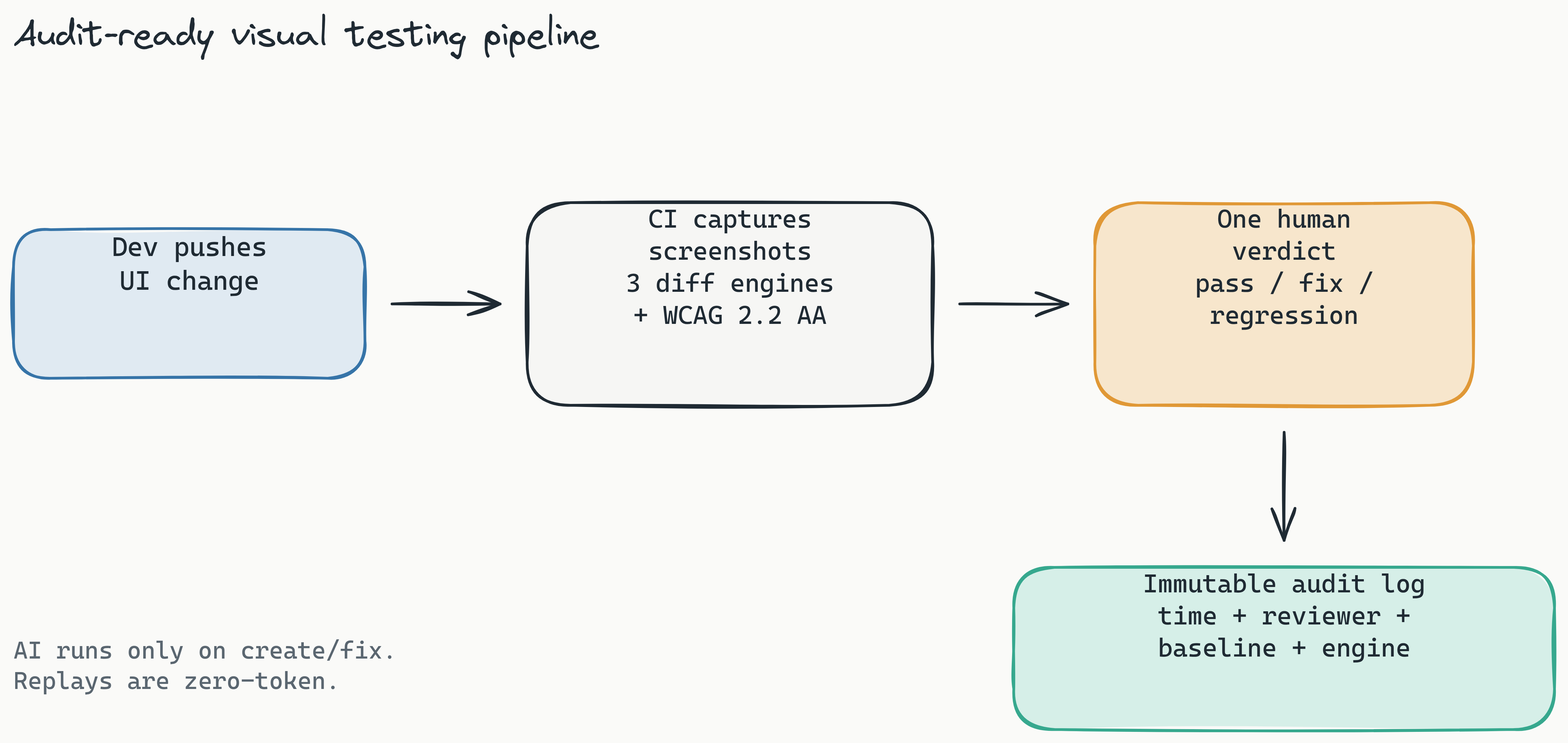
Visual testing for enterprise compliance is the automated process of comparing UI screenshots to detect unintended changes that could violate regulatory or accessibility standards. Unlike traditional visual regression testing that merely catches cosmetic bugs, compliance-focused visual testing ensures that every UI change maintains mandated requirements for data privacy, screen reader compatibility, and layout consistency.
Why Standard Visual Testing Falls Short for Compliance
Standard visual testing tools flag any pixel difference as a potential bug. That approach generates noise: false positives from anti-aliasing differences, font hinting, or browser rendering quirks. Compliance teams need more precision. They need to know which differences actually matter for regulatory purposes. Did a data field lose its accessible label? Did a GDPR-mandated consent banner shift offscreen? Did a HIPAA-protected data point become visible after a CSS change?
Introducing Pixel, Structural, and Perceptual Diff Engines
Lastest addresses this with three distinct diff engines, each suited for different compliance scenarios. You pick the engine per test, and you can run a different one for a layout-sensitive screen than for a content-sensitive one:
Pixel (Pixelmatch): Compares images at the pixel level. Fast and exact, ideal for detecting precise changes in data visibility, layout positioning, and icon integrity. Use this when you need to prove that a form field hasn't moved relative to a data masking overlay.
Structural (SSIM): A layout-aware engine that scores structural similarity rather than raw pixels. It tolerates rendering noise while catching genuine layout and structure changes, which matters when a reflow could push a consent control or a masked field out of its intended position.
Perceptual (Butteraugli): A human-eye-aligned engine that catches differences a person would actually notice while ignoring anti-aliasing and font noise. This is the engine that keeps cross-environment runs (different browsers, resolutions, rendering engines) honest for automated visual regression testing for security-first organizations.
On top of the diff engines, Lastest runs WCAG 2.2 AA scoring via axe-core on every screenshot, producing a 0–100 score with severity-weighted deductions and per-build trend sparklines. Accessibility stops being a separate manual audit and becomes a number that travels with every build. For more on tuning signal over noise, see our guide on reducing false positives in visual regression testing.
Every failure is also auto-classified by Lastest's AI failure classification as a real regression, a flaky result, an environment issue, or test maintenance, each with a confidence score and reasoning. That classification, the diff engine used, and the WCAG score all land in the same timestamped record that becomes your audit trail.
Self-Hosted vs Cloud Visual Testing for Compliance - Which Is Right for Your Team?
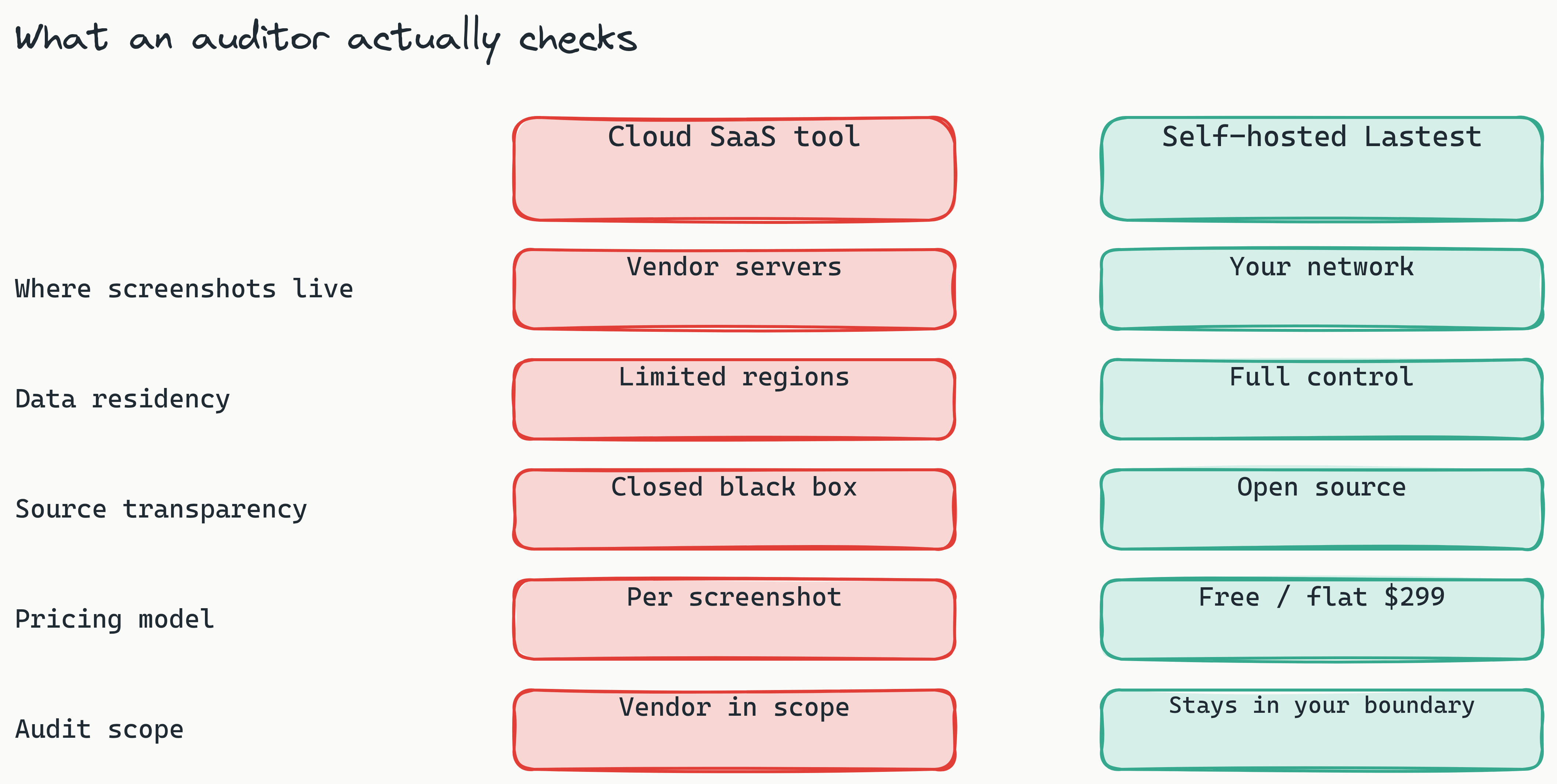
The choice between self-hosted and cloud visual testing comes down to one question: who controls your screenshots? For organizations in regulated industries, that question often determines whether a tool is even usable.
The Data Sovereignty Advantage of Self-Hosted Testing
Self-hosted visual testing solutions run entirely on your infrastructure. Screenshots, test results, and diff metadata never leave your network. This directly supports:
- GDPR data residency: Screenshots containing European user data stay within EU borders. No transfer to US-based servers, no Schrems II complications.
- HIPAA business associate agreements: Data stays on infrastructure you control, making BAAs simpler to scope and audit.
- SOC 2 scope control: Your testing pipeline remains within your audited infrastructure boundary.
For GDPR-compliant visual testing tools for enterprises, this is the gold standard. German companies, for instance, often require data to remain within EU borders and under direct organizational control, and self-hosted is the only viable path. Screenshots never leave your network, which makes self-hosting Lastest a natural fit for these constraints.
Lastest is fully open source and free to self-host forever under an FSL-1.1-ALv2 license. It runs via Docker on your own hardware, with unlimited screenshots and replays. Your data, your rules, your audit scope. If you would rather skip the ops, Lastest Cloud is a flat $299/month with no per-seat and no per-screenshot fees.
When Cloud Visual Testing Still Makes Sense
Cloud-based visual testing tools like Percy and Applitools offer lower operational overhead. No infrastructure to maintain, instant setup, and automatic scaling. For teams that don't handle sensitive data or operate under light regulatory requirements, cloud testing is efficient. Lastest Cloud occupies the same niche at a flat price, but for compliance-bound teams the self-hosted path is usually the one that survives an audit.
However, cloud tools require transmitting screenshots to third-party servers. For enterprises handling PII, PHI, or financial data, this is a non-starter. Cloud providers can offer data residency regions, but they cannot eliminate the fundamental fact that sensitive screenshots leave your control for processing.
Comparison Table
| Feature | Lastest (Self-Hosted) | Percy (Cloud) | Applitools (Cloud + On-Prem) |
|---|---|---|---|
| Deployment | Your infrastructure | SaaS | SaaS or dedicated server |
| Data residency | Full control | Limited regions | Limited regions |
| Open source | Yes (public repo) | No | No |
| Starting price | Free self-hosted; Cloud $299/mo flat | from ~$199 / month | from ~$699 / month |
| Diff engines | Pixel (Pixelmatch), Structural (SSIM), Perceptual (Butteraugli) | Pixel-based | Pixel + AI |
| Audit trail | Timestamped logs | Limited | Available on enterprise plan |
The bottom line: self-hosted wins for automated visual regression testing for security-first organizations that need absolute data control. Cloud works for teams that prioritize setup speed over data sovereignty.
How to Build a CI/CD Visual Testing Pipeline for Regulated Industries
A CI/CD visual testing pipeline for regulated industries needs three components: an automated test runner that captures screenshots, a diff engine that compares them to baselines, and an approval gate that logs every decision for audit purposes. Lastest is CI/CD native, with a reusable GitHub Action, GitLab MR comments (self-hosted GitLab included), webhook triggers, and scheduled cron. Its Smart Run feature reads your git diff and runs only the tests your change actually touches, which keeps audit runs fast without skipping coverage.
Step 1: Configuration and Docker Setup
Lastest runs on Docker. A single docker-compose up command spins up the testing environment on your infrastructure, including an embedded containerized Chromium browser pool, so there is no local Playwright install to manage on CI runners.
# docker-compose.yml
version: "3.8"
services:
  lastest:
    image: lastest/lastest:latest
    ports:
      - "3000:3000"
    volumes:
      - ./screenshots:/app/screenshots
      - ./baselines:/app/baselines
    environment:
      - STORAGE_DRIVER=local
This takes under five minutes to configure and runs on any server with Docker installed.
Step 2: Running Visual Tests in CI
For GitHub Actions, add a workflow step that starts the Docker environment and runs visual tests:
- name: Run visual tests
  run: |
    docker compose -f docker-compose.ci.yml up --abort-on-container-exit
Each test run captures full-page screenshots at defined viewports, compares them to stored baselines, and generates diff images annotated with change highlights. The output includes:
- Timestamp of the test run
- Screenshot hash (for integrity verification)
- Diff engine used (pixel, structural, or perceptual)
- Number of detected differences
Step 3: Human Approval as Audit Gate
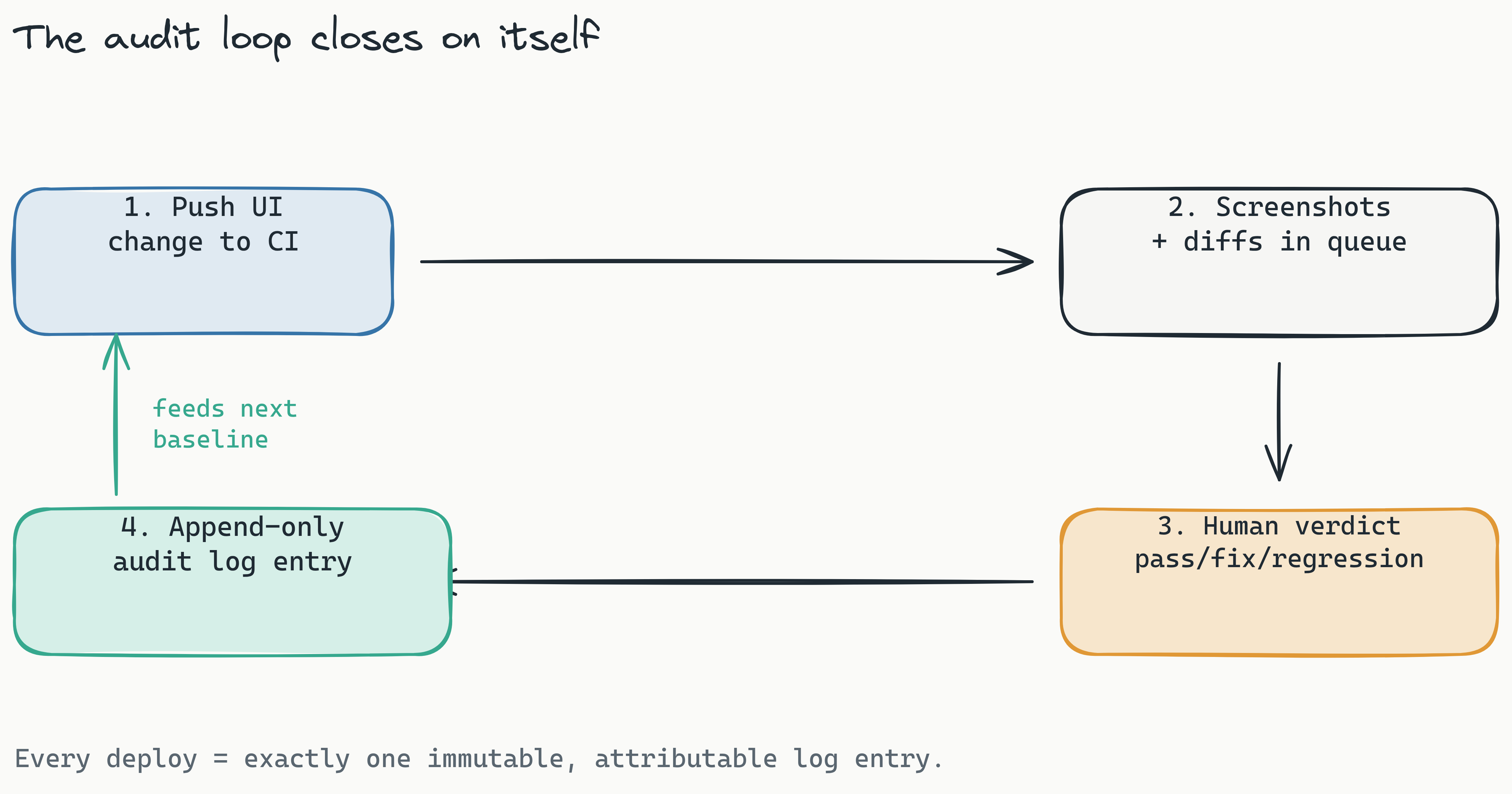
Diffs flow into the human review dashboard. There is exactly one human seam in the pipeline: a reviewer (an engineering lead or QA manager) renders one of three verdicts, pass, fix, or regression. The AI never approves its own output. The decision, with timestamp and reviewer identity, is written to a permanent audit log.
This matters for how the tests are authored, too. Lastest can write the underlying Playwright tests in three modes, so you choose how much automation your compliance posture allows: AI-Free recording (air-gapped, no API keys), AI-Assisted (AI proposes, a human reviews every change), or Full Autonomous via the Play Agent. The generated tests use a 7-layer selector fallback (data-testid, id, role, aria-label, text, CSS, then OCR), so they survive refactors that would break hand-written selectors and keep your audit baselines stable over time.
This three-step pipeline means every UI deploy has a verifiable before-and-after record. Regulators can see exactly what changed, when it changed, and who approved it. For automated visual regression testing for security-first organizations, this audit capability is often the difference between passing and failing a compliance review.
Why Open Source Visual Regression Testing Strengthens Compliance
Open source visual regression testing for compliance isn't just a cost-saving measure, it's a transparency requirement. Closed-source visual testing tools operate as black boxes. You cannot inspect how their diff algorithms handle your screenshots, where logs are stored, or whether data sharing agreements exist with third-party analytics services.
When an external auditor asks "How does your visual testing tool process screenshots containing PII?", a closed-source vendor gives you a marketing document. An open-source tool gives you the source code.
Industry surveys increasingly show enterprises favoring open-source components in their compliance toolchains, precisely so they can audit what the tooling does with sensitive data.
Transparency That Auditors Can Verify
Open source means every line of the diff engine is visible. Compliance teams can review the code to confirm:
- Screenshots are not sent to external servers
- Diff processing happens entirely in-memory
- Audit logs are append-only and tamper-evident
- No telemetry or analytics data is collected
Lastest's codebase is public on GitHub. Teams can fork it, audit every commit, and build custom logic for their specific compliance requirements. Because Lastest also lets you bring your own AI provider (Claude CLI, Anthropic API, OpenRouter, OpenAI, or local Ollama models), you decide which models touch your data during test authoring, with no forced dependency on a single vendor.
Avoiding Vendor Lock-in for Compliance-Critical Pipelines
Cloud-based visual testing tools lock you into their data model, their pricing structure, and their compliance certifications. If a vendor changes their privacy policy or discontinues a data residency region, your pipeline is compromised.
Open source avoids this entirely. You control the software, the data, and the upgrade cadence. Enterprise teams increasingly require open-source components in their compliance toolchains specifically to maintain this independence.
How to Audit UI Changes Using a Human Oversight Dashboard
How to audit UI changes for regulatory frameworks (GDPR, HIPAA, WCAG) comes down to one thing: creating a complete, permanent, verifiable record of every visual change and the decision that followed.
The Audit Workflow
- A developer pushes a UI change to the repository.
- The CI pipeline triggers visual tests against stored baselines.
- Diffs appear in the human review dashboard, grouped by test run and annotated with diff engine (pixel, structural, perceptual), WCAG 2.2 AA score, and an AI failure classification.
- A reviewer, usually a QA manager or engineering lead, examines each diff with before/after overlays.
- The reviewer approves or rejects each change, adding a reason if needed.
- The decision is logged permanently: timestamp, reviewer name, baseline version, diff engine used, and decision reason.
What the Audit Trail Captures
The dashboard generates an immutable log entry for every approval event:
Audit trail fields: timestamp, reviewer, baseline version, diff engine, decision reason
Regulatory frameworks like GDPR (Article 30 on processing records) and HIPAA (audit control requirements) demand exactly this kind of documentation. Compliance teams can export the full audit log for external review in minutes.
The human review dashboard transforms visual testing from a quality process into a compliance control. Every approved deploy has a clear, documented chain of custody that satisfies regulatory requirements and stands up to auditor scrutiny. Every edit, AI-fix, and restore is versioned with a reason, and branch baselines fork on PR open and merge back on PR merge, so the history is complete by default.
Cutting Compliance Testing Costs Without Cutting Corners
Compliance testing is expensive. Manual QA hours for visual inspection, cloud tools that bill per screenshot, infrastructure for running comparison servers, the line items add up fast.
Zero-token visual regression testing for cost compliance changes the economics fundamentally. With Lastest, AI runs only when you create or fix a test. Every replay after that is plain, deterministic Playwright execution that costs zero tokens. You can re-run the same suite thousands of times a day, across every viewport and baseline, for nothing.
This model eliminates the per-test anxiety that drives up costs in traditional tools. No more asking "Should I run this test now or wait until more changes accumulate?" No more cutting corners to save on a token budget. Self-hosted, screenshots and replays are unlimited regardless of volume.
The Cost Comparison
| Tool | Pricing Model | Typical Monthly Cost (500 tests/week) | Token Limits |
|---|---|---|---|
| Percy | Per-screenshot / per-seat | Scales up with screenshot volume | Yes |
| Applitools | Custom quote (from ~$699/mo) | Scales up with usage | Yes |
| Lastest (Self-Hosted) | Free (infrastructure only) | Your server cost only | None |
| Lastest (Cloud) | Flat $299/mo | Flat, no per-screenshot fee | None |
For compliance teams that need to test across multiple viewports, browsers, and environments, the savings compound. Per-screenshot pricing punishes exactly the thorough testing that compliance demands: every extra viewport and environment adds to the bill. Lastest decouples cost from volume entirely. Self-hosted, you pay only for the server you already run; on Cloud, you pay a flat $299/month no matter how many screenshots you capture.
Cost compliance matters because it removes the financial incentive to skip tests. When testing is free, you test everything. Every deploy, every viewport, every baseline comparison. That's how you maintain audit integrity without budget anxiety.
Conclusion: Getting Started with Visual Testing for Enterprise Compliance
Regulated industries need visual testing that does more than catch bugs. It needs to generate audit trails, respect data sovereignty, operate transparently, and scale without budget surprises. Self-hosted, open-source, multi-engine visual testing delivers on all fronts.
To explore these capabilities for your organization, look at what Lastest does and how it is built. It combines a zero-token replay model that eliminates per-test costs, three diff engines plus WCAG 2.2 AA scoring, open-source transparency that auditors can verify, and Docker-based self-hosting that keeps your screenshots on your infrastructure. Browse the docs for setup details, and see related guidance in our enterprise governance and policy guide.
Ready to bring audit-ready visual testing for enterprise compliance into your pipeline? Self-host Lastest for free under FSL-1.1, or skip the ops with Lastest Cloud at a flat $299/month. The full source is open on GitHub. Your data stays on your infrastructure, and every deploy gets an audit trail that stands up to scrutiny.