Salesforce is the CRM everyone tests by hand, three times a year, when the seasonal release notes land. Not because the teams are lazy, but because Lightning is genuinely hostile to the way most UI automation is written. Lightning Web Components render inside shadow DOM, so the CSS selectors a Selenium-era suite leans on cannot pierce the component boundary the old way. Element ids are generated fresh on every render. Salesforce has been moving base component internals private, and styling shifts (CSS container queries in base components being a recent example) arrive in seasonal releases whether you asked for them or not. And because every org is its own pile of custom objects, page layouts, flows, and managed packages, no two orgs render the same page the same way, so nobody's suite transfers.
Industry write-ups consistently put selector maintenance around Salesforce releases among the biggest ongoing costs of hand-written test suites. The math is easy to believe: Spring, Summer, and Winter releases land on a fixed schedule, preview sandboxes flip a few weeks ahead, and every flip is a fresh chance for your locators to quietly rot. Most teams respond by not automating at all and paying the manual-regression tax forever.
This post is the recipe for getting off that treadmill with Lastest. It is the CRM sibling of our Veeva Vault CRM recipe (Veeva's legacy CRM literally runs on Salesforce, so the two posts rhyme on purpose) and an application of the general playbook in how to test your ERP. The short version: selectors that do not care about shadow DOM, one auth bridge shared by every browser, seeded synthetic data, nine verification layers tuned for Lightning noise, and a deterministic replay you rerun on your own infrastructure against every preview sandbox.
Why Lightning breaks naive automation
It is worth being precise about the failure modes, because each one has a specific counter.
- Shadow DOM everywhere. Every Lightning Web Component mounts a shadow root. A CSS path written from the document root stops dead at the first boundary, and a page is dozens of boundaries deep. Selectors that worked on Classic or on Visualforce simply do not resolve.
- Generated ids. Lightning assigns component ids per render. An id you scraped from DevTools yesterday will not exist tomorrow, so the second layer of most locator strategies is dead on arrival.
- Base components change underneath you. Salesforce has been migrating base component internals to private implementations, which means the markup inside a lightning-button or a datatable is not a contract. Suites that reached inside base components break on schedule.
- Org drift. Two orgs on the same release render differently because config differs: page layouts, dynamic forms, feature flags, managed packages. A suite has to be authored against your org and resilient to your admins.
- The cadence is relentless. Three seasonal releases a year, forever. Whatever maintenance a release costs you, you pay it three times annually, on Salesforce's calendar, not yours.
None of this makes Lightning untestable. It makes a specific set of tools mandatory. Start with selectors.
Selectors that do not fear the shadow DOM
The trick is to stop treating the DOM tree as the primary address space. Lastest generates Playwright tests with a seven-layer selector fallback: data-testid, then id, role, aria-label, text, CSS, and finally OCR. On most apps that ordering is about resilience to refactors. On Lightning it is about physics: the layers fail or survive for structural reasons.

Walk the stack. A data-testid is gold when your own developers put one on a custom LWC, but Salesforce does not sprinkle test ids through base components, so it is rare on anything you did not build. Generated ids are worse than rare; they are actively misleading, because they exist and then change. A root-scoped CSS path stops at the first shadow root. That is the entire top and bottom of the old locator playbook gone.
What survives is the middle: role, aria-label, and text. Playwright's role and text engines pierce open shadow roots by design, and Lightning's base components carry solid ARIA metadata because Salesforce invests in accessibility. A button found by its role and accessible name resolves no matter how many shadow boundaries wrap it and no matter what the internals were renamed to this release. And when even that fails, OCR does not care about the DOM at all: it finds the string on the rendered screen and clicks it. The fallback bottoms out in a layer Salesforce cannot break without breaking the page for humans. We go deep on the mechanism in how self-healing selectors work.
There is a second half to this argument that DOM-only suites miss entirely: an LWC can mount correctly and still render wrong. A component whose element exists, whose text is present, and whose assert passes can be visually broken because a container query fired at the wrong breakpoint or a style hook shifted in the seasonal release. A DOM assertion cannot see that. A screenshot can. That is why the visual layers are not decoration on this recipe; they are the only check that verifies what the DOM cannot.
The auth bridge: log in once, fan out everywhere
Every meaningful Lightning page sits behind a login, and in most orgs that login is SSO plus MFA, which a test runner cannot complete. The standard Salesforce answer is an integration user: a dedicated automation account on password auth, exempted from MFA and SSO enforcement, locked down with a permission set that grants only what the tests need, and restricted by login IP ranges to your runner's egress. This is a well-trodden Salesforce pattern, not a hack, and it is the single prerequisite that unlocks everything else.
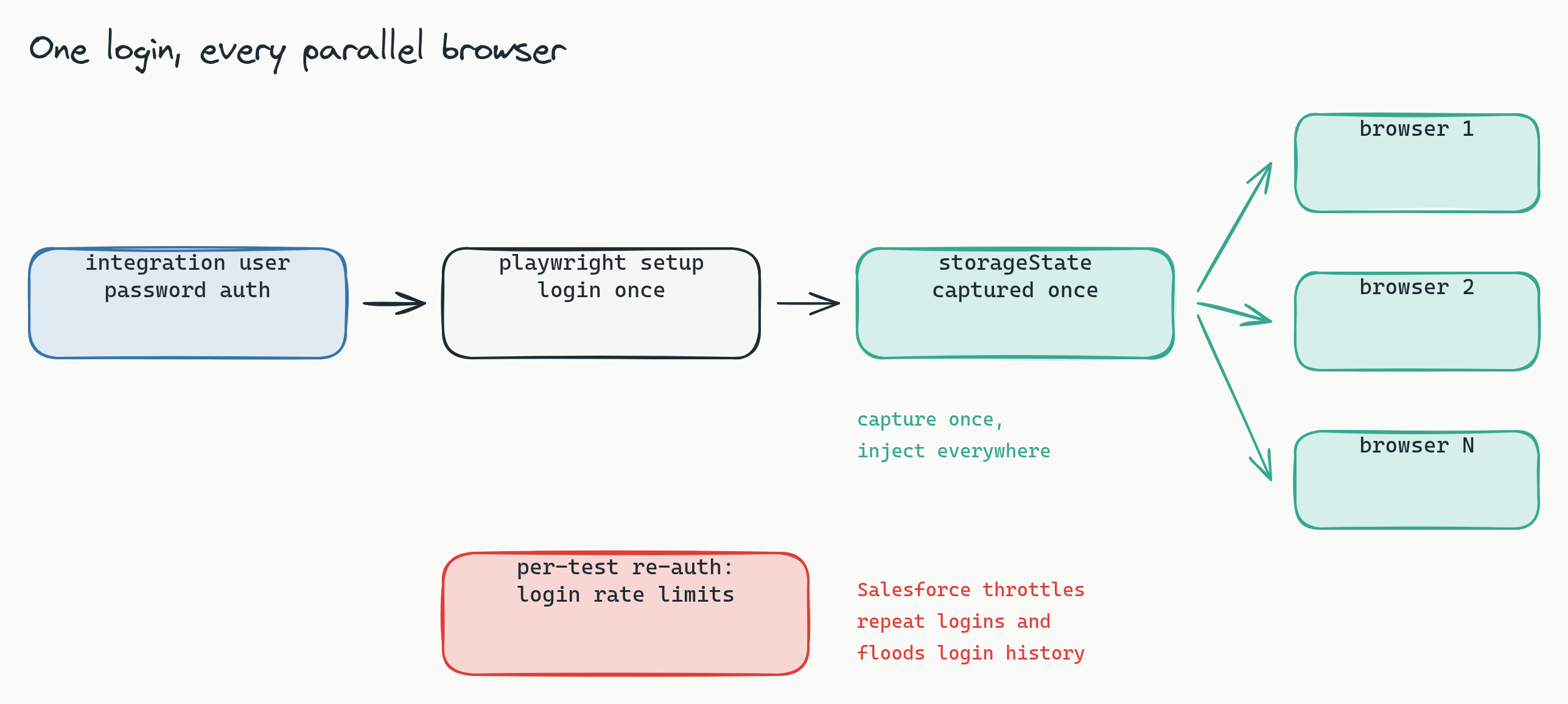
The mechanics are ordinary Playwright in a Lastest setup script:
// setup script (runs once per build)
await page.goto('https://login.salesforce.com/')   // or your My Domain login URL
await page.fill('#username', SF_USER)
await page.fill('#password', SF_PASS)
await page.click('#Login')
await page.waitForURL('**/lightning/**')           // Lightning home, not the login page
The waitForURL matters: Salesforce bounces through redirects after login, and you want the snapshot taken on the far side of all of them. Lastest captures the full storageState (cookies plus local storage) once the Lightning home has landed, then broadcasts that state cold into every parallel embedded browser that runs a test. Thirty browsers, one login.
Do not re-authenticate per test. Salesforce rate-limits repeated logins per user, security teams watch login history, and thirty browsers each driving the login form is exactly the pattern that trips both. Capture once, inject everywhere, and let each test's own navigation keep the session warm. This is a default setup step in Lastest, not code you write.
Seed the data, then freeze the render
A CRM screen is mostly dynamic content: record ids in URLs and breadcrumbs, "Last Modified" stamps, activity timelines full of relative dates ("2 hours ago"), rollup fields that move when anything touches them. If you point a pixel diff at live org data, red stops meaning anything within a week. The fix is upstream: control the data, then mask the residue.
The source of truth is a scenario spreadsheet, because a CSV is the one artifact an admin, a QA lead, and a developer can all edit:
scenario_matrix.csv
id    object       stage_or_queue   owner    edge_case
S01   lead         new              SDR      happy_path
S02   opportunity  negotiation      AE       discount_approval
S03   opportunity  closed_won       AE       quote_render
S04   case         tier1_queue      support  email_to_case
S05   case         tier2_queue      support  escalation_path
A generator expands each row into real records through the REST API, using Lastest's api setup type on the same session the browser captured:
// api setup step: seed records over REST, same session as the browser
POST /services/data/{apiVersion}/sobjects/Account
{ "Name": "ACME-S02", "Industry": "Manufacturing" }

POST /services/data/{apiVersion}/sobjects/Opportunity
{ "Name": "S02-negotiation", "StageName": "Negotiation",
  "CloseDate": "2026-09-30", "AccountId": "{seededAccountId}" }
Accounts, opportunities pinned to a stage, cases routed to a named queue: every environment gets identical fixtures, and going from five scenarios to fifty means adding rows, not writing tests. Then freeze what still moves: freezeTimestamps pins the clock so relative dates stop drifting, autoMaskDynamicContent catches ids and generated strings, and per-step ignore regions cover the stubborn few (the record id in the header, the "Last Modified" stamp, the activity timeline dates). Two identical runs should produce two identical screens; when they do, every diff you see is real.
The area tree: organize like the org
Structure the suite the way the org is actually used, one branch per functional area, scenarios from the spreadsheet parameterizing each branch:
- Home and navigation: the Lightning home page, app launcher, global search. Cheap tests, high signal, and the canary for release-wide styling shifts.
- Lead-to-Opportunity: record pages, the path component, conversion, quick actions. This is the revenue flow, so it gets the deepest scenario coverage.
- Service: case record pages, related lists, queue views. Related lists are where layout regressions hide.
- List views and reports: either pin the fixtures that feed them or mask the row data; a report over live data is noise by construction.
- Flows: screen flows are custom UI your admins own, which makes them the most regression-prone surface in the org and the least covered by Salesforce's own testing.
- Experience Cloud: if you run customer-facing sites, they ride the same releases and deserve the same coverage, with the bonus that public pages need no auth bridge.
Nine layers, tuned for Lightning
Lastest verifies nine layers on every step. The skill is deciding which layers gate the build and which are signal you read. For Lightning, start here:
- Enforce (fails the build):
visual,network,console,url. Visual is the core value, with record data masked. Network catches real 4xx and 5xx from Apex and the UI API. Console catches broken LWCs. URL catches login redirects and navigation regressions through trajectory divergence. - Log (signal, not a gate):
a11y(WCAG 2.2 AA via axe-core),perf(Lightning is heavy; watch drift, do not gate on it at first),dom(noisy under LWC re-renders), andtext(noisy on record data). - Disable:
design, until you author tokens. SLDS is a real design system, so a design-token config for your org is plausible later; the layer flips on with a config, no code.
One rollout nuance: start network and console in log mode, not enforce. Lightning's runtime is chatty (Aura and LWC framework traffic, transient errors, the occasional gack), and promoting those layers before you have tuned consoleErrorIgnoreHosts against a few clean runs is how a team learns to ignore red. Watch the noise profile, tune the ignore lists, then promote. Promote too early and green stops meaning green.
The seasonal-release play
Here is where the whole recipe pays for itself, three times a year, on a schedule you can put in the calendar today.
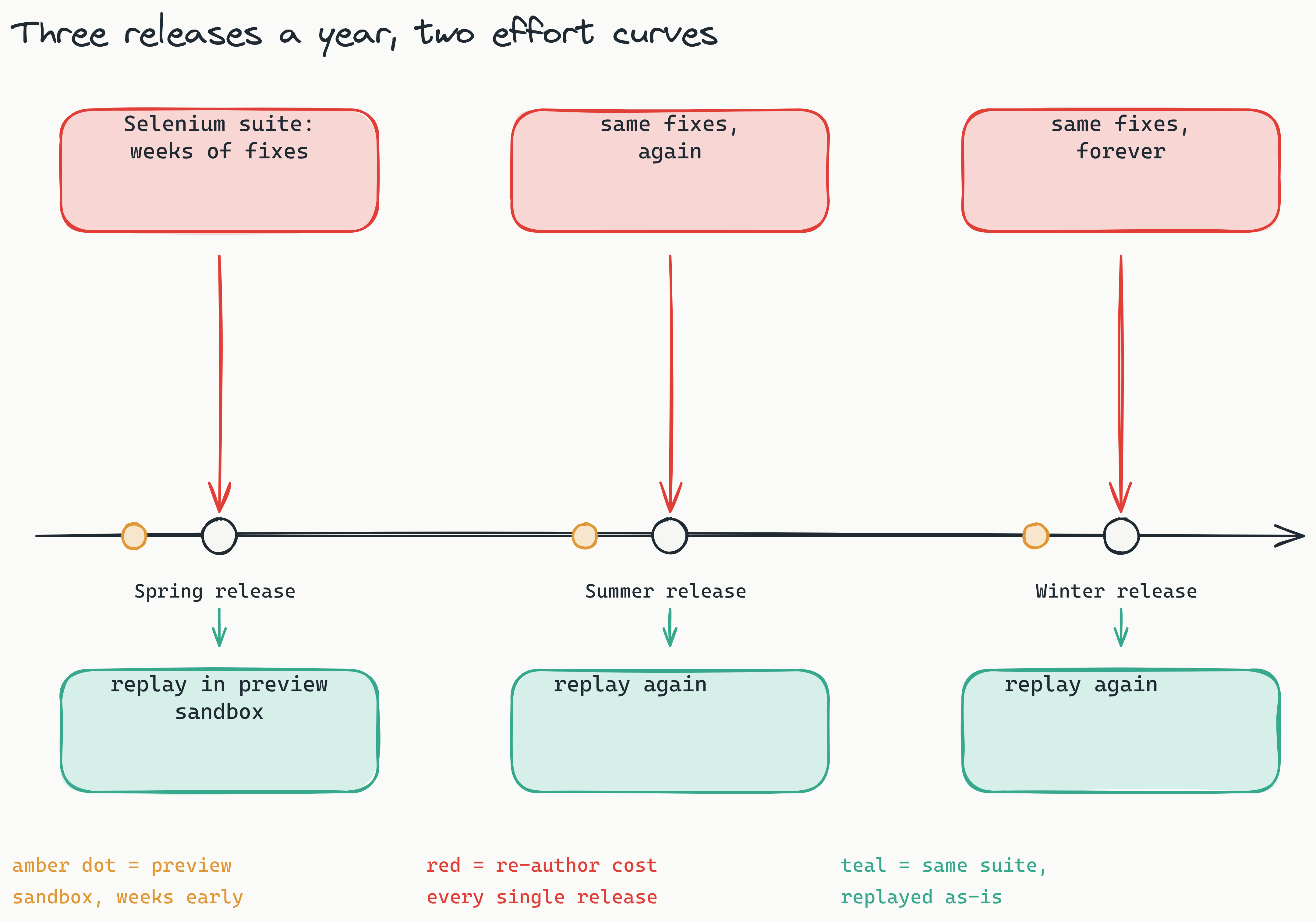
The play: keep a green suite on the current release. When the preview sandbox flips to the next one (Summer '26, say), point the suite at it and replay everything deterministically. Replays are plain Playwright execution with no model in the loop; AI ran when the tests were authored, not when they run, so the full regression pass against the preview release is reproducible run to run, finishes in minutes, and consumes no tokens. Every diff that comes back triages into one of two buckets:
- Intentional Lightning changes. Salesforce restyled a base component, moved a header, changed density. You approve the new baseline, and the approval is versioned with a reason, so the audit trail of "what changed in Summer '26 and who accepted it" writes itself.
- Regressions in your customizations. Your flow renders wrong under the new release, your custom LWC collides with a base component change. You found it weeks before production, in a sandbox, with a screenshot diff pointing at the exact screen.
Then the preview window closes, production flips, and you do it again next release. Twice more per year, forever, at flat effort. Compare that against the write-ups putting selector maintenance around each release among the biggest line items of Selenium-style suites, and the argument makes itself: the suite that heals selectors and replays deterministically converts a recurring re-authoring spike into a flat line.
Your CRM data stays home
One more property matters to whoever reviews this plan: Lastest is self-hosted. The pipeline, the screenshots, and the seeded records never leave your network, and the source is available for your reviewers to read line by line rather than accept on a questionnaire. And because the suite runs on synthetic data generated from a spreadsheet, there is no reason real customer records should be anywhere near it. Sandbox org, seeded fixtures, screenshots on your own infrastructure: that is the whole story a security review needs to hear.
Frequently asked
Can Playwright even see inside the shadow DOM? Yes. Playwright's role, text, and label engines pierce open shadow roots automatically, and Lightning Web Components use open shadow roots. What breaks is root-scoped CSS paths and per-render ids, which is why the fallback ordering puts role, aria-label, and text ahead of CSS, with OCR as the floor that needs no DOM at all.
Do I need a separate suite for every org? No, but you need per-org baselines. The scenarios and the area tree transfer between orgs; the rendered screens do not, because config drift changes layouts. Author the suite once, seed the same fixture data in each org, and let each org keep its own baseline set.
Is an MFA-exempt integration user actually safe? It is the standard Salesforce automation pattern when done properly: a dedicated user with a minimum-privilege permission set, password auth exempted from SSO and MFA enforcement, login IP ranges restricted to your runner's addresses, and sandbox-only credentials. That combination is narrower than most human accounts, not broader.
What happens when Salesforce changes a base component mid-release? The selector fallback absorbs the markup change, because role and accessible name survive internal refactors, and the visual layer flags the rendering change for a human to approve or reject. A restyle becomes a one-click baseline approval with a versioned reason, not a re-authoring session.
Start here
Three Salesforce releases a year is a schedule you can plan against. Book a release-readiness review: we map the preview-sandbox windows against your critical Lightning flows, size the scenario matrix, and hand back the suite structure and the integration-user auth-bridge plan for your sandbox org. Want to see the output before the call? See a sample diff report from a real replay run. Deployment is self-hosted by default, so screenshots of your pipeline and customer records stay inside your network. The cross-platform version of this recipe is in the release-testing playbook.
The takeaway is not that Lightning is easy to automate. It is that the things that make it hard (shadow DOM, generated ids, private internals, three releases a year) each map to a specific counter: selectors that address the page the way a human does, one auth bridge, frozen synthetic data, and a replay that reproduces the same evidence every time you rerun it. Set that up once, and the seasonal release stops being a fire drill and becomes a diff review.