Microsoft ships Dynamics 365 on a fixed cadence of two release waves a year, and the 2026 wave 1 rollout runs from April through September. Each wave carries hundreds of changes across the product line. Some are optional features an admin turns on deliberately. Others are mandatory changes Microsoft deploys automatically, on Microsoft's schedule, into your environment. Early access opens in sandboxes several weeks before general availability, and the release plans themselves are living documents that Microsoft keeps revising, week over week, while the wave is in flight.
Dynamics is also two products in a trench coat. The CRM side is a set of model-driven Power Apps: Sales, Customer Service, Field Service, all rendered by the same Unified Interface shell. The ERP side is Finance and Operations for the large end of the market and Business Central for the mid-market. A release wave touches both sides at once, so "we tested the CRM" is only half an answer.
The part that makes this a testing problem rather than a reading-the-release-notes problem is the UI itself. Model-driven apps are generated from metadata: forms, views, and commands are rendered from configuration, not hand-written markup. The DOM is dynamic, element ids are unstable between sessions and versions, and a form redesign you did not ask for can land in your org because a wave shipped it. That is why the standard ritual, someone manually clicking through the top 20 business flows after each wave, is both mandatory and insufficient. Mandatory because the changes are real; insufficient because a human doing it twice a year cannot cover two apps, dozens of forms, and every locale, and cannot prove afterward what they actually looked at.
This post is the recipe for replacing that ritual with a regression suite you replay on demand: bridge the Entra ID login once, seed the data from a spreadsheet, put Lastest's nine-layer verify on both sides of the trench coat, and rerun the whole thing at early access and again at GA as a zero-token, byte-comparable replay. It adapts the pattern we built for Veeva Vault CRM, which faces the same shape of problem on a three-release cadence, and it slots into the broader playbook in how to test your ERP with Lastest.
Why Dynamics 365 is genuinely hard to test
- Entra ID sits in front of everything. Every page is behind login.microsoftonline.com, and most orgs enforce MFA and conditional access policies. A test runner cannot approve a push notification.
- The markup is generated, not written. Model-driven forms are rendered from metadata. Ids churn, attributes shift between waves, and hand-written CSS selectors rot on a schedule Microsoft controls.
- The data never sits still. GUIDs in every URL, "Modified on" stamps on every record, relative dates in the timeline widget, rollup fields recalculating in the background. A naive pixel diff of two identical runs lights up on the clock alone.
- Changes arrive on someone else's calendar. A wave rolls out region by region over months, mandatory changes cannot be declined, and the release plan you triaged in March is not the release plan that ships in June.
- It is two products. A wave that redesigns a Sales form can also move a button in Business Central. One suite has to cover model-driven CRM and ERP flows without doubling the tooling.
None of these are reasons you cannot automate Dynamics. They are the checklist your setup has to clear. Let us go through it.
Know the wave before it hits
The wave calendar is the backbone of the whole strategy, so pin it to the wall. Microsoft publishes the release plans months ahead, then updates them continuously; early access lets an admin opt a sandbox into the wave several weeks before general availability; GA then rolls out across regions over the following months; and somewhere in the middle, mandatory changes switch on whether or not anyone in your org read the plan.

Read that timeline as a testing contract. When the plans publish, you baseline your suite against the current version. When early access opens in your sandbox, you replay. At GA, you replay again. The suite is authored once; the wave just decides when you press the button. We will come back to what you do with the diffs, but first the suite has to exist, and that starts with getting a browser through the front door.
The auth bridge: through Entra ID once
Everything starts with authentication, and authentication has one key that unlocks the whole approach: a service account with password auth, excluded from MFA and conditional access for your test egress IPs. This is not a hack. Scoping a policy exclusion to a named account and a known IP range is a standard, auditable Entra ID pattern that identity teams already use for service automation; the named-location condition is exactly what conditional access is for. With that account, a script can sign in. Without it, you are fighting an MFA prompt that no automation should ever try to solve.
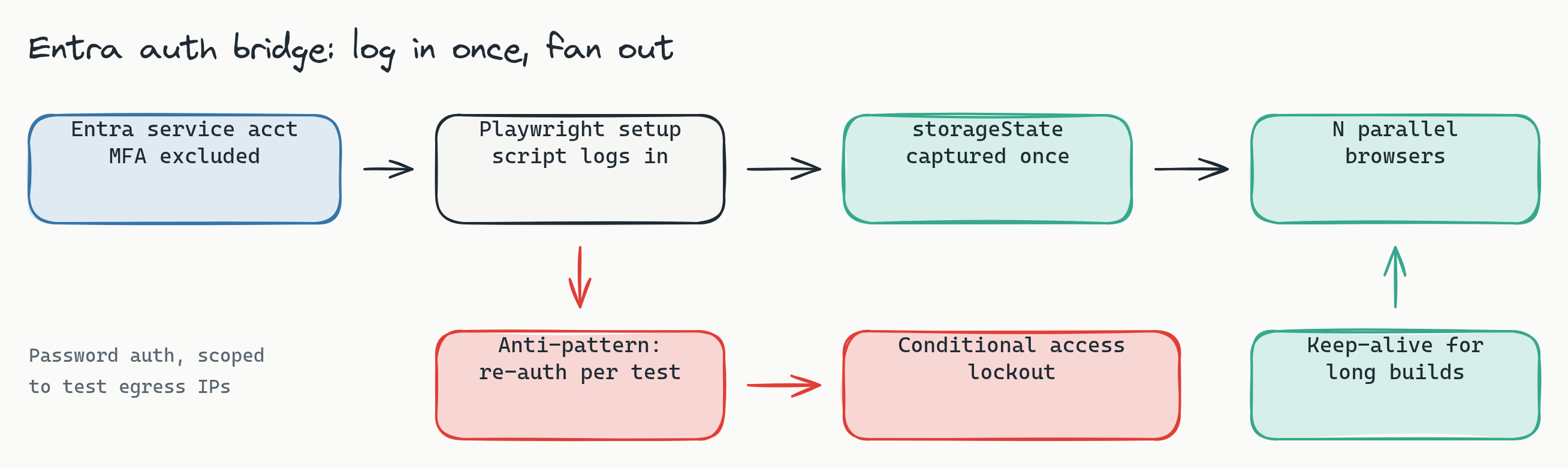
The mechanics are ordinary Playwright. A playwright-type setup script walks the Entra sign-in and ends on the app shell:
// setup script (runs once per build)
await page.goto('https://yourorg.crm.dynamics.com/')
// redirected to login.microsoftonline.com
await page.fill('input[type=email]', D365_USER)
await page.click('input[type=submit]')
await page.fill('input[type=password]', D365_PASS)
await page.click('input[type=submit]')
await page.click('#idSIButton9')            // "Stay signed in?" interstitial
await page.waitForURL('**/main.aspx**')     // the app shell, not the login page
The waitForURL on the app shell matters more here than on most platforms, because Entra tokens do not live in one cookie. The session is spread across cookies, localStorage, and sessionStorage on both the login domain and the app domain. Lastest snapshots the full storage state, cookie jar included, after the setup script lands, and broadcasts that state cold into every parallel embedded browser that runs a test. Whatever the setup script authenticated, every test inherits, and no test ever sees a login page.
Capture once. Do not re-authenticate per test.
The red path in that diagram is the Dynamics version of the auth burst trap. If every test performs its own sign-in, thirty parallel browsers hammering login.microsoftonline.com from one IP with one username looks exactly like a credential attack, and Entra's smart lockout and conditional access risk policies will respond accordingly. Now your test suite has locked out the service account, and possibly paged your identity team. The rule is absolute: capture the session once in setup, inject it everywhere, and for long builds let a keep-alive step ping the app periodically so the tokens stay warm. Each test's own navigation already counts as activity, so the only real exposure is a long idle stretch, and the keep-alive closes it.
Generate the data, then freeze it
Data drift is the number one source of false diffs in a CRM, and you kill it upstream in the data, not downstream in the diff. The pattern is the same one we use for Veeva: a scenario spreadsheet is the source of truth, and a generator expands each row into the concrete records a scenario needs. A CSV is the one artifact a functional consultant, a QA lead, and a developer can all read and edit, and going from five scenarios to fifty means adding rows, not writing tests.
Seeding is an API job, and this is where Lastest's api setup type earns its place. On the CRM side, records go in through the Dataverse Web API, reusing the same authenticated session the browser setup produced:
// api setup step: seed via the Dataverse Web API, same session
POST /api/data/v9.2/accounts
{ "name": "Contoso Test 01", "accountnumber": "LT-0001" }

POST /api/data/v9.2/opportunities
{ "name": "S01 renewal", "[email protected]": "/accounts(GUID)" }
Accounts, contacts, opportunities, cases: each scenario row expands into a small graph of records with known names and known values. On the ERP side, Finance and Operations exposes OData endpoints for its entities and Business Central has its own API surface, and the same seeding step covers them. The point is identical either way: the sandbox contains exactly the records the suite expects, created fresh by the build, so two identical runs render two identical screens.
Then you freeze the noise. Turn on freezeTimestamps with a fixed frozen timestamp so relative dates stop moving, enable autoMaskDynamicContent for the churn the platform generates on its own, and add per-step ignore regions over the fields that still move: the GUIDs Dynamics puts in URLs and records, "Modified on" stamps, and the timeline widget, which is a feed of relative times by design. Frozen data plus stabilization is what turns a noisy CRM screen into a baseline where a second identical run is byte-identical and red means something changed.
The area tree: both sides of the trench coat
With auth and data handled, organize the suite the way Dynamics organizes itself. One area tree covers both products, because the recipe underneath is the same recipe.
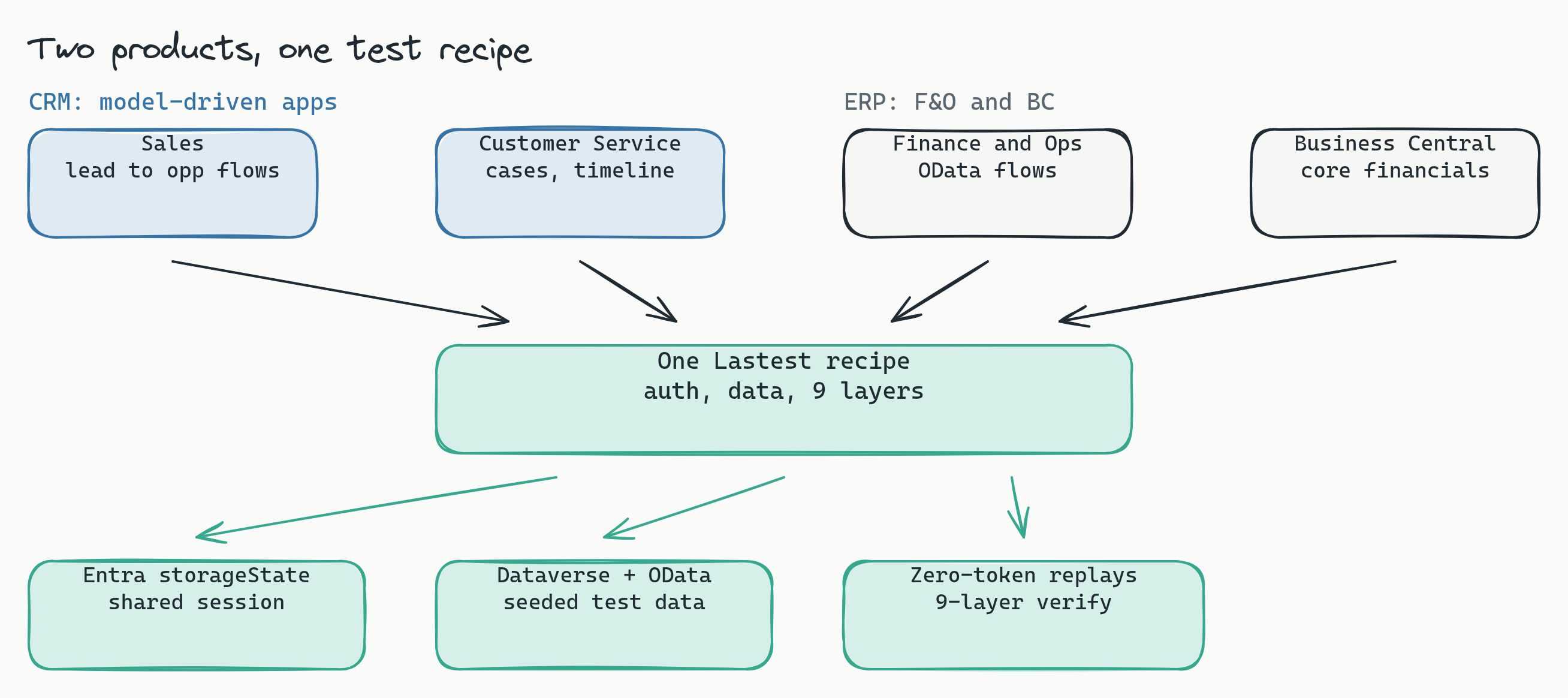
The branches, and the signature gotcha in each:
- Sales covers the lead-to-opportunity path: lead forms, qualification, the opportunity form, and the business process flow bar across the top. Business process flows are pure metadata rendering, so they are exactly where wave-driven form changes show up first.
- Customer Service covers case forms, queues, and the timeline. The timeline is the noisiest control in the product; mask its relative times and let the visual layer watch everything else.
- The model-driven shell itself deserves its own branch: the sitemap navigation, the command bar, the global search. Waves love to move buttons, and a command bar test is the cheapest way to catch a relocation before a user files it as a bug.
- Business Central or Finance and Operations, if you run them, get the core financial flows: sales order to invoice, purchase order to receipt, the posting screens your month-end depends on.
- Power Platform customizations are your own code riding on the wave: custom pages, PCF controls, embedded canvas apps. These deserve the densest coverage, because Microsoft tests its platform against its platform, not against your controls.
- Integrations covers the seams: the flows that read or write through Dataverse from outside, rendered wherever their results surface in the UI.
When a wave shifts the generated markup under a test, which it will, Lastest's seven-layer selector fallback (data-testid, then id, role, aria-label, text, CSS, and finally OCR) heals the selector instead of failing the run. On a metadata-generated UI this is not a nice-to-have; it is the difference between a suite that survives a wave and one that needs re-authoring every April and October. The mechanism is worth understanding in depth, and we wrote it up in how self-healing selectors work.
Nine layers, tuned for Dynamics
Lastest checks nine layers on every step, and the skill for Dynamics is deciding which layers gate the build and which are signal you read. The recommended starting configuration:
- Enforce (fails the build):
visual,network,console,url. Visual is the core value, with record data masked. Network catches real 4xx and 5xx failures from Dataverse and OData calls. Console catches broken customizations and script errors. URL catches auth redirect regressions, which on an Entra-fronted app is where sign-in problems first show themselves. - Log (signal, not a gate):
a11y(WCAG 2.2 AA scored by axe-core on every screenshot),perf(Web Vitals drift),dom, andtext. Thedomlayer is especially noisy on metadata-generated markup, where structural churn is normal, so read it, do not gate on it. - Disable:
design. It needs a design-token set to compare against, and until you author one for your org's theming it stays inert. Re-enabling it later is a config change, not code.
One rollout nuance: start network and console in log mode, not enforce. The Unified Interface streams telemetry constantly and keeps up a steady background chatter of OData requests, some of which fail by design as permission probes. Watch a few clean runs, learn the real noise profile, tune your ignore hosts, then promote both layers to enforce once green means green. Promoting too early trains the team to ignore red, which defeats the whole point.
The wave play: baseline, early access, GA
Now the calendar from the first diagram becomes a procedure.
Step one: baseline on the current version. Before the wave reaches you, run the suite green and approve the baselines. This is your record of what the org looked like when it worked.
Step two: replay at early access. When you opt a sandbox into the wave, replay the entire suite against it. Nothing about the replay is nondeterministic: AI ran when the tests were created, and every replay after that is plain Playwright execution with no model in the path, so running it once or nightly for the whole early-access window gives you the same comparable evidence each time. The diffs that come back are the wave, rendered onto your org, your customizations, and your data, which is information the release plan cannot give you.
Step three: triage the diffs into two piles. Pile one is intentional wave changes: a redesigned form, a moved command button, new spacing in a grid. Approve those as the new baseline, each with a reason attached, and Lastest versions every approval so the audit trail writes itself. Pile two is real breakage: a PCF control that no longer renders, a business process flow that lost a stage, an integration surface showing an error. Those become tickets now, weeks before your users would have found them at GA.
Step four: replay again at GA. The wave that reaches production is not guaranteed to be byte-identical to early access, because the release plans keep moving until rollout. The GA replay confirms that what you approved is what actually shipped, and catches anything that changed in between. Same suite, same zero cost, third data point.
Compare that to the manual version: two clicking marathons a year, no diffable record of either, and mandatory changes discovered by whoever hit them first. The suite does not eliminate wave work; it converts it from clicking into triage, which is the part that actually needs a human. That reviewer seam is deliberate: a person renders the verdict on every diff, and the AI never approves its own output.
Keep the data at home
For most Dynamics shops the security review is short, because the answer is structural. Lastest is self-hosted: screenshots, baselines, and replays run on your infrastructure, and nothing about your CRM or ERP leaves your network. And because the suite seeds synthetic scenario data from a spreadsheet, there is no reason for real customer records or financial data to be anywhere near it. A sandbox, a service account, and generated fixtures: that is the entire data footprint.
Frequently asked
Do I need to test both release waves every year? Yes, because both waves carry mandatory changes that Microsoft enables automatically, not just optional features an admin turns on. The good news is that the cost of the second wave is near zero once the suite exists: you replay the same tests at early access and at GA, and only the diff triage takes human time.
What if my organization cannot exclude a service account from MFA? Scope the exclusion narrowly and it usually clears review: one named service account, password auth only, excluded from MFA and conditional access solely for the known egress IPs of your test infrastructure. This is a standard conditional access pattern with a full audit trail in Entra, and it is far safer than the alternatives people actually resort to, like sharing a human account or storing TOTP seeds in scripts.
Does this cover Business Central and Finance and Operations too? Yes. The ERP side sits behind the same Entra ID login, so the same setup script and storage state carry over, and test data seeds through OData or the Business Central API instead of the Dataverse Web API. The area tree simply grows ERP branches for the financial flows you depend on, and the nine-layer verify treats those screens like any other.
Why not just rely on Microsoft's own testing of the wave? Microsoft tests the platform, not your org. Your form customizations, your PCF controls, your business process flows, your integrations, and your data are the surface a wave actually lands on, and none of that is in Microsoft's test matrix. The regressions that hurt are almost always at the seam between the wave and your configuration, and only your own suite covers that seam.
Start here
The next release wave is already dated, so work backwards from it. Book a release-readiness review: we map the Wave 1 and Wave 2 early-access windows against your critical Dynamics flows, size the scenario matrix, and hand back the suite structure and the auth-bridge plan for your sandbox, sized so the full suite can replay nightly through the whole early-access window. Want to see what lands at the end of a run? See a sample diff report from a real replay. Deployment is self-hosted by default, so screenshots of your customer and financial records stay inside your network. The cross-platform version of this recipe is in the release-testing playbook.
The takeaway is not that Dynamics 365 is easy to test. It is that the release wave calendar, the thing that makes manual testing exhausting, is exactly what makes automated testing efficient: three fixed replay points, one suite, one reproducible run whose evidence stays on your infrastructure. Bridge the auth once, generate the data, tune the layers, and let the replay carry the wave work your team has been carrying by hand.