NetSuite ships two mandatory releases a year. In 2026 that is 2026.1 in the spring cycle and 2026.2 in the fall, and the word mandatory is doing real work in that sentence. You cannot opt out. You cannot pin a version. Oracle upgrades your account on its schedule, in its phasing, and the only thing you control is how ready you are when it happens.
What you get instead of control is a warning window. Ahead of each release, NetSuite offers a Release Preview account running the new version, and your sandbox gets refreshed to it a few weeks before production flips. Inside that window, everything your business runs on has to be re-verified: SuiteScript customizations, saved searches, custom forms, approval workflows built in SuiteFlow, every integration that touches a record. Then the window closes, production flips, and six months later the whole thing happens again. Forever.
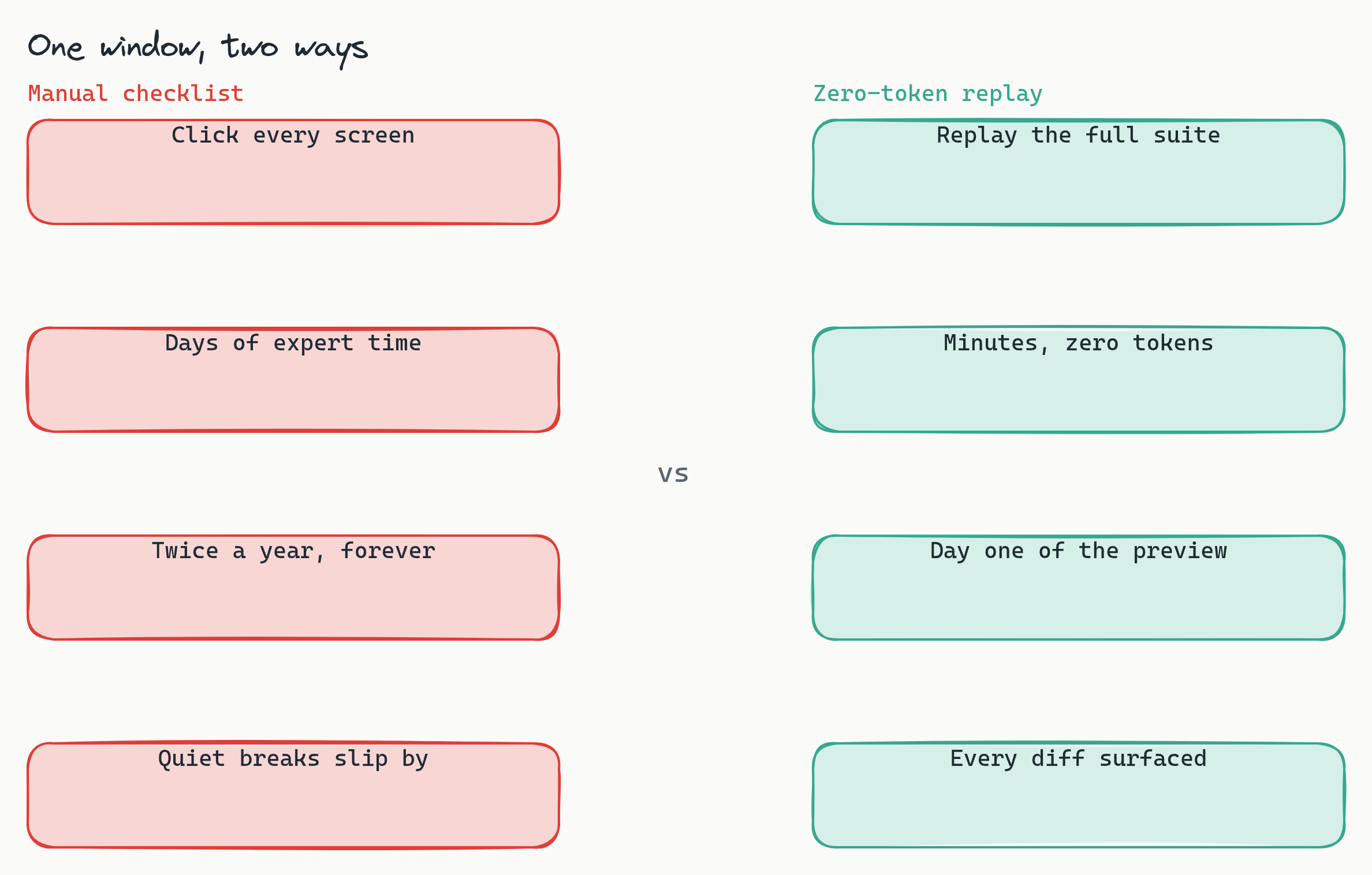
That framing matters, because it means testing NetSuite is not really a coverage problem. It is a deadline problem. Most teams meet the deadline the same way: a spreadsheet checklist, a borrowed week from the most senior admin and a couple of accountants, and a lot of clicking. That is a recurring tax on your most expensive people, and hand-checking misses things, especially the quiet breaks where a form still loads but a scripted field defaults wrong.

This post is the recipe for replacing that checklist sprint with a regression suite that replays itself. It adapts the pattern we laid out for Veeva Vault CRM, another platform that upgrades on the vendor's clock, and it slots into the broader playbook in how to test your ERP with Lastest. The short version: bridge auth once, generate the data from a spreadsheet, freeze the noise, and keep the suite green year-round so that when the preview lands you can replay everything deterministically and read the diffs.
The upgrade is a deadline, not a decision
It is worth being precise about why NetSuite feels different from testing your own app. When you own the deploy, you test when you ship. With NetSuite, Oracle ships and you absorb. Three properties follow:
- The date is fixed and external. Your production account flips on a scheduled weekend whether your regression pass finished or not. There is no holding the release for one more sprint.
- The blast radius is your customizations, not the vendor's features. Oracle tests NetSuite. Nobody but you tests your SuiteScript bundles, your scripted forms, your saved searches with formula columns, your SuiteFlow approval chains, and your integrations against the new version. That surface is exactly what the release notes cannot cover.
- It recurs. Twice a year, forever, on an account you cannot pin. Any testing approach with a per-release marginal cost measured in person-weeks compounds into a permanent line item.
So the goal is not a heroic one-time test pass. The goal is a suite whose marginal cost per release is close to zero, because the release cycle is guaranteed to come around again.
The auth bridge: one login, every browser
Everything starts with a login the automation can actually perform. The clean pattern in NetSuite is a dedicated integration user with password auth, assigned a purpose-built role with just the permissions the tests need. NetSuite's access model is role-based, so you can scope this user tightly: the test role sees the dashboards, forms, and transactions under test and nothing else. If your security policy allows it, keep MFA off that role, or use the standard exemptions NetSuite provides for automation accounts; a test runner cannot type a one-time code, and fighting that fact is wasted effort.
The mechanics are ordinary Playwright. A playwright-type setup script drives the login once per build and ends on the authenticated dashboard:
// setup script (runs once per build)
await page.goto('https://YOURACCOUNT.app.netsuite.com/')
await page.fill('input[name=email]', NS_USER)
await page.fill('input[name=password]', NS_PASS)
await page.click('input[type=submit]')
await page.waitForURL('**/app/center/card.nl*')   // dashboard, not login
Lastest snapshots the browser's storage state after setup, cookie jar included, and broadcasts it cold into every parallel embedded browser that runs a test. Whatever the setup script authenticates, every test inherits. The operational rule that keeps this healthy: capture once, never re-authenticate per test. Thirty parallel browsers each performing a fresh login is how you trip login throttling and, worse, how you spend minutes of every build on a page that is not the thing you are testing. One login per build, injected everywhere, is the whole trick.
Generate the data, then freeze it
An ERP screen is mostly moving data: internal IDs, document numbers, date stamps, "last modified" footers. If you point a naive screenshot tool at a NetSuite record, two identical runs will diff on the clock alone. You kill that noise upstream in the data and downstream in stabilization, in that order.
Upstream, the source of truth is a scenario spreadsheet. Each row is a business scenario; the columns are the parameters that make scenarios differ:
scenario_matrix.csv
id    record_flow     subsidiary  currency  edge_case
S01   quote_to_cash   US          USD       happy_path
S02   quote_to_cash   DE          EUR       multi_currency
S03   invoice_only    US          USD       partial_fulfillment
S04   approval_path   UK          GBP       over_limit_po
S05   quote_to_cash   JP          JPY       tax_rounding
A small generator expands each row into the concrete records the scenario needs: customers, items, sales orders, invoices. Seeding is an API job, and this is where Lastest's api setup type earns its keep: it reuses the session to create records over SuiteTalk REST before the browser tests run, so every environment starts from the same fixtures:
// api setup step: seed records over SuiteTalk REST
POST /services/rest/record/v1/customer
{ "companyName": "Test Customer S01", "subsidiary": { "id": "1" } }

POST /services/rest/record/v1/salesOrder
{ "entity": { "id": "1042" }, "item": { "items": [ /* ... */ ] } }
Downstream, you freeze the rendered noise with stabilization that ships in the box: freezeTimestamps with a fixed timestamp so every date renders identically, autoMaskDynamicContent for the churn the platform generates on its own, and per-step ignore regions over the fields that still move: internal IDs, date stamps, and "last modified" fields. Frozen data plus stabilization is what turns a noisy ERP screen into a baseline where a second identical run is byte-identical, and every red diff means something.
An area tree that mirrors how NetSuite actually breaks
Organize the suite the way a NetSuite org breaks during a release, not the way the navigation menu is laid out. Six areas cover most orgs, and each carries one signature source of noise you handle once at authoring time:
- Dashboards and saved searches. The trap is personalization noise: portlets remember state per user. Pin a test role with a fixed dashboard so the landing page is deterministic, then baseline the saved-search results your finance team actually lives in, formula columns included.
- Record forms. Custom fields and scripted forms are where releases bite. A beforeLoad or beforeSubmit script that changes field state under the old version may behave differently under the new one, and a form that renders with a field silently defaulted wrong is exactly the failure a checklist skims past.
- Order-to-cash flow. Sales order to fulfillment to invoice, driven end to end from a scenario row. Document numbers churn on every run by design, so mask them and assert on everything else: line items, totals, status transitions.
- Approval workflows. SuiteFlow paths are combinatorial, so make them tabular: one scenario row per path, including the rejection and escalation branches nobody clicks through by hand after the first month.
- Reports and financials. The reports your close depends on, and revenue recognition schedules if you use them. Frozen seed data means the numbers are stable, so a diff here is a real behavior change.
- Integrations surface. The screens your connectors write to and read from. When an integration breaks on a release, the first visible symptom is usually a record page, so baseline the pages your middleware touches.
One spreadsheet row can drive tests in several areas at once; scenario S04 exercises record forms, the approval workflow, and the financial report in one pass. You are parameterizing a handful of area tests with a column of scenarios, not writing a Cartesian pile of one-off tests.
Nine layers, tuned for NetSuite
Lastest checks nine layers on every step, and the skill is deciding which layers gate the build and which are signal you read. The starting configuration for NetSuite:
- Enforce (fails the build):
visual,network,console,url. Visual is the core value with the moving fields masked; network catches real 4xx and 5xx breakage; console catches scripting errors; url catches login and redirect regressions. - Log (signal, not a gate):
a11y(WCAG 2.2 AA scored by axe-core),perf,dom, andtext. These surface drift without blocking a release-window run. - Disable:
design, until you have a token set worth comparing against.
One rollout nuance deserves emphasis: start network and console in log mode, not enforce. NetSuite's UI is chatty, and the console carries script errors from bundles you do not own and cannot fix. Watch a few clean runs, learn the noise profile, tune the ignore hosts, and only then promote both layers to enforce. Promote too early and your team learns to ignore red, which defeats the entire point.
The release-window play
Here is where the leverage flips. The suite's job during the six months between releases is simply to stay green against the current production version, catching regressions from your own SuiteScript deployments and config changes as a side benefit. Then the release window opens, and the play is one move:
The day the Release Preview account or refreshed sandbox comes up on the new version, replay the entire suite against it. Replays in Lastest are plain Playwright execution: no model in the execution path, so the same suite against the same account produces the same evidence whether you run fifty tests or five thousand. The AI did its work once, when the tests were authored; the twice-a-year regression pass is a repeatable run whose artifacts are yours to keep.
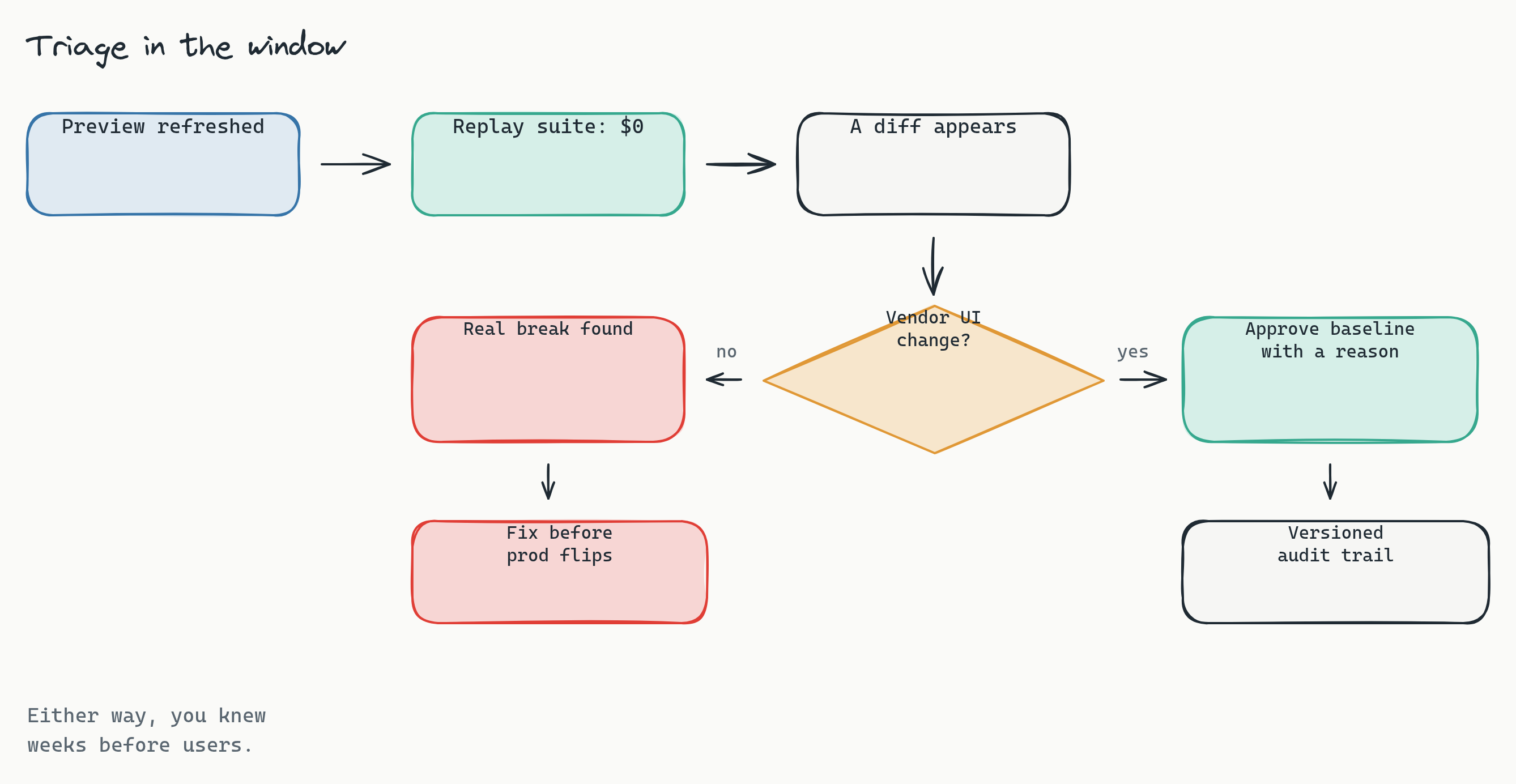
Every diff that comes back is one of exactly two things, and the triage is mechanical:
- An intentional vendor UI change. NetSuite releases move markup, spacing, and chrome. You approve the new baseline with a reason attached, and the approval is versioned, so six months from now you can see what changed in 2026.1 and who accepted it.
- A real break. A scripted form defaulting wrong, a saved search losing a column, an approval path dead-ending. You found it weeks before your users would have, with a screenshot and a diff to hand to whoever owns the fix.
The markup churn itself is mostly absorbed before it ever becomes a diff. Lastest generates selectors with a seven-layer fallback (data-testid, id, role, aria-label, text, CSS, OCR), so when a release shuffles the DOM under a button, the locator heals through the next layer instead of failing the test. That mechanism is the difference between a suite that survives 2026.2 and one that needs re-authoring every fall; we unpack it in how self-healing selectors work.
Compare the two postures honestly. The manual checklist team starts testing when the window opens and races the flip date, and the release notes decide their scope. The replay team finishes the regression pass the first morning and spends the rest of the window fixing the three things that actually broke. Same window, completely different use of it.
Your financials never leave the network
One more property matters to whoever signs off on this. Lastest is self-hosted: the browsers, the screenshots, and the baselines run on your infrastructure, so images of your P&L, customer lists, and pricing never leave your network. And because the suite seeds synthetic data from a spreadsheet, there is no reason for real customer or financial records to be anywhere near it. A sandbox full of generated customers named Test Customer S01 is a much easier conversation with your auditors than a testing SaaS holding screenshots of production.
Frequently asked
Can we skip or delay a NetSuite release? No. Releases are mandatory and Oracle schedules the upgrade of your account; there is no version pinning and no opt-out. What you can control is readiness: the Release Preview account and the sandbox refresh give you a window of a few weeks to test before production flips, and the realistic goal is to make full use of that window rather than to move it.
Does the integration user violate our MFA policy? Not if you scope it properly. The pattern is a dedicated user with a purpose-built role that has the minimum permissions the tests need, credentials held in your secret store, and activity that is easy to audit because the account does nothing but run tests. Many security policies already carry an exemption pattern for exactly this kind of automation account; if yours does not, that is a conversation to have once, not per release.
We already have SuiteScript unit tests. Is that not enough? Unit tests verify your script logic in isolation, and they are worth keeping, but they cannot tell you that a form renders correctly, that a saved search still shows the right columns, or that an approval chain routes end to end on the new version. Release regressions live at the seams between your customizations and the platform, and those seams are only visible through the rendered UI.
Do we need to test in production? No, and you should not. The whole approach runs against the Release Preview account and the refreshed sandbox with synthetic seeded data. By the time production flips, every diff has already been triaged in an environment where a failure costs nothing.
Start here
You can have this standing before the next Release Preview window opens. Book a release-readiness review: we map the 2026.1 and 2026.2 preview windows against your critical order-to-cash and record-to-report flows, size the scenario matrix, and hand back the suite structure and the auth-bridge plan for your sandbox. Want to see what the output looks like? See a sample diff report from a real replay run. Deployment is self-hosted by default, so screenshots of your financials stay inside your network. The cross-platform version of this recipe is in the release-testing playbook.
You cannot say no to the upgrade. But you can make saying yes routine: author the suite once, keep it green between releases, and let the replay meet the deadline that used to eat your team's month, twice a year, forever, with the evidence trail landing in your own systems each time.