
Manual visual testing is expensive, slow, and error-prone. You know the drill: a developer pushes a CSS change, a button shifts three pixels to the left, and suddenly your checkout flow breaks in production. Unit tests pass, but the visual bug slips through. Cloud tools like Percy, Applitools, and Chromatic solve this problem, but they lock you into per-snapshot or per-seat pricing that gets more expensive the more you test.
This is where the visual regression demo from Lastest changes the game. Lastest is a free, open source visual regression testing tool you can self-host with AI-powered test generation and a zero-token replay model that removes ongoing per-snapshot costs. Self-hosting is free forever under an FSL-1.1 license; the managed Lastest Cloud is a flat $299/month with no per-seat or per-screenshot fees. In this walkthrough you'll get a practical demo of Lastest, step-by-step CI/CD setup, a direct comparison with competitors, and a clear explanation of why self-hosted visual testing matters for European enterprises in 2026.
What Is Visual Regression Testing (and Why Your Team Needs It)
Visual regression testing is an automated process that compares screenshots of your UI before and after code changes. It catches unintended visual differences - misplaced buttons, broken layouts, or color shifts - before they reach users. Unlike functional tests that check if a button works, visual tests verify that it looks correct.
Manual UI review fails at scale for three reasons. First, human reviewers miss subtle differences: a two-pixel shift in a 1000-pixel layout is invisible to the naked eye during a quick glance. Second, manual testing is slow; reviewing a full application visually takes hours. Third, it's inconsistent, because two different reviewers will catch different bugs. Industry surveys consistently put the cost of fixing a defect in production at many times what it costs to catch the same defect earlier in the cycle, which is exactly why automated detection on every push pays for itself.
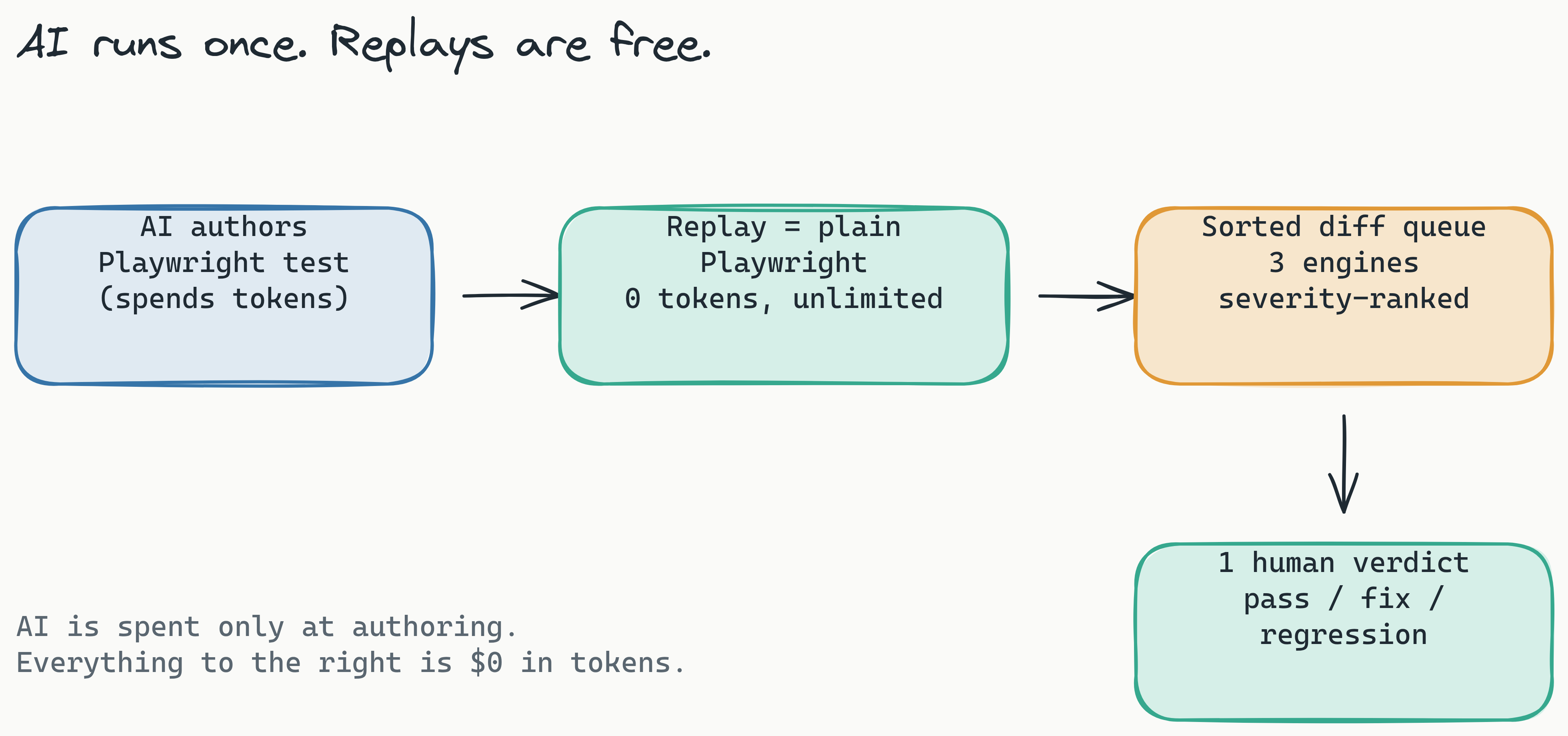
Automated visual regression tools solve these problems, but most come with a catch. Cloud solutions like Percy, Applitools, and Chromatic charge per snapshot or per seat, which means every CI run costs money and the bill grows with your test volume. Lastest approaches this differently. AI runs only when you create or fix a test; after that, every replay is plain Playwright execution at zero tokens. Self-hosted, your screenshots and replays are unlimited regardless of volume, and the data stays on your infrastructure.
What is visual regression testing?: Visual regression testing automates the comparison of UI screenshots to catch unintended visual differences. It verifies that the user interface looks correct after code changes, filling the gap left by standard functional tests. This process is essential for preventing layout bugs from reaching production.
Lastest in Action - A 2-Minute Demo Walkthrough
A Lastest visual regression demo typically takes under two minutes from setup to first result. Here's exactly how it works. We'll walk through a real scenario: a developer pushes a CSS change that shifts the checkout button to the left, and we need to catch it before it reaches production.
Step 1: Choose Your Deployment
You have two paths. For self-hosted, run docker-compose up and everything starts locally on your server. The dashboard becomes available at http://localhost:3000. For the managed version, sign up at app.lastest.cloud and you're ready in under a minute. The key differentiator: with self-hosted, all test data stays on your infrastructure and there is no license fee at all. See the self-host guide for production setup.
Step 2: Generate AI-Powered Tests
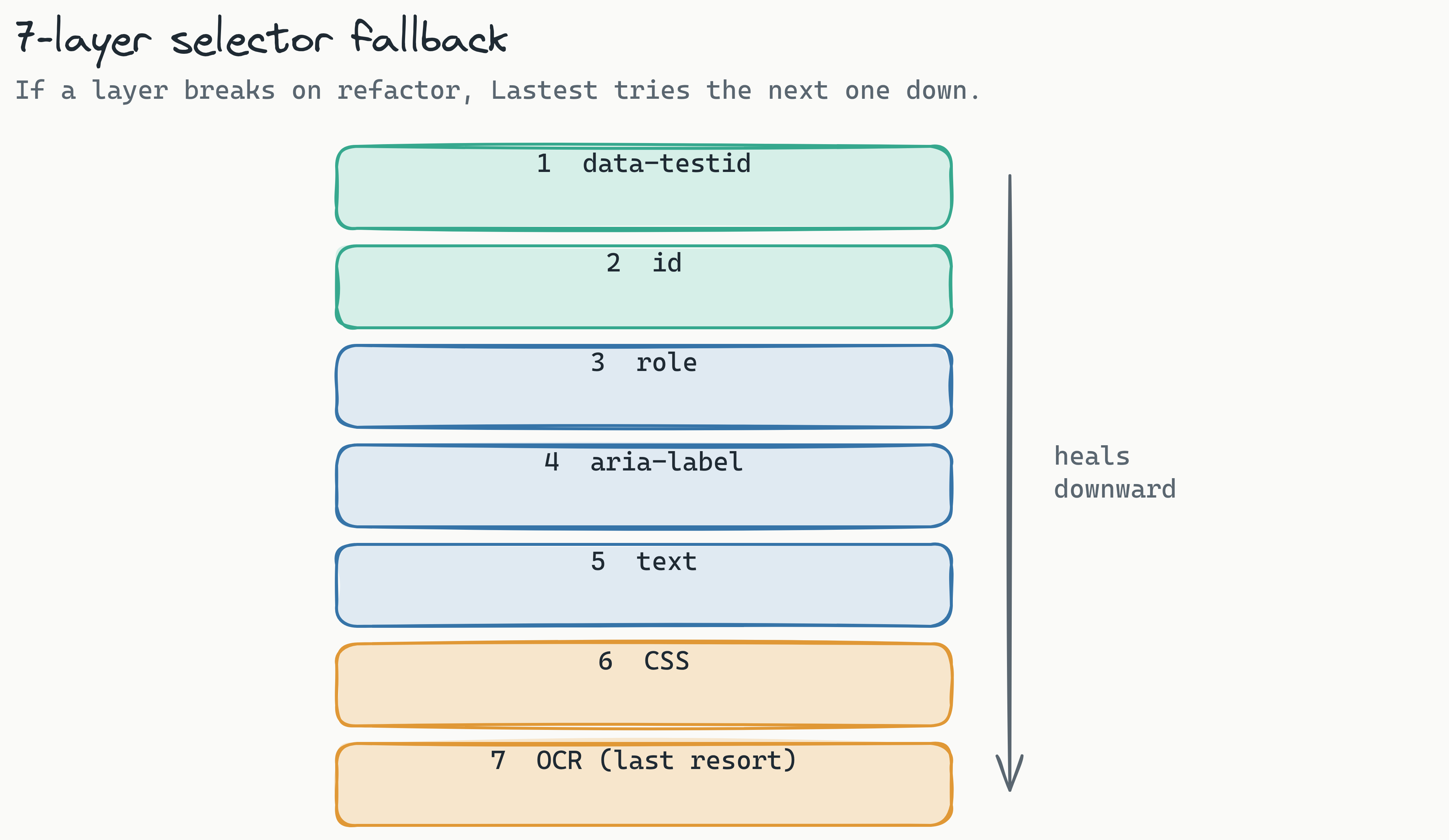
From the dashboard, enter your application's URL, an OpenAPI spec, or a markdown PRD. Lastest scans your app and generates resilient Playwright tests. Claude (or whichever provider you bring) writes the code with a 7-layer selector fallback – data-testid, id, role, aria-label, text, CSS, then OCR – so the tests survive refactors that would break hand-written selectors. Route Discovery scans your source for paths the spec missed. You only spend AI when you author or heal a test; the replays that follow are free.
You can run this three ways depending on how much oversight you want: AI-Free recording (air-gapped, no API keys), AI-Assisted (AI proposes, a human reviews every change), or Full Autonomous via the Play Agent, an 11-step pipeline of specialized sub-agents that plan, generate, run, and fix tests on their own. Pause, approve, or skip any step.
Step 3: Run Your First Visual Regression Test
Integrate Lastest into your CI/CD pipeline. For GitHub Actions, add a simple YAML workflow:
name: Visual Regression Tests
on: [push]
jobs:
  visual-test:
    runs-on: ubuntu-latest
    steps:
      - uses: actions/checkout@v4
      - name: Run Lastest
        run: npx lastest run --base-url http://your-staging-url.com
The pipeline runs against your staging environment, captures baseline screenshots, and compares them against your production UI.
Step 4: Review Diffs in the Human Oversight Dashboard
When the pipeline detects a visual difference, it fails. Open the Lastest dashboard to review the diff. You get three diff engines to choose from:
- Pixel (Pixelmatch): pixel-perfect and fast, but noisy on anti-aliasing
- Structural (SSIM): DOM and layout-aware, catches structural shifts
- Perceptual (Butteraugli): human-eye aligned, flags real bugs while ignoring font and anti-aliasing noise
Stabilization features keep screenshots consistent across machines: OCR-aware text diffing, timestamp freezing, network-idle and font-loading waits, DOM stability detection, and auto-masking of dynamic content. The reviewer renders exactly one of three verdicts – pass, fix, or regression – and the AI never approves its own output. Every failure is also auto-classified as a real regression, flake, environment issue, or test-maintenance need, with a confidence score and reasoning, so reviewers triage the signal first.
Step 5: Zero-Token Replays
After the first run, every subsequent replay – whether triggered by a new commit, a manual re-run, or a scheduled test – costs zero tokens, because it is plain Playwright execution. This is the fundamental pricing difference from competitors. Percy charges per snapshot for every single run. Lastest spends AI only when you author or heal a test, then replays it as many times a day as you like for free. Smart Run goes further: it reads your git diff and runs only the tests your change actually touches.
How Lastest Compares to Percy, Applitools, and Chromatic
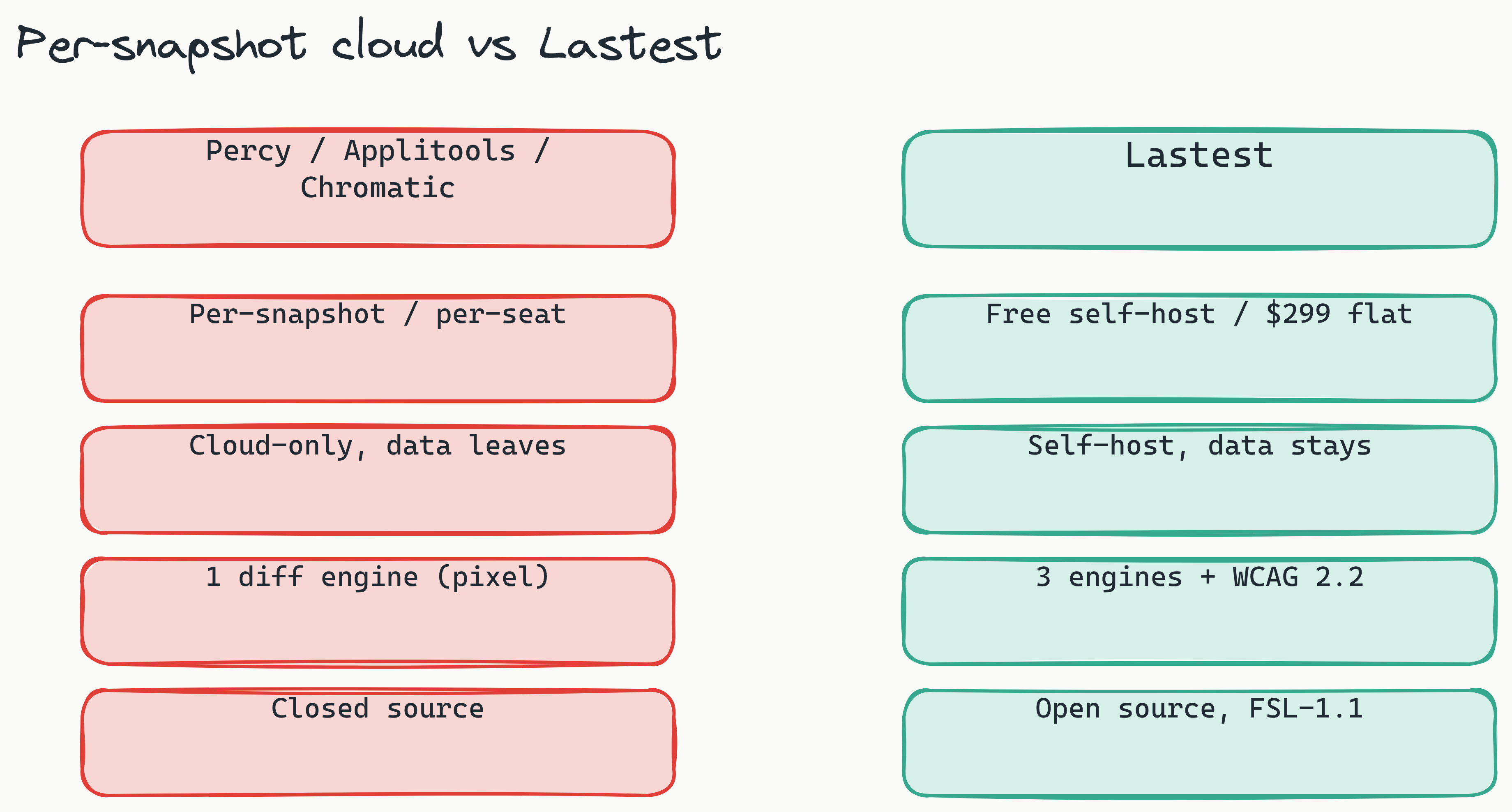
The visual regression testing market has established players, but each comes with trade-offs that matter for enterprise teams. Here's a direct comparison based on the features that actually affect your workflow and budget. For the long-form breakdown, see Lastest vs Percy vs Applitools and Chromatic vs Lastest.
Lastest vs. the Competition: A Side-by-Side Demo Comparison
| Feature | Lastest | Percy | Applitools | Chromatic |
|---|---|---|---|---|
| Pricing Model | Free self-hosted, or flat $299/mo Cloud; zero-token replays | Per-snapshot (from ~$199/mo) | Per-seat / per-checkpoint (from ~$699/mo) | Per-snapshot (from ~$179/mo) |
| Self-Hosted | Yes (Docker) | No | No | No |
| Open Source | Yes | No | No | No |
| AI Test Generation | Yes | No | Limited | No |
| Diff Engines | 3 (pixel, structural, perceptual) | 1 (pixel) | 2 (pixel, AI) | 1 (pixel) |
| Framework Flexibility | Any Playwright-supported framework | Any framework | Any framework | Storybook only |
| GDPR Compliant | Yes (self-hosted) | Cloud-only | Cloud-only | Cloud-only |
Pricing is the clearest differentiator. Percy's per-snapshot model means a team running 50 tests across 10 CI builds per day pays for 500 snapshots daily. With Lastest you spend AI only when you author or heal a test, then run all those replays for free. Self-hosted, the volume is unlimited and the license is $0 forever; on Cloud the price is a flat $299/month no matter how many screenshots or seats you use. Over a quarter, the cost difference is substantial.
Deployment is the second key differentiator. For European enterprises subject to GDPR, cloud-only tools create data sovereignty risks. Visual tests capture application data, including user-facing content, that may include personal data. Lastest's self-hosted Docker deployment means screenshots never leave your network.
Chromatic is tied exclusively to Storybook. If your team uses any other component library or framework, Chromatic is not an option. Lastest works with Playwright, which supports React, Vue, Angular, Svelte, Next.js, Nuxt, and more.
Is Lastest better than Percy for compliance?: Yes, for teams requiring data sovereignty, Lastest's self-hosted model offers a significant advantage over Percy's cloud-only approach. By running on your own infrastructure with Docker, Lastest ensures all visual test data remains behind your firewall, facilitating GDPR compliance.
Why Self-Hosted Visual Regression Testing Matters for European Enterprises
For enterprise teams in 2026, self-hosted visual regression testing is no longer a nice-to-have; it's a compliance and cost necessity, especially for organizations under GDPR. The regulation requires that personal data of EU citizens remains within adequate jurisdictions. When you use a US-based cloud visual testing tool, your application screenshots, which may contain user names, addresses, or other personal data, are processed and stored on American servers.
Self-hosted visual regression testing solves this problem directly. Lastest runs on your infrastructure, behind your firewall, on your terms. There is no third-party access to your test data because the screenshots never leave your network.
Cost is the second major advantage. Self-hosting Lastest is free forever under its FSL-1.1 license, with no per-snapshot and no per-seat fees. You spend AI tokens only when authoring or healing tests; every replay after that is free and unlimited. For a mid-size e-commerce business running 100 tests across 20 CI builds daily, that removes a recurring per-snapshot bill that would otherwise climb with every new test.
Bring your own AI keeps you out of lock-in on the model side too. Lastest works with Claude CLI, the Anthropic API, OpenRouter, OpenAI, or local Ollama models, and you can even use a different provider for diff analysis than for generation.
Security is the third benefit. With Lastest's self-hosted model, you control the infrastructure. "Your server, your rules" is not just a tagline: it means no third-party access to your test data, no risk of a vendor data breach exposing your application screenshots, and full auditability of who accesses what. Open source adds another layer of trust, because you can inspect the code, audit the security practices, and customize the tool to fit your workflow.
Accessibility compliance comes along for free. Lastest runs axe-core on every screenshot and produces a 0-100 WCAG 2.2 AA score with severity-weighted deductions and per-build trend sparklines, so the same run that catches visual regressions also tracks your accessibility posture over time.
For Germany-based engineering leads and IT directors, these factors are not optional. Data sovereignty is a legal requirement, not a preference, and Lastest's self-hosted model makes compliance straightforward. Teams that handle compliance-sensitive workloads can dig deeper in the enterprise compliance guide.
Setting Up Your First Visual Regression Test with Lastest
To set up visual regression tests in CI/CD with Lastest, start by deploying the dashboard with Docker, then generate AI-powered tests, and integrate them into your GitHub Actions or GitLab CI pipeline. Lastest ships a reusable GitHub Action, posts GitLab MR comments (self-hosted GitLab included), and supports webhook and scheduled cron triggers. Here's the exact workflow; the CI/CD guide goes deeper.
Prerequisites
- Docker installed on your server or local machine
- A Node.js project with Playwright configured
- Access to your application's staging or production URL
Step 1: Deploy Lastest with Docker
git clone https://github.com/las-team/lastest
cd lastest
docker-compose up -d
The dashboard becomes available at http://localhost:3000. For production deployments, configure TLS and authentication following the project's documentation.
Step 2: Generate Your First AI Test
Open the dashboard and enter your application's URL. Lastest scans the application, identifies interactive elements and routes, and generates Playwright-based visual tests with self-healing selectors. You spend AI only during this authoring step; once the tests are saved they replay indefinitely at zero token cost.
Review the generated tests in the dashboard. Every edit, AI-fix, and restore is versioned with a reason, so you can edit, add, or remove tests, then compose a build by cherry-picking the versions you want before running them.
Step 3: Integrate with GitHub Actions
Create a .github/workflows/visual-tests.yml file in your repository:
name: Visual Regression Tests
on: [push]
jobs:
  visual-test:
    runs-on: ubuntu-latest
    steps:
      - uses: actions/checkout@v4
      - name: Run Lastest Visual Tests
        run: npx lastest run --base-url http://your-app.com --api-key ${{ secrets.LASTEST_API_KEY }}
Replace http://your-app.com with your staging environment URL and set your API key as a GitHub secret. Every push triggers a visual regression test run.
Step 4: Review and Approve Diffs
When the pipeline detects a visual difference, it fails. Open the Lastest dashboard, review the diff using any of the three diff engines (pixel, structural, or perceptual), and decide whether the change is intentional or a bug. Approve intentional changes as new baselines. Reject buggy changes and fix the code before merging.
After the initial test generation, every CI run costs zero tokens. You can run tests daily, on every commit, or on demand, and the pricing doesn't change.
Common Questions About Lastest (FAQ)
Q: Is Lastest free for self-hosted use?
A: Yes, the self-hosted version is completely free and open source under an FSL-1.1 license. You spend AI tokens only when authoring or healing a test; replays are zero tokens forever. There are no subscription fees, no per-snapshot charges, and no per-seat charges for the self-hosted deployment. If you'd rather skip the ops, Lastest Cloud is a flat $299/month.
Q: How does zero-token visual regression pricing work?
A: AI runs only when you create or fix a test. Every replay after that, whether local, in CI/CD, or manual, is plain Playwright execution and costs zero tokens. This eliminates the per-snapshot pricing that makes Percy, Applitools, and Chromatic expensive at scale. You spend once to author the test, then run it unlimited times for free.
Q: Can I run Lastest without Docker?
A: Docker is the recommended and supported deployment method, and docker-compose up is the simplest path to get running. For Cloud users no setup is needed; just sign up at app.lastest.cloud. The Cloud version offers the same features with zero infrastructure management.
Q: What frameworks does Lastest support?
A: Lastest uses Playwright under the hood, so it supports any framework Playwright supports: React, Vue, Angular, Svelte, Next.js, Nuxt, and more. Unlike Chromatic, which is tied to Storybook, Lastest works with your existing component library regardless of how you build and render components.
Q: How does Lastest handle CI/CD failures?
A: When a visual diff is detected, the CI pipeline fails and the dashboard surfaces the difference. Your team reviews the diff, approves it as a new baseline if intentional, or rejects it if it's a bug. The human oversight dashboard ensures that no change goes to production without review.
Get Started with the Lastest Visual Regression Demo Today
Visual regression testing doesn't have to be expensive or locked into a cloud vendor's pricing model. Lastest gives you AI-powered test generation, zero-token replays, full self-hosted control, and open-source transparency, all while keeping your screenshots on your infrastructure for GDPR compliance.
For enterprise teams tired of per-snapshot pricing and cloud-only tools, Lastest offers a practical, cost-effective alternative. You can deploy in minutes with docker-compose up, generate your first AI test suite in seconds, and run unlimited visual regression tests at zero ongoing cost. Coding agents can drive the whole thing too, through the Lastest MCP server and its ~20 tools.
Ready to see Lastest in action? Self-host it free in minutes, or skip the ops and try Lastest Cloud at a flat $299/month, no per-snapshot or per-seat fees. Browse the full feature set, watch the live demos, and read the open-source code on GitHub to see exactly what you're getting before you deploy on your own infrastructure with full data sovereignty.