Most enterprise systems store records. Veeva Vault PromoMats and Vault MedComms store something stranger: they store the thing a human being will eventually look at. A promotional claim, a fair-balance block, an ISI, a detail aid slide, an email template that lands in an HCP's inbox. The record in the vault is the wrapper. The rendering is the product.
That distinction is why so many PromoMats test suites are quietly useless. A team wires up an API test, pushes a document through the MLR lifecycle, asserts that the status field reads Approved, and calls the flow covered. It is covered, in the sense that the state machine works. But nothing in that test would have caught a viewable rendition that dropped the last page of the ISI, an anchored annotation that slid two hundred pixels off the claim it was attached to, or an Approved Email template that renders correctly in Vault's preview and collapses in Outlook.
Those are the failures that matter here, because in a regulated commercial organization a rendering bug is not a cosmetic bug. It is a piece of unapproved promotional content in front of a healthcare professional. This post is the recipe for testing PromoMats and MedComms the way they actually fail. It builds on the Vault CRM testing recipe, which covers the auth bridge and the data-seeding pattern in depth, and it will not repeat that groundwork. What follows is what changes when the artifact under test is a rendered page rather than a form.
One asset, four renderings, four chances to break
Start by drawing the actual surface area, because it is bigger than the vault UI. A single approved asset in PromoMats is rendered at least four different ways before it reaches anyone, and each rendering is produced by different code on a different schedule.

- The viewable rendition. Vault generates a PDF rendition of the source file, and that rendition is the surface the MLR reviewer annotates and signs off on. If rendition generation degrades, your reviewers approved something other than what you think they approved.
- The CLM distribution package. Approved content is published to closed-loop marketing as a package of HTML5 slides that a rep drives on a tablet. Different renderer, different viewport, different interaction model.
- The Approved Email template. Templates and fragments are assembled at send time with tokens resolved against the recipient. What you preview in Vault is not what a mail client renders.
- The localized variant. The same claim in twelve markets, in languages whose text runs thirty percent longer than English, inside a layout designed for English.
Four renderings, one Approved flag. That flag is the same green whether all four are correct or one is. Any suite whose assertions bottom out at record state is testing the wrapper and ignoring the product.
What to assert instead: the nine-layer verify, tuned for content
Lastest gates a build on nine verification layers, and PromoMats is a case where the default weighting needs adjusting, because the usual advice (treat text diffs as review-only noise) is exactly wrong here. In a CRM, copy changes constantly and text diffs are chatter. In a promotional content vault, the copy is the regulated artifact. A word that changed in an ISI is not noise, it is the entire reason the system exists.
Here is the band assignment we would start with. Everything in ENFORCE fails the build; everything in LOG produces signal without blocking.
| Layer | Band | Why, for PromoMats specifically |
|---|---|---|
| visual | ENFORCE | Perceptual diffing on the rendition and the CLM slide. This is the primary gate: it is the only layer that sees a rendering regression. |
| text | ENFORCE | Promoted out of the usual review-only band. Extracted copy from an approved rendition should be byte-stable. A changed word in fair balance is a finding, not chatter. |
| network | ENFORCE | A 404 on a fragment, an asset, or a rendition stream means the reviewer is looking at an incomplete document. |
| console | ENFORCE | CLM slides are HTML5 apps. A JavaScript error in a detail aid is a broken detail aid. |
| url | ENFORCE | Catches auth and SSO redirect drift, same as any Vault app. |
| dom | LOG | Useful for annotation-anchor work (below), noisy on document lists. |
| a11y | LOG | WCAG 2.2 AA via axe-core. Worth trending on CLM slides, which are frequently the worst offenders. |
| perf | LOG | Rendition load time is a real reviewer complaint. Trend it, do not gate on it. |
| design | DISABLE | Off until you have a design-token set to compare brand assets against. Enable later with a config, no code change. |
The promotion of text from LOG to ENFORCE is the single most important configuration decision in this post. If you take nothing else from it, take that.
The annotation layer: where pixel diffing earns its keep
MLR review in PromoMats runs on anchored annotations. A reviewer draws a box on the rendition, attaches a comment, and that annotation is stored against a coordinate on a page. The approval record is the set of annotations and their resolutions.
Now consider what happens when anything upstream shifts the rendition by a few millimeters: a font substitution on the rendering host, a change in how a PDF page is rasterized, a new version of the source file that reflows a paragraph. The annotation coordinates do not move. The content underneath them does.
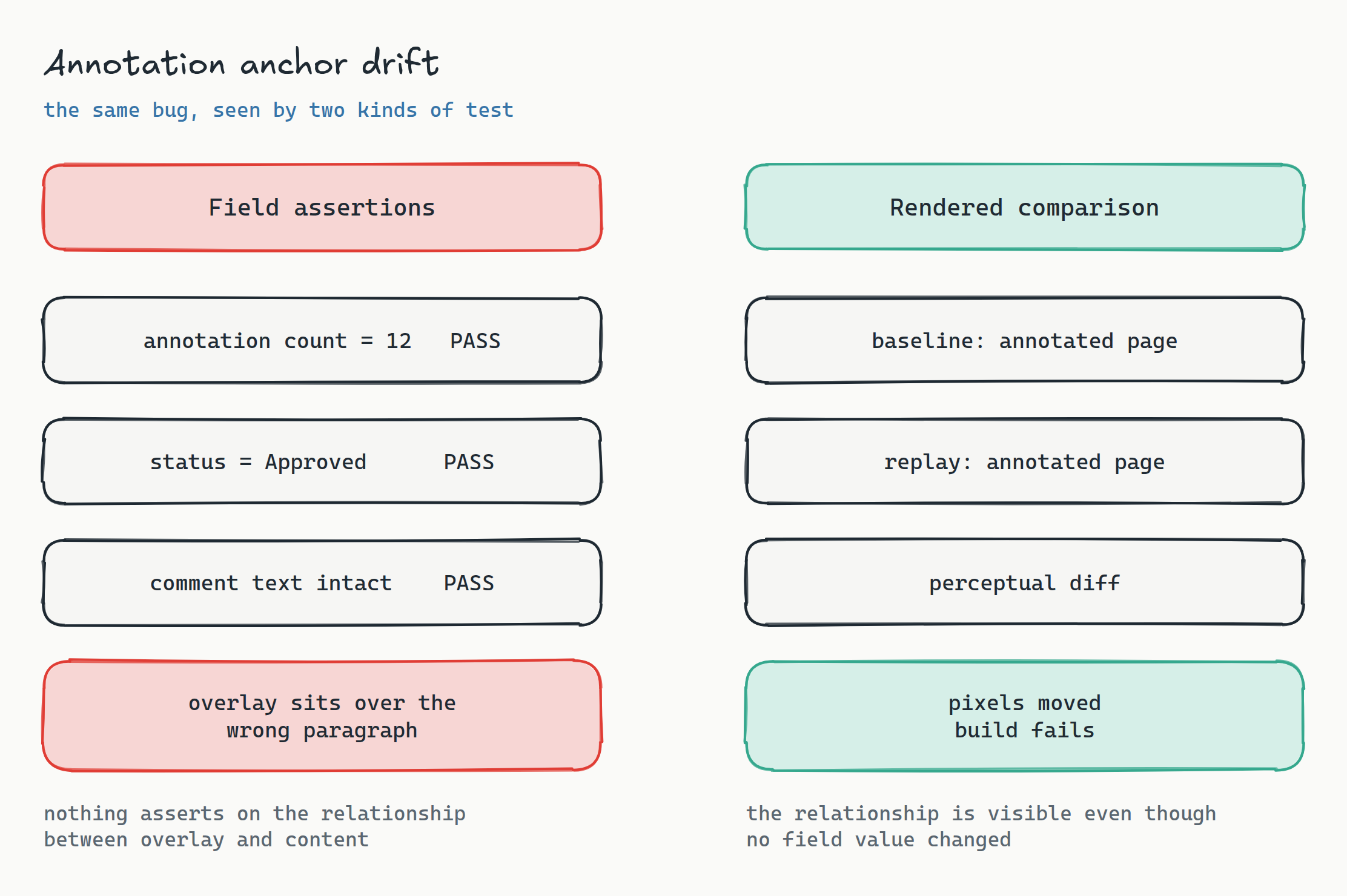
This is the canonical case for visual regression over assertion-based testing, and it is worth being precise about why. A DOM or API assertion can only check values it knows to look for. The annotation count is right. The page number is right. The comment text is right. The relationship between the overlay and the content beneath it is not expressible as a field, which is why nobody asserts on it, which is why it breaks silently. A stored baseline of the rendered, annotated page compares the relationship directly. We wrote up the general form of this argument in DOM diffing versus visual comparison; PromoMats is the sharpest real-world instance of it we have run into.
Practically: capture the rendition viewer with annotations displayed, at a fixed zoom and a fixed viewport, as a scenario per document type. Use perceptual diffing (Butteraugli) rather than strict pixel matching so that anti-aliasing differences between runs do not light the build up, and mask the annotation sidebar where timestamps and reviewer names live.
Approved Email, and why 26R2 made this newly worth testing
Approved Email is the highest-stakes rendering path in the stack, because the output leaves your infrastructure entirely and lands in a mail client you do not control. A template is assembled from fragments, tokens are resolved against the recipient and sender, and the result is sent. There is no reviewer between assembly and delivery.
Veeva's 26R2 release added Approved Email Automation, which pushes email content from a PromoMats vault into Vault CRM over a near real-time vault-to-vault connection, synchronizing templates, email fragments, and template fragments along with their renditions and relationships. That is a genuine improvement over the older batch sync, and it removes a class of version-lag problems. It also means the path from approval to the field is new code on a new schedule, which is precisely the condition under which you want a regression suite already standing.
Three scenarios worth authoring, in priority order:
- Token resolution. Render the template preview with a seeded account, seeded sender, and seeded product. Baseline it. An unresolved token renders as literal markup in production, and it is visually obvious in a diff and invisible to a status check.
- Fragment composition. Templates that pull optional fragments have a combinatorial surface. Pick the three or four combinations your compliance team actually cares about, usually the ones that carry ISI or fair balance, and baseline each.
- Post-sync fidelity. After the vault-to-vault sync, open the synced template on the CRM side and compare it against the PromoMats-side baseline. This is the assertion that the new automation path did not lose a rendition or a relationship, and it is a comparison no single-system test can make.
That third one is the interesting scenario architecturally. It is a cross-vault comparison: one baseline captured in the source system, one capture in the destination system, compared against each other rather than each against its own history. Lastest handles this as an ordinary scenario because a baseline is just a stored image with a name, and nothing requires the comparison to be against the same URL it came from.
CLM slides: an HTML5 app that nobody tests like one
A CLM presentation is a bundle of HTML5 slides with JavaScript, packaged and published to the field. Every practice you would apply to a web application applies here, and almost nobody applies them, because the artifact arrives through a content workflow rather than a build pipeline and so it never touches CI.
Run the slides in an embedded browser at tablet viewport, drive the key message navigation, and gate on the console layer. Broken slide logic is common, it is silent in the vault, and it surfaces in front of a physician. If your CLM content is authored by an agency, this suite is also the most useful acceptance gate you can hand them: a shareable build link showing exactly which slide broke, on which interaction, against which baseline.
Localization: one claim, twelve layouts
The multi-market case is where a visual suite pays for itself fastest, because the failure mode is entirely geometric and entirely invisible to assertions. German runs long and blows out a fixed-height fair-balance box. Right-to-left markets mirror a layout that had a hardcoded margin. A Japanese line break lands mid-term.
Model this as one scenario per locale over a small set of representative assets, rather than every locale over every asset. Six assets across twelve markets is seventy-two baselines, which sounds like a lot until you remember that replay is deterministic Playwright execution against stored images and costs nothing per run. The reason teams do not do this today is not that seventy-two checks are expensive. It is that seventy-two checks done by hand are a week of somebody's life, three times a year.
The cadence problem, and what replay does to it
Vault ships three general releases a year, each preceded by Limited Release phases. 26R1 went general in April 2026 and 26R2 in August 2026, and 26R3 is already on the calendar. Every one of those is an opportunity for a rendering path to shift underneath approved content, and every one of them currently triggers the same manual regression pass: somebody opens a sandbox, clicks through the important assets, and eyeballs them.
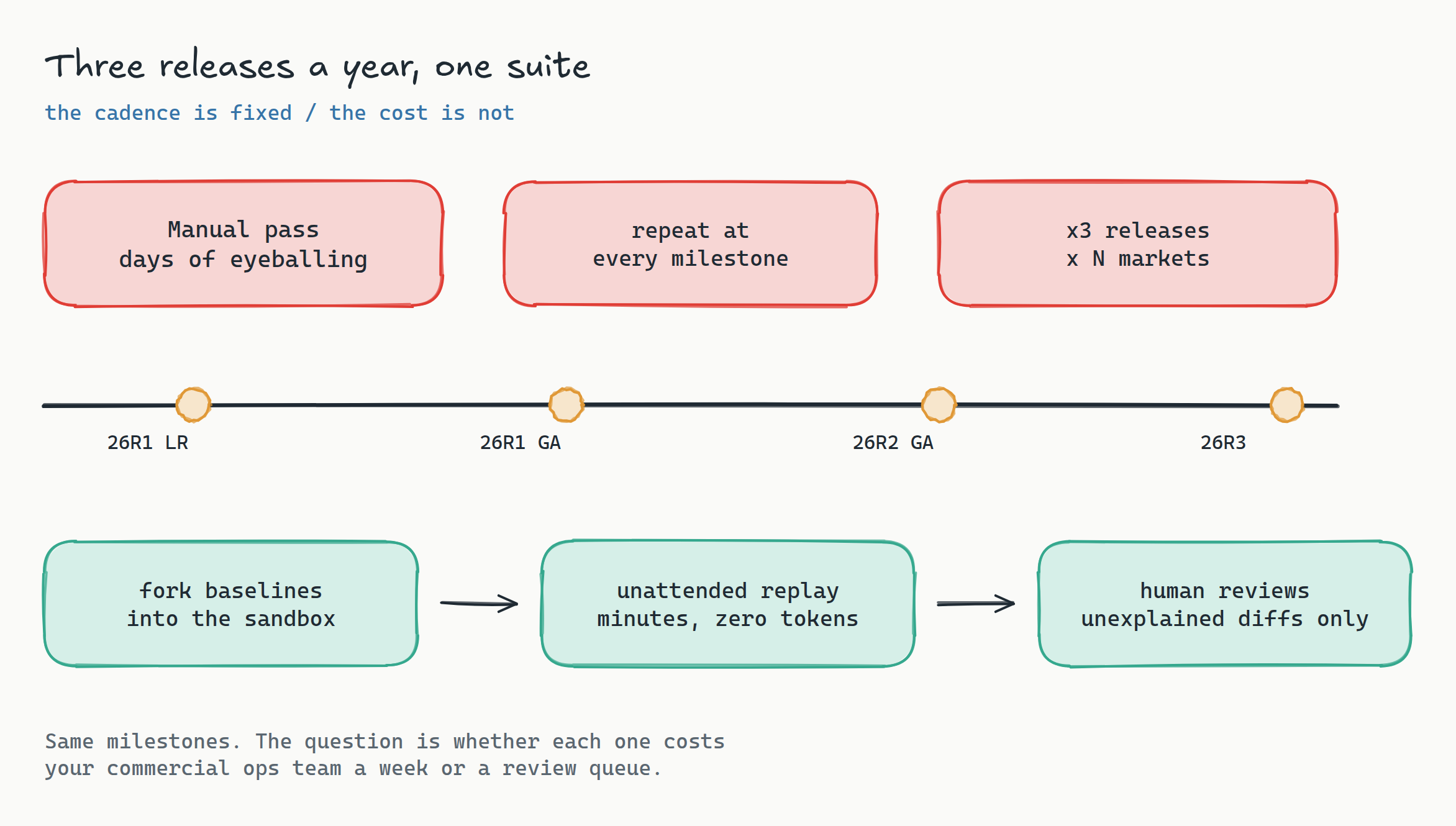
The shape of the fix is the same one from the CRM recipe. Point the suite at the Limited Release sandbox, fork the baselines for that branch, run the replay unattended, and put a human on the diffs the system could not explain. Failures come back auto-classified as real regression, flaky, environment, or test maintenance, with a confidence score and a reason, so triage starts from a sorted list rather than a wall of red.
What to freeze before your first green build
Content vaults are full of moving parts that will light up a diff on the first run and teach your team to ignore the tool. Freeze these before you baseline anything:
- Timestamps and relative dates. "Modified 2 hours ago", expiry countdowns, and review due dates. Turn on timestamp freezing and mask the audit-trail column outright.
- Document numbers and version labels. Seeded fixtures keep these stable; freshly created test documents will not.
- Reviewer names and avatars. Mask the annotation sidebar header.
- CLM statistics. 26R2 pulls CLM performance data back into the source vault and surfaces it next to the asset. Useful for marketers, pure noise for a baseline. Mask the panel.
- Anything that reads from OpenData or a live product catalog. Seed it or mask it.
If you want the general version of this discipline, reducing false positives in visual regression testing covers the stabilization toolkit in detail. The Vault-specific short version: mask aggressively on the first pass, then remove masks one at a time as you learn which regions are genuinely stable. Teams that do it the other way around abandon the suite in week three.
The honest prerequisites
Everything above runs on the same four prerequisites as any Vault suite, and it is worth stating them plainly rather than discovering them mid-project.
- A sandbox or partner vault with a password-auth integration user exempt from your org's SSO and MFA. This gates the entire approach. Get it first.
- Seeded, frozen content fixtures, delivered as a VPK, so that the documents you baseline are the documents you re-run against.
- Network reachability from the browser pool to the vault. Public hosts work directly; a private or VPN-gated vault needs a Remote Runner inside the network.
- For the Approved Email work, a connected CRM-side vault, because the post-sync comparison needs both ends.
Two points land in your favor with a regulated buyer. Lastest is self-hosted by default, so renditions of your unreleased promotional content never leave your network, which is the first question any pharma security review asks. And because the fixtures are synthetic, there is no reason for real HCP or patient data to be near the suite at all. The formal version of that conversation lives in the enterprise compliance guide.
Frequently asked
Can I test the rendition without opening the vault UI? You can pull a rendition through the API and compare the file, and that is a reasonable smoke test. But it does not cover the annotation overlay, the viewer controls, or the reviewer's actual field of view, which is where the interesting failures live. Do both; gate on the rendered view.
Does this replace MLR review? No, and it should not try to. MLR is a human judgment about whether content is compliant. This suite answers a narrower question: is the content the reviewer is looking at, and the content that later reaches the field, the same content that was approved. Those are different questions and the second one is the one currently going unasked.
How many baselines is a realistic starting point? Ten to fifteen. One rendition view per major document type, two or three Approved Email templates, one CLM deck, and your top two or three markets. Get that green and stable before you expand, because a suite that is red for reasons nobody trusts is worse than no suite.
What about MedComms specifically? The same recipe, with the emphasis shifted. Medical content has fewer distribution renderings and far more scrutiny on the text layer, so the text promotion matters even more, and the CLM section mostly does not apply. Standard response documents and their approved renditions are the scenarios to start with.
Start here
PromoMats is the system where the gap between "the record says approved" and "the thing an HCP sees is correct" is widest, and it is a gap that no amount of workflow testing closes. Book a release-readiness review and we will map your release windows against your content surfaces, size the baseline set, and hand back a suite structure with the auth-bridge plan for your sandbox vault. If you would rather see the artifact before the conversation, look at a sample diff report from a real replay run, or read the cross-platform release-testing playbook. Everything is open source at github.com/las-team/lastest and self-hosting is free forever.
The one-line version: stop asserting on the status field. The status field has never been wrong. Baseline the rendering, promote the text layer, and let the replay carry the three-times-a-year pass that currently eats a week of your commercial ops team.