
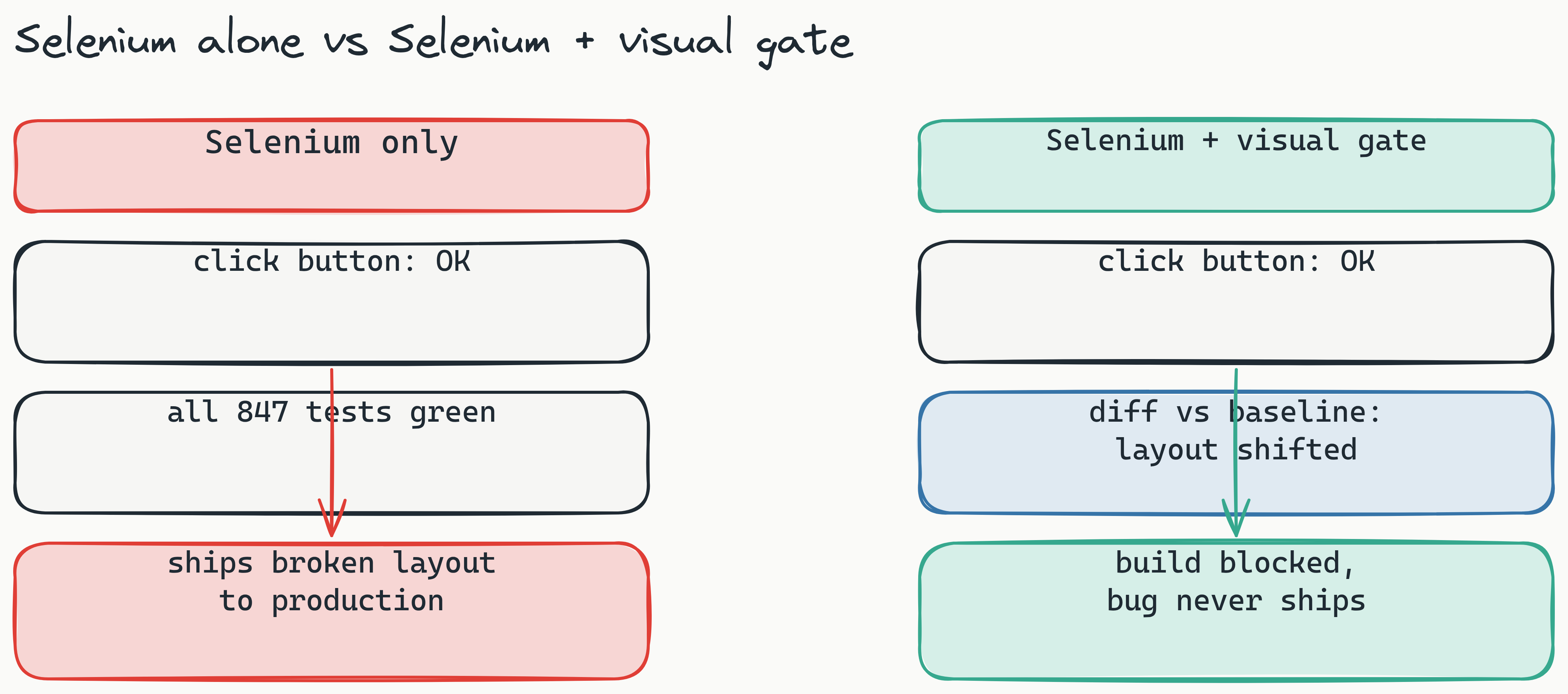
Your Selenium suite passes all 847 tests, and a single misplaced CSS class still ships a checkout button nobody can see. This is the "green test trap": functional tests confirm the button is clickable, but they never check whether a real user can see it. Visual regression testing with Selenium closes that exact gap, and wiring it into your existing suite is the highest-leverage QA move you can make in 2026. This guide covers what visual regression testing is, why Selenium needs it, how to choose a framework that does not tax you per screenshot, and a step-by-step path to add it, free and self-hosted, with AI-authored Playwright checks running beside your Selenium tests.
What is visual regression testing? Visual regression testing automatically compares UI screenshots against approved baselines to catch pixel-level visual changes that functional tests miss. It validates layout, positioning, colors, and rendering-elements Selenium cannot verify on its own.
What Is Visual Regression Testing and Why Does Selenium Need It?
Visual regression testing automatically compares UI screenshots against approved baselines to catch pixel-level visual changes. Selenium's core purpose is validating DOM behavior-does a button exist? Is it clickable? Does submitting a form trigger the right response? It does not validate whether a button is correctly positioned, has the right font size, or overlaps a critical text field. This fundamental difference-visual regression testing vs selenium testing-highlights exactly why both are essential for comprehensive quality assurance.
Here's a real-world scenario: a new global CSS rule accidentally shifts your hero section 20 pixels to the left. Selenium still finds the CTA button, clicks it, and the test passes. Your QA team greenlights the release. On production, users on smaller screens hit a broken layout where the button is pushed off the viewport. Functional pass does not equal visual pass.
Visual and functional testing answer different questions, so they catch different bugs. Industry surveys on QA consistently put a large share of escaped defects in the rendering and layout bucket, the precise category a DOM-only assertion is blind to. Adding a visual layer is the cheapest way to recover that coverage without rewriting a single Selenium test.
PAA answer: Can Selenium do visual regression testing? No, not natively. Selenium captures screenshots via its getScreenshotAs() method, but it provides no diff engine, no baseline management, and no comparison logic. You must integrate a third-party tool to add visual validation.
PAA answer: What is the difference between Selenium and visual testing? Selenium checks whether a page behaves correctly. Visual testing checks whether a page looks correct. They are complementary-you need both to ship confidently.
This is where visual regression testing selenium integration becomes essential. Without it, you are shipping code based on a partial quality signal.
Why can't Selenium alone handle visual testing? Selenium lacks three critical components for visual testing: a diff engine to compare images, baseline management to track approved versions, and thresholding to filter out rendering artifacts. These must be provided by a specialized visual testing tool.
The Selenium Gap: Functional Pass ≠ Visual Pass
The core issue is that Selenium validates behavior, not appearance. A button can exist in the DOM, be clickable, and even trigger the correct event handler-yet be completely invisible to users due to CSS issues like opacity: 0, display: none on a parent element, or being pushed off-screen by a layout shift. Selenium's WebDriver interacts with elements regardless of their visual state, creating a dangerous blind spot in your test coverage.
Real-World Cost of Visual Bugs
Visual bugs are expensive precisely because they pass every gate you have. The button renders in QA, the test is green, the deploy is approved, and the breakage only surfaces on a viewport, browser, or font stack your pipeline never exercised. For an e-commerce flow, an invisible or misplaced checkout button quietly leaks abandoned carts until someone notices the revenue dip. The point is not a headline dollar figure; it is that the failure mode is invisible to functional tests by construction, so the only way to catch it before users do is to compare what the page actually looks like against an approved baseline.
The Problem with Selenium's Native Screenshot Capabilities
Selenium WebDriver provides the getScreenshotAs() method, which captures a screenshot as a file or byte array. Here is the standard Java example:
File screenshot = ((TakesScreenshot) driver).getScreenshotAs(OutputType.FILE);
FileUtils.copyFile(screenshot, new File("./screenshots/login-page.png"));
That raw screenshot file is your starting point-and nothing more. Building a reliable visual regression system on top of it introduces several hard problems.
Limitation 1: No built-in diff engine. You have a static PNG, but no tooling to compare it against a baseline. You must build pixel-by-pixel comparison logic yourself, which is non-trivial and error-prone.
Limitation 2: No history or baseline management. Every new test run produces a new screenshot. Who decides what the "correct" baseline is? How do you reject false positives from acceptable rendering differences? Without baseline storage and approval workflows, your screenshots become noise.
Limitation 3: No thresholding or anti-aliasing handling. Screen displays render fonts and vector graphics slightly differently. A pure pixel diff will flag sub-pixel differences that no human would ever notice-generating hundreds of false alarms per sprint.
Limitation 4: Flakiness from dynamic content. Timestamps, loading spinners, ad blocks, and animated elements change between runs. Your DIY solution will produce failing "diffs" every time a date-time component updates, even though the underlying layout is identical.
PAA answer: How do I take screenshots in Selenium? Use driver.getScreenshotAs(OutputType.FILE) in Java or driver.get_screenshot_as_png() in Python. But as we just discussed, a raw screenshot is only the first step-and an incomplete one at that.
The DIY trap is real: teams invest weeks building comparison scripts, only to abandon them because the maintenance overhead exceeds the value. This is exactly why third-party tools transform how to implement visual regression testing in selenium from a hobby project into a production-grade practice.
Why do DIY screenshot comparison projects fail? Teams underestimate the complexity of baseline management, false positive filtering, and dynamic content handling. Without a dedicated tool, maintenance costs quickly outweigh the benefits.
The DIY Trap: Why Building Your Own Comparison Logic Fails at Scale
Building a custom screenshot comparison system seems straightforward at first-load two images, compare pixels, flag differences. But scaling this approach reveals hidden complexity: you need to store baselines per branch, manage test suites across environments, handle viewport differences, filter anti-aliasing artifacts, and build a review workflow. Most teams abandon their DIY solution within a few months, once the false-positive rate climbs high enough that reviewers stop trusting the diffs and quietly ignore them.
The Flakiness Factor: Dynamic Content, Fonts, and Rendering Differences
Different operating systems render fonts differently. Browser versions produce subtle rendering variations. Even the same browser on the same OS can produce slightly different pixel outputs depending on GPU acceleration settings. Without intelligent thresholding, every environment change becomes a visual regression "failure," undermining trust in your test suite.
Choosing the Best Selenium Visual Testing Framework in 2026
The market offers several options for the best selenium visual testing framework 2026, but they differ significantly in price, engine type, and deployment flexibility.
| Tool | Price | Engine Type | Open Source | Self-Hosted |
|---|---|---|---|---|
| Percy | SaaS, from ~$199/mo (per-screenshot tiers) | Pixel-based | No | No |
| Applitools | Enterprise, from ~$699/mo | AI (proprietary perceptual) | No | No |
| Chromatic | SaaS, from ~$179/mo (per-snapshot) | Pixel-based | No | No |
| BackstopJS | Free | Pixel-based | Yes | Yes |
| Lastest | Self-hosted free; Cloud $299/mo flat | AI (Pixel + Structural + Perceptual) | Yes | Yes |
Percy, Applitools, and Chromatic are well-established, but every one of them prices on a per-screenshot or per-seat model, so your bill climbs with the exact behavior you want to encourage: testing more. BackstopJS is a solid open-source alternative, but it ships a single pixel engine with no AI authoring, no perceptual mode, and no human review dashboard.
Lastest occupies a different position: open source under FSL-1.1, AI-powered, and self-hostable. It runs three diff engines, Pixelmatch (pixel), SSIM (structural), and Butteraugli (perceptual), so QA teams pick the right sensitivity per test. Self-host on your own infrastructure for $0 forever with unlimited screenshots, or run the managed Cloud for a flat $299/month with no per-seat and no per-screenshot fees. See the full feature set or the self-host guide.
PAA answer: What is the best visual regression testing tool for Selenium? It depends on your budget and compliance needs. If you want free entry with enterprise-grade AI, Lastest is your strongest option.
What diff engine should I choose for my Selenium visual tests? Pixel diff is fastest but most flakey. Perceptual diff (AI-powered) ignores imperceptible differences while catching real layout changes. Structural diff compares DOM trees and avoids rendering artifacts. Lastest uniquely offers all three engines.
The Open Source Advantage: Cost, Control, Community
Open-source visual testing tools have three structural advantages over proprietary SaaS. First, cost: self-hosted Lastest is $0 forever with unlimited screenshots, while per-screenshot vendors charge more as you test more. Second, control: you own your data, your infrastructure, and your upgrade cadence. Third, transparency: the diff algorithms and API are public on GitHub, so you can audit exactly how a verdict was reached instead of trusting a black box.
When to Choose Paid: Enterprise Compliance, Managed Infrastructure
Managed SaaS makes sense when your team has no DevOps capacity to run self-hosted infrastructure, or when policy mandates a vendor-managed service. Lastest's Cloud at a flat $299/month gives you that managed option while keeping the same open-source codebase, the same three diff engines, and pricing that does not move when your screenshot count does.
How to Integrate Visual Regression Testing into Your Selenium Suite (Step-by-Step)
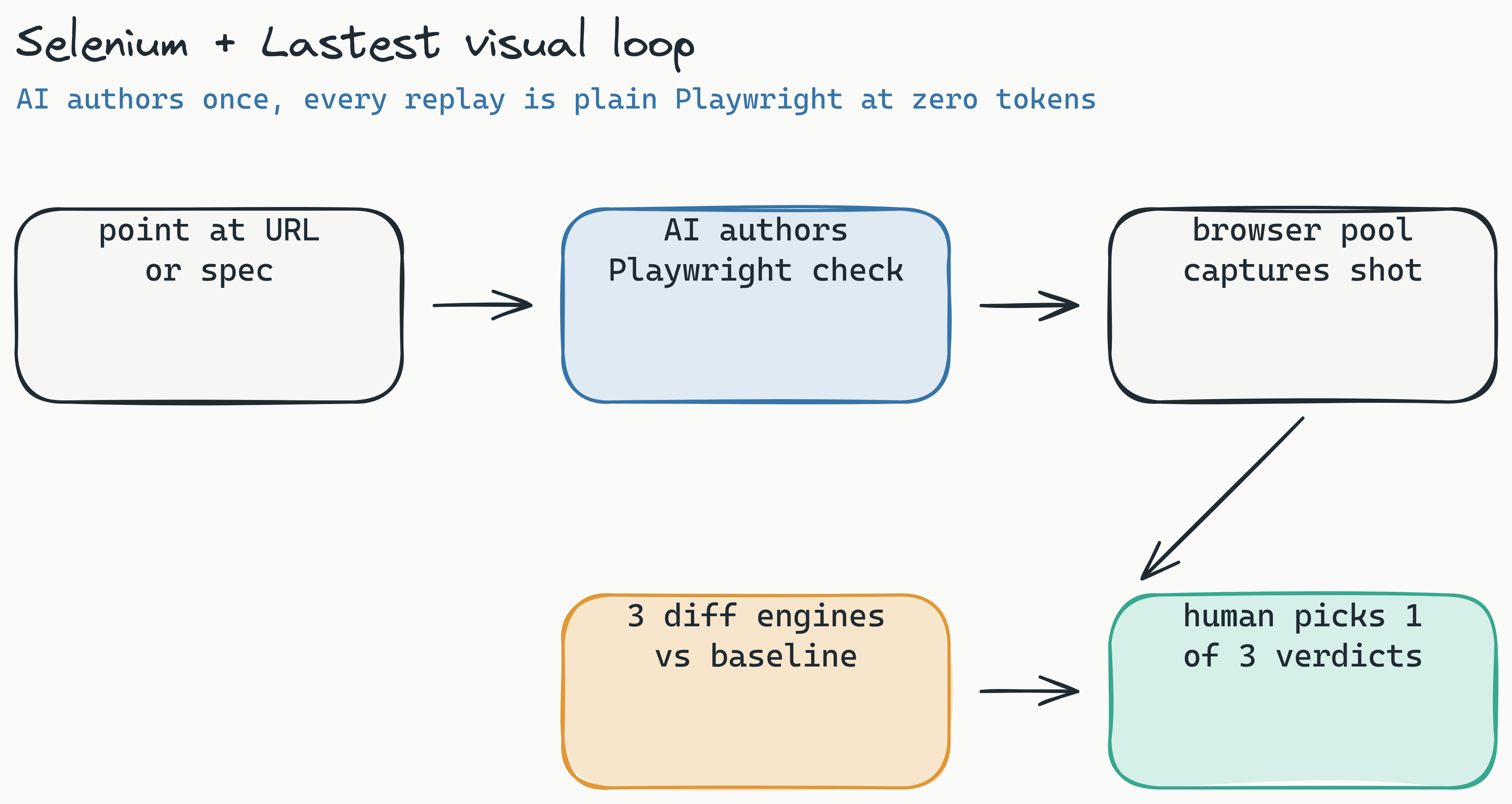
There are two clean ways to put visual regression testing alongside Selenium with Lastest. The pragmatic one keeps your Selenium suite for behavior and lets Lastest author resilient Playwright checks for the visual layer, so each tool does what it is best at. Follow these five steps.
Step 1: Install Lastest
Self-hosted (recommended for full control):
git clone https://github.com/las-team/lastest.git
cd lastest
docker compose up
The web dashboard comes up locally, with a containerized Chromium browser pool already provisioned, so there is no separate Playwright install to manage. Cloud (managed): sign up at lastest.cloud, create an organization, and copy your API key.
Step 2: Point Lastest at the URL Your Selenium Test Exercises
You do not hand-write the visual test. Give Lastest the route (or an OpenAPI spec or a markdown user story) and its AI authors a resilient Playwright check, complete with a 7-layer selector fallback (data-testid, id, role, aria-label, text, CSS, then OCR) so the check survives the same refactors that break hand-written Selenium locators. You stay in control: every AI-proposed change is queued for human review, never auto-merged.
Step 3: Capture and Compare
On each run, Lastest captures the screenshot through its embedded browser pool and compares it against the approved baseline. You choose the engine per check: Pixelmatch for pixel-exact static pages, SSIM for layout-aware structural checks, or Butteraugli for perceptual diffs that ignore anti-aliasing and font noise while still catching real shifts. Stabilization (network-idle wait, font-load wait, timestamp freezing, auto-masking of dynamic regions) keeps screenshots consistent across OS and browser so you are not drowning in artifact noise.
Step 4: Triage with One Verdict
Every diff lands in a review queue with an AI failure classification attached, labeling each result as a real regression, flaky, environment, or test-maintenance with a confidence score and reasoning. The reviewer renders exactly one of three verdicts: pass, fix, or regression. AI never approves its own output.
Step 5: Integrate into CI/CD
Drop the reusable GitHub Action into your pipeline as a blocking gate. Smart Run reads the git diff and runs only the visual checks your change actually touches, so PRs stay fast.
- name: Lastest visual regression
  uses: las-team/lastest-action@v1
  with:
    project: web-app
    smart-run: true   # only run checks the diff touches
PAA answer: How do I integrate Percy with Selenium? Percy follows a similar capture-and-upload shape, but it locks you into a per-screenshot SaaS model with no self-hosting and no open-source codebase, so the bill grows as your coverage grows.
This integration turns how to implement visual regression testing in selenium from a manual, ad-hoc process into an automated, CI/CD-native quality gate. Coding agents can drive the whole thing too: Lastest ships an MCP server exposing roughly 20 tools so Cursor or Claude Code can author and run checks for you.
How long does Lastest integration take with an existing Selenium suite? Most teams complete the integration in under 30 minutes, including installation, client setup, and first CI/CD pipeline run. Lastest's Docker-based deployment eliminates complex configuration.
Docker Setup (Self-Hosted)
For self-hosted deployment, clone the repository and run docker compose up. The stack includes the Lastest server, database, three diff engines, and the containerized Chromium browser pool, everything you need to run visual regression tests on your own infrastructure with screenshots that never leave your network. It provisions into k3d locally or your own cluster in production.
Cloud Setup
For cloud deployment, sign up at lastest.cloud, create an organization, and generate an API key. Configure the key as an environment variable in your CI/CD pipeline: LASTEST_API_KEY=your_key_here. No infrastructure management required.
CI/CD Pipeline Integration
Lastest integrates natively with GitHub Actions, GitLab CI, Jenkins, and any Docker-based CI system. Add the visual regression test as a blocking gate in your pipeline-if a visual diff is detected, the pipeline fails until a reviewer approves or rejects the change.
Going Open Source: The Smartest Choice for Selenium Screenshot Comparison
For selenium screenshot comparison open source, the business case is clear. Open-source tools like Lastest and BackstopJS give QA teams complete control over their testing infrastructure.
Cost comparison: per-screenshot SaaS tools start in the low hundreds per month and climb with volume, because their pricing is a tax on the exact behavior you want to reward. Self-hosted Lastest is $0 per month with unlimited screenshots, and zero-token replays mean re-running a check thousands of times a day costs nothing. The AI runs only when you create or fix a test; every replay after that is plain Playwright execution.
Data sovereignty: When you self-host Lastest on your own servers, screenshots never leave your infrastructure. This is critical for regulated industries like finance, healthcare, and government, where uploading UI screenshots to third-party servers may violate compliance policies.
Transparency: Lastest's code is public on GitHub. You can audit the diff algorithms, inspect the API, and even contribute new features. No black-box SaaS lock-in.
PAA answer: Is there a free visual regression testing tool for Selenium? Yes. Both Lastest (self-hosted) and BackstopJS are free and open source. Lastest offers the additional advantage of AI-driven diff engines and a dashboard.
Cost Analysis: Open Source vs. SaaS
On a per-screenshot SaaS plan, a high-volume team watches the bill scale with coverage, so the rational move is to test less, which defeats the purpose. Self-hosted Lastest charges $0 in licensing regardless of volume; you pay only for the modest server it runs on. The structural difference matters more than any single quote: flat or free pricing removes the incentive to under-test. If you want a managed option without the ops, Cloud is a flat $299/month no matter how many screenshots you capture.
Security and Compliance: Why Regulated Industries Choose Self-Hosted
Financial institutions, healthcare providers, and government agencies often cannot upload application screenshots to third-party cloud services due to data protection regulations (GDPR, HIPAA, SOC 2). Self-hosted Lastest keeps all screenshot data on-premises, satisfying even the most stringent compliance requirements.
Comparison: AI-Powered vs. Traditional Pixel Diff in Selenium Workflows
When evaluating ai visual regression testing with playwright vs selenium, you must understand the three diff engine categories.
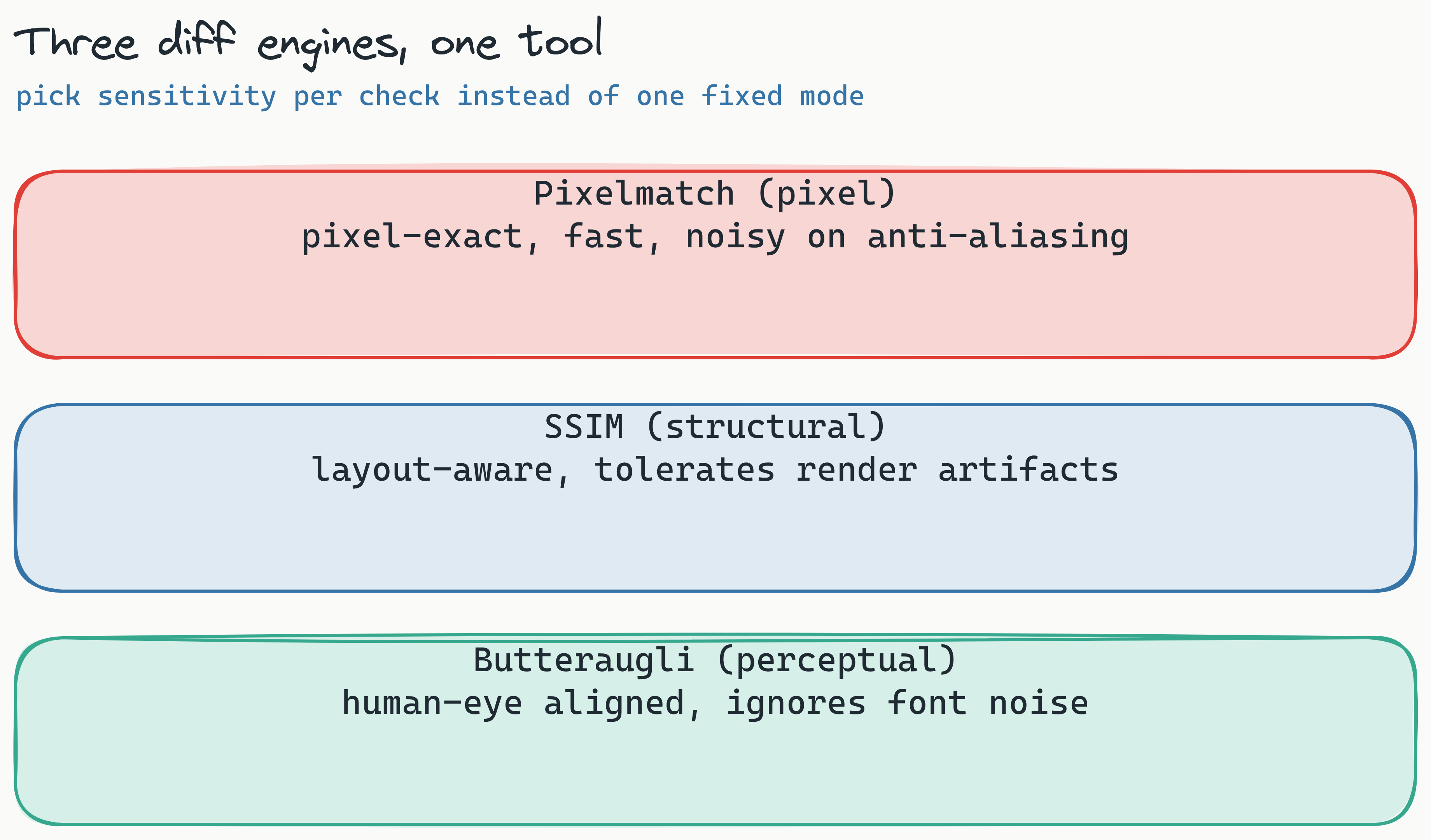
- Pixel diff (Pixelmatch): Compares every pixel. Fast but noisy. A single anti-aliased pixel difference can trigger a false positive. This is the only mode most traditional tools ship.
- Structural diff (SSIM): Layout-aware comparison that tolerates rendering artifacts while flagging structural change. Handles minor text-rendering differences but is less sensitive to tiny shifts.
- Perceptual diff (Butteraugli): Aligned to human vision. Ignores imperceptible pixel and anti-aliasing noise while catching real changes like shifted elements, missing images, or color errors. Lastest is one of the few tools to offer all three in one place.
PAA answer: Is Percy AI-powered? No. Percy uses standard pixel comparison. It is fast but generates false positives from rendering differences. Lastest, in contrast, offers a true perceptual engine that filters out noise.
Lastest's zero-token replay is the part that changes your habits. AI runs only when you create or fix a check; after that, every replay is plain Playwright execution at zero token cost. You can iterate on baselines, debug failures, and run ad-hoc comparisons thousands of times a day without metering anything. For a deeper breakdown, see the real cost of LLM-driven test runs.
In a direct comparison, Lastest and Applitools are both AI-powered, but Lastest is open source and self-hostable, so you get the perceptual engine without the vendor lock-in. The full breakdown lives in Lastest vs Percy vs Applitools.
What is the "zero-token replay" feature in Lastest? After you run a visual test for the first time, all subsequent replays of that test cost zero tokens. This enables unlimited iteration on baselines and debugging without incurring additional costs-a significant advantage over per-screenshot pricing models.
When to Use Each Diff Engine
Use the perceptual (Butteraugli) engine for high-traffic pages like checkout, dashboard, and login flows where visual accuracy is critical and font noise must be ignored. Use the pixel (Pixelmatch) engine for low-risk, static pages where speed matters more than tolerance. Use the structural (SSIM) engine for pages with dynamic content like tables or charts where the layout is stable but rendering varies.
PAA answer: Can I combine different diff engines in the same test suite? Yes. Lastest allows you to select a diff engine per screenshot or per test suite, giving you granular control over sensitivity and false positive rates. This flexibility is unique among visual testing tools.
Visual Regression Testing Selenium Best Practices for 2026
To maximize the value of visual regression testing selenium integration, follow these proven best practices.
Start Small: Critical User Journeys First
Begin with the 5-10 most critical pages in your application: login, checkout, dashboard, search results, and account settings. These pages generate the highest revenue and have the largest user impact if visual bugs slip through. Once your team is comfortable with the workflow, expand to secondary pages.
Set Appropriate Diff Thresholds
A 2% pixel difference threshold works well for most layouts, but adjust based on page complexity. For pages with heavy animations or third-party embeds, increase the threshold to 5%. For static, data-driven pages, use 1% for tighter accuracy.
Baseline on a Stable Reference Environment
Always capture baselines in a consistent environment-same browser version, same OS, same screen resolution, and same GPU settings. Docker containers provide perfect reproducibility for visual test baselines.
Establish a Review Workflow
Visual diffs should never auto-approve. Lastest enforces exactly one human review seam: the reviewer renders one of three verdicts, pass, fix, or regression, and AI never approves its own output. The dashboard sorts the queue by severity and attaches an AI failure classification to each diff, so reviewers spend their time on real regressions instead of triaging noise. Every screenshot also gets a WCAG 2.2 AA accessibility score from axe-core, with per-build trend sparklines, so you catch contrast and a11y regressions in the same pass.
Handle Dynamic Content Strategically
Mask dynamic elements like date pickers, loading spinners, and real-time counters using Lastest's element-level ignore regions. This eliminates false positives without disabling visual validation on the rest of the page.
PAA answer: How do you avoid false positives in visual regression testing? Use a perceptual diff engine, set sensible thresholds, mask dynamic content regions, and run on a consistent rendering environment. Lastest layers stabilization on top of this (OCR-aware text diffing, timestamp freezing, network-idle and font-load waits, page-shift detection, and auto-masking of dynamic content) so the bulk of artifact noise never reaches the queue in the first place. For more, see reducing false positives in visual regression testing.
Maintain Baselines
Treat baselines as part of your test assets-store them in version control alongside your test code. When you intentionally change the UI, update the baseline. When a visual diff appears unexpectedly, investigate before continuing deployment.
The Future of Visual Regression Testing in Selenium (2026 and Beyond)
The landscape of visual regression testing selenium integration continues to evolve rapidly. Four key trends will shape 2026 and beyond.
AI-Driven Test Generation
AI models are beginning to generate visual test cases automatically from design specifications. Instead of manually writing test scripts for each page, teams will describe the expected behavior in natural language, and AI will generate the corresponding visual tests. This lowers the barrier to entry for teams without dedicated QA resources.
Deeper CI/CD Integration
Visual testing is moving from a post-deployment check to a pre-merge gate. Tools like Lastest now offer native Git integrations that automatically compare the current branch against the main branch baseline, failing the build before code is merged-catching visual bugs at the earliest possible stage.
Component-Level Visual Testing
As organizations adopt design systems and component libraries, visual testing is shifting from full-page screenshots to isolated component comparisons. Lastest supports component-level screenshots, allowing teams to validate individual UI elements independently from the page layout.
Zero-Token Pricing Models
The shift toward zero-token replay and flat-rate pricing (like Lastest's self-hosted model) is making visual regression testing accessible to teams of all sizes. Per-screenshot pricing creates a tax on iteration that discourages thorough testing. Flat-rate models remove this disincentive and encourage teams to test more comprehensively.
PAA answer: Will visual regression testing replace functional testing? No. Visual and functional testing are complementary, not competitive. Visual testing catches layout and rendering issues; functional testing catches behavior and logic issues. Both are necessary for comprehensive quality assurance.
Conclusion: Ship with Confidence in 2026
Your Selenium suite is not complete without visual regression testing. The "green test trap" is real: functional passes do not guarantee visual correctness, and the failures that slip through are precisely the ones your DOM assertions cannot see. By adding a visual layer to your existing Selenium workflow, you close the gap between "works correctly" and "looks correct."
Visual regression testing with Selenium via Lastest is the most cost-effective path forward: open source, AI-powered, self-hostable, and running three diff engines (Pixelmatch, SSIM, Butteraugli) with AI failure classification and WCAG scoring on every screenshot. Whether you self-host for free or run the flat $299/month Cloud, you eliminate per-screenshot costs, keep screenshots inside your network, and ship every release without guessing.
Stop guessing how your UI looks and start proving it. Self-host Lastest for free or try Cloud, browse the docs or live demos, and star the repo on GitHub. If you are a developer doing your own QA, the devs-doing-QA workflow shows where this fits in your day.
Key takeaway: The most successful QA teams in 2026 don't choose between functional and visual testing-they integrate both. With Lastest's open-source, AI-powered visual regression testing, you get enterprise-grade capabilities without enterprise pricing. No per-screenshot costs. No vendor lock-in. No blind spots.