
Your headless CMS publishes content changes every day. A marketing editor updates a product description. A developer pushes a new component. Then suddenly a layout shift breaks the homepage. Unit tests pass because the API responds correctly. Integration tests pass because the data flow is intact. But the visual output is broken - and your users see it before your QA team does.
That's the blind spot visual regression testing (VRT) fills. Instead of validating data and logic, VRT compares screenshots of your application to catch visual bugs before they hit production. For headless CMS architectures - where content and code change independently - VRT has moved from "nice to have" to essential. It's the safety net keeping your user experience consistent across thousands of daily content updates.
This guide covers how to implement visual regression testing for headless CMS architectures, from understanding what makes them unique to comparing the top tools and setting up a Playwright-powered workflow that actually scales. We will look at why per-screenshot pricing punishes content-heavy sites, how three diff engines cut false positives, and why self-hosting on your own infrastructure is the move for teams under GDPR.
What Makes Headless CMS Testing Different From Traditional Sites?
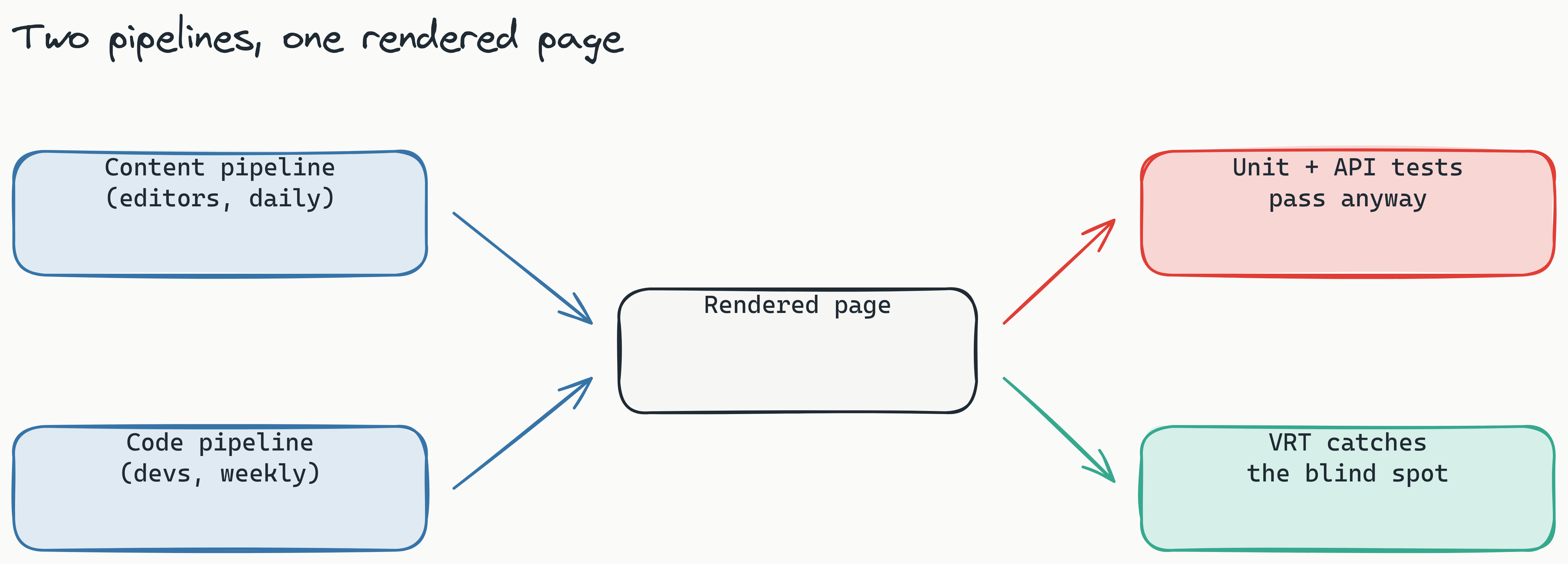
Visual regression testing for headless CMS works differently than testing a traditional monolithic site because the architecture introduces two independent change vectors. In a traditional CMS, content and presentation are tightly coupled - a change to either one triggers a full page rebuild. In a headless CMS, content lives in a separate backend and gets served via API to a frontend framework (React, Vue, Next.js). This decoupling means content editors and developers operate on separate pipelines.
Why is testing a headless CMS different from a traditional site? In a headless CMS, content and code change on separate pipelines. Content editors can publish several times a day, while developers deploy code less frequently. Neither pipeline alone validates the visual output of the final page, creating a unique blind spot for regressions that automated screenshot testing must fill.
The Content Pipeline
Content editors publish through the CMS daily. They update product descriptions, upload new images, change SEO metadata, and reorder page sections. These changes flow through the API directly to the frontend without any code deploy. If an editor uploads an image with the wrong dimensions or updates a rich text field that breaks the layout, no unit test catches it - because the code hasn't changed.
The Code Pipeline
Developers deploy component changes weekly or biweekly. They refactor CSS, update UI libraries, add new components, and optimize performance. These changes get tested through pull requests and CI pipelines. But because the frontend renders dynamic content from the CMS, a code change that works perfectly on a static test page might break when it encounters real content - a long headline, a missing image, or an unexpected data type.
Why Both Need VRT
Neither pipeline alone validates the visual output. Unit tests confirm that individual components render. API tests confirm that data endpoints respond correctly. But neither confirms that the combination of live CMS content and the current frontend build actually produces a correct visual experience. Visual regression testing bridges this gap by capturing screenshots of real pages and comparing them against baselines.
Why Visual Regression Testing Is Non-Negotiable for Headless Sites
The most common question teams ask is how to test visual regressions in headless CMS workflows. But the more important question is why it matters enough to invest in tooling and process changes.
Visual regressions are the number one cause of "mystery bugs" in headless CMS sites - bugs that users notice but engineers cannot reproduce. A user reports that the product page looks broken. The engineer pulls the latest code, loads the CMS data locally, and sees no issue. Meanwhile, the production site shows a layout shift caused by a CMS image that was cropped differently last night.
Real scenarios happen daily:
- A CMS migration tool removes trailing slashes from image paths, breaking every product image on the site. API tests pass because the image URLs are valid - the images themselves are just missing.
- A third-party widget updates its CSS, causing text overflow on CMS-managed content blocks. The widget provider tested their own components, but not in your specific CMS context.
- A CDN cache flush changes font rendering behavior, shifting text alignment across the site. No code changed, but the visual experience degraded.
Manual visual QA cannot scale across dozens of CMS-managed pages updated several times per day. By the time a QA engineer reviews a page, it may have changed again. Automated VRT catches these regressions in minutes and provides precise screenshots of exactly what changed. For a deeper look at why manual review collapses as surface area grows, see The 2026 AI Testing Scale Gap.
Key Challenges: Cost, Noise, and Data Privacy
Teams evaluating VRT tools for headless CMS face three primary challenges: cost scales with content volume, false positives waste engineering time, and data privacy concerns grow with every screenshot sent to a third-party cloud.
Per-Screenshot Pricing
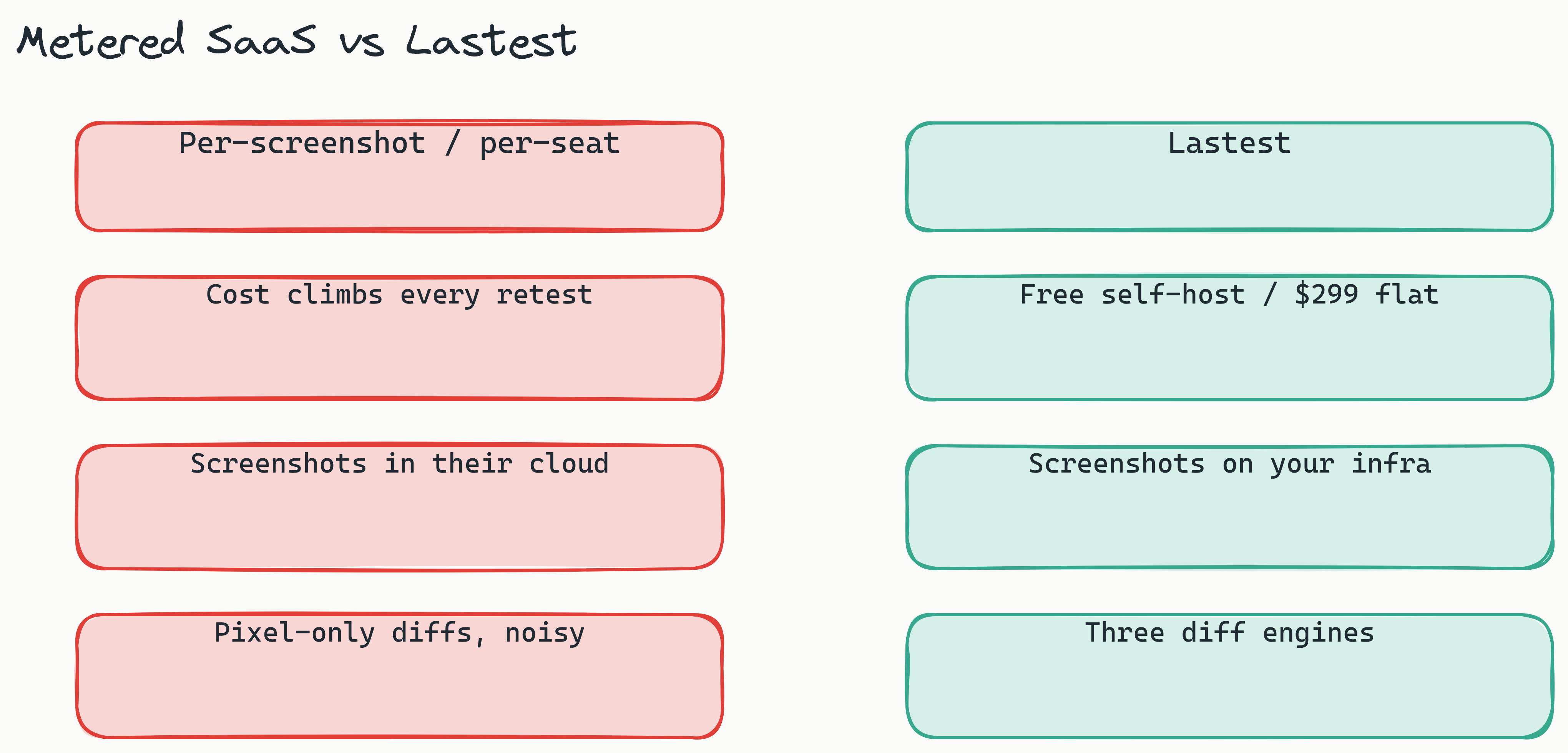
Most SaaS-based VRT tools meter on screenshots or seats. For a headless CMS with hundreds of pages updated daily, that cost adds up fast. A team testing 200 CMS pages, with 5 viewport sizes or states per page (mobile, tablet, desktop, logged-in, logged-out), captures 1,000 screenshots per run. Run that on every publish and the metered count climbs into the tens of thousands per month, before a single retest triggered by a content edit. The pricing model punishes exactly the workflow a headless CMS generates: frequent, repeated tests against a moving baseline.
Flaky Diffs Waste Engineering Time
Pixel-matching diff engines compare every individual pixel between screenshots. They flag antialiasing differences, OS-level font rendering changes, animation frames, and even subtle color shifts caused by browser version updates. For content-heavy CMS sites, the bulk of flagged diffs can be pure noise rather than real regressions. Engineers stop reviewing diffs because the signal-to-noise ratio is so poor, and real visual bugs get ignored alongside the noise. Lastest counters this with text-region-aware OCR diffing, timestamp freezing, network-idle waits, and auto-masking of dynamic content, so cross-OS screenshots stay stable before the diff even runs.
GDPR and Self-Hosted Privacy
Sending every UI screenshot to a third-party cloud service raises privacy concerns for companies handling sensitive data. B2B platforms, healthcare applications, and European companies under the General Data Protection Regulation (GDPR) need to know exactly where their screenshots are stored and who has access. The demand for open source visual regression testing self-hosted solutions is growing because teams want to keep screenshots on their own infrastructure, under their own security controls.
How do you manage privacy and cost in visual regression testing? Self-hosting the tool on your own infrastructure keeps all screenshots under your security controls, addressing GDPR and data residency requirements. It also eliminates the per-screenshot pricing model, replacing it with a predictable cost structure that scales with your server capacity, not your test frequency.
Self-hosting eliminates the pricing anxiety of metered models, gives teams full control over data residency, and removes vendor lock-in. Lastest self-hosts for free under the FSL-1.1 license with unlimited screenshots and replays on your own infrastructure. For headless CMS teams that test content-heavy workflows, self-hosting is not just a nice-to-have, it is a prerequisite for scaling VRT without budget surprises.
What's the Best Headless CMS Visual Regression Testing Tool? (Percy vs. Chromatic vs. Lastest)
The best headless CMS visual regression testing tool depends on your team's workflow, budget, and privacy requirements. Three tools dominate the conversation: Percy, Chromatic, and Lastest. Each serves a different primary use case.
| Feature | Percy | Chromatic | Lastest |
|---|---|---|---|
| Pricing | Per-screenshot | Per-screenshot | Free self-hosted / $299/mo cloud (flat) |
| Diff Engines | Pixel | Pixel + Layout | Pixel + Structural + Perceptual (AI) |
| Self-Hosted | No | No | Yes (open source) |
| AI Test Gen | No | No | Yes (AI authors, zero-token replays) |
| Headless CMS Focus | Generic | Storybook-centric | Any frontend + CMS |
When comparing Percy vs. Chromatic for headless CMS testing, a third option - Lastest - often wins because it combines AI-driven diffs with permissive self-hosting.
Percy excels at CI integration and is the most widely adopted VRT tool. It integrates smoothly with GitHub, GitLab, and Bitbucket, and its snapshot-based workflow is well-documented. However, Percy's pixel-only diff engine generates high false-positive rates for content-heavy CMS pages. It also lacks self-hosting, meaning every screenshot of your CMS-driven pages is stored on BrowserStack's infrastructure.
Chromatic is built for Storybook-first workflows. If your team already uses Storybook to develop and document UI components, Chromatic provides excellent integration. But most headless CMS architectures do not use Storybook for content pages. A CMS product page with dynamic data is not a Storybook story - it's a live composition of components rendering real content. Chromatic's tooling works best for component-level testing, not page-level visual regression testing driven by CMS content.
Lastest addresses the blind spots that Percy and Chromatic leave open for headless CMS teams. It offers three diff engines (pixel via Pixelmatch, structural via SSIM, and perceptual via Butteraugli) that catch CMS-specific issues like broken images, layout shifts from dynamic content, and font rendering changes. When a test does break, AI failure classification labels each failure as a real regression, flaky, environment, or test-maintenance issue with a confidence score, so you triage by signal rather than by guesswork. Its self-hosted option keeps screenshots on your own infrastructure, eliminating both cost concerns and privacy risks, and the open-source model gives teams full transparency into how diffs are calculated. See the full feature set or compare head-to-head in Chromatic vs Lastest.
How to Test Visual Regressions in a Headless CMS With Playwright
For teams using Playwright, headless CMS visual regression testing with Playwright becomes seamless. Playwright's browser automation capabilities - page navigation, network interception, viewport configuration - map directly to the VRT workflow. Here is the high-level process that connects Playwright with a visual diff engine.
Step 1: Capture CMS Content Snapshots
Use Playwright to navigate to the key CMS-driven pages in your application: the homepage, category pages, product pages, blog posts, and landing pages. Configure the viewport size and device settings to match your target breakpoints. Playwright handles authentication, cookie management, and network conditions so that the captured screenshots reflect the same state that real users see.
// Conceptual example - actual syntax varies by project
await page.goto('https://your-cms-site.com/products/category');
await page.screenshot({ path: 'baseline/products-category.png' });
Step 2: Define a Baseline
Run the test suite on a known-good commit or CMS state to create the baseline screenshots. Every subsequent test run compares against these baselines. Store baselines in version control so that regression history is preserved and traceable. Because CMS frontends get refactored often, brittle hand-written selectors break constantly; Lastest authors tests with a 7-layer selector fallback (data-testid, id, role, aria-label, text, CSS, then OCR) so the same test survives the markup churn that headless frontends are notorious for.
Step 3: Automate in CI/CD
Trigger Playwright tests on every CMS publish event or code push. Integrate with GitHub Actions or GitLab CI so that VRT runs automatically when either pipeline changes. Configure notifications to alert the team when diffs are detected - before the changes reach production.
Step 4: Review Diffs in the Dashboard
Route the captured screenshots to an AI-powered diff engine. The engine compares new screenshots against baselines and flags only meaningful visual changes. Review flagged diffs in a human oversight dashboard where you can approve, reject, or investigate each change.
What is the fastest way to set up visual regression testing? The fastest path is to automate screenshot capture using Playwright, then route those screenshots to an AI-driven diff engine. This reduces the setup time to configuration rather than custom coding. CI/CD integration is what makes VRT a habit, not a chore.
The most common question is how to test visual regressions efficiently - the answer is: automate screenshot capture with Playwright, then run those screenshots against an AI-powered diff engine that understands what is visually significant. CI/CD integration is what makes VRT a habit, not a chore. Without automation, manual screenshot comparison breaks down as content volume grows.
How AI-Driven Diffing Reduces False Positives
Traditional pixel-matching diff engines compare every pixel between two screenshots and flag any color difference as a failure. For headless CMS sites, this approach generates overwhelming noise. Antialiasing differences between operating systems, animation frames caught mid-transition, and font rendering variations from CDN caches all register as "bugs" in a pixel diff - even though no user would notice or care about the change.
AI-driven perceptual diffing changes this. Instead of comparing raw pixels, it uses computer vision models to understand what is visually significant. It recognizes that a slight color shift in a gradient background is irrelevant, while a button moving three pixels to the left is a meaningful structural change.
Lastest's three-engine architecture handles this at three levels:
- Pixel diff: Catches exact pixel-perfect changes for critical UI elements where precision matters (logos, icons, borders).
- Structural diff: Detects layout shifts - elements moving, hiding, resizing, or changing position relative to each other. This catches the most common CMS regression: an editor adding long text that pushes the CTA button off-screen.
- Perceptual diff (AI): Mimics human visual attention. It ignores cosmetic noise and only flags changes that would be noticeable to a real user.
How do you reduce false positives in visual regression testing? AI-driven perceptual diff engines ignore cosmetic noise like antialiasing or font rendering differences and only flag changes that would be noticeable to a real user. Using a structural diff engine in addition to a pixel engine helps teams focus on layout shifts caused by dynamic content.
Less noise means engineers actually review diffs instead of ignoring alerts. When a diff engine flags 10 changes per build and 9 are noise, engineers stop checking. When it flags 10 changes and only 1 is a real bug, they investigate every one.
How Zero-Token Replays Scale Testing for CMS Content
Headless CMS teams face a unique scaling problem: content changes trigger retests constantly, but each retest should not cost the same as the first. Lastest's zero-token replay model solves this cleanly. AI runs only when you create or fix a test. Every replay after that is plain Playwright execution against your baseline, so it consumes zero AI tokens no matter how many times you run it.
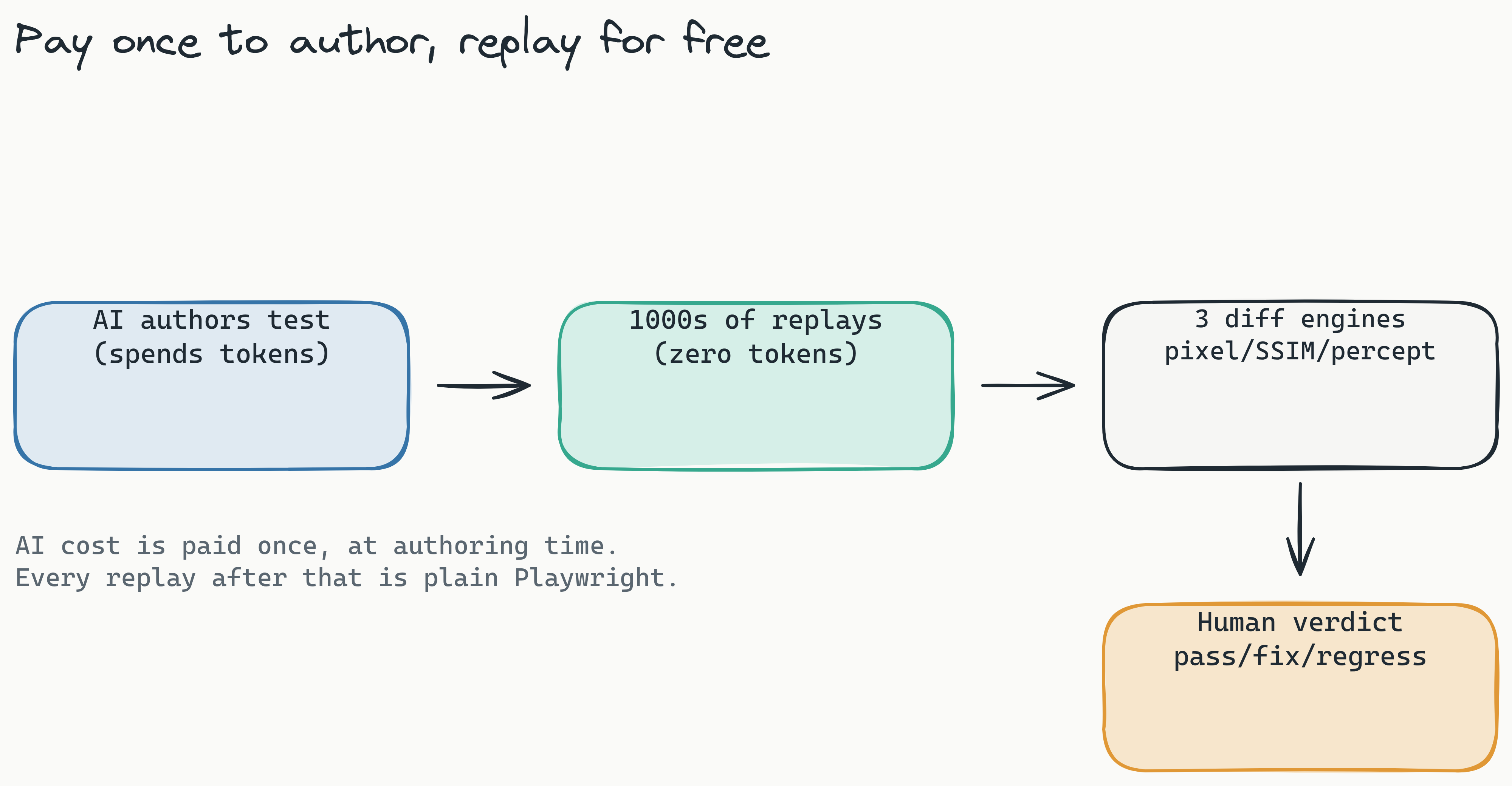
This matters enormously for content-heavy workflows. A team that authors tests for 200 CMS pages pays AI cost once, at authoring time. Every subsequent run, triggered by content edits, new pages, or regression checks, costs zero additional tokens, and on a self-hosted deployment the screenshots are unlimited regardless of volume. Compare this to metered tools, where each retest draws down your monthly screenshot allocation; a content team that retests on every publish can burn through an allocation in days, not weeks. Smart Run sharpens this further by reading your git diff and replaying only the tests your change actually touches.
How does zero-token replay help scale testing? Zero-token replay means you only pay for the first test run of a page; every subsequent replay triggered by content changes is free. This model directly matches the content-heavy workflow of a headless CMS, where pages are tested many times against a stable baseline.
Lastest Cloud removes this math entirely. At $299 per month flat, with no per-seat and no per-screenshot fees, the pricing matches the workflow: one payment, continuous testing. For teams that prefer to keep everything in house, the free open-source version provides the same zero-token replay logic on your own infrastructure. There is no pricing anxiety, no screenshot counting, no surprise overage bills.
Frequently Asked Questions
What is the difference between visual regression testing and screenshot testing? Screenshot testing captures a single image. Visual regression testing compares that image against a baseline and uses diff engines (pixel, structural, perceptual) to identify meaningful changes.
Can I use visual regression testing with a JAMstack or Next.js site? Yes. JAMstack and Next.js are common frontends for headless CMS. VRT works by capturing screenshots of the rendered HTML, regardless of the framework used to build it.
What is the difference between a pixel diff and a structural diff? A pixel diff compares every individual pixel and flags any color change as a failure. A structural diff compares the position and size of elements on the page, ignoring cosmetic noise like antialiasing.
How often should I run visual regression tests for my headless CMS? Run tests on every content publish event and every code push to a staging or production branch. This catches regressions from both pipelines within minutes of the change.
How do I handle dynamic content in screenshots (e.g., user-specific data)? Mask dynamic areas of the page (such as usernames or timestamps) before comparison. Most VRT tools, including Lastest, support region masking to ignore fluctuating content.
Is Lastest compliant with GDPR for self-hosted deployments? Yes. When self-hosted, all screenshots and test data remain on your own infrastructure, under your security controls, which is a key requirement for GDPR compliance.
Faster Releases, Fewer Bugs
Headless CMS architectures create a dual-pipeline challenge that traditional testing approaches miss. Content changes and code changes both introduce visual regression risk, but only VRT bridges the gap between them. The right tooling - AI-driven diffs to reduce noise, self-hosting for privacy and cost control, and Playwright integration for workflow alignment - makes VRT a practical, scalable practice rather than an expensive chore.
Mastering visual regression testing for your headless CMS means faster releases, fewer bugs, and confidence that every content update looks exactly as intended. Lastest also runs axe-core on every screenshot for a WCAG 2.2 AA accessibility score, so the same run that guards your layout guards your compliance too.
If you are ready to eliminate visual bugs from your headless CMS pipeline, self-host Lastest for free under the FSL-1.1 license, or skip the ops and try Lastest Cloud at $299 per month flat. Either way you get three diff engines, zero-token replays, and screenshots that never leave your control. The full source is open on GitHub; clone it, run it on your own CMS pages, and see the noise drop on your very first build.