
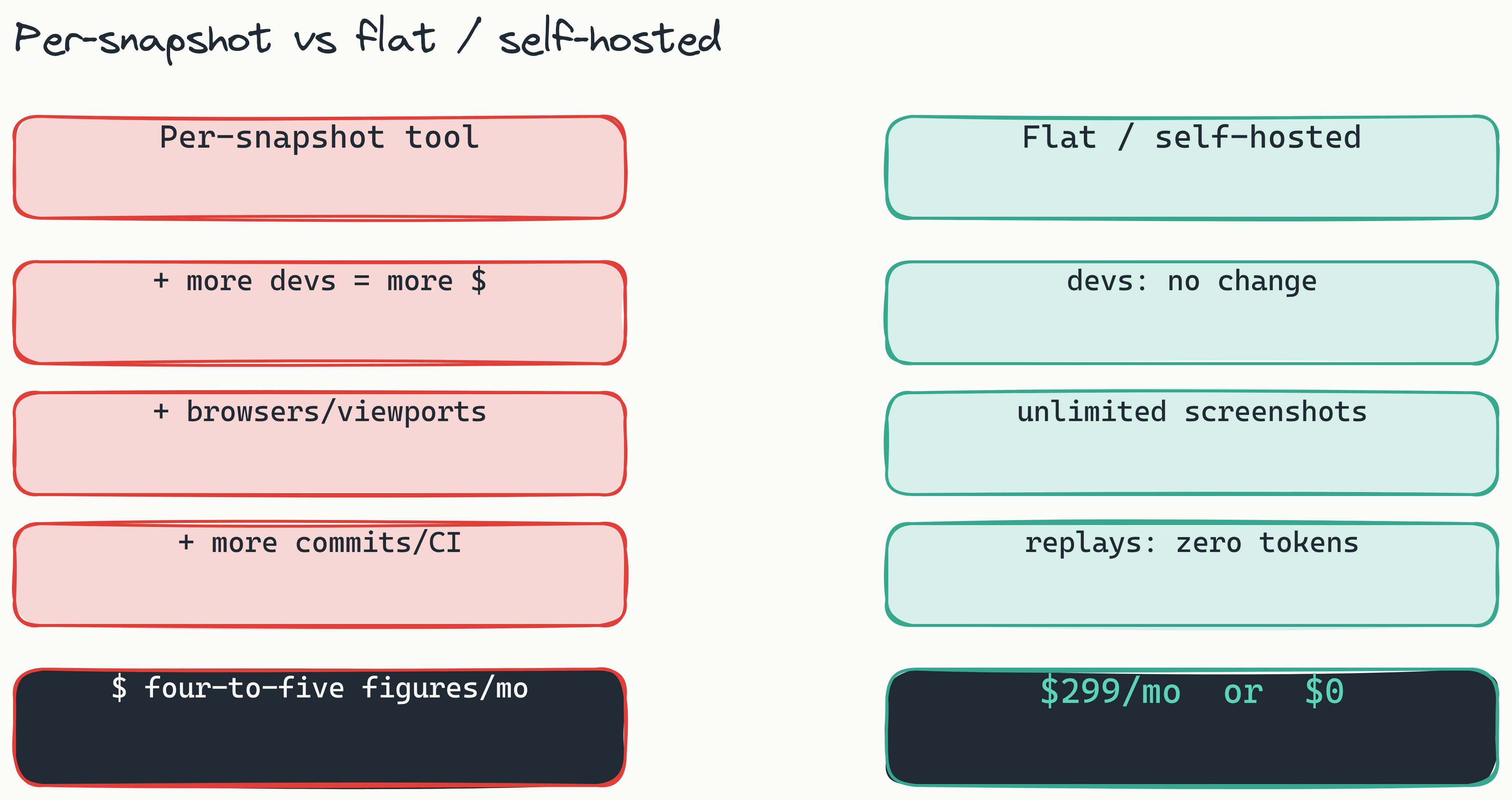
Enterprise QA teams routinely shell out thousands of dollars a month on snapshot-based visual regression testing tools, and that cost keeps compounding as teams grow, browsers multiply, and CI pipelines accelerate. Add a new viewport or increase deployment frequency, and your testing bill goes up again. Real visual regression testing cost savings for enterprise teams start with recognizing how three cost drivers, snapshot volume, browser diversity, and CI frequency, combine to create runaway expense growth, and then choosing a pricing model that does not scale with any of them.
This article gives you a practical framework for evaluating total cost of ownership across visual regression testing solutions, with actionable strategies for cutting expenses without sacrificing quality. We'll break down the three main cost drivers, compare pricing models head to head, and build a business case you can actually take to your CFO. The short version: the cheapest enterprise-scale path in 2026 is either a flat $299/month or free, self-hosted, open source.
Why Visual Regression Testing Costs Spin Out of Control in Enterprise Organizations
Here's the problem: most tools charge per snapshot, and the number of snapshots grows linearly with team size, browser count, and deployment frequency. It's an invisible cost multiplier that budget owners don't see until the invoice lands.
Do the math on a typical 200-developer team. Each developer commits changes multiple times per week. Each commit triggers a CI pipeline running visual tests across five browsers and three viewports. So: 200 developers × 5 browsers × 3 viewports × 50 commits per week equals 150,000 snapshots per month. At $0.02 to $0.05 per snapshot, you're looking at $3,000 to $7,500 per month before any extras.
The sticker shock usually hits during active development sprints. Teams report monthly bills doubling or tripling when they ramp up deployment frequency or add mobile viewports. Hidden costs make it worse: baseline re-runs, diff reviews, and archive storage all carry charges under per-snapshot models. Industry reference points bear this out, with hosted incumbents starting at roughly $179 to $699 per month before volume tiers kick in, and per-snapshot bills climbing well into four and five figures once enterprise teams scale their commit cadence.
Understanding these cost drivers is step one toward visual regression testing cost savings for enterprise teams. Once you know where the money's going, you can evaluate alternative pricing models that break the per-snapshot cycle. We go deeper on the math in our 2026 enterprise pricing breakdown for open-source VRT.
[How do per-snapshot pricing models drive visual regression testing costs for enterprise teams?]: Per-snapshot pricing creates exponential cost growth because snapshot volumes increase linearly with team size, browser count, and deployment frequency. A 200-developer team running tests across five browsers and three viewports can produce 150,000 snapshots per month, resulting in $3,000 to $7,500 in monthly costs before hidden charges like baseline re-runs and archive storage are added.
Per-Snapshot vs. Self-Hosted - A Total Cost of Ownership Comparison
When evaluating visual regression testing pricing, enterprise teams need to consider not just the monthly subscription but the full total cost of ownership across three dimensions: direct license fees, developer time for setup and maintenance, and infrastructure costs. Here's how five tools stack up across different team sizes.
| Tool | Monthly Cost (50 devs) | Monthly Cost (200 devs) | Monthly Cost (500 devs) | Setup Effort | Scaling Cost Pattern |
|---|---|---|---|---|---|
| Percy (per-snapshot) | ~$1,200 | ~$4,800 | ~$12,000 | Low | Linear |
| Applitools | ~$2,000 | ~$7,500 | ~$18,000 | Medium | Linear with volume tiers |
| Chromatic | ~$750 | ~$3,000 | ~$7,500 | Low | Per-component |
| Lastest (cloud, flat rate) | $299 | $299 | $299 | Low | Flat |
| Lastest (self-hosted, FSL-1.1) | $0 | $0 | $0 | Medium (Docker) | Infrastructure only |
The pattern is clear: per-snapshot models work fine for small teams with limited tests, but they punish scale aggressively. A team of 500 developers running 150,000 snapshots per month can pay five figures monthly on a per-snapshot tool, dozens of times the flat-rate cloud cost. Percy versus open-source visual testing isn't a feature comparison; it's a cost architecture decision. (For the feature side, see our Lastest vs. Percy vs. Applitools comparison.) When considering visual regression testing TCO, the per-snapshot approach benefits smaller teams but penalizes enterprise organizations undergoing daily deployments.
For enterprises evaluating visual regression testing pricing, flat-rate or self-hosted models remove the cost anxiety tied to release frequency. Your testing bill doesn't spike when you ship more often, it stays flat. With Lastest self-hosted, screenshots and replays are unlimited regardless of volume, because the cost is your own infrastructure and nothing else. That predictability alone can justify a tool switch for teams whose costs have become unpredictable.
How Zero-Token Replays Kill Your Biggest Testing Cost
Zero-token replays eliminate the biggest testing cost by separating where AI runs from where tests run. In Lastest, AI is invoked only when you create or fix a test. Every replay after that is plain Playwright execution: no AI, no tokens, no per-snapshot charge. You can run a suite thousands of times a day and the marginal token cost is zero. Self-hosted, the screenshot cost is zero too.
Think about the economics of a typical sprint. Your QA team sets up baselines at the start. Then they re-run those tests after every commit, sometimes 10 to 15 times before release. Under a per-snapshot model, every single re-run costs money. You're paying for the same test being validated 15 times. With zero-token replays, AI touched the test once at authoring time, and every subsequent re-run is deterministic Playwright that costs nothing in tokens.
The core idea is separating test generation from test execution. Generation is where the intelligence lives, so that is where AI (and any token cost) belongs. Execution is mechanical, so it should be free. For enterprise teams running thousands of replays across multiple CI pipelines, this distinction is the difference between predictable costs and runaway spending. We unpack the token math in detail in the real cost of LLM-driven test runs.
Here's a realistic scenario. A team of 200 developers authors a suite once. During a sprint, that suite gets replayed an average of 10 times per change across CI. Under per-snapshot billing, those replays are 1.5 million charged runs per month. Under zero-token replays, AI ran only at authoring time and the 1.35 million CI replays cost nothing. DevOps testing costs drop dramatically when replays carry no token and (self-hosted) no screenshot cost.
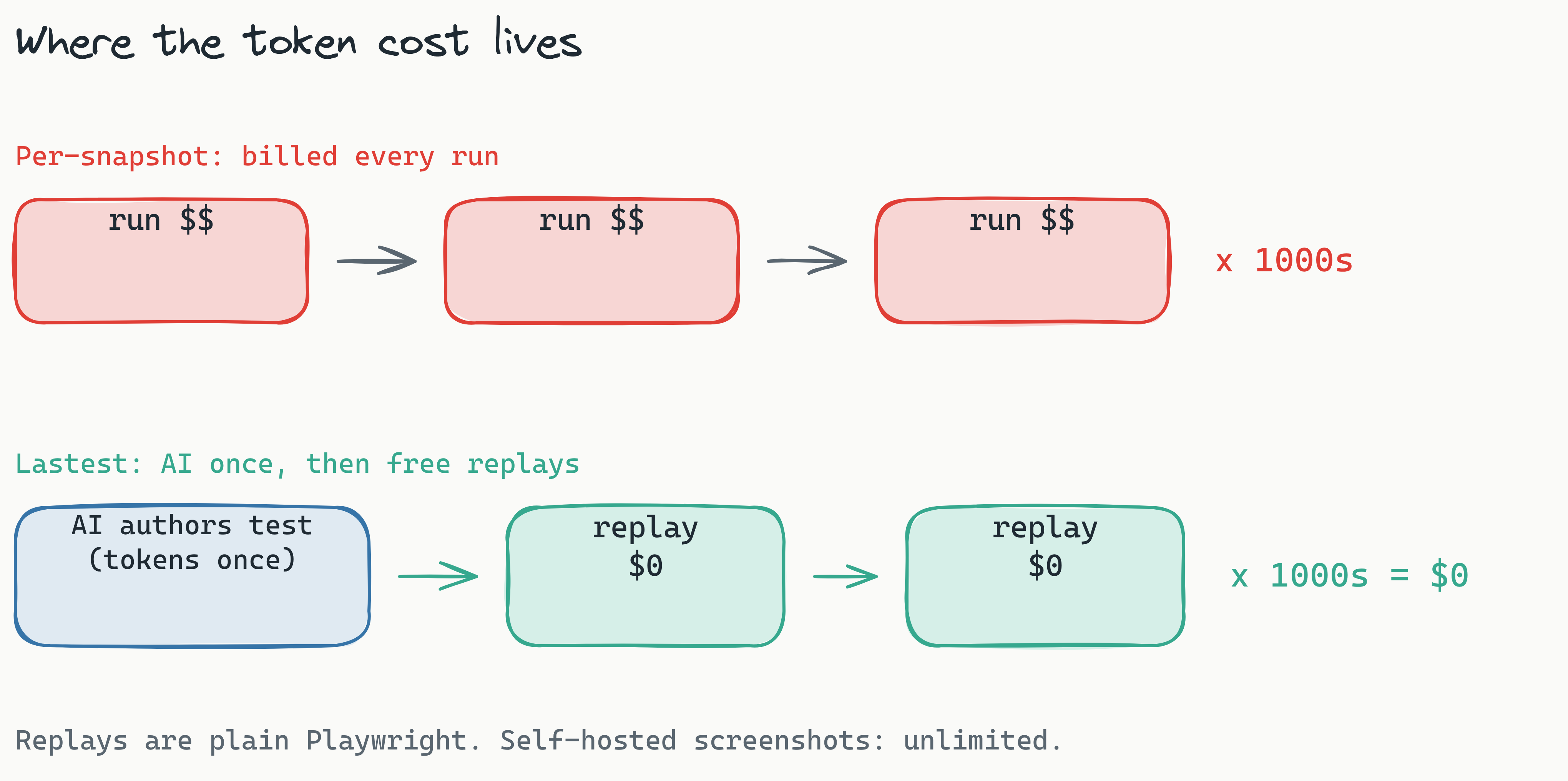
[What are zero-token replays and how do they reduce visual testing costs?]: Zero-token replays run AI only when a test is created or fixed; every replay afterward is plain Playwright execution with no tokens and no per-snapshot charge. Because authoring happens once and replays happen thousands of times, this removes the cost that dominates per-snapshot billing. Self-hosted, screenshots and replays are unlimited at zero marginal cost.
AI-Powered Test Generation: Slashing Your Initial Investment
AI-powered test generation reduces your initial investment by writing the resilient Playwright code for you, eliminating most of the manual effort of authoring baselines and collapsing the time to first meaningful result from days to hours. In Lastest, Claude (or any model you bring) authors the tests, and a human reviews every change before it lands.
The upfront cost of visual regression testing isn't just the tool subscription. It's developer hours spent setting up baselines, identifying edge cases, and configuring viewport matrices. A team of 10 developers might spend two full weeks writing and validating baseline tests for a single application, a significant cost in developer time alone. AI-generated tests collapse that timeline, with the AI analyzing your application structure (URLs, OpenAPI specs, markdown PRDs) and generating relevant tests automatically. Route Discovery even scans your source for paths the spec missed.
Crucially, those generated tests are durable, so you are not paying to rewrite them every refactor. Lastest uses a 7-layer selector fallback (data-testid, id, role, aria-label, text, CSS, then OCR) so a selector that breaks in hand-written suites self-heals instead of failing. Durable tests mean the authoring cost stays a one-time cost rather than a recurring maintenance tax. That tax is real - the Step 2 maintenance line below is where per-snapshot teams quietly burn $6,000 a month, and selector optimization is what shrinks it: the fallback ladder heals broken locators automatically, per-selector success-rate stats surface the few tests worth a human's attention, and MCP live-page selector validation catches drift before it becomes a red pipeline. Fewer manual selector fixes is fewer paid QA hours.
The other silent cost is reviewer labor spent triaging failures that were never real regressions. Because Lastest verifies at the pixel level - classifying each screenshot as unchanged, flaky, or changed against configurable pixel and percentage thresholds using three diff engines (Pixelmatch, SSIM, Butteraugli) rather than a binary pass/fail assertion - it can tell a genuine visual change apart from noise. A data filter ignores dynamic-data regions (timestamps, prices, avatars) via mask selectors, auto-mask, and text-region-aware OCR diffing, a show-area filter scopes both the comparison and the reviewer's attention to the region that actually changed (page-shift detection avoids flagging the whole screen), and animation freezing plus 12 flaky-test guards (network-idle wait, DOM-stability, font-loading wait, burst capture, cross-OS consistency) stop moving pixels from ever reaching the review queue. Every false positive that never opens is a diff a paid engineer never has to review.
You also control the spend. Lastest is bring-your-own-AI: Claude CLI, Anthropic API, OpenRouter, OpenAI, or a local Ollama model. Pick a cheap local model for routine generation and a stronger one for diff analysis, or run AI-Free recording mode (air-gapped, no API keys) when you want zero token cost at all. With three ways to work (AI-Free, AI-Assisted, Full Autonomous), you tune the AI spend per test or per team.
For enterprise teams evaluating AI visual testing for CI/CD pipelines, the cost benefit starts on day one. A reusable GitHub Action and GitLab MR comments mean no bespoke pipeline configuration cost, and Smart Run reads your git diff to run only the tests your change actually touches, so CI minutes do not balloon either.
Open Source Visual Testing: The European Enterprise Answer
Open-source, self-hosted visual regression testing is a leading choice for European enterprises because it combines cost predictability with data sovereignty: your visual test data never leaves your infrastructure. Lastest is open source under the FSL-1.1 license, so the full source is on GitHub and the self-hosted edition is free, forever.
European enterprises face unique challenges with SaaS tools. GDPR requires that personal data, and by extension screenshots of applications that may contain personal data, stays within compliant infrastructure. Third-party cloud storage for visual test results introduces legal risk that many CTOs won't accept.
The self-hosted model solves this at the architecture level. When you deploy Lastest with Docker, your test screenshots, diff images, and historical snapshots all live on your infrastructure. No data leaves your network. No third-party S3 buckets. No questions about where your test data is stored. The embedded browser pool runs containerized Chromium locally (into k3d for dev, your own cluster in prod), so even the browsers never phone home. For enterprises concerned with GDPR visual testing compliance, this is a decisive advantage. (See our enterprise compliance guide for the full checklist.)
Self-hosted open source has become the default posture for data-sovereignty-conscious teams, and Docker deployment for these tools is now straightforward, often a single bring-up command on your existing infrastructure. You can read the deployment steps on the self-host page and docs.
The trade-offs are real. Self-hosted requires Docker knowledge and initial setup time. Someone on your team needs to understand container orchestration and basic DevOps workflows. But that investment is negligible compared to the data security and cost control it unlocks. For enterprises comparing visual regression testing pricing, the self-hosted model offers ultimate cost predictability: your testing costs equal your infrastructure costs, nothing more.
[Why is open source visual testing preferred for GDPR compliance?]: Open source visual testing allows enterprises to self-host their testing infrastructure, ensuring all test screenshots, diff images, and historical snapshots remain on their own servers. This eliminates the legal risk of third-party cloud storage under GDPR. Docker deployment with a single "docker-compose up" command makes it practical without specialized infrastructure.
Building Your Cost-Savings Business Case
Presenting a cost-savings business case to your CFO or VP of Engineering takes more than just comparing tool prices. You need to quantify current costs, project savings, and account for implementation risks. Use this framework.
Step 1: Calculate current monthly snapshot costs. Pull your most recent three invoices from your current tool. Include any overage charges. Most enterprise tools charge between $0.02 and $0.05 per snapshot, but volume tiers can hide the true per-snapshot cost.
Step 2: Quantify developer time spent on test maintenance. Survey your QA team: how many hours per week do they spend updating baselines, fixing broken snapshots, and managing the test suite? Multiply by your blended developer hourly rate.
Step 3: Include CI infrastructure costs. Visual testing adds parallel runners, storage for historical snapshots, and network costs. Estimate these from your cloud provider's billing reports.
Step 4: Project savings under a new model. For self-hosted, your only costs are infrastructure - typically $200 to $500 per month for a mid-size team. For flat-rate cloud, your cost is known and capped.
Example calculation for a 200-developer team:
- Current cost: 150,000 snapshots per month × $0.03 per snapshot = $4,500 per month
- Developer maintenance: 20 hours per week × $75 per hour = $6,000 per month
- CI infrastructure: $500 per month
- Total current: $11,000 per month ($132,000 per year)
- Self-hosted cost: $200 to $500 per month for infrastructure
- Annual savings: $126,000 to $130,000
| Cost Category | Current (Per-Snapshot) | Self-Hosted Alternative |
|---|---|---|
| License/Snapshot fees | $4,500/month | $0/month |
| Developer maintenance | $6,000/month | $1,500/month (reduced maintenance) |
| CI infrastructure | $500/month | $500/month |
| Total monthly | $11,000/month | $2,000/month |
| Annual total | $132,000/year | $24,000/year |
| Annual savings | - | $108,000 |
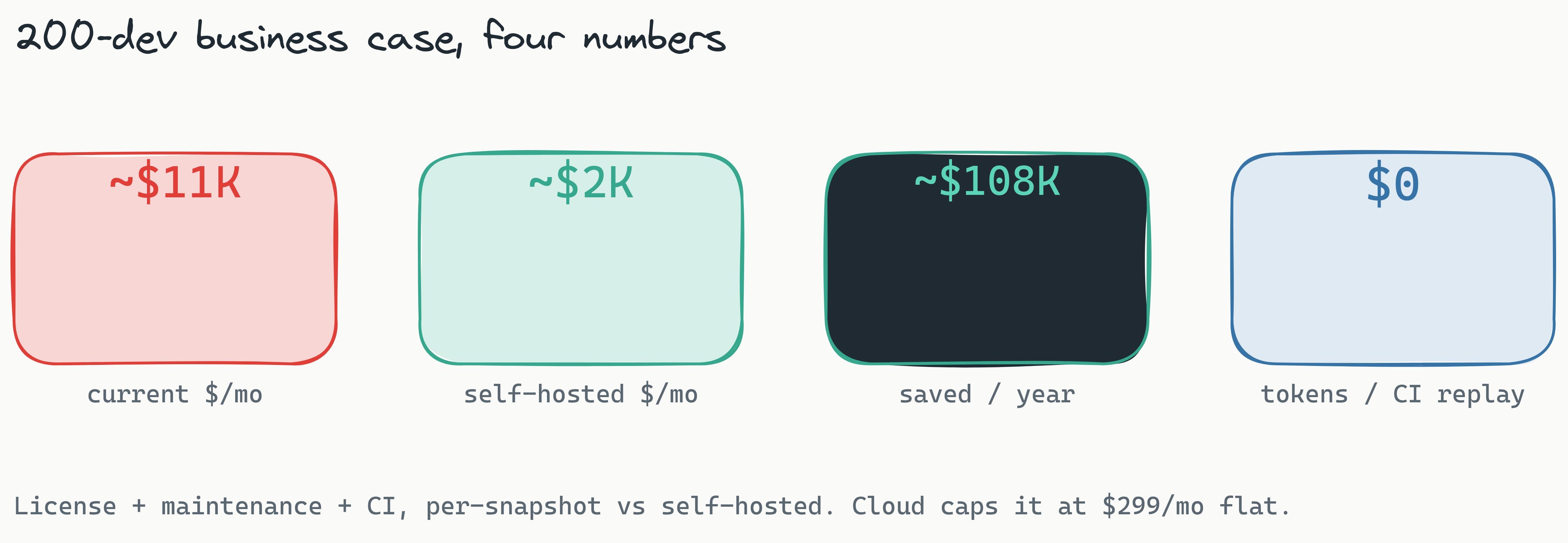
Total cost of ownership is consistently cited as a top selection criterion for enterprise testing tools, and the business case for automated UI testing cost reduction becomes compelling when you quantify both direct savings from license costs and indirect savings from developer time and CI resources.
There are risks, of course. The 200-developer team calculation assumes your team can handle Docker setup and ongoing maintenance. If you lack DevOps expertise, the cloud flat-rate option at $299 per month is the safer bet. Include a risk assessment section in your business case that acknowledges these trade-offs honestly.
[How do you build a cost-savings business case for visual regression testing?]: Start by calculating current monthly snapshot costs from recent invoices, then quantify developer time spent on test maintenance, and include CI infrastructure costs. Project savings under a new model - for a 200-developer team, switching from per-snapshot to self-hosted can save $126,000 to $130,000 annually by eliminating license fees and reducing developer overhead.
Getting Started: Free Self-Hosted or Cloud at $299/Month
Once your team has the cost-savings business case ready, the next step is evaluating Lastest against your current workflow. Both deployment paths are designed to minimize friction and maximize cost predictability.
Option 1: Self-hosted (free, forever). Deploy on your own infrastructure using Docker. Your team can have a fully functional visual regression testing environment running in minutes. Zero licensing cost under FSL-1.1. Zero per-snapshot billing. Unlimited screenshots and replays. Your test data stays on your servers, meeting GDPR and data sovereignty requirements. The full source is on GitHub at github.com/las-team/lastest.
Option 2: Cloud ($299 per month, flat). For teams that want to avoid DevOps overhead, the cloud version offers the same zero-token replay model at a flat monthly rate. $299 per month, with no per-seat fees and no per-screenshot fees, regardless of snapshot volume or team size. No surprise bills. A free Cloud evaluation tier with a monthly quota lets you try before you commit.
Both options include the same engine: the three diff engines (Pixelmatch for pixel-perfect, SSIM for structural/layout-aware, and Butteraugli for perceptual, human-eye comparison), AI test generation with 7-layer self-healing selectors, AI failure classification (real regression, flaky, environment, or test-maintenance), WCAG 2.2 AA accessibility scoring on every screenshot, the 11-step autonomous Play Agent, and an MCP server with roughly 20 tools so coding agents like Cursor and Claude Code can drive Lastest directly. The only difference is where your data lives and who manages the infrastructure. Browse the full feature list or watch the demos.
Frequently Asked Questions
What is the difference between per-snapshot and flat-rate pricing for visual testing? Per-snapshot pricing charges you for every screenshot generated and compared, leading to exponential cost growth as teams scale. Flat-rate pricing charges a fixed monthly fee regardless of snapshot volume, providing predictable costs that don't spike with deployment frequency.
Can open source visual testing tools match commercial tool features? Yes. Lastest, for example, offers AI-powered test generation, three diff engines (Pixelmatch, SSIM, and Butteraugli), WCAG 2.2 AA accessibility scoring, AI failure classification, and native CI/CD integration, all open source. The trade-off is typically more setup effort, though Docker deployment has significantly reduced that gap.
How does visual regression testing integrate with GitHub Actions and GitLab CI? Most modern visual testing tools provide pre-built GitHub Actions and GitLab CI steps that fit into existing pipeline YAML files. Integration typically requires adding a single step that runs visual tests alongside your existing test suite, with results available in the pipeline output.
What is the minimum team size for flat-rate pricing to be cost-effective? Flat-rate pricing becomes cost-effective for any team running more than a few thousand snapshots per month. For a 50-developer team generating 37,500 snapshots, flat-rate at $299 is significantly cheaper than per-snapshot models at $1,200 or more. The savings increase with team size.
Does self-hosted visual testing meet GDPR compliance requirements? Yes, self-hosted visual testing is the gold standard for GDPR compliance because all test screenshots, diff images, and historical data remain on your own infrastructure. No data ever leaves your network or enters third-party cloud storage that could violate data sovereignty rules.
How long does it take to switch from a per-snapshot tool to a self-hosted solution? Most teams can complete the switch within a few hours to a day. Docker deployment with "docker-compose up" can have a fully functional environment running in minutes, and AI-powered test generation reduces the time needed to recreate baseline tests. The main time investment is learning the new tool's UI and dashboard.
The Bottom Line
Real visual regression testing cost savings for enterprise teams come down to understanding three things: how snapshot volumes create runaway cost growth, how per-snapshot pricing punishes scale, and how alternative models (zero-token replays, durable AI-generated tests, and self-hosted deployment) break that cycle. The 200-developer team cutting roughly $9,000 per month by switching from per-snapshot to self-hosted isn't hypothetical; it's the arithmetic of predictable pricing replacing consumption-based billing.
If your team can run Docker, self-host Lastest for free and your testing cost becomes your infrastructure cost, nothing more. If you would rather skip the ops, Cloud is a flat $299 per month with no per-seat or per-screenshot fees. Either way the engine is the same and the source is open: star or fork it on GitHub at github.com/las-team/lastest. It is the cheapest path to enterprise-scale visual testing in 2026.