
A developer pushes a CSS change on a Friday afternoon. The checkout button shifts three pixels to the left. No unit test catches it. No integration test flags it. On Monday, the support inbox fills with screenshots from confused customers. This scenario plays out across development teams constantly - and it's entirely preventable.
Visual regression testing (VRT) has matured fast, and 2026 is the year open-source solutions finally rival enterprise tools in capability. AI-powered diff engines now cut false positives dramatically, and self-hosted options give teams full control over their data and costs. When comparing the best visual regression testing tools in 2026, teams face three core decisions: open-source versus commercial, AI-powered versus pixel-based, and self-hosted versus cloud. This guide breaks down the top tools across each dimension so you can make the right call for your stack.
What Is Visual Regression Testing and Why It Matters in 2026
Visual regression testing is the automated process of comparing UI screenshots before and after code changes to detect unintended visual differences. Instead of relying on a human to spot that a button shifted or a font changed, VRT tools capture a baseline screenshot, compare it against a new screenshot after each deploy, and highlight every pixel-level or structural difference for review.
How Visual Regression Testing Works in Practice
The workflow follows four stages. First, a baseline screenshot is captured from a known-good version of the application. Second, after a code change, the tool captures a new screenshot of the same view. Third, a diff engine compares the two images and generates an overlay highlighting the differences. Fourth, a human reviewer examines the diff and either approves it as an intentional change or flags it as a bug that needs fixing.
Why 2026 Is Different
To automate visual regression testing in 2026, teams must contend with faster release cycles, microservice architectures that fragment the front end, and growing complexity in responsive design across devices. A single component library update can break layouts on a dozen screen sizes simultaneously. Manual review at this scale is no longer viable. The tools have evolved accordingly - AI-powered diff engines now understand layout intent rather than just comparing pixels, and integrations with CI/CD pipelines mean visual checks run automatically alongside unit and integration tests.
[How do visual regression testing tools work in 2026?]: Modern VRT tools use a four-stage pipeline: capture a baseline screenshot, take a new screenshot after a code change, compare the two using pixel, structural, or AI-powered diff engines, and present the differences for human review. AI-powered engines in 2026 now understand layout intent, significantly reducing false positives compared to older pixel-only methods.
The Cost of Visual Bugs: Why Manual Testing Fails
The debate of visual regression testing versus manual testing in 2026 is increasingly one-sided. Manual visual review has fundamental limitations that automated testing overcomes, and the cost of visual bugs caught in production is higher than most teams realize.
The Hidden Costs of Human Visual Review
Industry research suggests that the cost of fixing a bug increases exponentially the later it is caught - by a factor of 5x during integration testing and 15x once in production. Visual bugs are especially insidious because they affect user trust directly. A misaligned checkout button or a broken product image can tank conversion rates immediately.
Human reviewers suffer from fatigue and inconsistency. After 30 minutes of comparing screenshots, attention drops significantly. Two different QA engineers reviewing the same change may flag different issues or miss the same one. Scaling manual review across multiple browsers and devices multiplies these problems exponentially.
A Real-World Comparison: 10 Screens Across 5 Browser/Device Combos
Consider a team that needs to verify 10 UI screens across 5 browser and device combinations - 50 screenshots total. Manual review takes an experienced QA engineer approximately 2 hours, assuming no interruptions. An automated VRT pipeline completes the same comparison in under 5 minutes, with consistent diff detection every time. Over a month of daily deployments, that saves roughly 40 hours of QA time - a full work week - while catching bugs that manual review would miss.
Top 7 Best Visual Regression Testing Tools in 2026
The landscape of visual regression testing has diversified significantly. Below is a comparison of the leading tools, followed by brief profiles of each.
| Tool | Pricing | Diff Engine | Open Source | CI/CD Support | AI Features | Self-Hosted |
|---|---|---|---|---|---|---|
| Lastest | Free self-hosted; cloud from $299/mo | Pixel, structural, perceptual | Yes | GitHub Actions, GitLab CI | AI test generation, zero-token replays | Yes |
| Percy | Free tier; $0.10/snapshot after | Pixel | No | GitHub, GitLab, Bitbucket | No | No |
| Applitools | Enterprise; $150–500+/mo | AI-powered layout matching | No | All major CI tools | Ultrafast Grid, layout matching | Enterprise tier |
| Chromatic | Free for small teams; $149+/mo | Pixel | No | GitHub, GitLab | No | No |
| Screener | SaaS subscription | Pixel + layout | No | GitHub, GitLab, Bitbucket | Basic | No |
| BackstopJS | Free | Pixel | Yes | Custom setup | No | Yes |
| Playwright Visual Testing | Free (built-in) | Pixel | Yes | All CI tools | No | Yes |
1. Lastest
Lastest combines open-source flexibility with AI-powered authoring. It ships three diff engines - Pixelmatch (pixel), SSIM (structural), and Butteraugli (perceptual) - so you pick the right sensitivity per test. AI runs only when you create or fix a test; every replay after that is plain Playwright execution, so replays cost zero tokens no matter how often you run them. Authoring uses a 7-layer selector fallback (data-testid, id, role, aria-label, text, CSS, OCR) that survives refactors which break hand-written selectors. The free self-hosted edition (FSL-1.1, deploys via Docker Compose) is unlimited; Lastest Cloud is a flat $299 per month with no per-seat or per-screenshot fees. The tradeoff: Lastest is newer, with a smaller community than the incumbents, so its docs and support are still maturing.
2. Percy
Percy is a cloud-only tool with pixel-based diffing and per-snapshot pricing at $0.10 per snapshot after the free tier. It integrates readily with GitHub and GitLab but lacks AI capabilities and self-hosting options. For teams with moderate snapshot volumes that want a managed service, Percy is a reliable choice, but costs scale linearly with usage.
3. Applitools
Applitools leads in AI-powered testing with its patented layout matching and Ultrafast Grid, which renders screenshots across multiple browsers simultaneously. Pricing is enterprise-level, estimated at $150 to $500-plus per month depending on usage. It offers an on-premise option at the enterprise tier for teams with strict compliance needs.
4. Chromatic
Chromatic is built for Storybook-first workflows, making it ideal for design-heavy teams that maintain component libraries. It is free for small teams and costs $149 per month for larger ones. It uses pixel-based diffing and integrates natively with GitHub and GitLab.
5. Screener
Screener is a SaaS tool offering pixel and layout diff detection. It integrates with major CI platforms and uses subscription pricing. It does not offer self-hosting or AI features.
6. BackstopJS
BackstopJS is a mature, free open-source tool with pixel-based diffing. It requires significant DevOps setup and offers no AI capabilities. It is best suited for teams with strong infrastructure experience and minimal budgets.
7. Playwright Visual Testing
Playwright includes built-in visual testing capabilities at no extra cost. It supports pixel-based diffing and works with all CI tools. However, it requires teams to build their own infrastructure for snapshot storage and comparison management.
Open-Source vs. Commercial VRT: Which Is Right for Your Team?
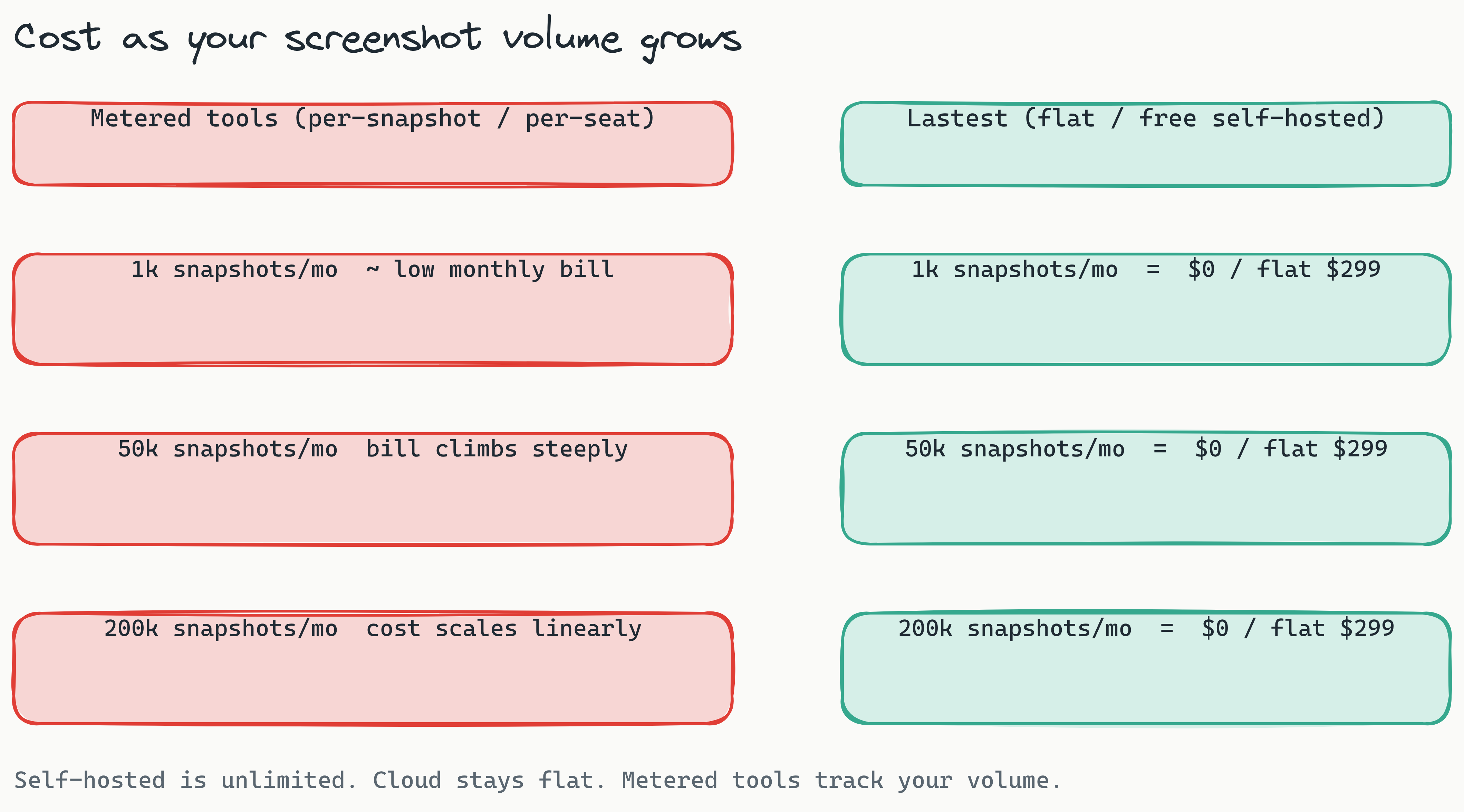
When choosing an open-source visual regression testing tool in 2026, the decision hinges on team size, compliance needs, and DevOps maturity. Both approaches have clear strengths.
When Open-Source Wins
Open-source tools like Lastest and BackstopJS offer zero licensing cost, full data sovereignty, and complete customization. Teams can modify the tool to fit their exact workflow, integrate it with internal systems, and avoid vendor lock-in. For startups and midsize engineering teams with in-house DevOps capability, open-source provides maximum flexibility at minimal direct cost.
When Commercial Tools Make Sense
Commercial tools like Applitools and Percy deliver managed infrastructure, dedicated support, and advanced AI features out of the box. For enterprises with 15-plus developers and limited DevOps bandwidth, the premium pricing buys predictability and reduced maintenance overhead. Per-snapshot and per-seat pricing models, however, get expensive at scale: once you are running tens of thousands of snapshots a month, usage-based billing can dwarf a flat subscription. See the full breakdown in our Percy vs Applitools pricing comparison.
The Hybrid Option
Lastest exemplifies the hybrid model: a free self-hosted open-source version with an optional cloud tier. Teams that need data sovereignty and cost control can deploy locally, while those that want managed infrastructure can move to Lastest Cloud at a flat $299 per month - no per-seat or per-screenshot metering. As an affordable visual regression testing tool in 2026, the self-hosted option costs nothing beyond your own infrastructure, making it accessible to solo founders and large teams alike.
[Should you choose open-source or commercial VRT in 2026?]: Open-source tools like Lastest and BackstopJS offer zero cost and full data control, ideal for teams with strong DevOps skills. Commercial tools like Applitools provide managed infrastructure and advanced AI, but per-snapshot and per-seat pricing climb steeply at scale. A hybrid model like Lastest's - free self-hosted, or a flat $299/mo cloud tier - offers the best of both worlds.
Self-Hosted Visual Regression Testing for Enterprise Compliance
For regulated industries, a self-hosted visual regression testing tool is not a preference - it is a requirement. Data residency laws, audit requirements, and security policies often prohibit sending screenshots of internal applications to third-party cloud services.
Why Enterprises Require Self-Hosting
GDPR in Europe, HIPAA in healthcare, and financial services regulations in banking all impose strict data handling requirements. A self-hosted VRT tool keeps every screenshot on the organization's own infrastructure, behind its own firewall. This eliminates the compliance risks of transmitting UI data to external cloud services and provides complete control over access logs, encryption, and retention policies.
Docker Compose Deployment Walkthrough
Deploy a self-hosted VRT tool with a single command. Using Lastest as an example, the setup involves:
- Clone the repository to your server
- Configure environment variables for authentication and storage
- Run
docker-compose upto launch the application
The entire deployment takes minutes, and the tool runs entirely within your infrastructure. No data leaves your network at any point.
Compliance Checklist
Before choosing a self-hosted solution, verify these capabilities:
- Data residency: all screenshots and baselines stored on your servers
- Encryption: data encrypted at rest and in transit
- Access logs: detailed audit trails for every review action
- Role-based access: granular permissions for reviewers, developers, and administrators
- Air-gapped environment support: no network egress required
Why AI-Powered Visual Regression Testing Changes the Game
AI visual regression testing in 2026 addresses the biggest pain point of traditional VRT: false positives. Pixel-based diff tools flag every anti-aliasing artifact, font rendering difference, and dynamic content change as a failure, drowning reviewers in noise.
Three Diff Engines Compared
- Pixel (Pixelmatch): Compares images at the pixel level. Fast and pixel-perfect, but noisy - it cannot distinguish intentional changes from anti-aliasing and rendering variations across browsers, so it tends to produce the most false positives.
- Structural (SSIM): Compares structural similarity, so it is DOM- and layout-aware. It ignores rendering artifacts but can miss subtle shifts that do not register structurally.
- Perceptual (Butteraugli): Aligned with human vision. It ignores anti-aliasing and font noise and flags only differences a person would actually perceive, which is what catches real bugs while cutting noise the hardest.
Lastest ships all three and lets you choose per test. It also layers in stabilization - OCR text-region diffing, timestamp freezing, network-idle waits, DOM stability detection, and auto-masking of dynamic content - so cross-OS screenshots stay consistent. On top of that, every failure is auto-classified as real regression, flaky, environment, or test-maintenance, with a confidence score and reasoning, so reviewers triage by severity instead of wading through raw diffs.
How AI Reduces False Positives
AI-powered tools ignore anti-aliasing differences between operating systems, font rendering variations across browsers, and dynamic content like timestamps or ad placements. They learn which regions of the page are stable and which naturally change, reducing the noise that plagues pixel-only tools.
The Zero-Token Replay Advantage
Lastest's zero-token replays are the efficiency pattern that makes this practical. AI runs only when you create or fix a test; every replay after that is plain Playwright execution that costs zero tokens. You can run the same suite thousands of times a day for nothing, and self-hosted screenshot volume is unlimited regardless of scale. That removes the cost barrier to running visual tests on every commit, which is what lets teams genuinely shift visual testing left. For coding agents, Lastest also exposes an MCP server with around 20 tools, so Cursor or Claude Code can drive test creation, runs, and triage directly.
Visual Regression Testing in CI/CD Pipelines: Setup Guide
Integrating visual regression testing into CI/CD pipelines is essential for catching visual bugs before they reach production. A pipeline that blocks deploys on visual regressions enforces the same discipline as unit test coverage.
Why Pipeline Integration Is Critical
Shift-left testing catches bugs when they are cheapest to fix. A visual regression caught during a pull request costs nothing to fix. The same bug caught after deployment to production requires a hotfix, a redeploy, and potentially a rollback - costs that multiply with every affected user.
GitHub Actions Example
Below is a YAML snippet showing Lastest integration in a GitHub Actions workflow:
name: Visual Regression Testing
on: [pull_request]
jobs:
  visual-test:
    runs-on: ubuntu-latest
    steps:
      - uses: actions/checkout@v4
      - name: Run Lastest Visual Tests
        uses: las-team/lastest-action@v2
        with:
          base-url: "http://localhost:3000"
          test-pattern: "tests/visual/**/*.spec.js"
      - name: Upload Diff Report
        uses: actions/upload-artifact@v4
        with:
          name: visual-diffs
          path: ./lastest-reports/
GitLab CI Example
For self-hosted Lastest instances, the GitLab CI configuration looks similar:
visual-regression:
  image: lastest/runner:latest
  stage: test
  script:
    - lastest run --config .lastest.yml
  artifacts:
    paths:
      - lastest-reports/
    when: always
Smart Run: Test Only What Changed
Running every visual test on every push gets slow as a suite grows. Lastest's Smart Run reads the git diff and runs only the tests your change actually touches, so a small CSS tweak does not trigger the whole suite. Combined with branch baselines that fork on PR open and merge back on PR merge, this keeps CI fast without sacrificing coverage. For a full walkthrough, see our visual regression testing in CI/CD guide.
Common Pitfalls
Flaky visual tests often stem from dynamic content, browser version mismatches, and poor baseline management. Use stable URLs for baselines, pin browser versions in Docker images, and establish clear policies for approving baseline updates.
How to Choose the Right Visual Regression Testing Tool in 2026
Evaluating the best visual regression testing tools in 2026 requires matching tool capabilities to team needs. A visual regression testing tools comparison should start with three questions: What is your team size? What is your budget? What are your compliance requirements?
Decision Matrix
| Team Profile | Recommended Tool | Rationale |
|---|---|---|
| Startup, 5–15 devs, low budget, wants AI | Lastest | Free self-hosted with AI features |
| Enterprise, 50+ devs, compliance requirements | Applitools or Lastest Cloud | Advanced AI or self-hosted with support |
| Design-heavy team using Storybook | Chromatic | Native Storybook integration |
| DevOps team, minimal budget | BackstopJS or Playwright | Free, mature, requires setup |
Final Checklist Before Choosing
- Snapshot volume: per-snapshot pricing becomes expensive above 50,000 monthly snapshots
- CI frequency: tools with zero-token replays encourage running tests on every commit
- Team technical level: open-source tools require DevOps investment
- Data sensitivity: regulated industries need self-hosted options
Frequently Asked Questions About Visual Regression Testing
How does visual regression testing work in 2026? It works through a four-stage pipeline: baseline capture, automated comparison, diff detection via pixel, structural, or AI-powered perceptual engines, and human review. Most tools integrate directly with CI/CD systems to run checks automatically on every pull request.
Which open-source visual regression testing tools are best? Lastest leads with AI-powered testing and three diff engines. BackstopJS is mature and reliable for pixel-based testing. Playwright offers built-in visual testing, though with limited features.
Can I use visual regression testing for free? Yes. Lastest is free when self-hosted, BackstopJS is fully free and open-source, and Playwright's visual testing is included in the library at no cost.
How does AI improve visual regression testing? AI reduces false positives by understanding layout intent rather than comparing pixels directly. It ignores anti-aliasing artifacts, font rendering differences, and dynamic content. The result is fewer noise alerts and faster review cycles.
Is visual regression testing better than manual testing? For repeatable, scalable visual checks, automated VRT is dramatically better. It catches what fatigued eyes miss in one-tenth the time and scales across unlimited browser and device combinations without additional human effort.
What is a perceptual diff engine? A perceptual diff engine (Lastest uses Butteraugli) is aligned with human vision. It ignores anti-aliasing and font noise that are invisible to the eye and flags only differences a real user would notice, which sharply cuts the false positives that plague pixel-only diffing.
When evaluating the best visual regression testing tools in 2026, prioritize what matters for your team: compliance, budget, and workflow integration. Open-source tools with AI capabilities now rival enterprise offerings, and self-hosted options eliminate data sovereignty concerns for regulated industries.
The most effective visual testing strategy runs automated checks on every pull request, uses AI-powered diff engines to minimize noise, and keeps costs predictable through flat-rate or zero-token pricing. For most teams, that combination points toward a self-hosted open-source tool with optional cloud upgrades - the hybrid approach Lastest is built around.
Ready to see how the best visual regression testing tools in 2026 stack up in your own pipeline? Self-host Lastest for free and have it running in minutes (FSL-1.1, no credit card, no sales call), or skip the ops and start on Lastest Cloud at a flat $299/mo. Browse live demos first, or read the source and star the repo on GitHub.