
Introduction
Here's a scenario that keeps SaaS engineering leaders up at night. Your team ships what looks like a harmless CSS update on a Friday afternoon. By Monday morning, customer support is flooded with complaints about a broken checkout flow. A single pixel misalignment in a button hover state made users believe the "Complete Purchase" button was disabled. The revenue hit? Thousands in lost conversions. Trust damage? That's harder to quantify - but it lingers.
This isn't a hypothetical. It plays out more often than most teams care to admit. Industry surveys consistently put user abandonment after a bad experience in the majority, and UI bugs erode confidence faster than almost anything else. The fix isn't throwing more QA hours at the problem. It's smarter, automated visual regression testing for SaaS powered by AI.
This guide is for engineering leaders evaluating modern visual testing approaches. We'll cover why SaaS platforms need automated visual testing, what separates a great AI-powered tool from the noise, how to choose between open-source and cloud models, and how to get started with a free, self-hosted solution that won't box you in. The short version: you can run unlimited visual regression tests on your own infrastructure for $0 with self-hosted Lastest, and AI only spends tokens when you author or fix a test, never when you replay one.
Why SaaS Platforms Need Automated Visual Testing (More Than Ever)
SaaS platforms need automated visual regression testing because they deploy continuously - and every update risks breaking the user experience in ways unit tests simply can't catch. The DORA 2025 DevOps Report shows elite-performing SaaS teams deploy multiple times per day. Each deployment introduces potential visual regressions that traditional test suites overlook entirely.
The High Cost of UI Bugs in SaaS
The CISQ 2024 report on software failure costs estimates poor software quality costs US companies at least $2.41 trillion annually. For SaaS businesses, UI bugs carry outsized weight because they directly impact user trust and conversion rates. A button that shifts 2 pixels to the left might not break functionality, but it chips away at user confidence that the product is professionally maintained.
Why Manual QA Can't Keep Up
Attention for repetitive review tasks degrades fast, and visual review is about as repetitive as work gets. Testing fatigue sets in when teams eyeball dozens of near-identical screenshots per deployment. Human reviewers naturally miss subtle changes, especially across multiple browsers and viewport sizes. The goal isn't to remove the human (a human still renders the final verdict), it's to stop making the human scan everything by hand.
SaaS's Unique Challenge: Continuous Everything
SaaS platforms face a challenge most software products don't: they must maintain consistent visual experiences across countless states, browsers, devices, and user configurations. A UI change that looks fine in Chrome on desktop might break entirely in Safari on mobile. Every deployment expands the risk surface.
[Why is automated visual regression testing critical for SaaS in 2026?]: Automated visual regression testing is critical for SaaS platforms because it catches UI bugs that unit and integration tests miss entirely. Manual reviews suffer from testing fatigue, so subtle regressions slip through. Tools that leverage AI to author and triage tests and run in CI/CD pipelines prevent visual defects from ever reaching production, protecting user trust and conversion rates.
The answer to "how to prevent UI bugs in SaaS environments" isn't more manual testing. It's automated visual regression testing that runs on every pull request and catches issues before they ever reach production. See our CI/CD visual testing guide for the pipeline mechanics.
The Problem with Legacy Tools: Pixel Diffing, High Costs, and Lock-In
The tools that pioneered visual testing (Percy, Applitools, and Chromatic) have served the market well. But they come with limitations modern SaaS teams can no longer afford.
Pixel Diffing: The Noise Problem
Legacy tools primarily use pixel-based diffing, comparing every single pixel in two screenshots. The problem? One-pixel anti-aliasing differences, font rendering variations, and sub-pixel animations trigger false alarms constantly. Teams quickly develop "alert fatigue," ignoring warnings and missing genuine regressions. Pixel-only comparison is the single biggest source of false positives in visual testing, which is exactly why a structural and perceptual layer matters.
Per-Test Pricing in a CI/CD World
Percy and similar tools charge per screenshot or per test execution. For SaaS teams deploying dozens of times daily across multiple browsers and viewports, costs scale linearly with deployments, not with value. A team running 50 visual tests per deployment, 3 times daily, faces quickly ballooning monthly bills that turn visual testing into a budget headache rather than a quality investment. Hosted competitors start at roughly $179 to $699 per month depending on screenshot volume and seats. Lastest charges $0 self-hosted (unlimited screenshots) and a flat $299 per month on Cloud, with no per-seat or per-screenshot fees.
Vendor Lock-In
Proprietary SDKs and closed-source diff engines make migration painful. Once your test suite is integrated with a vendor's proprietary runner, switching becomes an expensive engineering project. This lock-in reduces competitive pressure and leaves teams stuck with tools that may not evolve quickly enough.
| Tool | Pricing Model | Diff Engine Type | Open Source |
|---|---|---|---|
| Percy | Per-screenshot | Pixel-only | No |
| Applitools | Per-test execution | AI-enhanced pixel | No |
| Lastest | Free self-hosted / $299/mo flat cloud | Pixel + structural + perceptual | Yes (FSL-1.1) |
The comparison between Percy and Applitools for CI/CD setups usually misses the larger point: both use proprietary, per-execution pricing models that don't serve teams scaling their deployment frequency.
What to Look for in an AI-Powered Visual Testing Tool for SaaS
When evaluating an AI visual regression testing tool for SaaS environments, engineering leaders should prioritize capabilities that directly address the pain points of legacy tools. Here's a decision framework to apply to any vendor.
Smart Diffing: Beyond Pixel Comparison
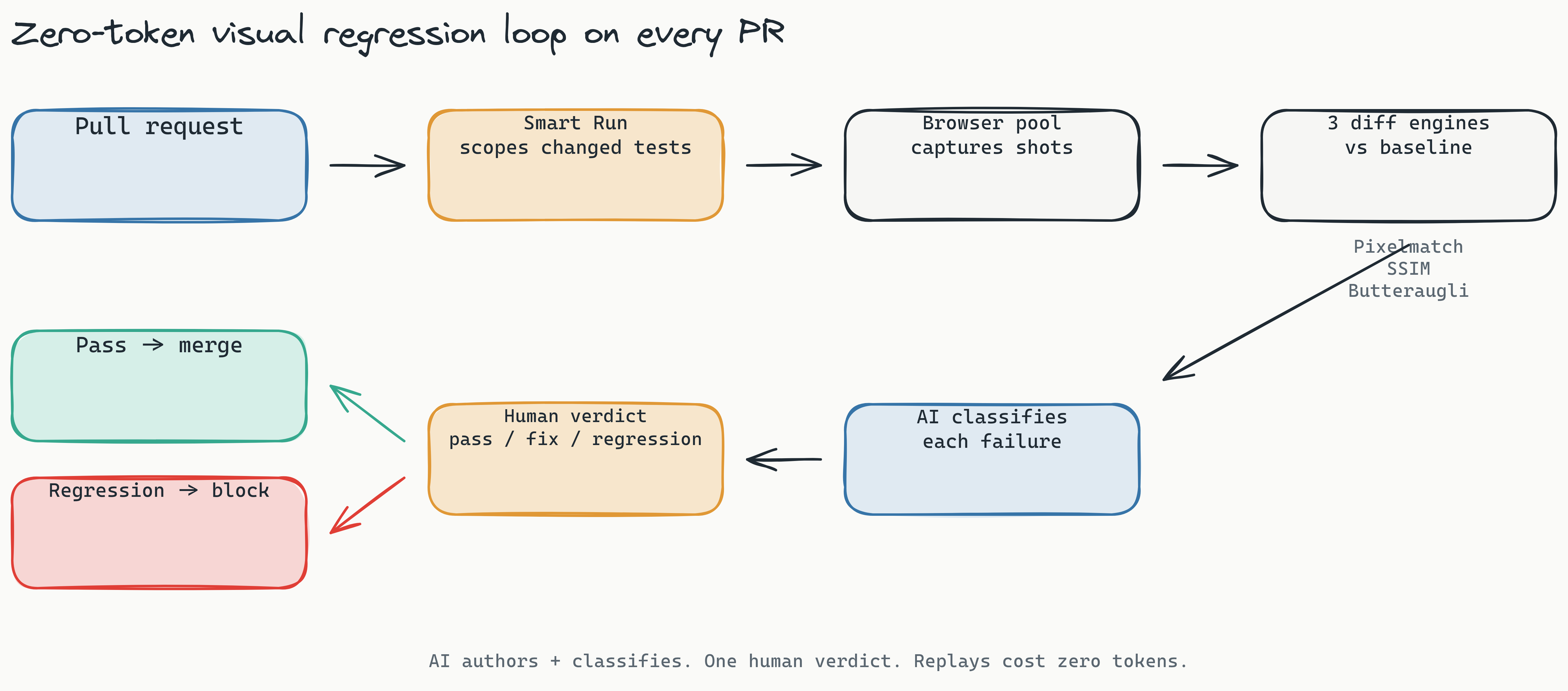
A modern tool must offer at least three diff engine types. Lastest ships exactly these three:
- Pixel (Pixelmatch): fast, pixel-perfect comparison for catching precise alignment issues. Accurate but noisy on anti-aliasing and font rendering.
- Structural (SSIM): DOM and layout-aware comparison that understands page structure, not just raw pixels.
- Perceptual (Butteraugli): human-eye-aligned comparison that catches differences a person would actually notice and ignores imperceptible anti-aliasing and font noise.
Layering structural and perceptual diffing on top of pixel comparison is what cuts the false-positive flood that drowns pixel-only tools. That means your QA team spends time reviewing actual regressions instead of filtering through noise. Lastest also stabilizes screenshots across operating systems with OCR-aware text diffing, timestamp freezing, network-idle waits, DOM-stability detection, and auto-masking of dynamic content, so cross-OS captures stop firing phantom diffs.
Zero-Token Replays
One of the most important shifts in 2026 is zero-token replays. AI spends tokens only when you create or fix a test. Every replay after that is plain Playwright execution with no model calls, so it costs nothing in tokens. Run a suite thousands of times a day and the token bill stays flat at zero. On self-hosted Lastest, screenshots are unlimited too, regardless of volume. This removes the cost disincentive to test thoroughly, a critical factor because most teams quietly stop testing as much when each run costs money.
CI/CD-Native Integration
Your visual testing tool must fit seamlessly into existing CI/CD pipelines. Look for a reusable GitHub Action, GitLab MR comments (including self-hosted GitLab), webhook triggers, and scheduled runs. Lastest adds Smart Run, which reads your git diff and runs only the tests your change actually touches, so a one-line CSS tweak doesn't replay your entire suite. An embedded, containerized Chromium browser pool means you don't even install Playwright locally.
Human Oversight Dashboard
AI shouldn't replace human judgment entirely. It should augment it. The ideal tool provides exactly one human review seam: a fast dashboard where a reviewer renders one of three verdicts (pass, fix, or regression) and the AI never approves its own output. Lastest pairs this with AI failure classification, auto-tagging every failure as a real regression, flaky, environment, or test-maintenance issue, complete with a confidence score and reasoning, so reviewers triage the queue instead of staring at raw diffs. Dashboard speed matters: if reviewing takes more than a few seconds per diff, adoption drops dramatically.
[What should a SaaS team prioritize when choosing an AI visual regression tool?]: A modern AI visual regression tool should offer more than pixel-based comparison. Teams should prioritize tools with structural and perceptual diffing to reduce false positives, a pricing model like zero-token replays that encourages frequent testing, and native integration with CI/CD pipelines like GitHub Actions.
Open Source vs. Cloud: Choosing the Right Model for Your SaaS Team
Choosing between open-source and cloud visual regression testing depends on your team's compliance needs, DevOps capacity, and scaling trajectory. Neither option is universally superior; the right choice depends on your specific context.
When Self-Hosted Makes Sense
Self-hosting an automated visual testing open source enterprise solution is the right choice when:
- Compliance requirements demand data sovereignty: GDPR, SOC 2, HIPAA, and similar regulations may restrict what data can leave your infrastructure. With self-hosted Lastest, screenshots never leave your network.
- You need air-gapped environments: financial services, defense, and healthcare teams often operate with no external network access. Lastest's AI-Free recording mode runs with no API keys at all, so you can author tests fully air-gapped.
- You want full customization: open-source code lets you add features, modify diff behavior, or integrate with proprietary infrastructure. You can also bring your own AI provider (Claude CLI, Anthropic API, OpenRouter, OpenAI, or local Ollama models), so nothing forces a single vendor.
For enterprises bound by GDPR, self-hosting visual regression testing ensures zero test data leaves your infrastructure. This is not a limitation; it's a strategic advantage for any compliance-conscious organization, regardless of location.
When Cloud Is the Better Fit
A managed cloud service works best when:
- Your team lacks DevOps bandwidth: managing self-hosted infrastructure requires ongoing maintenance, updates, and scaling capacity.
- You need immediate team speed: Cloud is ready in minutes, not days.
- You prefer predictable monthly costs: Lastest Cloud is a flat $299 per month with no per-seat or per-screenshot surprises.
The Hybrid Option
Many modern tools offer both self-hosted and cloud options. Lastest provides its full AI-powered diffing engine in the free, open-source self-hosted version (FSL-1.1 licensed, $0 forever, unlimited screenshots). Teams can start self-hosted and optionally move to Lastest Cloud at a flat $299 per month when they'd rather skip the ops, without changing their test suite or workflow.
For SaaS teams starting their visual testing journey, the self-hosted approach offers the best of both worlds: full capabilities, zero vendor lock-in, and predictable costs tied to your own infrastructure.
Getting Started: Setting Up Visual Regression Testing with Playwright and Lastest
To set up Playwright visual regression testing free with Lastest, you'll install the open-source tool via Docker, integrate it with your existing Playwright test runner, and configure a GitHub Action to run on every pull request. Here's the workflow at a high level.
Step 1: Install and Configure: clone the Lastest repository and start it with Docker. This spins up the Lastest server, database, dashboard, and the embedded Chromium browser pool in containers on your infrastructure. Point Lastest at your app by URL, OpenAPI spec, or a markdown PRD. You don't need a local Playwright install.
Step 2: Generate and Run Your First Visual Test: have the AI author a resilient Playwright test (Claude writes the code with a 7-layer selector fallback so it survives refactors), or record one yourself in AI-Free mode. Lastest captures screenshots at configurable breakpoints and compares them against baselines. When a diff is detected, whether pixel, structural, or perceptual, the dashboard highlights the specific region with a visual overlay.
Step 3: Review and Approve: open the dashboard to see flagged differences, each pre-classified as a real regression, flaky, environment, or maintenance issue. Each diff shows baseline, current, and overlay side by side. Render one of three verdicts (pass, fix, regression). The dashboard loads fast enough to clear a stack of diffs in a minute.
Step 4: Automate in CI/CD: add the reusable GitHub Action (or a GitLab CI job) that runs Lastest on every pull request. Smart Run scopes the run to only the tests your diff touches, compares against the baseline, and blocks the merge if unexpected differences appear. From here on, every replay is plain Playwright execution: zero tokens, run it as often as you like.
Quick Start
git clone https://github.com/las-team/lastest
cd lastest && docker compose up -d
# Point Lastest at your app URL or OpenAPI spec
# Add the reusable GitHub Action for PR checks
The entire workflow runs on the free self-hosted version: no credit card, no trial clock, no feature limitations. See the docs for the full setup, or browse the demos to watch the loop run.
[How do I set up visual regression testing for free using Playwright?]: To set up free visual regression testing with Playwright, use a self-hosted, open-source tool like Lastest. Clone the repo, run
docker compose upto launch the server and embedded browser pool, point it at your app, and add the reusable GitHub Action to your repository. This configures automated visual checks on every pull request with zero-token replays and no per-test or per-screenshot costs.
Frequently Asked Questions
What is the difference between pixel diffing and perceptual diffing?
Pixel diffing compares screenshots pixel-by-pixel, flagging any change regardless of visual significance. Perceptual AI diffing mimics human vision, ignoring imperceptible differences like sub-pixel anti-aliasing, which reduces false positive rates dramatically.
Is open-source visual regression testing safe for enterprise use?
Yes. Open-source tools can be safer for enterprise use because they can be self-hosted, keeping all visual data within your own infrastructure. This is critical for meeting compliance requirements like GDPR or HIPAA without exposing test data to a third party.
How does zero-token replay pricing work?
Under a zero-token replay model, you pay a one-time cost to generate an AI-driven visual test. After that, you can run the same test an unlimited number of times without additional charges. This aligns the tool's pricing with your goal of running tests more frequently.
Can visual regression testing replace my existing unit or integration tests?
No. Visual regression testing complements, rather than replaces, unit and integration tests. While unit tests verify logic and integration tests verify data flow, visual tests ensure the user interface renders correctly, catching CSS shifts and layout bugs that other tests miss.
What is the best way to integrate visual testing into CI/CD?
The best approach is to use a tool that provides native integrations for GitHub Actions and GitLab CI. Configure the visual testing tool to run on every pull request, compare screenshots against a baseline, and block the merge if unexpected visual differences are detected.
The Future of Visual Testing: Perceptual AI and Zero-Token Replays
Visual regression testing is evolving rapidly, and two trends will define the next generation of tools.
Perceptual AI Diffs
The most significant advancement is the shift from pixel-perfect comparison to perceptual diffing. Rather than flagging every micro-pixel shift, perceptual engines like Butteraugli align with what a human eye would actually notice, ignoring anti-aliasing and font-rendering noise. Layered with structural SSIM comparison, this cuts the false-alarm flood that makes teams ignore pixel-only tools. Teams can trust their visual testing pipeline instead of tuning it out.
Zero-Token Replays
The model of "spend tokens only to author or fix, then replay free forever" aligns tool incentives with user goals. Traditional per-execution pricing creates a perverse incentive: the vendor makes more money the more your team runs tests. Zero-token replays remove that friction entirely, encouraging teams to test more frequently and review more carefully. We break the math down in the real cost of LLM-driven test runs.
The future is human-in-the-loop AI: AI authors and heals tests, a human renders the final verdict, and infrastructure keeps sensitive data under your control. Bring-your-own-AI (including local Ollama models) plus self-hosting gives enterprise teams the benefits of AI without sacrificing data sovereignty. For deeper automation, the Play Agent runs an 11-step pipeline of specialized sub-agents that plan, generate, run, and fix tests, and you can pause, approve, or skip any step.
Conclusion
UI bugs are a fact of life in SaaS platforms that deploy continuously. They damage user trust, increase churn, and cost engineering time that could go toward feature development. The old approaches (manual QA reviews, noisy pixel-diffing tools, and per-test pricing models) are no longer sufficient for modern engineering teams.
What works in 2026 is a smarter approach: AI-powered visual regression testing for SaaS that cuts false positives with three diff engines, offers flexible deployment for compliance-minded teams, and uses zero-token replay pricing that rewards frequent testing instead of punishing it.
Visual regression testing for SaaS platforms doesn't have to mean expensive lock-in or noisy results. Ready to stop UI bugs from reaching production? Self-host Lastest free (FSL-1.1, unlimited screenshots, $0 forever), or skip the ops with Lastest Cloud at a flat $299 per month. The full source is on GitHub. If you're a SaaS MVP or solo founder, start with five core flows and grow from there.