
Visual regression testing for enterprise teams has shifted from nice-to-have to non-negotiable. Every engineering lead has been there: a routine deployment sails through all functional tests, only for a UI bug to sneak past and hit users. The button's misaligned. The color palette shifted. A critical form element vanishes on mobile. These aren't cosmetic nitpicks-they erode trust, delay releases, and drain engineering resources on emergency fixes.
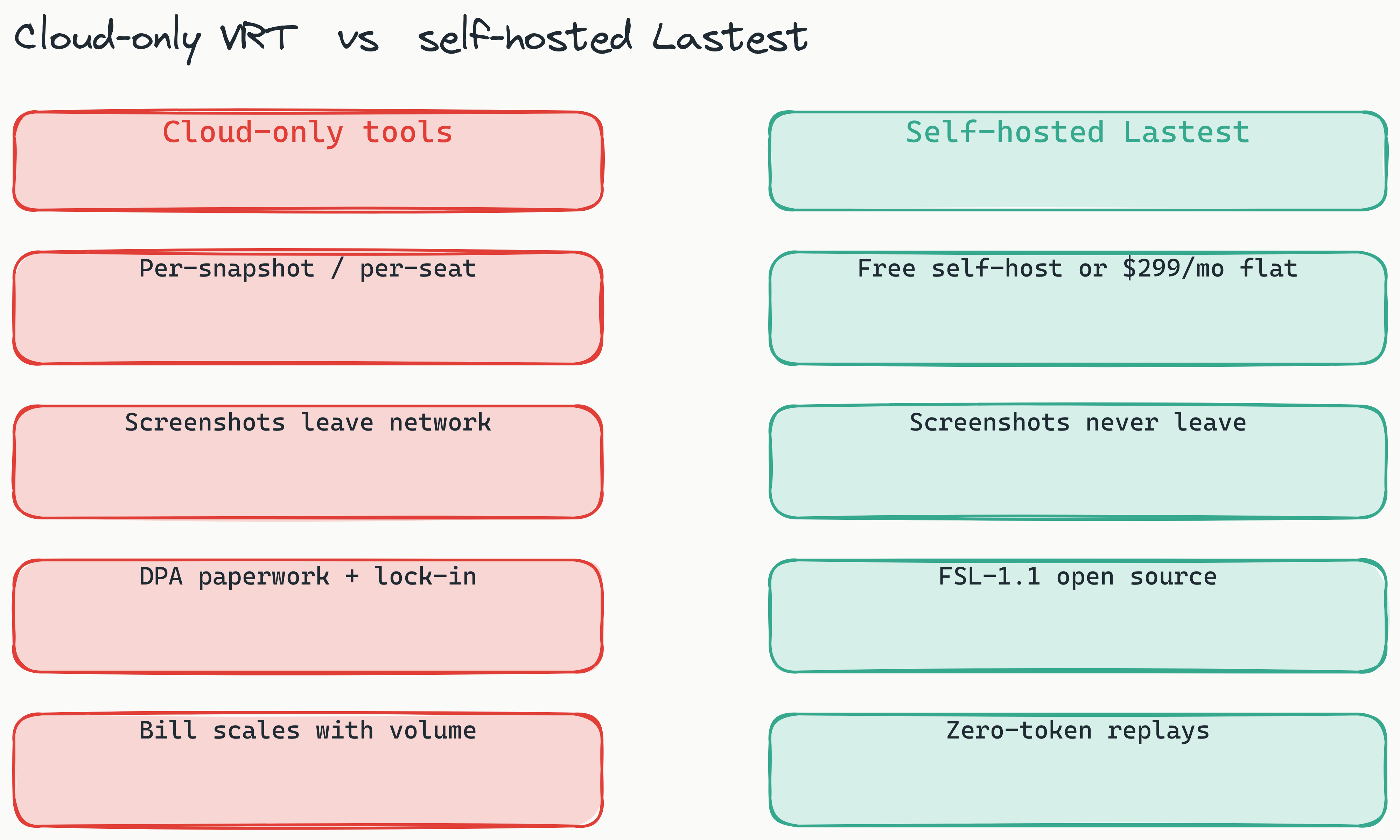
Visual regression testing (VRT) solves this by automatically comparing screenshots of your application before and after code changes. It catches unintended visual differences that functional tests never see. For enterprise teams operating at scale, manual visual reviews simply can't keep pace with continuous deployment. The market is shifting decisively toward automated, self-hosted solutions that plug directly into existing CI/CD pipelines-and away from cloud-only tools that introduce compliance and cost headaches.
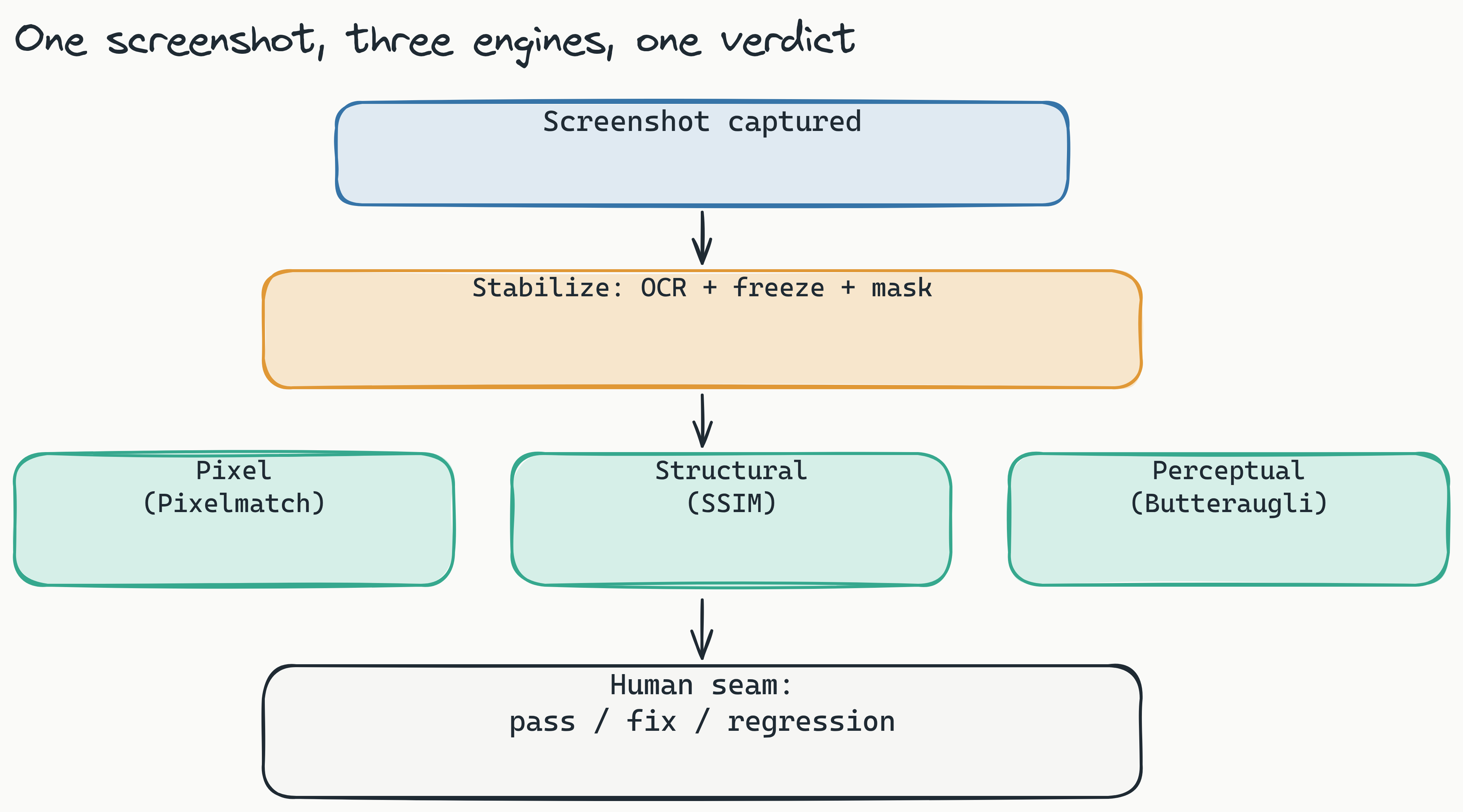
This guide covers why enterprise teams are ditching manual visual QA, how to automate visual regression testing in your CI/CD pipelines, and why self-hosted open-source tools are winning for security-conscious organizations in 2026. We will use Lastest as the worked example: an open-source platform that is free to self-host under the FSL-1.1-ALv2 license, runs three diff engines, and routes every diff through exactly one human review seam.
Why Enterprises Are Abandoning Manual Visual QA
The scale problem hits hard. As your application grows from dozens to hundreds of pages, and your deployment frequency jumps from weekly to multiple times daily, manual visual review becomes a bottleneck that slows everyone down. Industry research suggests that a substantial portion of software bugs are visual in nature-layout shifts, color mismatches, missing elements, or responsive design failures. Yet most functional test suites completely ignore rendering.
The cost of a visual bug reaching production goes far beyond the engineering hours needed to fix it. There's the brand dilution when customers see a broken interface. The lost revenue when a checkout button disappears. The team morale hit when a release that passed all tests still breaks something visible to users. A single visual regression sitting in a critical conversion path can quietly bleed revenue for days before anyone notices.
Functional testing alone isn't enough because it validates behavior, not appearance. An integration test can confirm that clicking "Submit" sends the right API request, but it can't tell you that the submit button is now overlapping the privacy notice. Visual regression testing fills this gap by applying the shift-left principle (a practice originating from the Toyota Production System and popularized by the DevOps movement) to UI quality: catching rendering issues at the same stage where you catch logic bugs, rather than during a separate manual QA pass before release.
[Why do enterprises move away from manual visual QA?]: Manual visual QA cannot keep pace with continuous deployment at enterprise scale. As applications grow to hundreds of pages and deployment frequency increases, manual reviews become a bottleneck that delays releases. Automated visual regression testing catches rendering bugs at the same stage as logic bugs, reducing costly production incidents and freeing engineering teams from emergency fixes.
How to Automate Visual Regression Testing in Your CI/CD Pipeline
To automate visual regression testing in your CI/CD pipeline, integrate a visual testing tool as a Dockerized service that captures and compares screenshots during each build. The goal is to run visual checks alongside your unit and integration tests, so developers see feedback within minutes-not hours.
What Is a Visual Regression Test?
A visual regression test works in three phases:
- Baseline capture - Establish a screenshot of each page or component in its known-good state
- Fresh capture - During a new build, capture screenshots of the same elements
- Comparison - Compare new screenshots against baselines and highlight differences
The output is a diff image that shows exactly what changed, helping developers decide whether the change is intentional (a feature update) or accidental (a regression).
Integrating into GitHub Actions and GitLab CI
Lastest integrates directly into GitHub Actions and GitLab CI (including self-hosted GitLab) using a reusable Action and a containerized browser pool. You add a single step to your pipeline configuration that starts the Lastest service, runs your test suite, and captures screenshots, with no local Playwright install required. GitLab merge requests get inline diff comments, and you can also fire tests from webhooks or a scheduled cron. Detailed configuration examples live in the Lastest docs.
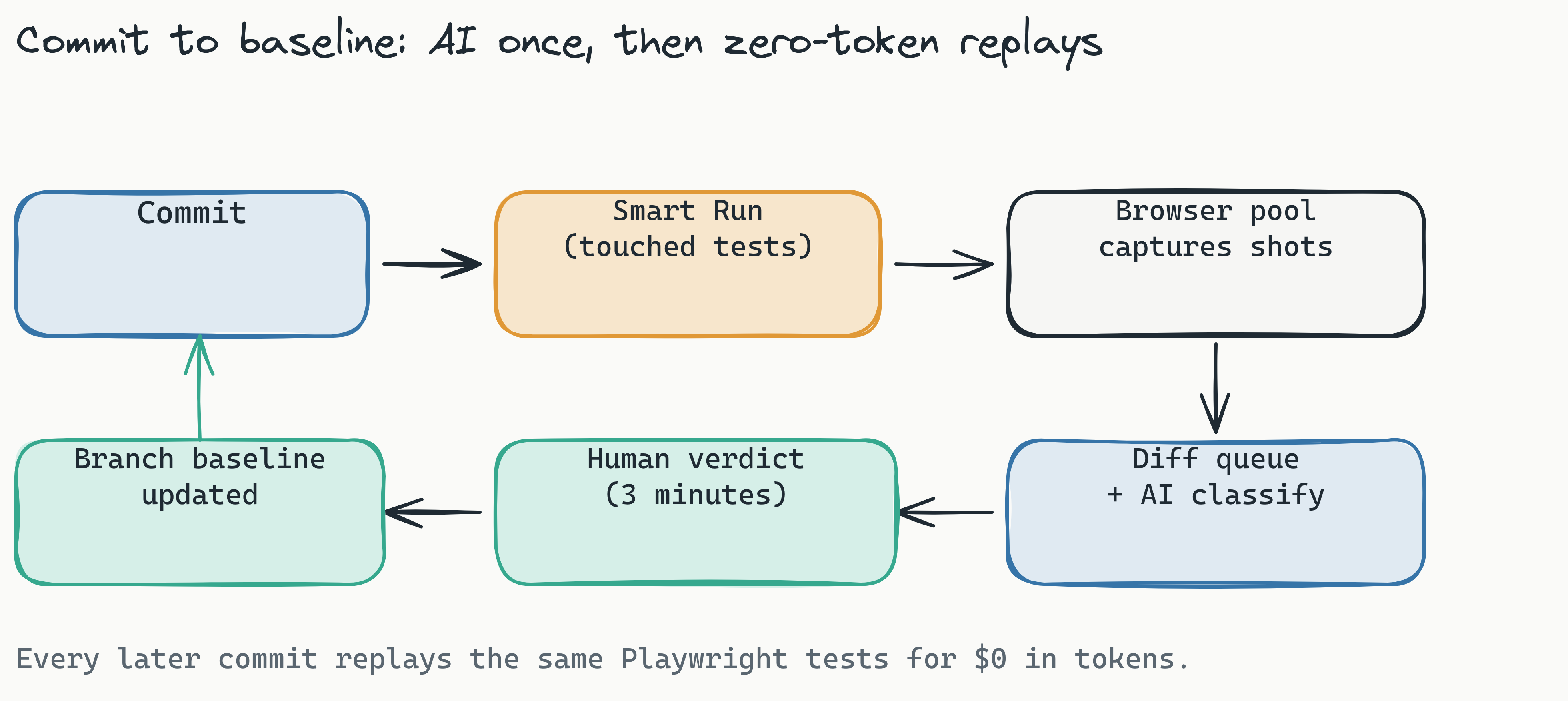
Two mechanics matter at enterprise scale. First, zero-token replays: AI only runs when you create or fix a test. Every subsequent run is plain Playwright execution, so you can replay thousands of times a day without burning a single token. Second, Smart Run reads your git diff and runs only the tests your change actually touched, instead of re-screenshotting the whole app on every commit. Together they keep the entire feedback loop short and the bill flat. This visual regression testing for CI/CD pipelines enforces visual quality gates automatically at every commit, and you can read a deeper walkthrough in our CI/CD visual regression guide.
[How do you set up automated visual regression testing in CI/CD?]: Add a Dockerized visual testing service as a step in your CI pipeline configuration. The service captures baseline screenshots, then compares new screenshots against baselines during each build. Tools like Lastest integrate with GitHub Actions and GitLab CI with a single configuration step, running visual tests alongside functional tests and returning diff reports within minutes.
Self-Hosted vs. Cloud: Why Self-Hosted Wins for Enterprise Compliance
Self-hosted visual regression testing gives enterprise teams full control over their data, eliminating the compliance risks of sending UI snapshots to third-party cloud servers. This distinction matters more in 2026 than ever, as data sovereignty regulations tighten worldwide.
GDPR and Data Sovereignty
For enterprises based in Germany, the EU, or any jurisdiction with strict data protection laws regulated by the General Data Protection Regulation (GDPR), sending application screenshots to cloud VRT providers introduces legal exposure. Screenshots often contain proprietary UI elements, customer data rendered in views, and internal business logic. A self-hosted solution ensures that no visual data ever leaves your corporate network. No external API calls. No third-party storage of your snapshots. No questions about cross-border data transfers. Achieving GDPR compliance for testing tools requires this level of data control.
Industry analysts predict that by 2027, a majority of enterprises will mandate self-hosted solutions for any testing tool that processes application output. The reason is straightforward: cloud-only tools create an audit trail that compliance teams struggle to justify.
Cost Predictability
Many cloud VRT tools bill per snapshot or per seat. As your application grows, those costs scale with screenshot volume, and they climb faster the moment you add parallel branches or multiple environments. Lastest takes the opposite shape. Self-hosted, it is free forever under the FSL-1.1-ALv2 license, with unlimited screenshots and replays on your own infrastructure. If you would rather skip the ops, Lastest Cloud is a flat $299 per month, with no per-user and no per-screenshot fees. For enterprise teams running hundreds of thousands of visual tests per month, a flat or zero marginal cost is the difference between a predictable line item and a bill that fights your growth. See the full breakdown on the enterprise VRT pricing post.
Lastest's open-source model goes further by eliminating vendor lock-in entirely. As an open source visual regression testing tool, your team can audit the code, contribute changes, and customize the tool to fit your exact workflow. You can also bring your own AI: Claude CLI, the Anthropic API, OpenRouter, OpenAI, or a fully local Ollama model, so no test-generation prompt or screenshot is forced through a vendor you did not choose. The "your server, your rules" principle applies at every level.
Head-to-Head: Percy vs. Applitools vs. Lastest (2026 Comparison)
When comparing Percy vs. Applitools vs. Lastest for enterprise use, the critical differentiator is self-hosting and open-source, areas where Lastest stands apart. Below is a factual comparison based on publicly available information. For a deeper teardown, see our dedicated Lastest vs Percy vs Applitools comparison.
Comparison Table
| Feature | Percy | Applitools | Lastest |
|---|---|---|---|
| Pricing model | Per snapshot / per seat (from ~$199/mo) | Custom quote (from ~$699/mo, usage-based) | Free self-hosted; flat $299/mo Cloud (no per-seat, no per-screenshot) |
| Self-hosted option | No (cloud only) | No (cloud only) | Yes (Docker, open-source) |
| AI diff engines | Single (pixel-based) | Ultrafast Grid (AI visual AI) | Three: pixel, structural, perceptual |
| Open-source | No | No | Yes (FSL-1.1-ALv2) |
| CI/CD integrations | GitHub, GitLab, Bitbucket | GitHub, GitLab, Jenkins | GitHub Actions, GitLab CI, Docker |
| GDPR ready out of box | Requires DPA | Requires DPA | Yes (self-hosted = data never leaves) |
When to Choose Each Tool
Percy excels at breadth of browser coverage and has strong integrations with established CI platforms. It's a solid choice if your team has no self-hosting requirement and prefers a fully managed service.
Applitools offers the most advanced AI capabilities with its Ultrafast Grid, which renders screenshots across multiple browsers and viewports simultaneously. If AI-powered visual testing is your primary need and you have no data sovereignty concerns, Applitools is a strong option.
Lastest wins for enterprise teams that require self-hosting, open-source transparency, and multi-engine diffing to reduce false positives. On top of the three diff engines, it adds AI failure classification: every failing test is auto-tagged as a real regression, a flake, an environment issue, or a test-maintenance problem, each with a confidence score and reasoning, so triage starts from a sorted queue rather than a wall of red. Combine that with zero per-screenshot pricing and complete data control, and it becomes the practical choice for security-first organizations.
The Power of AI: Pixel, Structural, and Perceptual Diffing
An AI visual regression testing tool like Lastest uses multiple diff engines to distinguish real bugs from harmless rendering variations. This multi-engine approach is the key to keeping false positives low and developer trust high.
When Pixel-Perfect Diffing Falls Short
Pixel-perfect diffing compares every single pixel of two screenshots. It's extremely strict and catches every color shift, anti-aliasing artifact, and font rendering variation. The problem? Many of these differences are invisible to the human eye or irrelevant to the user experience. A pixel-perfect diff on a page with dynamic content, font smoothing differences across operating systems, or subtle anti-aliasing variations generates false positives that waste engineering time.
Perceptual Diffing for Human-Centric Review
Perceptual diffing simulates how a human viewer perceives visual differences. It ignores variations in anti-aliasing, sub-pixel text rendering, and minor color shifts that don't affect readability or layout. In practice, swapping a strict pixel comparison for a perceptual one on noisy pages removes the bulk of the false positives that erode reviewer trust, without losing the bugs a human would actually flag.
Lastest provides three diff engines, each backed by a battle-tested algorithm:
- Pixel (Pixelmatch) - Pixel-perfect and fast, ideal for brand-critical pages like marketing sites and landing pages
- Structural (SSIM) - DOM and layout-aware, comparing positions without caring about color or texture, ideal for dynamic dashboards
- Perceptual (Butteraugli) - Human-eye aligned, ignoring anti-aliasing and font noise while catching real bugs, ideal for forms and interactive components with multiple states
Before any engine runs, a stabilization pass keeps screenshots consistent across operating systems: OCR-aware text-region diffing, timestamp freezing, network-idle and font-loading waits, DOM stability detection, page-shift detection, and auto-masking of dynamic content. That is what makes low false positive visual testing a measurable outcome rather than a slogan.
Enterprise teams can assign the appropriate engine per test case. The human oversight dashboard lets QA teams review, approve, or reject each diff before it becomes the new baseline.
Low false positive visual testing isn't a marketing phrase-it's a measurable engineering outcome when you match the diffing strategy to the test scenario.
Enterprise Deployment: Setting Up a Self-Hosted Visual Regression Tool
For enterprise teams deploying self-hosted visual regression testing, Lastest's Docker setup is designed to run in minutes without external dependencies. The deployment process prioritizes simplicity because CTOs and IT directors need solutions that don't add infrastructure overhead.
Step-by-Step Deployment
- Clone the repository from
https://github.com/las-team/lastest - Run the Docker container with a single
docker-compose upcommand - Configure your CI pipeline (GitHub Actions or GitLab CI) to start the Lastest service
- Set diff engine preferences per test case (pixel, structural, or perceptual)
- Review diffs via the human oversight dashboard and approve or reject changes
- Establish new baselines automatically for accepted changes
For advanced enterprise configurations, the Lastest docs cover scaling strategies, the distributed Remote Runners that fan out across CI, and the embedded browser pool that provisions into k3d locally or your own cluster in production. The open-source codebase is available for teams that want to audit or customize. When you self-host, captured screenshots stay within your corporate network, with no external API calls, which is what makes the compliance story defensible.
Two platform features earn their keep in regulated enterprises. WCAG 2.2 AA scoring runs axe-core on every screenshot and produces a 0 to 100 accessibility score with severity-weighted deductions and per-build trend sparklines, so a visual build becomes an accessibility build at no extra step. And the MCP server exposes roughly 20 tools over the Model Context Protocol, letting coding agents like Cursor and Claude Code drive Lastest directly. Explore the agent surface on the tools page.
You also choose how much autonomy to hand the AI, per test or per team: AI-Free recording (air-gapped, no API keys), AI-Assisted (the AI proposes, a human reviews every change), or Full Autonomous via the Play Agent, an 11-step pipeline of specialized sub-agents that plan, generate, run, and heal tests on their own. You can pause, approve, or skip any step, and it resumes where it left off. When selectors drift after a refactor, a 7-layer fallback (data-testid, id, role, aria-label, text, CSS, then OCR) keeps tests passing instead of failing on a renamed class.
For teams that prefer managed hosting without the compliance trade-offs of traditional cloud tools, Lastest Cloud is a flat $299 per month. The free self-hosted version includes all features with unlimited screenshots and replays.
Frequently Asked Questions
What is visual regression testing?
Visual regression testing automatically compares screenshots of your application before and after code changes to catch unintended visual differences that functional tests miss. It uses diff engines to highlight changes in layout, color, or element positioning.
How is visual regression testing different from functional testing?
Functional testing validates that application behavior works correctly (e.g., "does clicking Submit send the right API request?"), while visual regression testing validates that the user interface renders correctly. Both are necessary for comprehensive quality assurance.
Can I run visual regression tests locally before committing code?
Yes. Self-hosted tools like Lastest run locally via Docker, allowing developers to run visual tests on their machines before pushing changes to CI/CD pipelines. This catches visual bugs even earlier in the development cycle.
How much does visual regression testing cost for enterprise teams?
Costs vary widely. Cloud-only tools commonly bill per snapshot or per seat, so the bill grows with screenshot volume. Self-hosted Lastest is free forever under the FSL-1.1-ALv2 license with unlimited screenshots, and Lastest Cloud is a flat $299 per month with no per-seat or per-screenshot fees. For teams running hundreds of thousands of tests monthly, a flat or zero marginal cost can reduce spend by orders of magnitude.
Is visual regression testing compliant with GDPR and data sovereignty regulations?
Only if your visual test data never leaves your network. Self-hosted solutions keep all screenshots and diff data within your corporate infrastructure, eliminating the compliance risks of sending proprietary UI snapshots to third-party cloud servers.
What's the difference between pixel, structural, and perceptual diffing?
Pixel diffing compares every individual pixel; structural diffing compares layout positions without caring about color or texture; perceptual diffing simulates human vision and ignores minor rendering variations. Multi-engine tools like Lastest let you assign the appropriate engine per test case.
Conclusion
Visual regression testing is no longer optional for enterprise teams shipping at scale. The combination of self-hosted deployment, open-source transparency, and multi-engine AI diffing gives engineering leaders the security, speed, and accuracy they need to catch visual bugs before they reach production. Unlike cloud-only tools that charge per snapshot and require sending data to third parties, open-source self-hosted solutions eliminate vendor lock-in, reduce costs, and ensure compliance without sacrificing AI-powered accuracy.
For enterprise visual testing, self-hosted open-source tools eliminate vendor lock-in, reduce costs, and ensure compliance without sacrificing AI-powered accuracy. Whether you're evaluating Percy vs Applitools vs Lastest or building your visual testing strategy from scratch, Lastest gives your team an enterprise visual testing tool that respects your infrastructure and your budget.
Ready to take control of your visual testing pipeline? Self-host Lastest for free under the FSL-1.1-ALv2 license with unlimited screenshots, or skip the ops and start on Lastest Cloud at a flat $299 per month, with no per-screenshot fees and no data leaving your network. The full source is on GitHub, and you can watch it work on the live demos.