Veeva Vault ships three general releases a year, and each one arrives on a fixed calendar that nobody on your side gets to negotiate. For 26R3, prerelease vaults have been available on all PODs since November 2, early and limited release PODs upgrade on November 20, and general release PODs upgrade on December 4, 2026. If you are reading this in mid-November, the prerelease vault is the only place where 26R3 is already running and your users are not.
That window is short, and it is the whole point of the prerelease vault. It is where you find out whether the release changes anything your configuration depends on, while a finding still costs a ticket rather than an incident. This post covers what 26R3 changes, sorted by how you would detect it, and a plan for spending the remaining weeks on the checks that matter. It builds on the auth bridge and seeded-data groundwork from the Vault CRM testing recipe, which applies unchanged to every Vault application.
The calendar you are actually working to
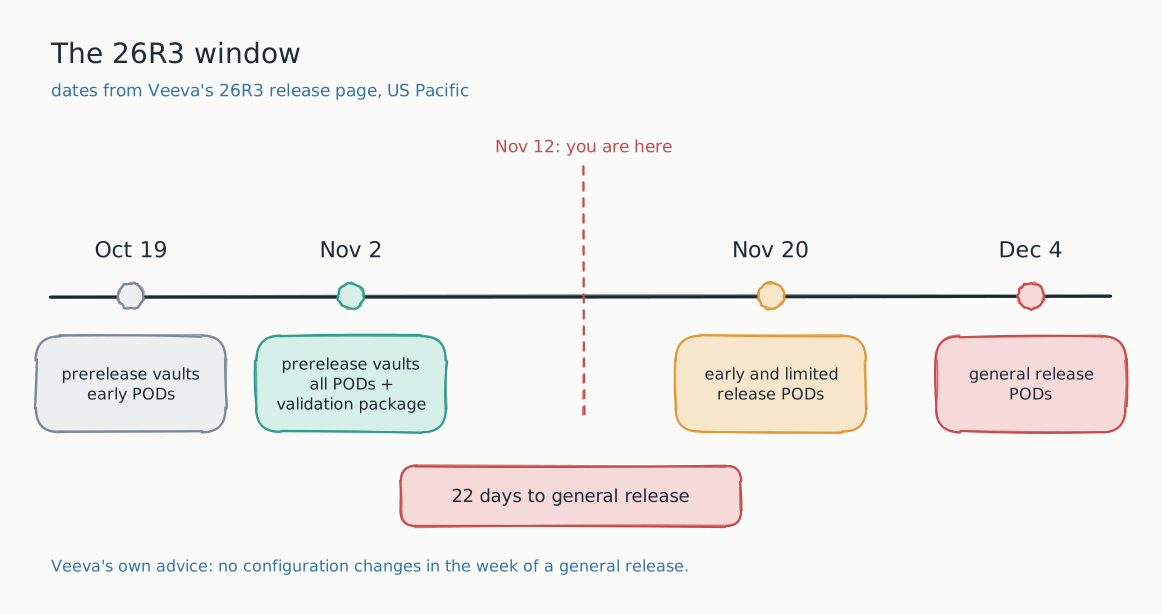
Veeva's About the 26R3 Release page gives the dates in US Pacific time:
- October 19: prerelease vaults on the early PODs.
- November 2: prerelease vaults on all PODs, and the validation package on VeevaDocs.
- November 20: release to early and limited release PODs, production and sandbox alike.
- December 4: release to general release PODs.
Two details on that page change how you should plan. First, the Release Impact Assessment is a living spreadsheet; at the time of writing it was last updated on November 10, so read it again before you sign anything off rather than relying on the copy you downloaded in October. Second, Veeva recommends not making configuration changes to environments in the week of a general release. Take that advice seriously and your real deadline for configuration fixes is the end of November, not December 4. Anything your testing finds after that waits until the release has landed.
One caution on scope: Vault CRM publishes its own release notes and cadence, so if CRM is in your estate, check its schedule separately rather than assuming it moves with the Vault Platform dates above.
The impact assessment tells you what changed, not what it touches
The Release Impact Assessment is the right starting point, and the validation package is the right evidence for your quality system. Neither one can tell you how a release interacts with your configuration: your custom document types and renditions, your page layouts, the reports your teams export every Monday, and the integrations that read from Vault on a schedule. That interaction is where release regressions actually live, and it is the one thing only you can test.
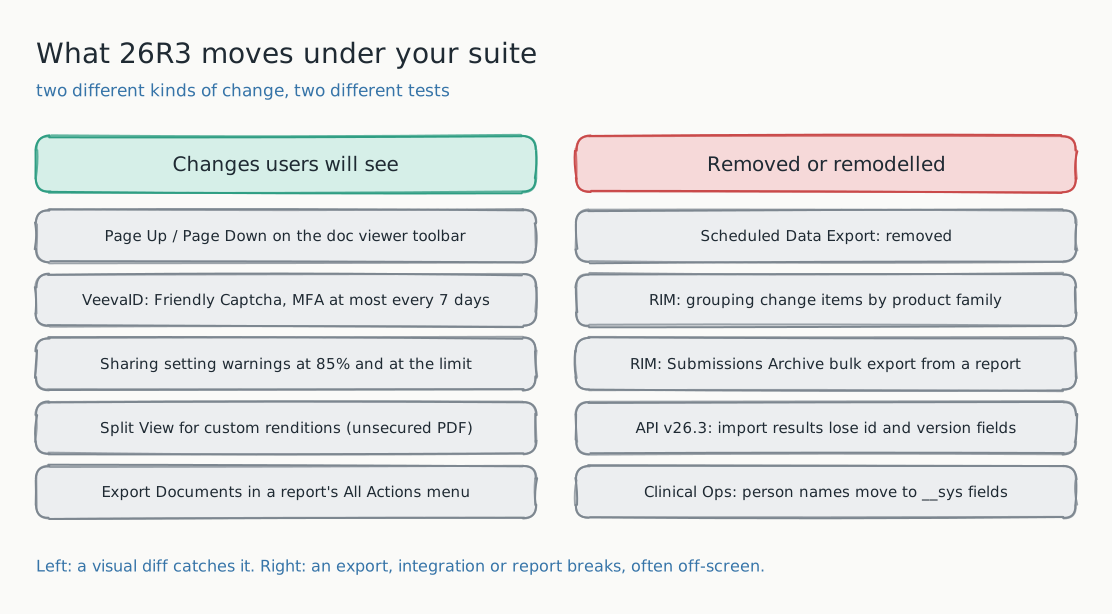
So the useful question for the prerelease vault is not "do the new features work?" Veeva tests that. It is "which of our screens, exports, and integrations behave differently on 26R3 than on 26R2?" That is a comparison, and it splits cleanly into two kinds of change that need two different checks.
What changes on screen
These are 26R3 Platform changes that Veeva's What's New in 26R3 page describes, and that alter what a user sees in screens most Vault suites already cover:
- Document viewer toolbar. Page Up and Page Down buttons are now on the viewer toolbar. Every baseline that includes the viewer will move. That is expected drift: approve it once on the prerelease vault, so the production run on December 4 is quiet.
- Split View for custom renditions. Users can now open custom renditions in Split View. Veeva notes this only applies to custom renditions that are PDF files with no security, so whether it appears depends on your rendition configuration. Test it against the rendition types you actually use.
- Sharing setting warnings. Vault now warns as a document approaches the maximum number of sharing settings: a preventive warning at 85 percent (1,275 entries) and a detective warning at the 1,500 limit. Documents with large sharing lists will render a new warning in the Sharing Settings panel.
- Export Documents from a report. A new Export Documents action in a report's All Actions menu exports up to 1,000 unique document versions. If your teams have a manual export routine, the menu they click through has changed.
- Document Redaction. New, but not switched on for you: admins must enable redaction on specific document types by configuring the Redacted rendition type. Only test it if you plan to enable it.
The change most likely to break an automated suite outright is in sign-in. VeevaID now replaces legacy CAPTCHA tools with a background mechanism (Friendly Captcha), and prompts for multi-factor authentication no more than once every seven days. If your automation signs in through VeevaID, check that login first on the prerelease vault, because anti-bot changes are exactly what break scripted sign-ins. The setup we recommend avoids the question entirely: a password-auth integration user, exempt from SSO and MFA, scoped to the sandbox.
For all of these, a visual comparison does the work. Run the same scenarios against a 26R2 sandbox and the 26R3 prerelease vault with the same seeded data, and every one of the changes above shows up as a diff on the step where it appears. The job then is triage, not discovery: expected (it is in the release notes), interaction (it is in the release notes but looks different on your configuration), or regression (it is not in the release notes at all).
What goes away off screen
The second column is more dangerous, because none of it fails on a screen your team looks at. It fails in a job, an export, or an integration, usually a few days after go-live, when someone notices data is missing.
- Scheduled Data Export is removed. Veeva's announcement says the feature is no longer available for any vault starting in 26R3. If a warehouse or a reporting tool depends on it, the check you need is a data freshness check downstream, not a screenshot.
- RIM: grouping of change items is deprecated. The "Enable Grouping of Change Items by Product Family" setting goes away. If your regulatory teams rely on that grouping in their views, the screen they work in will look different, and so will anything you baselined on it.
- RIM: Submissions Archive bulk export from a Vault report reaches end of support. Read Veeva's announcement for the replacement path before your archive team's next export, not during it.
- API v26.3: Retrieve Submission Import Results changes shape. Veeva announced that with 26R3 this endpoint no longer includes
id,major_version_number__v, orminor_version_number__v. Any integration that reads those fields needs to change, and the prerelease vault is where you can call the endpoint and see the new response. - Clinical Operations: person names are standardized. New system fields for prefix, middle name, and suffix arrive as part of a name migration. Layouts and reports that show person names, and integrations that map them, are worth a direct look.
These need a different kind of test from the visual pass: a call to each API your integrations use, a run of each scheduled export, and a check on each report that feeds something outside Vault. The network layer of a replay helps here too. A report screen that renders normally while a call behind it returns a 4xx is the classic silent failure, and failing the run on that call is cheaper than finding out from a missing file.
A three-week plan for the prerelease vault
- Match the configuration. Whatever configuration your prerelease vault carries, make sure the 26R2 sandbox you compare it with carries the same, with the same seeded data. Otherwise your diff measures configuration drift, not the release.
- Baseline on 26R2, replay on 26R3. Run your existing suite against the sandbox, then the identical suite against the prerelease vault. Mask the usual noise first: record identifiers, timestamps, user names in audit columns, and anything that counts open items.
- Triage every diff into three buckets. Expected, interaction, regression. Expected drift gets approved. Interactions get a configuration fix or a user communication. Regressions get a Veeva support case, while there is still time for a fix.
- Run the off-screen checks. Call each API endpoint your integrations depend on, run each scheduled export, and open each report that leaves Vault.
- Land configuration fixes before the week of December 4. Veeva's own advice is no configuration changes in the week of a general release, so plan as if that week is frozen.
- Re-run on release day. Run the suite on November 20 if you are on an early or limited release POD, and on December 4 for general release. With expected drift already approved, any diff on those days is new.
Step three is where most of the time goes, and it is where a visual tool earns its keep. A release that adds two buttons to the document viewer will move every viewer screenshot in the suite. Approving that change once, on the prerelease vault, is the difference between a December 4 report your team reads and one they scroll past.
The nine-layer verify for a release rehearsal
| Layer | Band | Why, for 26R3 |
|---|---|---|
| visual | ENFORCE | The toolbar, Split View, and the new warnings all show up here first. |
| network | ENFORCE | Catches screens that render while a call behind them fails, including API shape changes. |
| text | ENFORCE | New menu actions and warning copy are text changes. A changed label in a regulated workflow is a finding. |
| url | ENFORCE | Navigation changes surface as unexpected routes. |
| console | ENFORCE | Client errors in the viewer mean the page you see may be incomplete. |
| dom | LOG | Useful for telling a rendering change from a structural one during triage. |
| a11y | LOG | Trend it. New toolbar controls are a common place for regressions. |
| perf | LOG | Compare 26R2 and 26R3 timings for your heaviest screens. |
| design | DISABLE | Off until a token set exists. |
Where these notes stop
This post lists 26R3 changes we could confirm on Veeva's own release pages on November 12, 2026. The full What's New in 26R3 page is long, application sections for RIM, Quality, Safety, and PromoMats carry more changes than we cover here, and the Release Impact Assessment is the authoritative list of what is on by default. Use this as a map of which kinds of change to look for, and the impact assessment as the list of which ones apply to you.
Frequently asked
Do we need to test if we only use standard configuration? Less, but yes. Standard configuration still has your data, your users, your reports, and your integrations on top of it, and that is where removals like Scheduled Data Export and API response changes land. A short suite on the prerelease vault costs far less than finding a broken integration after December 4.
Can a visual diff replace our validation scripts for the release? No. Validation scripts and Veeva's validation package document that the system does what it is specified to do. A visual comparison answers a different question: what changed between the version you validated and the one you are about to get. Use it to decide where your validation effort should go, and keep its run reports as supporting evidence.
What if the prerelease vault and our sandbox have different data? Then most of your diffs will be data, not release. Seed both from the same synthetic set before you compare, and freeze identifiers and timestamps. The setup is covered in reducing false positives in visual regression testing.
Is it too late to start for 26R3? Not if you start this week. A focused suite on the screens your teams use daily, plus the off-screen checks above, fits in the time left before configuration should freeze. If it is too late for a full suite, it is the right time to build the one you will run against 27R1.
Start here
Every Vault general release follows the same pattern: a prerelease window, a fixed date, and a short period in which a finding is still cheap. Book a release-readiness review and we will map the screens and integrations that matter for 26R3, and hand back a suite you can run against every release after it. Want to see the output first? Look at a sample diff report, or read the cross-platform release-testing playbook. Everything is open source at github.com/las-team/lastest, and self-hosting is free forever.
The one-line version: 26R3 is already running in your prerelease vault, and December 4 is fixed. Compare it against 26R2 on your own configuration now, approve the drift you expect, and leave the release day with nothing to discover.