There is a component in your app that your test suite cannot reach cleanly. Everyone has one. It is a custom dropdown, or a canvas-rendered chart with clickable regions, or an icon-only button whose only distinguishing feature is a background image. The test that covers it is pinned together with a CSS path and an nth-child, it breaks every third sprint, and somebody has added a comment above it apologising.
That component now has a second problem, and it is going to be a commercial one.
The traffic hitting your app is no longer only humans and crawlers. Browser agents are a third category: Playwright MCP driving a real browser for a coding assistant, an agentic browser completing a purchase, a shopping assistant filling a form, a support bot checking an order. Cloudflare's traffic reporting puts agentic bots at a small slice of AI traffic today, a couple of percent against training and search crawlers, but it is the slice that acts rather than reads, and it is growing from a base of approximately zero.
And here is the part that should interest anyone who owns a test suite: those agents navigate the same way your best selectors do.
Agents do not look at your app
The intuition most people carry is that an AI agent "looks at" a page, the way a person would. Some do, and the ones that do are the ones that fail. Vision-based navigation is slow, expensive per step, and prone to guessing at state it cannot see. Parsing raw DOM is worse in a different way: a modern SPA's markup is thousands of nested divs with hashed class names, and nothing in it says which of them is a button.
The approach that won is the accessibility tree. Microsoft's Playwright MCP server, now the de facto reference implementation, takes structured accessibility snapshots and hands the model a compact list of elements with roles, accessible names, and stable refs. No screenshots required. The agent reads "button, name: Add to cart, ref: @e12" and calls a tool against that ref.
The accessibility tree is not a special agent API. It is the thing browsers already compute for screen readers, derived from your semantic HTML and ARIA attributes. Nobody built it for agents; agents simply found the one machine-readable description of your interface that already existed.

The selector ladder is the same ladder
Now look at how a resilient test finds an element. Lastest generates Playwright with a seven-layer selector fallback: data-testid, then id, then role, then aria-label, then visible text, then CSS, then OCR against the screenshot. When a refactor breaks the top rung, the test walks down the ladder instead of failing, which is what self-healing selectors actually means underneath the marketing.
Read that ladder again with agents in mind. Rungs three, four and five, role, aria-label, and visible text, are the accessibility tree. They are the same three properties the agent's snapshot exposes. Rung one and two are private to you. Rungs six and seven are the desperate ones.
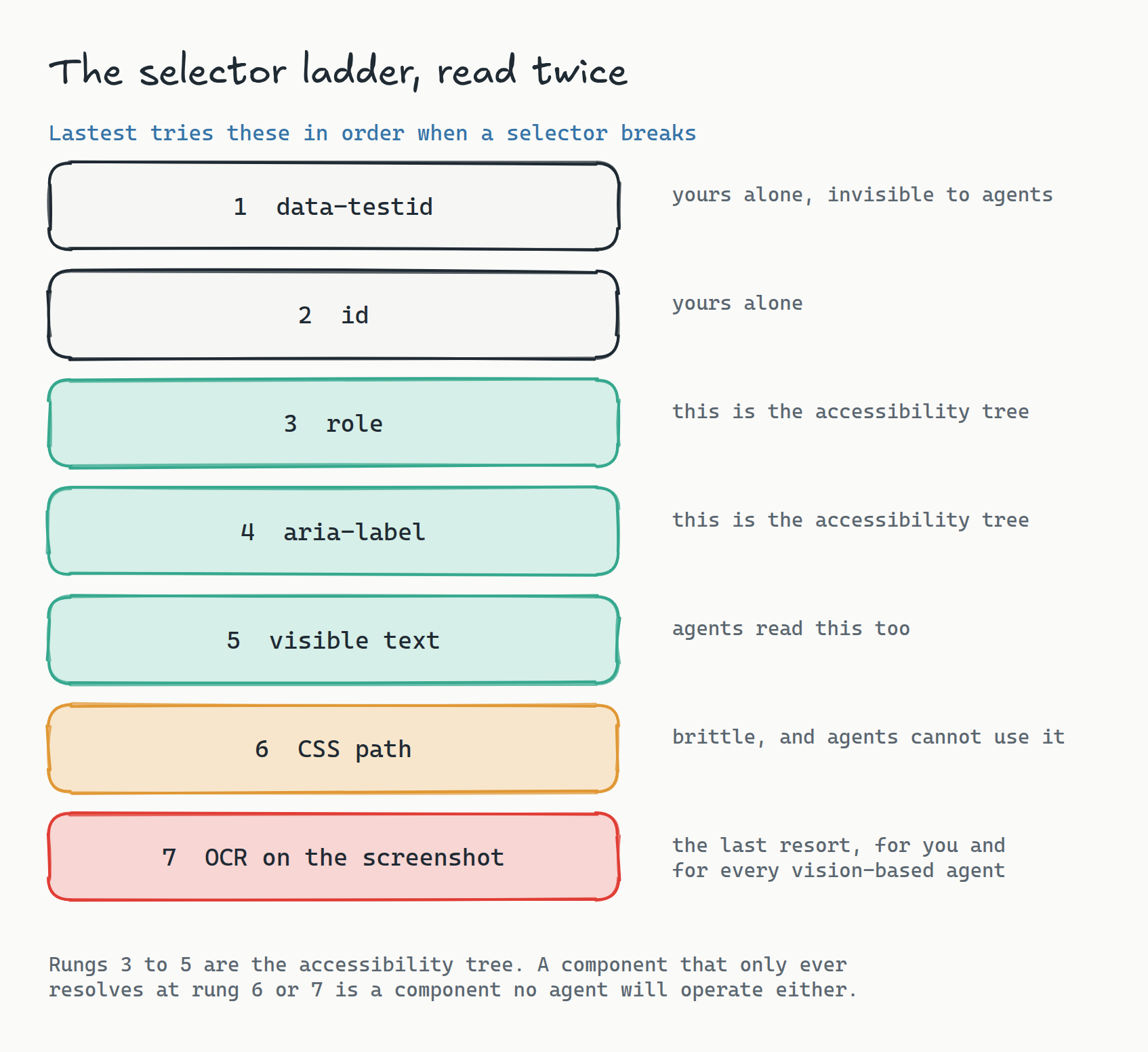
So the diagnostic is free. Ask which rung each of your components resolves at. Anything that consistently falls through to CSS or OCR is telling you two things at once: your test for it is brittle, and no agent will ever operate it reliably. Anything that resolves at role or label is solid for your suite and legible to every agent on the web.
You do not need an agent-readiness audit or a new scanner. Your flaky test list already is the audit. It has been sitting in your CI dashboard the whole time, sorted by severity, and until now you read it as a testing problem.
What actually blocks an agent
The specifics are unglamorous and extremely familiar to anyone who has written E2E tests:
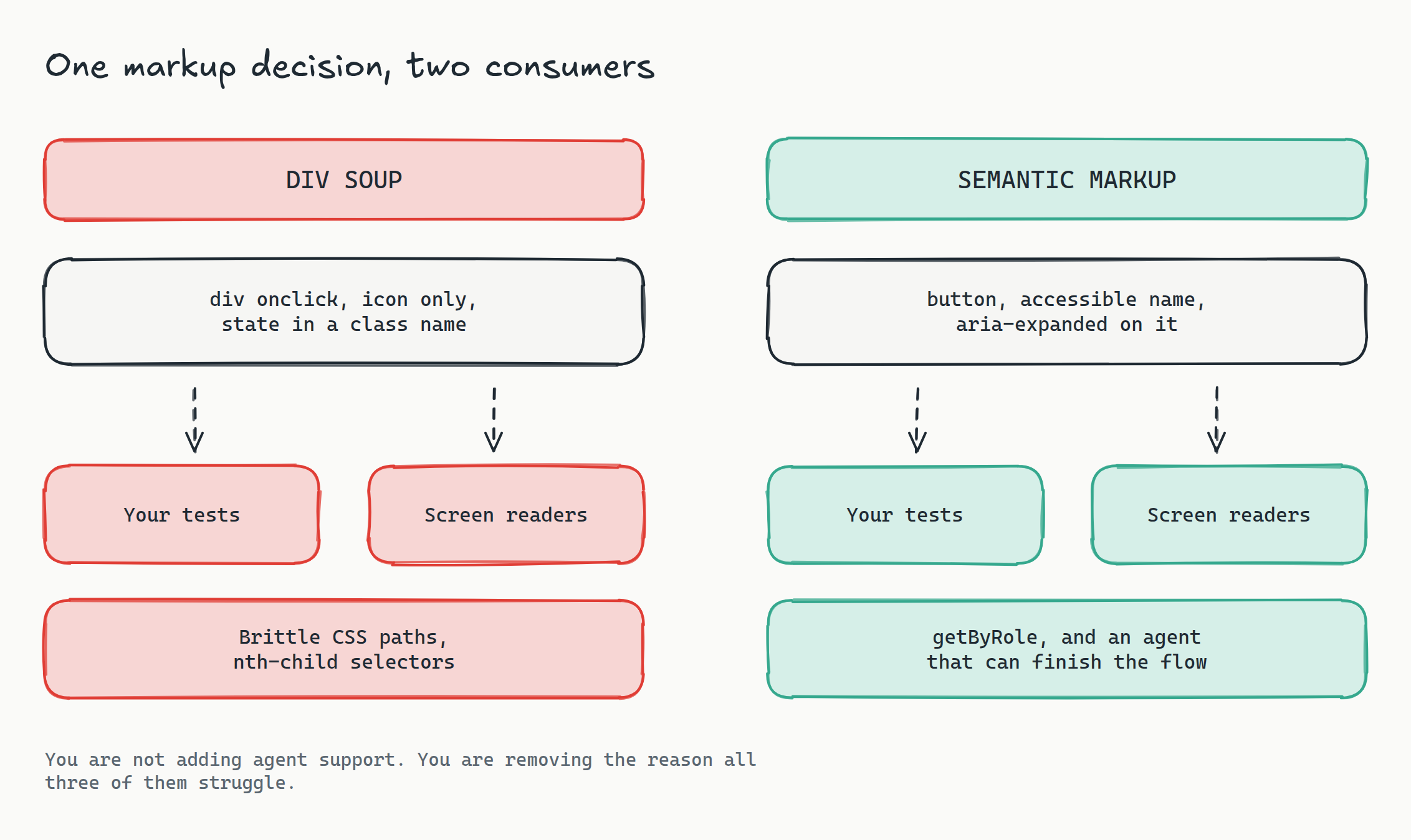
- Icon-only buttons with no accessible name. The agent sees "button" with an empty name and has no way to distinguish it from the four other nameless buttons in the toolbar. Your test has the same problem and solved it with a CSS path.
- Divs with click handlers. No role, so they do not appear as interactive at all. The agent does not know it can be clicked. Neither does a screen reader.
- State encoded in class names.
.is-opentells the agent nothing;aria-expanded="true"tells it everything. This is also the difference between a test that waits for the right thing and a test that sleeps for 500ms. - Custom widgets rebuilt from divs. A hand-rolled combobox without the ARIA pattern is opaque to agents, unusable with a keyboard, and requires bespoke test helpers.
- Canvas-rendered interfaces. Nothing in the tree at all. Vision-based agents will squint at it, everything else gives up, and your suite falls back to OCR.
- Modals that do not manage focus. The agent acts on the element underneath, which is exactly the race condition your flaky test has been hitting.
Every item on that list appears verbatim in an accessibility audit. That is not a coincidence, it is the whole point: accessibility work, test resilience, and agent readiness are three names for the same underlying property, which is whether your interface describes itself in machine-readable terms.
The budget argument, since somebody will ask
"Improve semantics" has historically been a hard sell. It has no demo, the payoff is diffuse, and it competes against features. That argument changes when three separate line items collapse into one piece of work.
Semantic markup is simultaneously: the accessibility remediation you owe under EAA enforcement and EN 301 549, the fix for the flaky tests eating your CI budget, and the reason an agent can complete a purchase on your site instead of on a competitor's. You are not adding agent support. You are removing the reason all three of them struggle.
Google has already started scoring this directly. Lighthouse and PageSpeed Insights added an experimental agentic browsing category that assesses how readable a page is to an AI agent, weighting exactly what you would expect: a clean accessibility tree, stable layout, machine-readable metadata. Whatever you think of the metric, when the measurement lands in the tool every team already runs, the work stops being invisible.
How to actually find your gaps
Three passes, in order of effort:
Read your own suite. Grep for CSS selectors and nth-child. Every hit is a component with no accessible identity. Sort by how often the surrounding test has been touched and you have a priority list ordered by real pain.
Watch the fallback ladder. If you run Lastest, the interesting signal is which rung each selector resolved at and whether that changed. A selector that used to resolve at role and now resolves at CSS is a semantic regression, and it is a regression an agent will feel before any of your users complain. Every heal is versioned with a reason, so the drift is visible rather than inferred.
Point an agent at it. The cheapest test of agent readiness is an agent. Lastest ships an MCP server exposing around twenty tools, so a coding agent can drive your app through the same protocol an external agent would use. Give it a goal, watch where it stalls, and note the component. Then fix the component and watch your flaky test for it go quiet at the same time. If you are already building with a coding agent in the loop, this costs you one prompt.
The uncomfortable part
Worth saying plainly: not everyone wants agent traffic. If your business model depends on humans seeing an upsell, an agent that completes the task in three tool calls is not obviously your friend, and "block, meter, or serve" is a real strategic question rather than a technical one.
But the choice is downstream of a capability. You cannot decide how to treat agent traffic until agents can complete flows on your site at all, and today, for most apps, they cannot, because of the same components your test suite has been complaining about for two years. Fix the semantics and you get to make the strategy call. Skip it and the call gets made for you by whichever competitor's checkout the agent could actually operate.
Frequently asked
How do AI browser agents actually read a web page? Most production agents take a structured accessibility snapshot rather than a screenshot. Playwright MCP, the de facto reference server, hands the model a compact list of elements with roles, accessible names, and stable refs, and the model picks one to act on. Vision-based navigation exists but is slower, costs more per step, and guesses at state, so it tends to be the fallback rather than the default.
Is agent readiness the same thing as accessibility? Largely, yes, and that is the useful part. Both depend on whether your interface exposes roles, accessible names, and state in machine-readable form. An icon button with no label, a div with a click handler, or state stored in a class name blocks a screen reader and an agent for the same reason, and the fix is one change that serves both.
What does this have to do with our flaky tests? A resilient selector resolves by role, aria-label, or visible text, which are exactly the properties the accessibility tree exposes. When a test can only find an element by CSS path or OCR, that element has no accessible identity, which is also why no agent can operate it. Your flaky test list is a free agent-readiness audit you have already paid for.
Do we need a separate tool to check whether agents can use our app? Not really. Point an agent at it: Lastest's MCP server exposes about twenty tools so a coding agent can drive your app through the same protocol an external agent would, and where it stalls is your gap. Lighthouse and PageSpeed Insights have also added an experimental agentic browsing category that scores accessibility-tree cleanliness and layout stability.
Should we want agent traffic at all? That is a business decision, not a technical one, and blocking or metering agents is a legitimate strategy. But you cannot decide how to treat agent traffic until agents can complete flows on your site, and the work that makes that possible is the same work that fixes your accessibility conformance and your brittle tests. Do the work, then make the call.
Start here
Open your CI dashboard, sort tests by flakiness, and look at what the top ten have in common. If the answer is CSS paths and nth-child, you have found both your test debt and your agent-readiness gap in a single query.
Self-host Lastest for free to generate tests with a seven-layer selector fallback, see which rung each element resolves at, and drive your app through the MCP server the same way an external agent would. Replays are zero-token, screenshots are unlimited and never leave your network. If you would rather not run the ops, Lastest Cloud is a flat $299 a month with no per-seat or per-screenshot fees. Source at github.com/las-team/lastest.
The agents did not ask you to build them an API. They found the one you had been neglecting for twenty years and started using it. The teams that already keep that interface clean, for tests or for screen readers, get the third benefit for free.