Somewhere in your company there is a PDF. It is forty pages long, it cost five figures, and on page three it says your product meets WCAG 2.1 AA with a handful of noted exceptions. It is signed and dated. Sales attaches it to RFPs. Legal points at it when a customer asks.
That PDF describes one day. It describes the build that was deployed on the morning the auditor opened your app. Everything you have shipped since then is unmeasured, and if you deploy more than once a quarter, "since then" is most of your product.
This was survivable when accessibility was a procurement checkbox. It is less survivable now. The European Accessibility Act has been enforceable since 28 June 2025, with penalties and market restrictions administered independently by each member state. Its harmonised standard, EN 301 549, currently pins WCAG 2.1 AA in full, and the version expected to land in 2026 moves that to WCAG 2.2. Meanwhile enterprise and public-sector buyers have started asking for conformance evidence at renewal rather than only at first sale, which means your claim has to survive contact with a product that changes weekly.
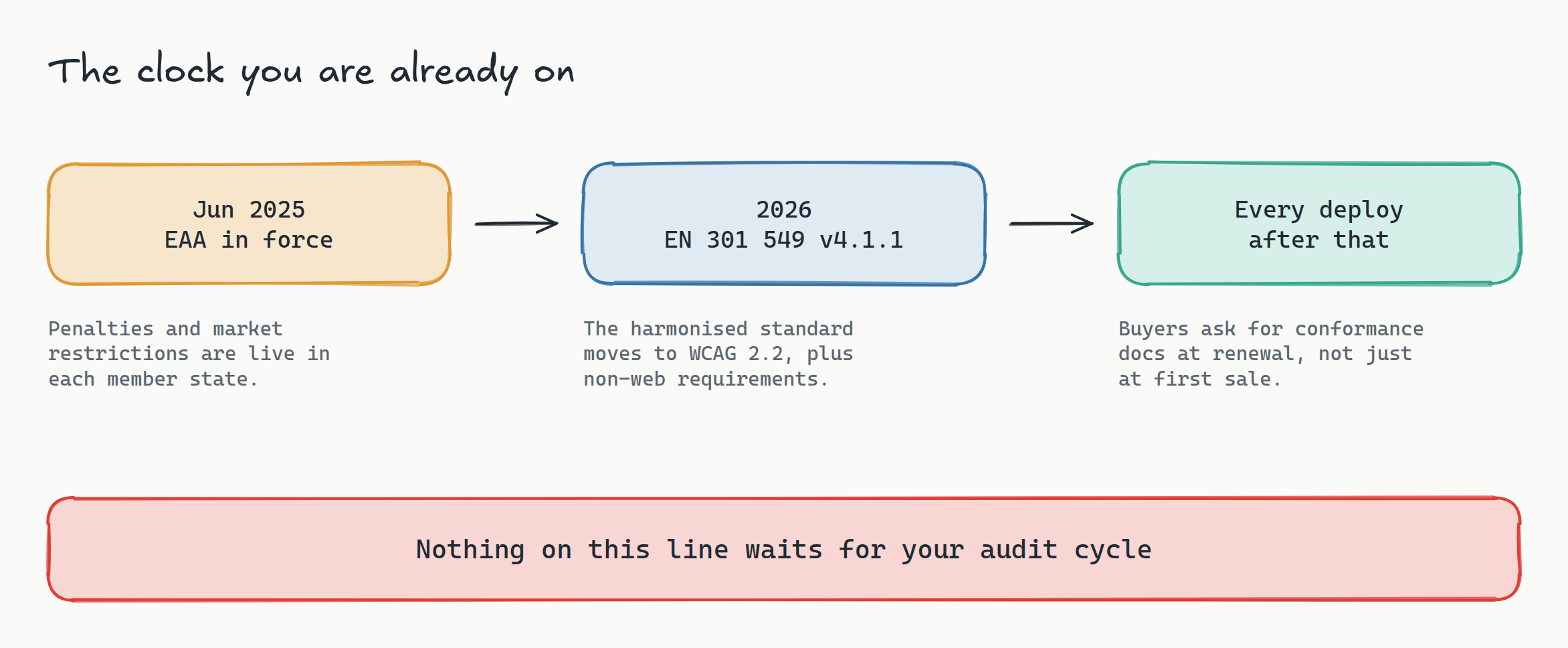
So the interesting question is not "are we compliant?" It is "how would we know if we stopped being compliant, and how long would it take?" For most teams the honest answer is: a customer complaint, eleven months from now.
Accessibility is a regression problem wearing an audit costume
Think about how the failures actually arrive. Nobody files a ticket that says "make this button inaccessible." What happens is that a designer tweaks a brand colour and the contrast ratio on disabled text slips under 4.5:1. A developer swaps a native <button> for a styled <div> to get a hover animation working. A component library upgrade changes the default focus ring to outline: none. A new modal traps focus in the wrong direction. Each one ships in a normal PR, passes review, and lands.
These are regressions. They have the exact shape of every other regression: a change that was correct in intent and wrong in one measurable property, invisible to the person who made it, cheap to fix the day it lands and expensive to fix six months later when nine other components have inherited the same pattern.
We treat every other regression class this way. We do not audit for broken layouts once a year; we diff screenshots on every build. We do not audit for broken checkouts once a year; we run E2E tests on every PR. Accessibility is the one quality attribute the industry still handles with an annual inspection, and that is entirely an artefact of how the tooling was sold, not of anything intrinsic to the problem.

What you can automate, and the part where people oversell it
Here is the honest boundary, because vendors are currently blurring it. Automated rule engines catch somewhere around a quarter to a third of WCAG issues. That number gets quoted a lot, usually by people arguing in one of two bad directions: either "automation is nearly useless, buy manual audits" or "our scanner makes you compliant."
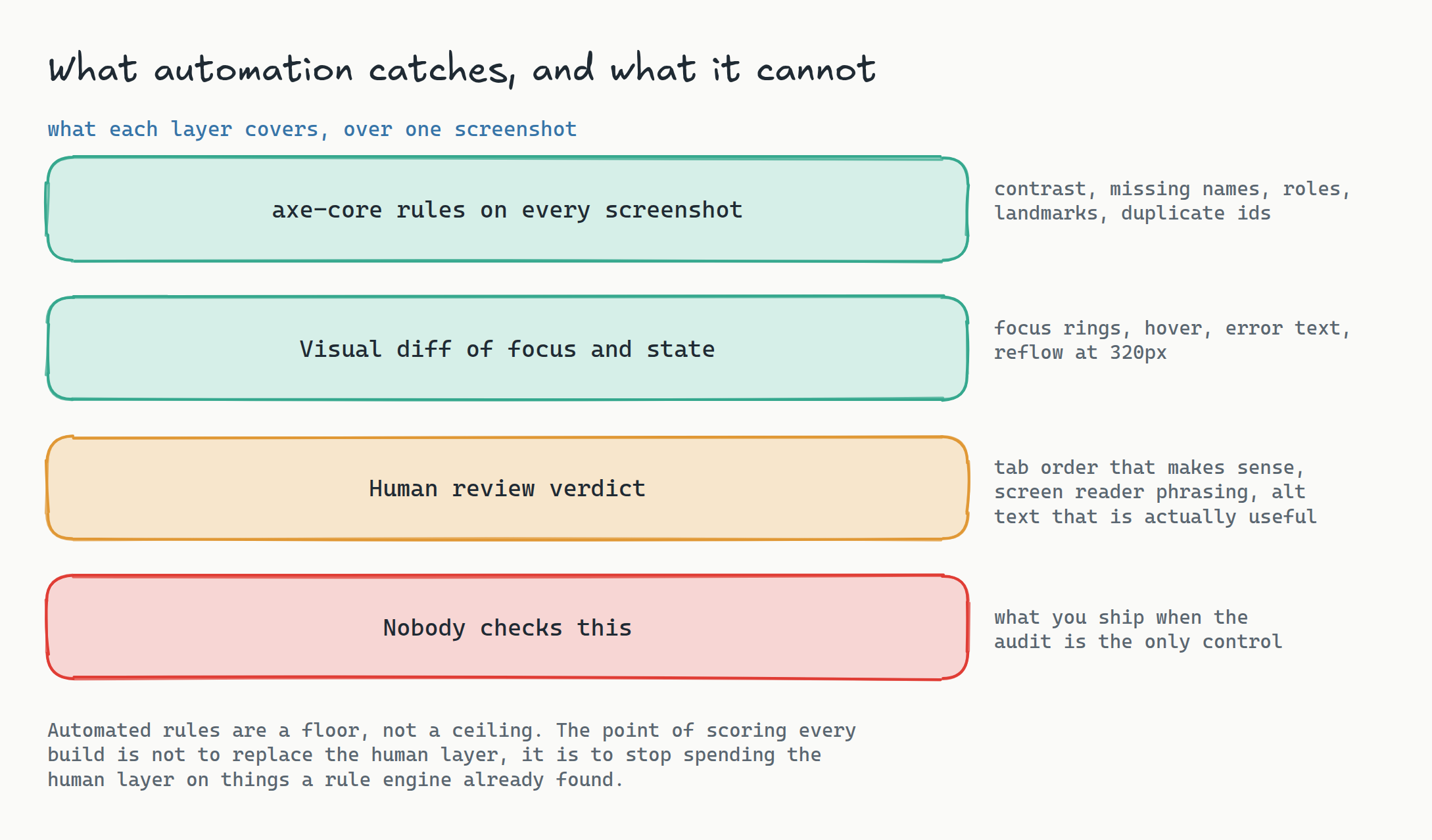
Both readings miss the point. The third that automation catches is the third that recurs. Contrast ratios, missing accessible names, empty links, unlabelled form fields, duplicate ids, missing landmarks, images without alt text: these are the issues that come back every time somebody adds a component, and they are exactly the issues a rule engine finds deterministically in milliseconds. The two thirds that need a human, like whether the tab order matches the visual flow or whether your alt text actually says something useful, are largely judgment about things that do not change every sprint.
Automating the mechanical third is not a substitute for the human two thirds. It is what makes the human two thirds affordable, because your accessibility specialist stops spending their week rediscovering contrast failures a linter could have caught in CI and starts spending it on the judgment calls only they can make.
Wiring the mechanical third into the build
Lastest runs axe-core against every screenshot it captures and turns the result into a 0 to 100 score with severity-weighted deductions, plus a per-build trend sparkline. That design choice matters more than it sounds. The unit is the screenshot, not the page, which means every viewport, every theme, and every state your visual tests already visit gets scored for free. If your suite covers the checkout in light mode, dark mode, and at 320px, you get three accessibility scores from work you already did.
The practical setup is boring, which is the point:
# the suite you already have
lastest run --suite checkout

# every screenshot in it now carries an a11y score
# severity-weighted: critical violations cost more than minor ones
The score is the gate. Pick a floor, fail the build under it, and treat a drop the way you treat a failing test. A PR that takes the checkout from 96 to 88 is not a discussion for next quarter's remediation project; it is a red check with a diff attached, on the branch of the person who has the context to fix it in ten minutes.
The trend line is the other half. A single score tells you where you are. The per-build sparkline tells you the thing an audit structurally cannot: which direction you are moving, and which commit turned you around. When a customer asks for evidence at renewal, "here is our score on every build for the last eighteen months" is a materially stronger artefact than a PDF with last spring's date on it.
The states an audit never sees
There is a category of accessibility failure that even a thorough manual audit tends to miss, and it is the one visual testing is unusually good at.
Auditors test the states they can reach in a session. Your test suite reaches the states you have automated, which is a much larger and stranger set: the form with three validation errors showing, the modal on its second open, the table sorted descending with a filter applied, the dark-mode variant of the empty state. These are where focus rings vanish, where error text ends up below the contrast threshold against a tinted background, where a live region announces nothing.
Because Lastest scores every screenshot, those states get checked whether or not anyone thought to check them. And because the same run captures pixels, the perceptual diff engine catches the visual half of the same class of bug: the focus ring that disappeared in the last theme refactor is a pixel change and an axe finding at the same time, from the same capture, at no extra cost.
Reflow deserves a specific mention. WCAG 2.2 requires content to work at 320 CSS pixels wide without two-dimensional scrolling. That is a viewport, which is to say it is a thing your visual suite already parameterises. Adding 320px to a viewport matrix is a config change. Auditing it by hand across forty screens is a day of someone's life, every time.
Where the human seam goes
None of this removes the reviewer, and you should be suspicious of any tool that claims otherwise. Lastest's model is one explicit human review seam: the machine proposes, a person renders a verdict of pass, fix, or regression, and the AI never approves its own output. Accessibility slots into that seam cleanly.
The workflow that actually holds up:
- Rule engine, every build, blocking. Contrast, names, roles, landmarks. No human in the loop, no negotiation. Under the floor, the build fails.
- Visual diff, every build, reviewed. Focus states, error states, reflow. A human renders the verdict on anything that changed.
- Human judgment, per release or per quarter. Tab order, screen reader phrasing, alt text quality, cognitive load. Scoped to what actually changed, which the first two layers already told you.
- Formal audit, on the regulator's or the buyer's cycle. Now it confirms a system you already run instead of discovering eleven months of accumulated drift.
That last point is the one to take to whoever owns the budget. Teams that gate on every build do not stop paying for audits. They stop paying for the remediation sprint that follows every audit, because there is nothing left in the report that the build did not already catch.
Screenshots of your app, on your infrastructure
One practical note for anyone in a regulated sector, since accessibility work tends to live next to compliance work. Accessibility scanning means rendering your application, often behind auth, often with real-looking data on screen. Lastest is self-hosted: browsers, screenshots, scores, and baselines all run on infrastructure you control, so images of authenticated user flows never leave your network. If you are already reasoning about this for visual testing under compliance constraints, accessibility scoring rides on the same deployment and inherits the same guarantees.
And because replays are zero-token and self-hosted screenshots are unlimited, scoring accessibility on every build costs nothing per run. That is the difference between "we check a11y on release branches" and "we check a11y everywhere, always," and it is a pricing property rather than a technical one. Per-screenshot billing is what taught teams to ration coverage in the first place.
Frequently asked
Does automated scanning make us EAA compliant? No, and be wary of anything sold on that claim. Automated rule engines catch roughly a quarter to a third of WCAG issues; the rest needs human judgment about tab order, screen reader phrasing, and whether content is genuinely usable. What automation gives you is a continuous floor, so the human effort goes to the judgment calls instead of rediscovering contrast failures that a rule engine finds for free.
We already run axe in CI. What does scoring screenshots add? Coverage of states. A page-level scan checks the page as it loads; scoring every screenshot checks every state your visual suite already reaches, including validation errors, second opens of a modal, dark mode, and the 320px reflow viewport. It also gives you a per-build trend rather than a pass/fail, so you can see the direction you are moving and which commit changed it.
What score should we gate on? Start by measuring for a sprint without blocking anything, take the floor of what you observe, and gate one point below it. A gate you set from real data holds; a gate you set from an aspiration gets disabled in week two. Ratchet it upward as the trend improves rather than picking a round number on day one.
Is WCAG 2.2 actually required in the EU yet? The EAA's harmonised standard, EN 301 549, currently incorporates WCAG 2.1 Level AA in full, and the revision expected in 2026 moves that to WCAG 2.2. If you are building the gate now, build it against 2.2: the added criteria mostly concern focus appearance, target size, and dragging alternatives, which are exactly the things a visual suite is already positioned to check.
Does this replace our accessibility specialist? The opposite. It removes the mechanical findings from their queue so their time goes to the two thirds no tool can evaluate. Teams that automate the floor generally end up asking more of their specialist, not less, because the questions that reach them are finally the hard ones.
Start here
Self-host Lastest for free, point it at a staging build, and let it score every screenshot your suite already captures. You get a 0 to 100 WCAG 2.2 AA figure per screenshot, a per-build trend, unlimited zero-token replays, and screenshots that never leave your network. If you would rather not run the ops, Lastest Cloud is a flat $299 a month with no per-seat and no per-screenshot fees. The full source is at github.com/las-team/lastest.
The audit is not the problem. The problem is that an audit is a photograph, and you are shipping a film. Keep the photograph for the regulators, and put a meter on the film.