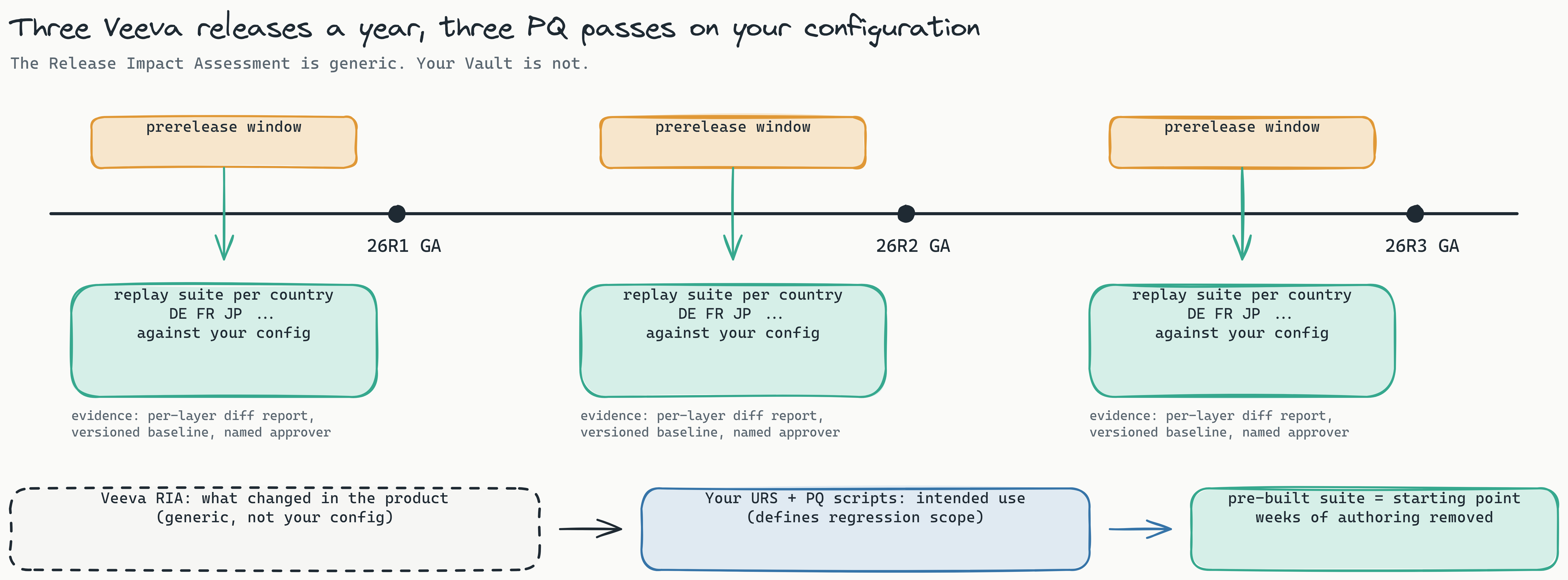
Veeva ships three general releases a year. Before each one, your prerelease Vault is available for a window, and it is on you to run PQ and UAT against your configuration. The Release Impact Assessment tells you what changed in the product. It does not tell you what breaks in your call-reporting layout for Germany, your consent flow for Japan, or your disclosure fields for France. That is your regression scope, and three times a year it comes due for every country you operate in.
Most teams answer this with a spreadsheet of manual scripts and a rota of country testers. This post is about the alternative Lastest ships: pre-built release-regression suites for Vault CRM and the wider Vault platform, expressed as plain Playwright you own, with every country in the rollout expressed as a column in a scenario spreadsheet. One recorded flow, replayed per country, against the prerelease Vault, inside your network.
If you want the underlying recipe (auth bridge, data freezing, layer tuning), read how to test Veeva Vault CRM first. This post assumes that and focuses on what comes pre-built and how the multi-country parametrisation works.
Three things first: residency, ownership, determinism
Before the suite contents, the three properties that make this usable in a regulated pharma environment at all.
- Data stays where your Vault is. Lastest runs inside your network via docker compose, and can run air-gapped. Screenshots, DOM snapshots, network logs and the scenario data never leave your perimeter. Credentials are encrypted per repository. If you use a model at authoring time, you point Lastest at your own endpoint.
- The suite is Playwright in your git repo. The pre-built suites are not a hosted catalogue you rent. They are seeded into your repository as
.spec.tsfiles, a scenario CSV and a shared auth bridge. You can read every line, diff every change, and take the whole thing to a different runner tomorrow. - Replay is deterministic. AI is used only when a test is authored or repaired. Replay is plain Playwright with zero model inference. The same suite against the same Vault gives the same result, which is the property a validation lead needs to sign a PQ report.
What is in the box
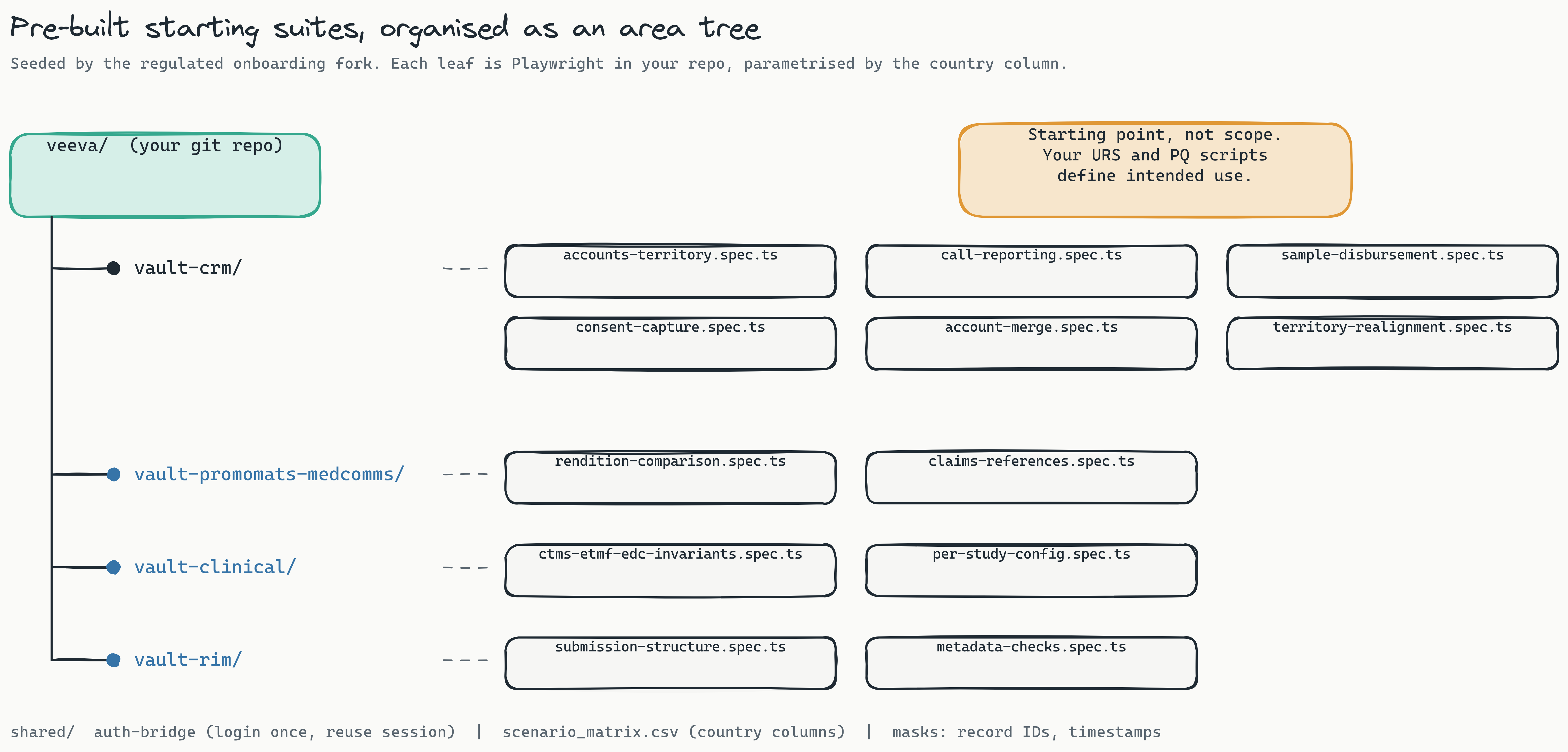
The suites were seeded by the regulated onboarding fork and organised as an area tree, one branch per Vault application, one leaf per functional area. Each leaf is a recorded flow plus the checkpoints that matter for that area.
Vault CRM
- Accounts & territory: account 360, territory filters, alignment views. Record IDs and "last sync" stamps masked.
- Call reporting: create call, attendees, products detailed, key messages, submit. The flow this post uses as its worked example.
- Sample disbursement: order, disbursement, signature capture, lot tracking. The signature canvas is an ignore region by design.
- Consent capture: channel consent, opt-in and double opt-in paths, revocation.
- Account merge: duplicate detection, survivor selection, child record reparenting invariants.
- Territory realignment: reassignment, visibility after realignment, orphan checks.
Vault PromoMats and MedComms
Rendition comparison: the viewable rendition of a promotional piece before and after the release, compared with the perceptual diff engine so anti-aliasing noise does not read as a change, plus claims and reference linkage checks. Detail in how to test Veeva Vault PromoMats.
Vault Clinical
CTMS, eTMF and EDC invariants (document counts per study, milestone states, expected-document lists) with a per-study configuration column, so a study with a different TMF reference model version replays with its own expectations.
Vault RIM
Submission structure and metadata: dossier tree shape, required metadata fields per region, lifecycle states after a release.
Shared plumbing
All branches share an auth bridge (log in once as the integration user, snapshot the session, reuse it across every browser in the run), one scenario spreadsheet as the single source of synthetic test data, and default masks for record IDs and timestamps. No real HCP or patient data is ever in the suite; every account, HCP and call is generated from the spreadsheet.
What is not in the box
Be clear about the boundary. The suites remove weeks of authoring. They do not define your regression scope. Your URS states intended use; your PQ scripts state what must be demonstrated. Lastest does not invent that. What the pre-built suites give you is the executable form of the common flows, so that when your validation lead maps a PQ script to a spec, the spec already exists and only the checkpoints and country parameters need review. Where your configuration diverges (custom objects, unusual page layouts, a country with a bespoke sample workflow), you record the delta, and it becomes another spec in your repo.
Why a country is a column, not a copy
The mistake multi-country programmes make is cloning the suite per country. Five countries, five copies of the call-reporting test, five things to fix when 26R2 moves a button.
In the pre-built suites, a country is a column in scenario_matrix.csv. The recorded flow is written once. Everything that legitimately differs between countries lives in the spreadsheet:
- Call-reporting rules: which fields are mandatory, whether a call needs a signature, how many products can be detailed per call.
- Sample and consent regulation: sample eligibility rules (Germany's AMG §47 regime, Japan's PMDA framework), consent model (single or double opt-in), retention notices.
- Disclosure fields: EFPIA-style transfer-of-value capture in EU countries, Sunshine-style reporting where it applies, the local disclosure body reference.
- Language and locale: the UI language, date and number formats, and the right-to-left or CJK rendering that a screenshot baseline must be taken in.
- Territory model: region, secteur, area, and how alignment appears in the account list.

Worked example: call reporting for DE, FR and JP
Take the call-reporting leaf. The recorded flow is: open an account, create a call, add an attendee, detail two products, capture whatever the country requires, submit, and verify the saved call. Here is the slice of the spreadsheet that drives it for three countries. Every value is synthetic.
| field | DE | FR | JP |
|---|---|---|---|
locale | de-DE | fr-FR | ja-JP |
account | SYN-HCP-DE-0142 | SYN-HCP-FR-0087 | SYN-HCP-JP-0311 |
call_type | detail | detail | detail |
products | PROD-A;PROD-B | PROD-A;PROD-B | PROD-A;PROD-B |
sample_allowed | true (AMG §47) | false | true (PMDA) |
signature_required | true | false | true |
consent_model | double opt-in | opt-in | opt-in |
disclosure_field | FSA transfer-of-value | Loi Bertrand ToV | JPMA ToV |
territory_label | Region | Secteur | Area |
date_format | DD.MM.YYYY | DD/MM/YYYY | YYYY/MM/DD |
And the spec that consumes it. The recorder produced the interaction steps; the country loop and the column reads are the parametrisation layer added once on top. It is ordinary Playwright, checked into your repo:
// vault-crm/call-reporting.spec.ts
import { test, expect } from '@playwright/test';
import { scenarios } from '../shared/scenario-matrix';   // parses scenario_matrix.csv
import { checkpoint } from '../shared/lastest';            // visual + text + DOM + network layers

for (const c of scenarios('call-reporting')) {           // one iteration per country column
  test(`call reporting [${c.country}]`, async ({ page }) => {
    // session already injected by the auth bridge (login once, reuse per browser)
    await page.goto(`/ui/accounts/${c.account}`);
    await page.getByRole('button', { name: c.t('New Call') }).click();

    await page.getByLabel(c.t('Call Type')).selectOption(c.call_type);
    for (const p of c.products) {
      await page.getByRole('button', { name: c.t('Add Product') }).click();
      await page.getByLabel(c.t('Product')).last().fill(p);
    }

    if (c.sample_allowed) {
      await page.getByRole('tab', { name: c.t('Samples') }).click();
      await expect(page.getByText(c.sample_rule_notice)).toBeVisible();
    } else {
      await expect(page.getByRole('tab', { name: c.t('Samples') })).toHaveCount(0);
    }

    if (c.signature_required) {
      await page.getByRole('button', { name: c.t('Capture Signature') }).click();
      // signature canvas is masked: drawn fresh every run by design
    }

    await expect(page.getByLabel(c.disclosure_field)).toBeVisible();
    await checkpoint(page, `call-form-${c.country}`, {
      mask: ['[data-record-id]', '.last-modified', 'canvas.signature'],
      locale: c.locale,
    });

    await page.getByRole('button', { name: c.t('Submit') }).click();
    await expect(page.getByText(c.t('Submitted'))).toBeVisible();
    await checkpoint(page, `call-saved-${c.country}`, { mask: ['[data-record-id]', '.timestamp'] });
  });
}
Three things to notice.
c.t()is a label lookup, not a translation call. The spreadsheet carries the localized label for each UI string per country, so the same role-based selector resolves against the German, French or Japanese UI. When Veeva changes a label in 26R2, you change one cell.- Regulatory branching is data, not code. France has no sample tab in this configuration; the test asserts its absence rather than skipping. Germany requires a signature; Japan does too. The reason lives in your URS, not in the spec.
- Every checkpoint is masked the same way. Record IDs, "last modified", and the signature canvas are excluded before the diff runs, so a green result means the rendered form is the same as the approved baseline for that country, not that the clock happened to match.
The baselines are per country. call-form-DE is compared to the approved DE baseline, never to FR. When the prerelease Vault opens, the whole matrix replays: for a nine-country rollout that is nine call-reporting runs from one spec, unattended, with a per-country diff report at the end.
Check modes per country, not per suite
Lastest checks nine layers on every checkpoint (visual, text, DOM, network, console, performance, URL, API, storage) plus a11y and design-system plugin layers, and each can be set to enforce, log or disable per repository. For a multi-country suite the useful tuning happens in two places.
- Diff engine per locale. Latin-script countries usually work with SSIM. For ja-JP, where font hinting differs between the browser image and the baseline environment, the perceptual engine avoids a wall of false diffs on kanji anti-aliasing. That is a column value (
diff_engine), not a code change. - Text layer in enforce for disclosure fields. The visual layer catches layout regressions, but the wording of a transfer-of-value notice is a compliance requirement. The text layer on that region is set to enforce, so a changed sentence fails the run even if the pixels look close.
Network and console start in log mode. Vault fires transient 4xx permission probes by design; you learn the noise profile over a few clean runs on your own configuration, then promote. The full layer catalogue is on the features page.
Adding a country
The onboarding path for a new market, say Italy, is short and deliberately boring:
- Add an
ITcolumn toscenario_matrix.csvwith locale, sample and consent rules, the disclosure field (EFPIA-style ToV via the local code), territory label and localized UI labels. - Generate the synthetic IT accounts and HCPs from the spreadsheet into the sandbox. Nothing real is involved.
- Run the suite once for IT only. Review each checkpoint with your Italian application owner and approve the baselines. That review is the human step, and it is recorded with a named approver.
- From the next prerelease window on, IT replays with the rest.
No recording, no new test code.
Evidence your validation lead can use
Each country run produces a per-layer diff report with the baseline version, the approver, the mask set and the checkpoint images. Because replay is deterministic and the suite is versioned in git alongside your configuration, a run against 26R2 prerelease is reproducible: same commit, same spreadsheet, same Vault, same result. That is an artifact you can attach to a PQ report.
And because everything runs inside your network, the screenshots of your configured Vault, the synthetic HCP records and the session cookies never touch a third-party service. For the pharma-specific deployment shape, see pharma.lastest.cloud and the Veeva Vault release testing overview.
Frequently asked
Do the pre-built suites replace our PQ scripts? No. Your URS and PQ scripts define intended use and regression scope. The suites are the executable starting point for the common Vault flows, so mapping a PQ script to a runnable spec is a review exercise rather than a weeks-long authoring project.
How do country-specific rules get into the tests without separate copies? Each country is a column in the scenario spreadsheet: locale, sample and consent rules, disclosure fields, territory model and localized labels. The recorded Playwright flow reads the column at runtime and replays once per country against its own approved baseline.
Where does the test data come from? From the spreadsheet. Accounts, HCPs, calls and samples are synthetic records generated per country into your sandbox. Real HCP or patient data is never used in the suite.
Does anything leave our network during a run? No. Lastest runs inside your network via docker compose, can operate air-gapped, and replay involves zero model inference. Screenshots, DOM snapshots and credentials stay in your environment; the suite itself lives in your git repository.
Next step
If you run Vault CRM in more than one country and the prerelease window is a scramble, Book a release-readiness review. We map your country matrix onto the area tree, identify which pre-built leaves cover your PQ scripts and where your configuration needs a recorded delta, and hand back the suite structure and the scenario spreadsheet skeleton for your rollout.