
Introduction - Why Visual Regression Testing Matters in 2026
Visual regression testing isn't a "nice-to-have" anymore. It's a core part of modern CI/CD pipelines. Manual visual checks just don't cut it when teams ship dozens of deployments daily. A single CSS change that shifts a button by two pixels? Functional tests won't catch it. Users will, and trust erodes fast.
The cost of shipping UI bugs is real: lost revenue, more support tickets, and constant context-switching for developers. Teams need tools that catch regressions early, fit existing workflows, and don't demand a dedicated budget line item. The problem is that most of the market makes you book a demo before you can even see a diff.
This guide walks you through a complete Lastest visual regression testing setup, so you can evaluate the tool without a single sales call. No demo booking. Just a git clone and a docker compose up. We'll cover how Lastest stacks up against Percy and Applitools, how to set it up in minutes, how its zero-token replay model actually works, and what enterprise teams need to know about self-hosting and pricing.
What Makes Lastest Different from Percy, Applitools, and Other Tools
What makes Lastest different from other visual regression testing tools? Lastest differs from Percy, Applitools, and Chromatic in three ways: it's the only fully open-source option, it charges nothing for replays (AI runs only when you create or fix a test, never when you re-run one), and it ships three diff engines instead of one.
The Open-Source Advantage
Lastest is distributed under the FSL-1.1 license (Functional Source License, which converts to Apache 2.0 over time). That fundamentally changes how your team relates to the testing tool. With closed SaaS, you're locked into the vendor's roadmap, pricing changes, and data policies. With Lastest you can fork the repository, read every line before you run it, modify it to meet internal security requirements, and self-host on your own infrastructure. If you decide to move on, you keep everything you've built. This is why Lastest is emerging as a leading open source visual regression testing tool that teams can trust.
Three Diff Engines vs One or Two
Most visual regression tools offer a single diff engine, usually pixel-based. Lastest gives you three. A pixel diff (Pixelmatch) catches exact color or dimension changes-fast, but noisy. A structural diff (SSIM) is DOM and layout-aware, great for catching shifts a raw pixel compare drowns in noise. A perceptual diff (Butteraugli) simulates human vision, cutting false positives from anti-aliasing and font-rendering differences while still catching the bugs a person would actually notice. Run all three side by side and toggle between them. See the full feature list.
On top of the engines, Lastest stabilizes screenshots so cross-OS runs don't flap: text-region-aware OCR diffing, timestamp freezing, network-idle and font-load waits, DOM-stability detection, and auto-masking of dynamic content.
Comparison Table
| Feature | Lastest (Self-Hosted) | Lastest Cloud | Percy | Applitools |
|---|---|---|---|---|
| Open-Source | ✅ FSL-1.1 | ❌ | ❌ | ❌ |
| Self-Hosting | ✅ Yes | ❌ Cloud-only | ❌ | ❌ |
| Pricing | Free, forever | $299/mo flat | from ~$199/mo | from ~$699/mo |
| Cost model | Unlimited screenshots | Flat (no per-seat) | per-screenshot | per-seat |
| AI Test Generation | ✅ Bring your own AI | ✅ | ❌ | ✅ (proprietary) |
| Diff Engines | 3 (pixel, structural, perceptual) | 3 | 1 (pixel) | 2 (pixel, layout) |
| CI/CD Support | GitHub Actions, GitLab, webhooks, cron | Same | Yes | Yes |
The tradeoffs are clear. This Lastest vs Percy vs Applitools comparison shows Lastest is the only option combining open-source licensing, self-hosting, and replays that never bill you again. For teams running thousands of tests daily, that difference is dramatic.
How to Set Up Lastest in 15 Minutes (Your Self-Guided Demo)
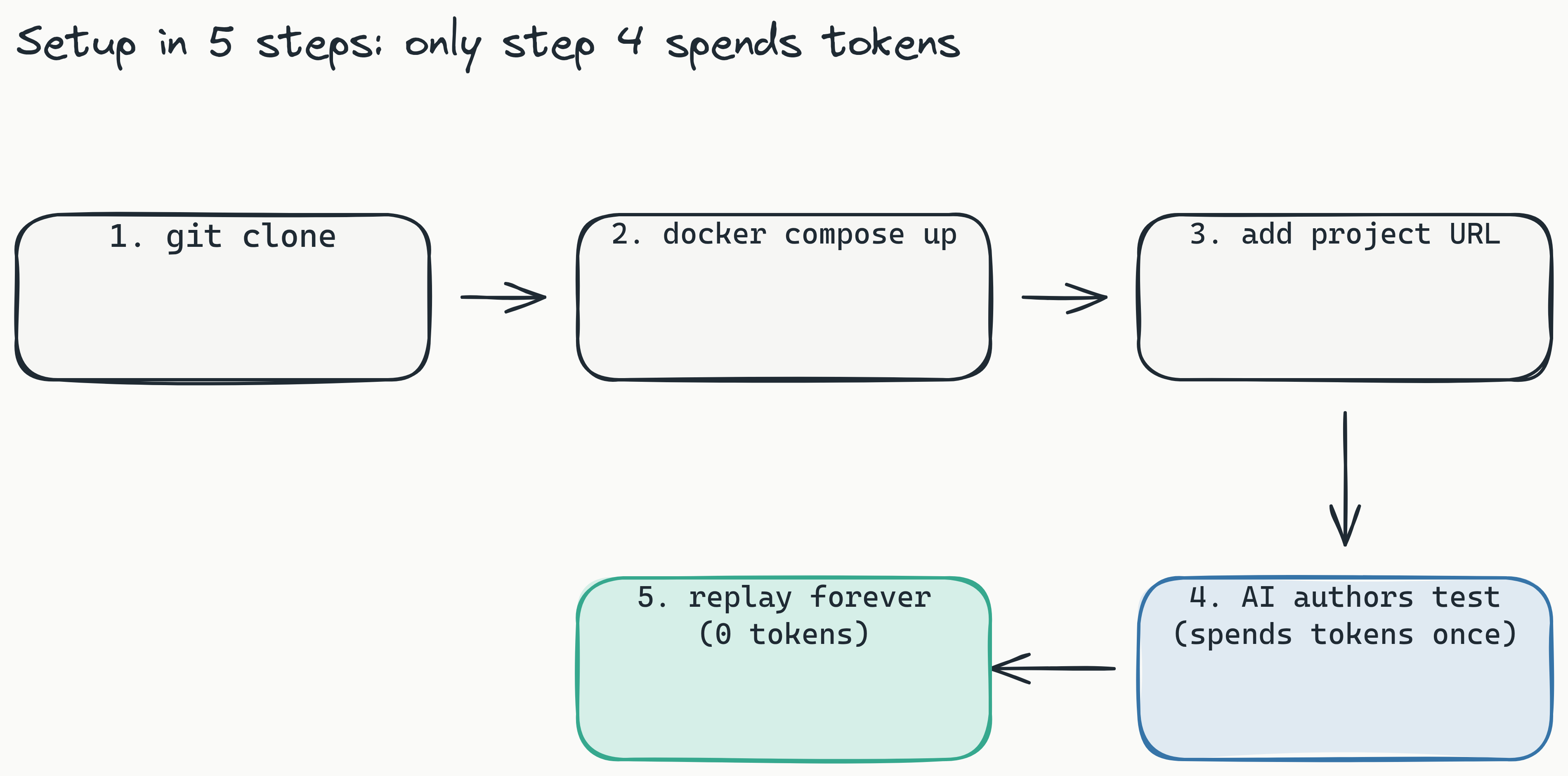
How do I set up Lastest visual regression testing? Clone the GitHub repository, run
docker compose upon your machine or server, then configure your first project in the dashboard. No demo booking required.
Step 1: Clone the Repository
Open a terminal on your local machine or server and run:
git clone https://github.com/las-team/lastest.git
This copies the entire Lastest codebase to your machine. Since the tool is open-source, you can inspect every line before running it.
Step 2: Start with Docker Compose
Navigate into the cloned directory and run:
docker compose up
Docker Compose (a tool for defining and running multi-container Docker applications) pulls the images and starts every service, including an embedded, containerized Chromium browser pool. There's no local Playwright install to manage. Within a minute or two the dashboard is reachable at localhost, or at your server's IP if you're running remotely. No cloud dependency. No API key provisioning. No account creation at this stage.
Step 3: Configure Your First Project
Open the dashboard in your browser. Add a project name and the base URL of the app you want to test (your staging or development environment). You can point Lastest at URLs, an OpenAPI spec, or a markdown PRD; Route Discovery will even scan your source for paths the spec missed. Lastest captures baseline screenshots for each page path you define.
Step 4: Let the AI Author a Test, Then Run It
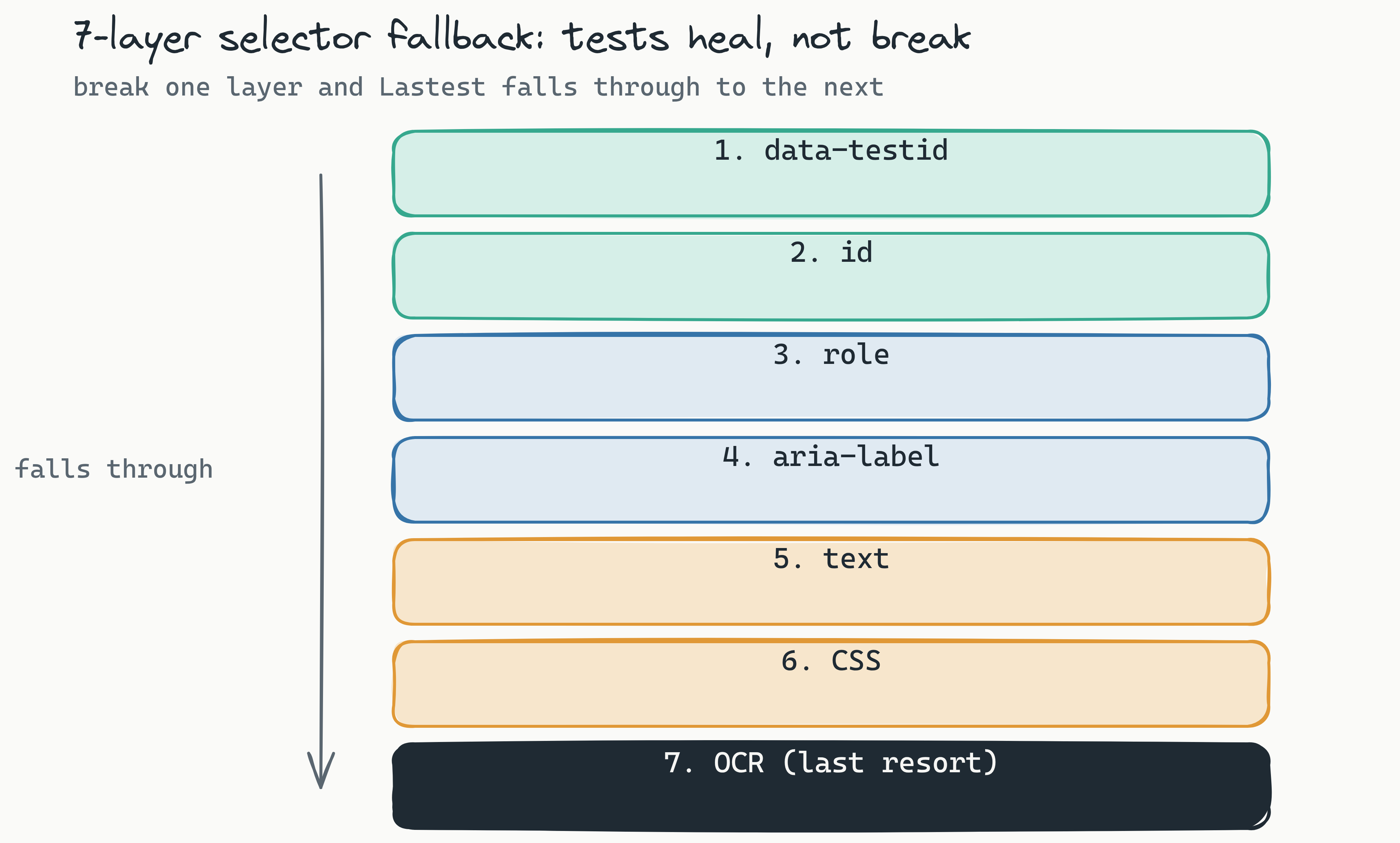
Ask Lastest to generate a test. Claude (or your own provider; more on that below) writes resilient Playwright code with a 7-layer selector fallback-data-testid, id, role, aria-label, text, CSS, then OCR-so refactors that break hand-written selectors don't break your suite. Once the test exists, run it. That replay is plain Playwright execution and consumes zero tokens. The dashboard then shows all three diff views: pixel, structural, perceptual. Toggle between them to see exactly what changed and whether it was intentional.
Pro tip: a human renders the final verdict. Every diff gets one of three outcomes-pass, fix, or regression. The AI never approves its own output. That single review seam is what keeps the suite trustworthy as it grows. Watch a demo run if you want to see the loop end to end.
Ready to try it yourself? The full setup docs and the repository are public.
Understanding Lastest's AI Test Generation and Zero-Token Replays
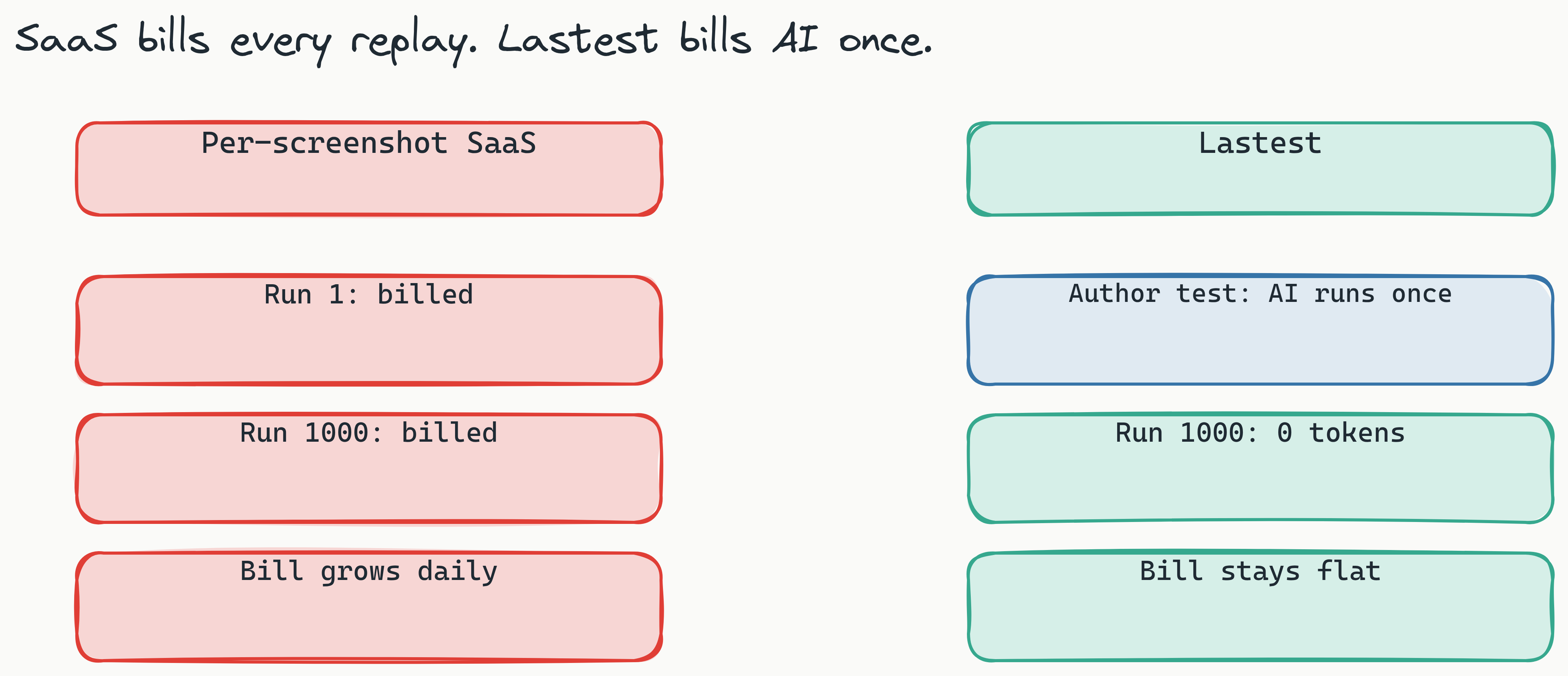
How does Lastest's token model work? AI runs only when you create or fix a test. Every replay afterward is plain Playwright execution that consumes zero tokens. Test thousands of times a day for $0 in tokens, and on self-hosted, unlimited screenshots regardless of volume.
How AI Generation Works
The AI analyzes your page structure and DOM to generate test scenarios without manual scripting. It detects interactive elements like dropdowns, hover states, and responsive breakpoints, then writes test cases for them. You don't have to hand-define every page state and browser width.
You also pick how much autonomy to grant, per test or per team. AI-Free recording is fully air-gapped with no API keys. AI-Assisted has the AI propose changes that a human reviews. Full Autonomous hands the work to the Play Agent, an 11-step pipeline of specialized sub-agents (Orchestrator, Planner, Scout, Diver, Generator, Healer, and others) that plan, generate, run, and fix tests on their own. Pause, approve, or skip any step; it resumes where it left off.
Bring Your Own AI
Lastest isn't locked to one provider. Use Claude CLI, the Anthropic API, OpenRouter, OpenAI, or a local model via Ollama. You can even run a different provider for diff analysis than for generation. There's no proprietary model tax and no lock-in.
Why Zero-Token Replays Matter
Consider an agile team running 200 tests across 5 browsers, which equals 1,000 test runs per day. With a per-screenshot or per-seat SaaS model, that volume drives the bill up every single day, because you're charged for the re-runs. The cost scales with usage.
With Lastest, the AI cost lands once, at the moment you author or heal a test. After that, every run-even thousands per day-is a zero-token replay. The cost doesn't grow with test volume, only with the creation of new tests. For teams running visual regression on every pull request, that's the difference between a predictable line item and "testing bill shock." The deeper math is in the real cost of LLM-driven test runs.
Lastest for Enterprise: Self-Hosting, Security, and CI/CD
Is Lastest suitable for enterprise use? Yes. It self-hosts entirely on your own infrastructure so screenshots never leave your network, and it integrates with GitHub Actions, GitLab, webhooks, and scheduled cron for automated pipelines.
Self-Hosting and Compliance
For teams subject to HIPAA, SOC 2, or GDPR, sending visual snapshots of internal apps to a third-party SaaS can be a compliance risk. Lastest's self-hosted model keeps all data on your own infrastructure. No screenshots, DOM data, or test artifacts ever leave your network boundary.
Because Lastest is open source, your team can fork the repository and modify the software to meet internal security requirements. You control the upgrade cadence, pulling new features when you're ready rather than on a vendor's schedule.
Classification, Accessibility, and Smart Run
Two features pull real weight at enterprise scale. AI failure classification tags every failure as a real regression, flaky, environment, or test-maintenance issue, with a confidence score and reasoning, so reviewers triage signal instead of noise. WCAG 2.2 AA scoring runs axe-core on every screenshot and returns a 0–100 accessibility score with severity-weighted deductions and per-build trend sparklines. And Smart Run reads your git diff and runs only the tests your change actually touched, so CI stays fast.
CI/CD Integration
Lastest integrates directly with common CI/CD platforms:
- GitHub Actions: a reusable Action ships in the repo. Add your project config and tests run on every pull request.
- GitLab: merge-request comments, including on self-hosted GitLab.
- Webhooks & cron: trigger runs from any pipeline or on a schedule.
For coding agents, an MCP server exposes roughly 20 tools so Cursor, Claude Code, and similar agents can drive Lastest directly. Branch baselines fork on PR open and merge back on PR merge, and every edit, AI-fix, and restore is versioned with a reason. The full CI/CD guide goes deeper.
Lastest Pricing: Free Self-Hosted vs $299/mo Cloud
What is Lastest's pricing structure? Self-hosted is completely free, forever, under an open-source license. Lastest Cloud is a flat $299 per month-no per-seat and no per-screenshot fees-for teams that want managed infrastructure.
Free Self-Hosted Plan-What You Get
The self-hosted version is $0 for the software, forever. You run your own server or VM, but there are no limits on test volume, users, or projects, and screenshots are unlimited regardless of volume. You get all three diff engines, AI generation with your own provider, the Play Agent, Smart Run, and WCAG scoring. Community support is on GitHub issues. For startups and lean teams with any DevOps capability, this removes the testing-tool line item from the budget entirely. Start at self-host.
Lastest Cloud ($299/mo)
Cloud provides managed hosting: no Docker setup, no server maintenance, no infrastructure overhead. It's a flat $299 per month with no per-seat or per-screenshot fees, compared with per-screenshot models starting around $199/mo (Percy) and per-seat models from roughly $699/mo (Applitools). There's also a free Cloud evaluation tier with a monthly quota if you just want to kick the tires. Cloud includes the same diff engines and AI features as self-hosted.
When to Choose Each
Choose Free Self-Hosted if: you have any DevOps capacity, require data sovereignty for compliance, or you're a startup on a lean budget. Good fits include SaaS MVPs and Next.js apps.
Choose Cloud if: you want zero-ops testing, need a quick start without infrastructure setup, or prefer a managed service.
Conclusion
No sales calls. No trials gating. Just a git clone and a docker compose up. Lastest is the only open-source, self-hostable alternative to Percy and Applitools where AI authors and heals your tests, a human renders one of three verdicts, and replays run free forever. You can evaluate it entirely on your own terms, in your own environment, without talking to a single sales rep.
If you're ready to stop booking demos and start testing, self-host Lastest free or spin up Lastest Cloud, clone the repo at github.com/las-team/lastest, run docker compose up, and see your first diff in minutes. Want more comparisons first? Browse the blog or explore the tools.