Remote Runners
Run tests on remote machines by deploying runners that connect back to your Lastest server via HTTP polling.
Architecture
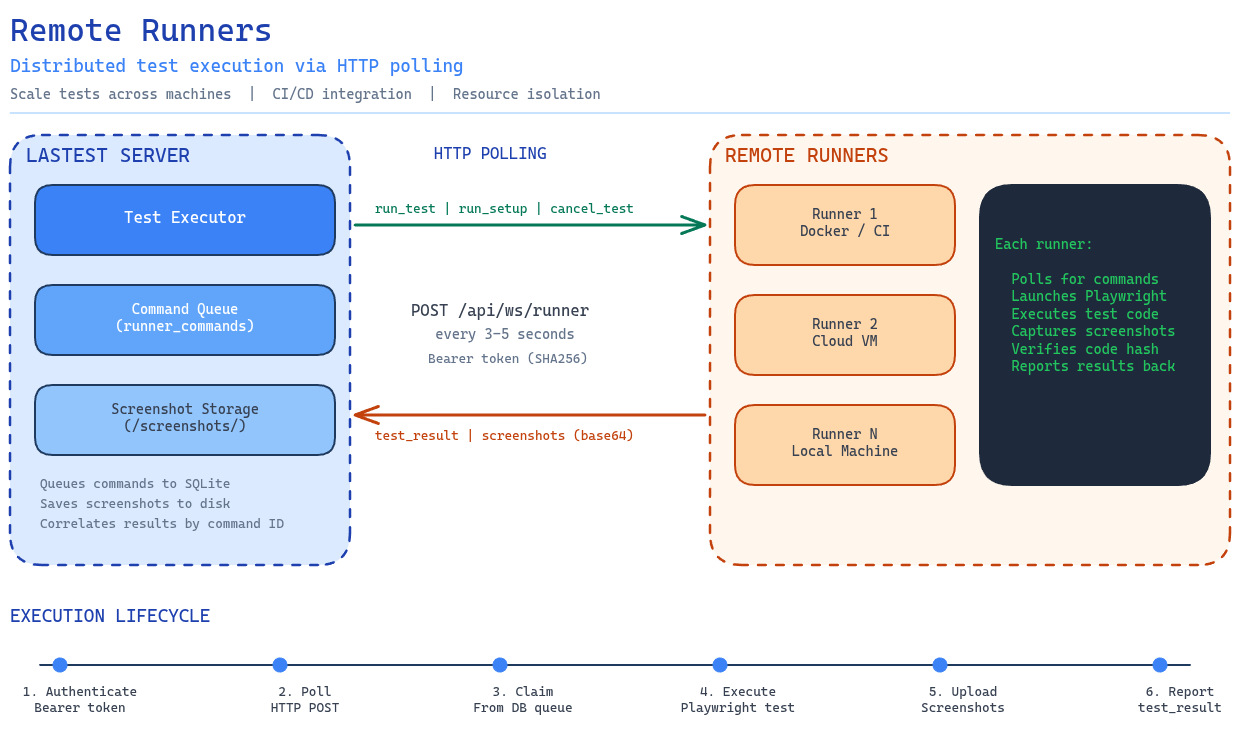
How it works: The Lastest server queues test commands into SQLite (runner_commands table). Remote runners poll POST /api/ws/runner every 3-5 seconds, claim pending commands, execute them with Playwright, and upload screenshots + results back over the same channel. Authentication uses Bearer tokens (SHA256 hashed in DB).
Setup
- Register a runner in Settings > Runners
- Copy the token (shown only once)
- Install and run on your target machine:
# Install from npm
npm install -g @lastest/runner

# Start as daemon
lastest-runner start -t YOUR_TOKEN -s https://your-lastest-server

# Or run in foreground
lastest-runner run -t YOUR_TOKEN -s https://your-lastest-server
Runner CLI
lastest-runner start -t <token> -s <server-url>  # Start as background daemon
lastest-runner stop                               # Stop the daemon
lastest-runner status                             # Show runner status
lastest-runner log [-f] [-n <lines>]              # View logs (-f to follow)
lastest-runner run -t <token> -s <server-url>     # Run in foreground
Capabilities
| Capability | Description |
|---|---|
| Run | Execute tests remotely |
| Record | Record new tests on remote machines |
| Parallel | Configurable max parallel tests per runner |
| System Info | Automatic OS, architecture, memory, and CPU reporting |
Runner v2 Features
- Concurrent multi-task support -- run multiple tests simultaneously
- SHA256 code integrity verification -- ensures test code hasn't been tampered with
- Remote recording -- record tests on remote machines
- Heartbeat polling with command queuing -- reliable connection management
- Per-test abort support -- cancel individual tests without affecting others
Configuration
Runner config is stored in ~/.lastest/:
runner.pid-- daemon process IDrunner.log-- runner log filerunner.config.json-- saved configuration
Managing Runners
In the Lastest UI (Settings > Runners, admin only):
- Register new runners
- View connected runners and their status
- See system info (OS, CPU, memory)
- Configure parallel execution limits
- Remove runners