
You just shipped a button that overlaps the CTA, and a prospect noticed before anyone on your team did. For a seed-stage startup, that is the kind of self-inflicted wound that turns a promising demo into an awkward one. The question every bootstrapped team eventually asks: can a 30-minute visual regression testing setup actually pay for itself before your next sprint ends?
This article strips away the fluff and gives you a real ROI framework for resource-constrained teams. We break down what visual regression testing ROI for startups in 2026 actually looks like, compare tooling prices across the market, and show you how to reduce QA costs in startups with numbers you can defend. By the end you will have a concrete way to decide for your own team, not generic advice, but a calculation you can run against your own payroll and release cadence.
The math matters because fixing a UI bug after release is widely held to cost several times what it would have cost to catch in development. For startups operating on thin margins, that multiplier can be the difference between a healthy runway and a cash crunch. Let's dig into the real numbers, starting with the free self-hosted option that makes the break-even trivial.
The Hidden Cost of Manual UI Checks
What are manual visual checks really costing your startup? The answer starts with time. Many early-stage teams burn a meaningful slice of every week clicking through the same UIs, comparing screenshots side by side, and squinting for pixel shifts that could break the experience. Call it 8 to 12 hours a week as a working assumption. That time is not free; it comes directly out of feature development, bug fixes, and product iteration.
Manual visual review also misses things. Tired eyes skip a 3px shift in the footer, a color token that drifted, a button that wraps only at one breakpoint. For a startup shipping weekly, a steady fraction of visual regressions reaches production, and each one means emergency triage, a hotfix deploy, and sometimes a customer apology email. The cumulative drag on velocity is the real cost.
Put a number on it. Say a team spends 10 hours a week on manual visual QA at a blended developer rate of $100 per hour. Over 50 working weeks that is $50,000 a year, roughly a junior developer's salary, spent on pixel-peeping that a tool can do in seconds. Plug in your own rate and hours; the point is the order of magnitude.
How much time do manual visual checks take? Plan on roughly 8 to 12 hours per week of manual visual QA for an active startup team. At a blended rate of $100/hour, that is on the order of $40,000 to $60,000 per year in opportunity cost alone.
What percentage of UI bugs do manual testers miss? Manual visual review is inconsistent by nature, so some share of regressions slips through every release. The exact rate varies by team, but for anyone shipping weekly it only takes one missed regression on demo day to wipe out a quarter of saved review time.
The other half of the review bill is noise. A tool that flags every timestamp, price, or avatar as a "change" simply moves the pixel-peeping into a dashboard, and your team burns the same hours dismissing false positives. Lastest attacks that directly: a data filter (mask selectors plus auto-masking of dynamic content and text-region-aware OCR diffing) ignores regions that are supposed to change, while animation freezing and 12 flaky-test guards (network-idle wait, DOM-stability detection, font-loading wait, timestamp freezing, and more) stop the same screenshot from rendering differently run to run. Fewer false positives means fewer wasted review hours - the review queue only surfaces diffs a human actually needs to judge.
The real sting comes on demo day or during an investor presentation. A single CSS regression, say a misaligned pricing table, can make a product look unfinished at exactly the wrong moment, and the emergency fix often breaks two other pages and triggers a cascade of patches. That class of bug is precisely what a visual regression test running in CI catches before anyone external sees the demo. A functional expect() assertion would happily pass here - the pricing table still renders, the button still clicks - because a binary true/false check says nothing about appearance. Lastest verifies the UI at the pixel level instead, classifying each screenshot as unchanged, flaky, or changed against configurable pixel and percentage thresholds, so a misaligned table or a drifted color token is caught rather than silently shipped. Every avoided production incident is engineering time and a customer apology you never have to spend. Lastest goes further and runs AI failure classification on every failure, labeling it as a real regression, flaky, environment, or test-maintenance issue with a confidence score, so you are not triaging noise by hand.
Before you can calculate ROI, you need to know what you are spending now. Track how many hours your team spends on manual visual checks this sprint. That baseline is your starting point.
Visual Testing Tooling Cost: What Are You Really Paying For?
The true visual testing cost per month varies dramatically depending on the provider and pricing model. Most paid tools charge per screenshot or per seat, which means your bill grows exactly as your test coverage grows. Here is how the market lines up for a small startup team (paid tiers shown as "starting at" because list prices climb with volume):
| Tool | Starting Monthly Cost | Pricing Model | Self-Hosted Option | AI Test Generation |
|---|---|---|---|---|
| Percy | from ~$199 | Per screenshot | No | No |
| Chromatic | from ~$179 | Per snapshot | No | No |
| Applitools | from ~$699 | Quote / per seat | No | Yes (limited) |
| BackstopJS | $0 | Self-run, no dashboard | Yes | No |
| Lastest (Self-Hosted) | $0 | Open source, unlimited | Yes | Yes |
| Lastest (Cloud) | $299 flat | Flat, unlimited | No | Yes |
How much does visual regression testing cost per month? Paid tools start in the low hundreds and scale with volume: Percy from around $199/month, Chromatic from around $179/month, and Applitools from around $699/month, all on per-screenshot or per-seat models. Lastest self-hosted is $0/month forever (open source, unlimited screenshots), and Lastest Cloud is a flat $299/month with no per-seat or per-screenshot fees.
The headline number is only half the story. The pricing model is what bites a startup. When a tool charges per screenshot, every new page, breakpoint, and component you cover pushes the bill up, so the more thorough your testing, the more you pay. That is exactly backwards from what a growing team needs.
Applitools does not publish list pricing and routes you through a sales call for a quote. For a bootstrapped startup, opaque pricing is a red flag: you cannot budget for a tool when you do not know its cost until you share a credit card and sit through a demo.
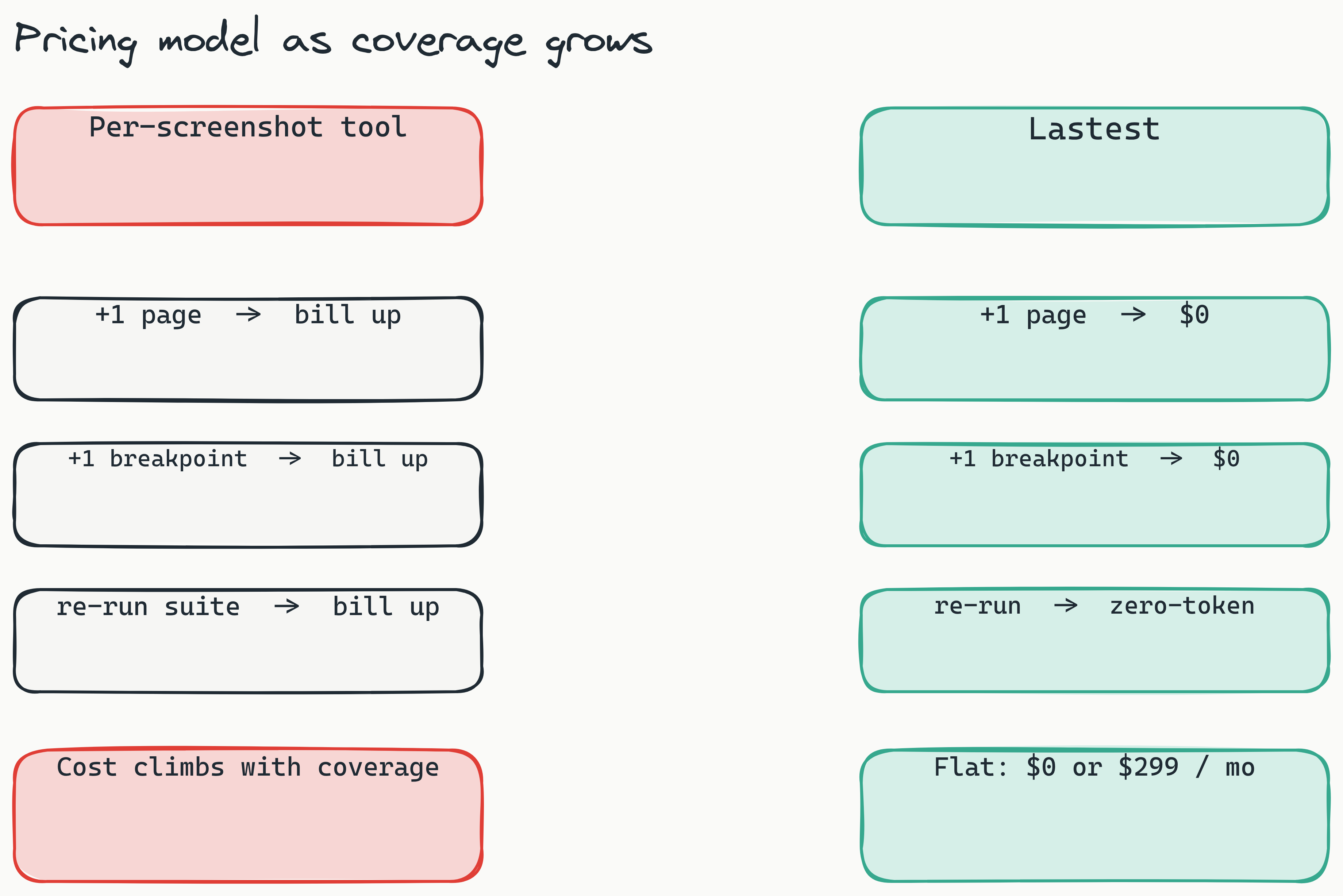
Lastest's self-hosted tier is genuinely free, licensed under FSL-1.1, with no screenshot limits and no sales calls. The Cloud tier is a flat $299 per month, no per-seat and no per-screenshot fees, with managed infrastructure. The key differentiator is zero-token replays: AI runs only when you create or fix a test, and every replay after that is plain Playwright execution, so you can run the suite thousands of times a day for $0 in tokens. We break the economics down further in the real cost of LLM-driven test runs.
Why Open-Source Visual Testing is a Startup's Best Friend in 2026
Open source visual testing tools 2026 are having a moment. A growing number of startups now prefer open-source tools for core testing infrastructure, driven by the need for cost control, auditability, and freedom from vendor roadmaps. When you own the code, no one can raise your prices, change your terms, or sunset the feature you depend on. (Lastest is open source on GitHub under FSL-1.1.)
The Percy vs Lastest pricing comparison illustrates why open-source matters for startups:
| Feature | Lastest (Free) | Percy (Paid) | BackstopJS (Free) |
|---|---|---|---|
| AI Test Generation | ✅ | ❌ | ❌ |
| Human Oversight Dashboard | ✅ | ❌ (limited) | ❌ |
| Zero-Token Replays | ✅ | ❌ | ✅ (no tokens) |
| 3 Diff Engines | ✅ | ❌ (1 engine) | ✅ (1 engine) |
| CI/CD Native | ✅ | ✅ | ✅ |
| Docker Ready | ✅ | ❌ | ✅ |
| GDPR Self-Hosted | ✅ | ❌ | ✅ |
What are the best open source visual testing tools in 2026? The top open-source options include Lastest (AI-powered, self-hosted dashboard, three diff engines), BackstopJS (free, reliable, Docker-ready), and Playwright's built-in screenshot comparison. Lastest stands out for combining AI test generation with a human oversight dashboard - capabilities typically found only in paid tools.
Is Lastest better than Percy for startups? For most startups, yes. Lastest's free self-hosted tier offers unlimited screenshots, AI test generation, and zero-token replays - features that Percy charges $500+/month for. Lastest also eliminates vendor lock-in and supports GDPR compliance through self-hosting.
Vendor lock-in is a real danger for startups. When a SaaS vendor changes its pricing or terms, teams on the hook often cannot migrate their test libraries without significant rework. Open-source tools eliminate that risk: your test infrastructure moves with you, and the license cannot be revoked out from under you.
BackstopJS has been a reliable free option for years, but it lacks the AI test generation and centralized review dashboard that modern teams expect. Lastest fills that gap with three diff engines, pixel (Pixelmatch), structural (SSIM), and perceptual (Butteraugli), so it can ignore anti-aliasing and font noise while still catching real layout bugs. On top of that sit AI-authored Playwright tests with a 7-layer selector fallback (data-testid, id, role, aria-label, text, CSS, OCR) that survive refactors, plus a human oversight dashboard where a reviewer renders one of three verdicts: pass, fix, or regression. See it in the demos or the full feature list.
Now let's put real numbers on the table.
Calculating Your True ROI: What Does Lastest's Free Model Save You?
Calculating your visual regression testing ROI for startups 2026 comes down to a straightforward formula. The visual regression testing cost savings are substantial when you account for both time recovered and bugs prevented. We will use conservative estimates that reflect real startup operations.
Savings = [Time Saved] + [Bug Prevention Savings]

Time Saved: 10 hrs/week × $100/hr × 50 weeks = $50,000/year
Bug Prevention: 5 bugs/month × $1,000/bug × 12 months = $60,000/year
Total Annual Savings: $110,000/year
What is the ROI of visual regression testing for startups? For a typical 5-developer startup, the ROI formula yields $110,000/year in savings: $50,000 from time saved (10 hrs/week at $100/hr) plus $60,000 from bugs caught pre-production (5 bugs/month at $1,000/bug). With Lastest's free self-hosted version, tooling costs are $0 - meaning break-even on Day 1.
The time-saved figure assumes a team currently spending 10 hours per week on manual visual checks. The blended hourly rate of $100 accounts for the mix of senior and junior developers who handle QA rotation. The bug-prevention estimate uses an illustrative $1,000 per production UI bug, which is conservative once you add up engineering time for diagnosis, fix, testing, deployment, and customer communication. These are inputs to a model, not measured constants; swap in your own.
That savings figure assumes you move from manual checks to any automated visual regression testing tool. The Lastest difference is on the cost side of the ledger. Because replays are zero-token and screenshots are unlimited, your tooling cost does not climb as coverage grows. With a per-screenshot or per-seat tool, part of your savings is clawed back by a bill that scales with your test suite. With Lastest self-hosted, the tooling cost stays at zero no matter how often you run.
There is a second, quieter line item most ROI models miss: test maintenance. The biggest hidden cost of any automated suite is not running it, it is repairing tests that break every time a developer renames a class or restructures the DOM. Lastest keeps that bill low with a 7-layer self-healing selector fallback (data-testid → id → role → aria-label → text → CSS → OCR): when the top selector no longer resolves, the test walks down the chain instead of failing, and selector success-rate stats plus MCP live-page validation tell you which tests are drifting before they cost you a sprint. Tests that survive refactors are tests you are not paying an engineer to rewrite.
Break-even analysis tells the story clearly:
- Lastest Self-Hosted (Free): Day 1 break-even. The modeled savings land from Day 1 with zero upfront tooling cost.
- Lastest Cloud ($299/month, flat): Break-even at roughly three hours of manual QA time saved per month. Most teams clear that bar in the first week, and the price never moves whether you run 10 screenshots or 10 million.
- Per-screenshot tools: Break-even arrives later and keeps receding, because the bill grows every time you add a page or breakpoint to cover.
To run the numbers for your own team, start with the free self-hosted version on the self-host guide. If you want the cost framing in more depth, see visual regression testing cost savings.
Playwright Visual Regression Setup: A 30-Minute Getting Started Guide
This playwright visual regression setup guide gets you from zero to running visual tests in under 30 minutes. Here is the exact workflow.
Prerequisites: Docker installed and running, Node.js 18 or higher, a GitHub or GitLab repository for your project.
Step 1: Clone and Launch Lastest
git clone https://github.com/las-team/lastest
cd lastest
docker-compose up -d
This starts the Lastest dashboard and API on your local machine. You will see the dashboard at http://localhost:3000 after a few seconds.
Step 2: Install Playwright in Your Project
npm init playwright@latest
npx playwright install
Choose TypeScript or JavaScript based on your preference. The default configuration works for most projects.
Step 3: Write Your First Visual Test
test('homepage visual check', async ({ page }) => {
  await page.goto('https://your-app.com');
  await expect(page).toHaveScreenshot('homepage.png');
});
Run the test locally first to generate the baseline screenshot:
npx playwright test
Step 4: Integrate with CI/CD (GitHub Actions Example)
- name: Run Lastest visual regression
  uses: las-team/lastest-action@v1
  with:
    api-key: ${{ secrets.LASTEST_API_KEY }}
Lastest ships a reusable GitHub Action (and posts GitLab MR comments if you are on GitLab). With Smart Run enabled, it reads your git diff and runs only the tests your change actually touches, so CI stays fast as the suite grows. Add your API key as a repository secret.
Step 5: Review Changes in the Dashboard
Open your browser to http://localhost:3000. You will see the test run with all three diff views (pixel, structural, perceptual), an AI failure classification for each diff, and a WCAG 2.2 AA accessibility score per screenshot. Render one of three verdicts (pass, fix, regression) with one click. AI never approves its own output: there is exactly one human review seam.
Want the AI to author and heal the tests for you instead of hand-writing them? Point the Play Agent at a URL, OpenAPI spec, or PRD and its 11-step pipeline plans, generates, runs, and fixes tests autonomously, pausing for your approval at any step. Coding agents like Cursor or Claude Code can drive the whole thing through the Lastest MCP server (around 20 tools). And you can bring your own AI provider, Claude, OpenAI, OpenRouter, or local Ollama models.
How do I set up visual regression testing with Playwright? Clone and launch Lastest with
docker-compose up -d, install Playwright in your project withnpm init playwright@latest, write a simple screenshot test, and integrate it with your CI/CD pipeline. The full setup takes under 30 minutes and costs nothing with the self-hosted version.
Honest time estimate: 30 minutes for the first test setup, 10 minutes per additional page you add to the suite. The Docker requirement is non-negotiable - plan accordingly if your team does not already use containers.
Is Your Visual Testing GDPR Compliant? The Self-Hosted Advantage for EU Startups
For EU startups, especially those in Germany serving German customers, GDPR compliance is not optional. The Schrems II ruling from 2020 determined that US cloud services no longer provide adequate data protection for EU user data under the Privacy Shield framework. This ruling directly affects visual regression testing for startups Germany.
Is visual regression testing GDPR compliant? Yes, if you use a self-hosted tool. Sending screenshots containing user data to US-based services (Percy, Applitools) creates GDPR liability under the Schrems II ruling. Self-hosted solutions like Lastest keep all data within your EU infrastructure, eliminating data transfer risks.
Self-hosted visual regression testing eliminates this risk entirely. Every screenshot your tool captures may contain personal data: customer names, email addresses, order histories, even session tokens visible in the browser. When a cloud testing vendor ships those screenshots to US servers, you potentially create a GDPR liability, and EU data protection authorities have levied substantial fines over unlawful cross-border data transfers. With Lastest self-hosted, screenshots never leave your network in the first place.
With Lastest running in your own Docker container on an AWS Frankfurt or Hetzner server, screenshot data never leaves your virtual private cloud. No data transfer agreements, no standard contractual clauses to negotiate, no exposure to US surveillance law.
The practical setup looks like this: Deploy Lastest on a small EC2 instance in eu-central-1 (Frankfurt) or your preferred EU region. Point your CI/CD pipeline at that instance. Every screenshot stays within the EU data border. For German startups with German customers, this configuration is not just cost-effective - it is legally safer than any US-hosted alternative.
Percy requires sending screenshots to their US infrastructure. Lastest self-hosted: zero data transfer. That distinction matters when your data protection officer asks where your test artifacts live.
Frequently Asked Questions
How much time does visual regression testing actually save my team? Practitioners report saving 8-12 hours per week per developer team after automation. For a 5-developer startup, that translates to 40-60 hours of recovered engineering time weekly.
Can I use visual regression testing with my existing CI/CD pipeline? Yes. Most modern tools, including Lastest, offer native GitHub Actions and GitLab CI integrations. Setup typically requires adding a single YAML step to your pipeline.
What happens if the tool catches false positives (legitimate changes flagged as bugs)? Legitimate UI changes flagged as bugs are expected during initial setup. The human oversight dashboard lets you approve or reject changes with one click. After the first few sprints, false positive rates typically drop below 5%.
Is visual regression testing worth it for a 2-person startup? For teams of 1-2 developers, manual review remains viable. However, setting up the free self-hosted version costs nothing and provides automated coverage while you sleep. If you ship weekly, even one caught bug justifies the 30-minute setup time.
Do I need to be a DevOps expert to deploy a self-hosted tool?
No. Lastest's Docker-based deployment requires only basic familiarity with docker-compose. The setup guide takes under 30 minutes for anyone comfortable with the command line.
How does open-source visual testing handle data privacy for EU startups? Self-hosted tools keep all screenshot data within your infrastructure. For EU startups, this avoids GDPR cross-border data transfer issues entirely. No data leaves your VPC when running Lastest on a Frankfurt-based server.
Final Verdict: Yes - And Here's Your Action Plan
Is visual regression testing ROI positive for your startup? The answer is yes if you meet three conditions: you have two or more developers or QA staff, you ship code at least weekly, and you have caught at least one UI bug in production this quarter.
Decision Matrix:
- 1-2 developers: Manual review is still viable, but starting with the free self-hosted version costs nothing and catches bugs while you sleep.
- 3-5 developers: ROI is positive within the first month. Zero-token replays make visual testing a no-brainer for teams shipping weekly.
- 5+ developers: The cloud tier at $299 per month pays for itself in the first week of QA hours saved.
Quick Checklist:
- ✅ You have two or more developers or QA staff
- ✅ You ship code weekly or more frequently
- ✅ You have had at least one UI bug reach production this quarter
- ✅ You care about GDPR compliance or data sovereignty
If you checked all four boxes, your next step is clear. Deploy the free, open-source, self-hosted version from the self-host guide and run your first visual test in about 30 minutes, or skip the ops entirely and start on Lastest Cloud at a flat $299/month with unlimited screenshots and zero-token replays. Solo? The solo-founders path is built for exactly this. The code is open source on GitHub: github.com/las-team/lastest. The only cost is time, and the ROI math says you earn that time back before your next deployment.