Every junior QA engineer runs into the same wall. Job postings ask for "hands-on test automation experience," but nobody hands you production access to get it. So you do the course, you automate the todo app from the tutorial, you put "Selenium, Playwright, Cypress" on your CV — and it lands in the same pile as five hundred other CVs listing the same three tools. The problem isn't that you haven't practiced. It's that your practice happened somewhere nobody can see, on apps that don't behave like real software.
This post makes two arguments. First: a QA automation practice site is not an optional extra on the way to a testing job — it's where the skills that actually separate candidates get built, because tutorial apps systematically hide the hard parts. Second: practice only pays off if it produces evidence. Hiring managers don't read certificates; they read code and click links. A practice site that scores your runs and ranks you publicly turns hours of training into portfolio material — a repo, a rank, a reference you can put in the projects section of your CV. That's exactly what we built the Lastest QA Automation Playground to do, and this post is as much about how to use any practice site well as it is about ours.
Why tutorial apps lie to you
The standard path into test automation goes through course material: a demo shop or a todo list, stable IDs on every element, pages that load instantly, and a happy path that always works. You write driver.findElement(By.id("submit")), it passes, and you feel like you can test software.
Then you meet a real application. IDs are generated by the framework and change every render. Content arrives asynchronously behind spinners. Half the checkout flow lives in an iframe from a payment provider, the design system renders inside shadow DOM, and an A/B test moved the button your selector was anchored to. The first thing a production app does to a course-trained junior is invalidate everything the course rewarded.

This gap is not a niche complaint; it's visible in hiring data. The 2026 test automation jobs report found CI/CD, API testing, Git and SQL each appearing in over 60% of automation postings — none of which a todo-app tutorial touches — and Playwright overtaking Selenium in demand. Meanwhile the World Quality Report has 55% of QA teams reporting a skilled-labor shortage in automation. Read those two together: the industry is short on people who can automate real applications, while the entry-level pipeline keeps producing people who can automate demos. The gap is the opportunity.
The practice sites everyone recommends — and what they're missing
Ask "what's a good website to practice automation testing?" anywhere and you'll get the same canonical list: the-internet (the classic scenario collection, still useful, visibly dated), Sauce Demo (one small store with deliberately broken user accounts), UI Testing Playground (great edge cases: dynamic IDs, load delays, hidden layers), DemoQA (widget-heavy, ad-heavy), and Expand Testing's practice site (broad UI and API examples). They're all free, they all give you something to point a framework at, and working through any of them beats re-running the course demo.
But audit that list against what you actually need as a junior building toward a job, and three gaps repeat:
- Nothing is scored. You automate a page, your test goes green, and... that's it. Nobody — including you — can tell the difference between "I clicked around" and "I covered the scenarios that matter." There's no feedback loop, which is the single thing that makes practice compound.
- Nothing is shareable. Your practice leaves no public trace. When a hiring manager asks "show me what you've automated," a folder on your laptop doesn't answer the question.
- They're stuck in the 2015 web. Most predate shadow DOM, web components and modern SPA rendering. The exact features that break selectors in real 2026 applications are the ones the classic practice sites don't have.
What a practice site should look like: 18 exercises that fight back
The Lastest playground is our answer to that audit — 18 exercises, free, no signup, no rate limits. We didn't build it as a marketing page; we built it because Lastest itself (an AI agent that writes and runs e2e tests) needs a hostile environment to be tested against, and the same hostility is exactly what a junior needs to train against. Every element ships a stable data-testid — except on the pages where breaking your selectors is the exercise.
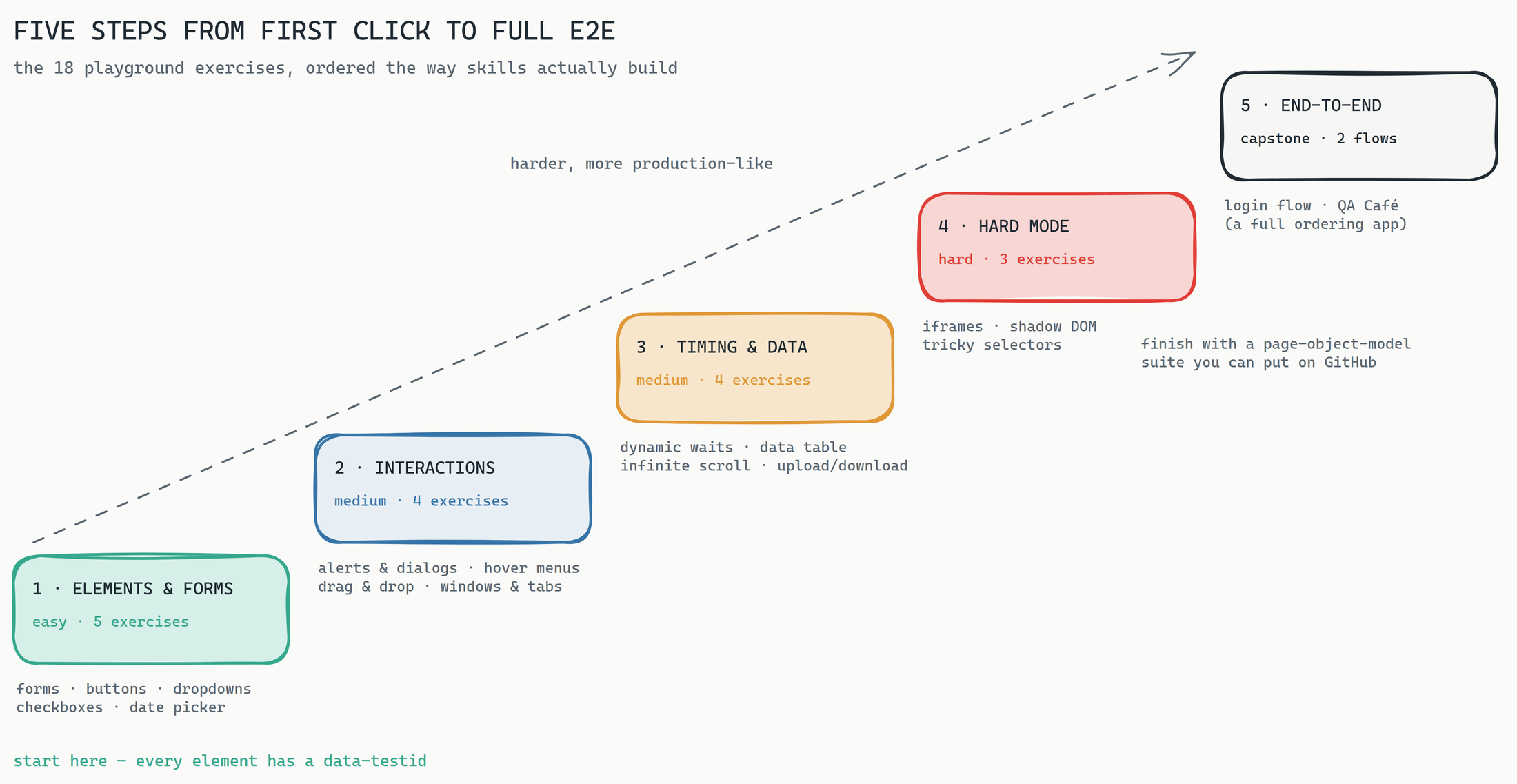
The order matters more than the inventory. Most juniors jump straight from "I can fill a form" to "I'll automate a whole app," skipping the two layers where real-world flakiness lives:
- Elements & forms — inputs, validation, buttons that move or hide behind overlays, custom comboboxes, indeterminate checkboxes, a calendar widget. The vocabulary of the web, including the words tutorials skip.
- Interactions — native dialogs, focus-trapped modals, hover-only menus, drag & drop, popups and new tabs. Mouse choreography and context switching.
- Timing & data — elements that appear after five seconds, spinners, progress bars, sortable tables, infinite scroll. The category where
sleep(3000)habits go to die, and the single biggest source of flaky suites in the wild. - Hard mode — nested iframes, shadow DOM two levels deep, and a page of deliberate anti-patterns: IDs that change every render, duplicate button texts, a non-breaking-space label, invisible overlays. This is the 2026 web, condensed.
- End-to-end flows — the canonical login test, then QA Café: a complete little ordering app with a cart, promo codes and checkout, built for page-object-model practice.
Two design choices make it more than a scenario dump. Each exercise page lists suggested test scenarios as a checklist — so "practice" means covering defined objectives, not wandering. And objectives score themselves as your tests run: complete them and your points land on a public leaderboard when you sign in. That closes the feedback loop the classic sites never had — and it quietly solves the sharing problem too, which is where the career part of this post starts.
The portfolio angle: evidence beats certificates
Here's the uncomfortable consensus from hiring managers, repeated across dev.to guides, Ministry of Testing threads and QA career blogs: a tool list on a CV is noise. What gets a junior shortlisted is a small number of complete, public, verifiable projects — a pinned GitHub repo with a real README, page objects, sensible waits, CI that runs the suite, and a report a stranger can read. Recruiters consistently say they want links and numbers, not adjectives.
A scored practice site is the fastest legitimate way to produce exactly that. Work through the playground properly and you don't just have skills — you have three artifacts, each independently checkable:
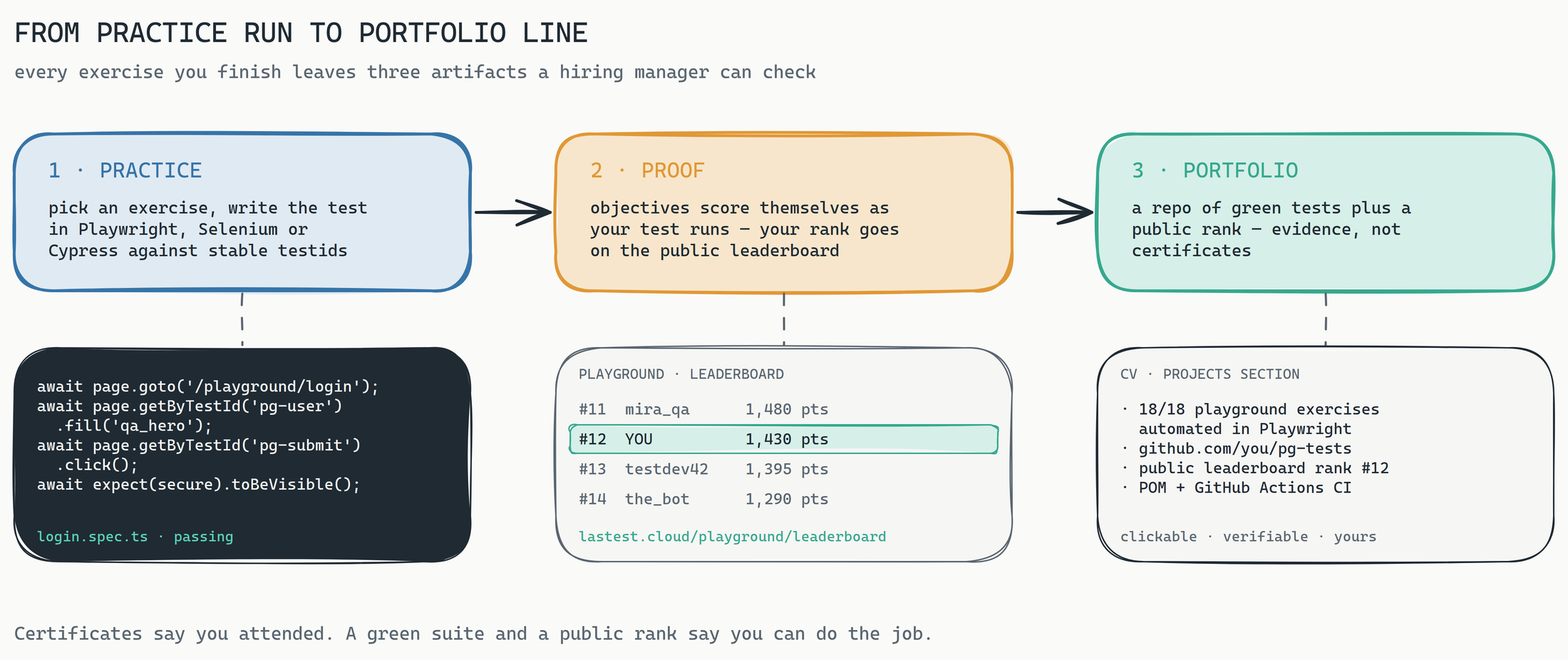
Concretely, here's the playbook we'd hand any junior:
- One repo, 18 specs. Create
playground-testson GitHub. One spec file per exercise, page objects for the QA Café flow, a README that maps each spec to its exercise URL and states what it asserts. Commit as you go — a commit history spread over weeks reads as growth; a single dump reads as a copy-paste. - Put it in CI. A GitHub Actions workflow that runs the suite on every push, against the live playground, with the HTML report uploaded as an artifact. CI experience shows up in 60%+ of automation job postings; this is the cheapest honest way to have it.
- Sign in and get on the leaderboard. Your objectives score automatically as your suite runs, and your rank is public. That's the part no folder on your laptop can do: a third-party URL that confirms your tests actually completed the objectives — lastest.cloud/playground/leaderboard.
- Write the CV line last. "Automated all 18 Lastest playground exercises in Playwright (POM + GitHub Actions) — public leaderboard rank #N" with two links. It's specific, it's verifiable in ninety seconds, and it invites exactly the interview questions you're now equipped to answer: how you handled the dynamic waits, what you did about the shadow DOM, why your selectors survive the tricky page.
Use the playground as a reference, in both senses. It's a reference implementation of the problems you claim to handle — when an interviewer asks "how do you deal with flaky selectors," you point at a page built from nothing but flaky selectors and the green spec that beats it. And it's a referee: the leaderboard vouches that the work happened. Certificates say you attended a course. A green suite and a public rank say you can do the job.
A two-week plan that actually finishes
The playground is sized so a motivated junior can complete it without heroics. A cadence that works: days 1–3, the five Elements & forms exercises — get your project skeleton, linting and first page objects right here, while the subject matter is easy. Days 4–6, Interactions. Days 7–9, Timing & data — expect this to be the humbling one; it's where you replace every hard-coded sleep with a real wait strategy. Days 10–12, Hard mode, one exercise per day; they're dense. Days 13–14, the login flow and QA Café end to end, plus the README and CI polish. Fourteen days, eighteen specs, one repo, one rank.
If you're already past junior and reading this as a team lead: the same pages work as a training ground and a hiring filter. We've written before about gamifying QA inside a team — a shared playground leaderboard is the zero-setup version of that, and "send us your playground repo" is a far better screening exercise than a whiteboard.
FAQ
What's the best site to practice test automation?
Any site beats none: the-internet, Sauce Demo, UI Testing Playground and DemoQA are all worth bookmarking. But prefer a practice site that (a) covers the modern hard parts — shadow DOM, iframes, dynamic waits, deliberately unstable selectors — and (b) gives you something shareable when you're done. The Lastest playground was built to check both boxes: 18 scored exercises, free, no signup required to practice.
How do I build a QA portfolio with no work experience?
Stop collecting certificates and start producing artifacts: one public repo of well-structured tests against a real practice site, CI that runs them, a README that explains your choices, and — if the site supports it — a public score or rank that proves the tests did what you claim. Three verifiable links outweigh any tools list.
Playwright, Selenium or Cypress for practicing?
The playground doesn't care — it's plain HTML with stable test IDs, so all three work. If you're choosing today, the job-market momentum is clearly with Playwright, and its trace viewer makes the timing exercises dramatically easier to debug. Selenium is still the biggest keyword in postings; knowing both is the safe answer.
The honest version
A practice site won't make you a senior. What it does is compress the messy first year of "learning on the job" into a few focused weeks — against pages engineered to fail the way production fails — and leave a paper trail while it does it. The juniors who get hired fastest aren't the ones with the longest course list. They're the ones who can hand over a link, and whose link holds up. Come break the playground; it was built to fight back, and every point you score is one more line of evidence that you win those fights. And when you eventually want the tests written for you — that's the day job of Lastest itself.