Playwright 1.65 was published on November 5, 2026. The headline features are friendly: the test runner now runs under Bun, there is a new failures reporter, and an -exclusive- test lock lets one test run while nothing else does. The section worth reading first is further down. It lists eleven breaking changes, and the announcements below it add one more: Playwright no longer tests on Node.js 20.
Most of those changes fail loudly, which is the good kind. A few fail quietly: the test still passes, but it now asserts something slightly different from what it asserted on 1.64. And if your suite has been sitting a few versions behind, the jump also carries the breaking changes from every release in between, plus fifteen major versions of Chromium. This checklist covers all three, and the order to work through them in so that every red test has exactly one cause.
Step zero: move off Node 20 first, on your current version
The 1.65 release notes say it plainly: Playwright no longer tests on Node.js 20, so use Node.js 22, 24 or 26. Node 20 itself reached end of life on April 30, 2026, so this is overdue for most teams anyway. The official Docker images moved too: they now include Node.js 26 instead of Node.js 24, so if your CI runs in the Playwright image, bumping the image tag changes your Node version as a side effect.
Do the Node upgrade on its own, on the Playwright version you already run, and get the suite green there. If you change Node and Playwright in the same pull request, every failure has two suspects, and you will spend the afternoon working out which one did it.
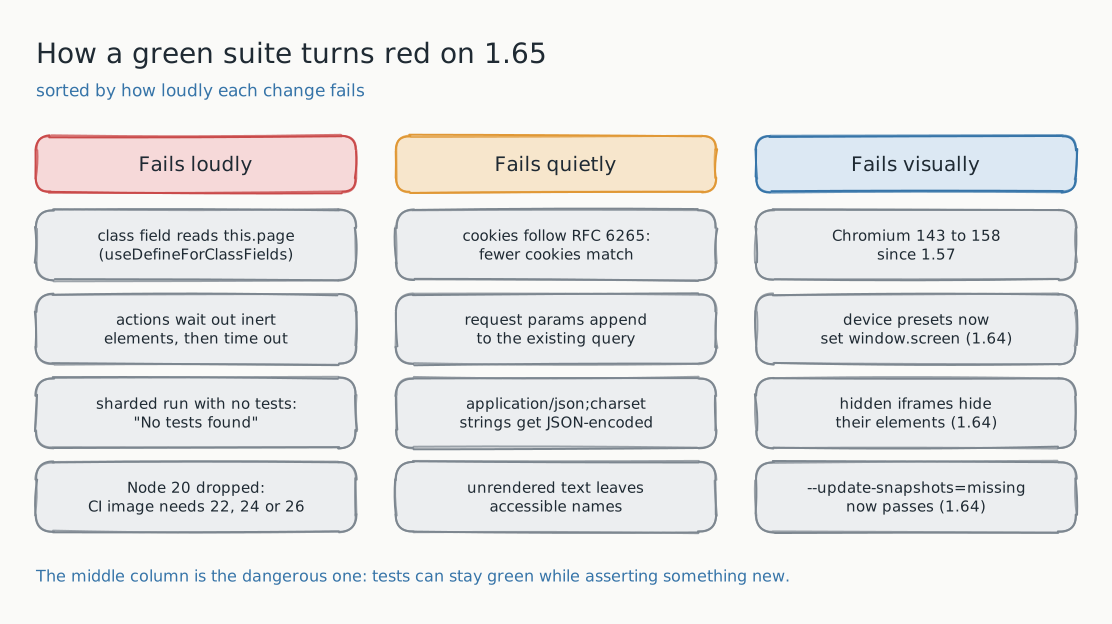
The loud breaks in 1.65
These turn a passing test into a failing one, so you will find them on the first run. The first one is common enough that it deserves its own example.
Class fields now follow useDefineForClassFields. Playwright now compiles TypeScript class fields the same way tsc does, according to your tsconfig.json. That setting is on for ES2022 and later targets, and when no target is set at all. The consequence lands squarely on a very common page-object pattern: a field initializer that reads a constructor parameter property now runs before the constructor has assigned it.
class LoginPage {
  // TypeError: Cannot read properties of undefined (reading 'getByRole')
  readonly submit = this.page.getByRole('button', { name: 'Submit' });

  constructor(private readonly page: Page) {}
}
The fix is to move the initialization into the constructor, or to set "useDefineForClassFields": false in your tsconfig.json. If your page objects are written this way, every test that touches one fails on the first line, which at least makes the cause obvious.
The rest of the loud list:
- Actions wait for elements to stop being inert.
click,check,tap,fill,clearandselectOptionnow wait until the element is not inert. An action on an element with theinertattribute, or inside one, now times out if it stays inert. If a test used to click through a modal backdrop, it will now wait instead. - Sharded runs with no matching tests fail. A sharded run now fails with "No tests found" when no tests match across all shards. Pass
--pass-with-no-testsif that is intended. An empty shard still passes when the other shards have tests. - Style imports must exist.
.css,.lessand.scssimports in test files now load as empty modules instead of being removed, so the imported file has to be there. - The blob reporter clears its output directory again. It deletes the directory's contents before writing, as it did before 1.64. If you write other files there, move them.
- Test locations shift by a few columns. Locations of imported calls such as
test(in CommonJS output now point to the start of the callee, soa.spec.ts:3:11becomesa.spec.ts:3:7. Anything that parses or keys on test locations, such as a flake tracker, sees new identifiers.
The quiet breaks in 1.65
These are the ones to read twice. None of them throws. Each one changes what a request sends, what a cookie lookup returns, or what a locator matches, so a test can stay green while it checks something different.
- Cookie matching follows RFC 6265. With a URL,
browserContext.cookies()andapiRequestContext.cookies()no longer return host-only cookies for subdomains, orPath=/apicookies for/apiv2, and aPath=/foo/cookie no longer matches/foo. Assertions that a session cookie exists may start failing, or worse, start passing for a different cookie. - Proxy credentials stay with the proxy. Credentials in the
proxylaunch option now answer only proxy challenges and are no longer sent to websites. If a test relied on them to authenticate on the site itself, usehttpCredentialson the context instead. - Request params append instead of replace. String and
URLSearchParamsvalues of theparamsoption are now appended to the query the URL already has. A request built from a URL with a query string now sends both. - JSON content types match more loosely.
APIRequestContextnow treatsapplication/jsoncase-insensitively and with parameters, such asapplication/json;charset=UTF-8. With those headers, a string that does not parse as JSON is now JSON-encoded, quotes and all, instead of being sent as is. Release notes call out the sharp edge: this can invalidate signatures computed over the original string. PassBuffer.from(body, 'utf8')to send exact bytes. - Unrendered text leaves accessible names. Text the browser does not render, such as text not assigned to a slot or text directly inside a closed
<details>, is no longer part of accessible names and aria snapshots. That can change whatgetByRolewith a name matches, and it will changetoMatchAriaSnapshotresults on pages that use either pattern.
The way to find these is not to wait for a failure. Search the suite for cookies(, params:, string data with a JSON content type, and toMatchAriaSnapshot, and read each hit with the new behavior in mind.
If you are coming from an older version
Teams rarely upgrade one minor at a time. If your lockfile still says 1.57, you are taking on the breaking changes of every release since, so read them as one list:
| Version | What can break |
|---|---|
| 1.64 | Device descriptors now forward screen, so window.screen and media queries see the emulated size. JSX in tests follows your tsconfig.json. --update-snapshots=missing now passes the run. Elements inside a hidden iframe count as hidden. |
| 1.63 | The experimental React and Vue component testing packages are no longer updated. Ubuntu 20.04 is no longer supported. |
| 1.62 | In headless mode the clipboard is isolated from the operating system. Debian 11 is no longer supported. |
| 1.60 | Long-deprecated APIs removed: Locator.ariaRef(), the handle option of exposeBinding, the logger option of connect and connectOverCDP, and the videosPath and videoSize context options (use recordVideo). |
| 1.59 | The JUnit reporter now reports some former <failure> entries as <error>. The experimental Svelte component testing package is removed. WebKit drops macOS 14. |
| 1.58 | The _react and _vue selectors and the :light suffix are removed. The devtools launch option is removed. WebKit drops macOS 13. |
Two of these matter more than they look. The 1.64 screen change can switch a responsive layout on its own: if your CSS or scripts read the screen size, a device preset now changes what renders. And the 1.64 change to --update-snapshots=missing means a CI job in that mode can now go green while writing new baselines. That is the intended behavior, but it is worth knowing which of your jobs run that way before you upgrade.
The visual layer: fifteen Chromium versions at once
Playwright 1.57 shipped Chromium 143. Playwright 1.65 ships Chromium 158. Fifteen major versions of rendering engine changes are a lot to absorb in one step, and a screenshot suite will notice: expect some baselines to move even where your application did not change at all.
That is not a reason to stay behind. It is a reason to upgrade in a way that makes those diffs attributable:
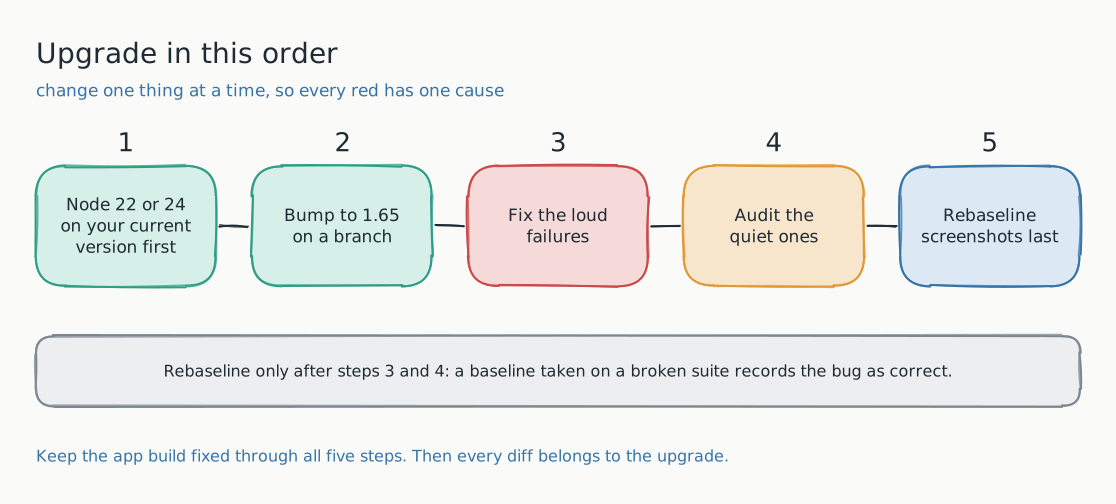
- Pin the application build. Run the before and after suites against the same deployed build. If the app changes during the upgrade, you cannot tell its diffs from the browser's.
- Fix the loud and quiet failures first. A screenshot taken on a page where a test now clicks the wrong element is not a baseline, it is a record of a bug.
- Read the visual diffs with the DOM beside them. A pixel diff with an unchanged DOM is almost always the browser: font rasterization, form control styling, anti-aliasing. A pixel diff with a changed DOM is your application, or one of the behavior changes above.
- Approve browser drift in one batch. Rebaseline once, deliberately, with the diff report attached to the upgrade pull request, so the history shows why every baseline moved.
This is the work Lastest is built for. It runs your Playwright tests, captures each step, and diffs the visual and DOM layers side by side, so the upgrade's footprint shows up as one reviewable report rather than a wall of failed toHaveScreenshot assertions. Approve the browser drift once and the next run is quiet again.
The checklist
- Upgrade Node to 22, 24 or 26 on your current Playwright version, and get green there first.
- Check whether your CI uses the Playwright Docker image, which now ships Node.js 26.
- Search page objects for class field initializers that read constructor parameters.
- Search for clicks that rely on passing through inert or backdrop elements.
- Add
--pass-with-no-teststo sharded jobs that can legitimately match nothing. - Review cookie lookups,
paramsusage, and string bodies sent with a JSON content type. - Expect aria snapshot and
getByRolename changes on pages with slots or closed<details>. - If you are behind 1.64, read the table above, especially the
screenand--update-snapshots=missingchanges. - Pin the app build, then rebaseline screenshots last, in one deliberate batch.
Frequently asked
Can we stay on Node 20 with Playwright 1.65? Playwright no longer tests on Node.js 20, so you would be running an untested combination on a Node version that reached end of life in April 2026. Move to Node 22, 24 or 26 first, as its own change.
Should we upgrade one minor at a time or jump straight to 1.65? Jump, but read every breaking-changes section in between as one list, as in the table above. Stepping through each minor multiplies the number of baseline updates without making any single one easier to understand.
Do we have to regenerate all our screenshots? Not all of them, and not first. Keep the app build fixed, fix the code-level failures, and then review the visual diffs. Many baselines will not move at all, and the ones that do should be approved as a batch with a clear reason.
Is running tests under Bun required now? No. Bun support is new and opt-in: without the --bun flag, bunx playwright test still runs on Node.js. Release notes list several differences under Bun, including no watch mode, so treat it as a separate experiment from the upgrade.
Try it on your own suite
Lastest runs Playwright tests, records every step, and shows you exactly which pixels and which DOM nodes changed between two runs. That makes it a good place to see what a browser upgrade actually did to your application, before you approve it. It is open source and runs in Docker.